
1. Wprowadzenie
The Rakstore XY-AP50H is a compact and versatile TPA3116D2 stereo digital amplifier board featuring Bluetooth 5.0 connectivity. It delivers 50W+50W output, making it suitable for various audio applications including home theater systems. This manual provides detailed instructions for setup, operation, and maintenance to ensure optimal performance and longevity of your device.
2. Informacje dotyczące bezpieczeństwa
- Upewnij się, że napięcie zasilaniatage mieści się w określonym zakresie napięcia stałego 5–27 V. Użycie nieprawidłowej wartości napięciatage może uszkodzić urządzenie.
- Always connect speakers and power supply before powering on the ampliyfikator.
- Avoid short-circuiting the speaker outputs or power input terminals.
- Nie wystawiaj urządzenia na działanie wilgoci, wody ani ekstremalnych temperatur.
- Trzymaj urządzenie poza zasięgiem dzieci.
- Disconnect power before performing any maintenance or making connections.
3. Funkcje produktu
- Wysoka moc wyjściowa: Wyjście stereo 50W + 50W.
- Łączność Bluetooth 5.0: Stabilna, bezprzewodowa transmisja dźwięku do 15 metrów (bez przeszkód).
- Szeroki zakrestage Zakres: Operates on DC 5-27V / 2A or above.
- Wiele wejść audio: Supports Bluetooth, AUX, and USB Sound Card functions.
- Mechanizmy ochrony: Includes power supply reverse connection protection, short circuit protection, and self-recovery overheating protection.
- Kompatybilność głośników: Adaptable for 10W-200W, 4Ω/8Ω speakers.
4. Koniec produktuview i komponenty
Familiarize yourself with the various components and connection points of the XY-AP50H amplifier pokładzie.
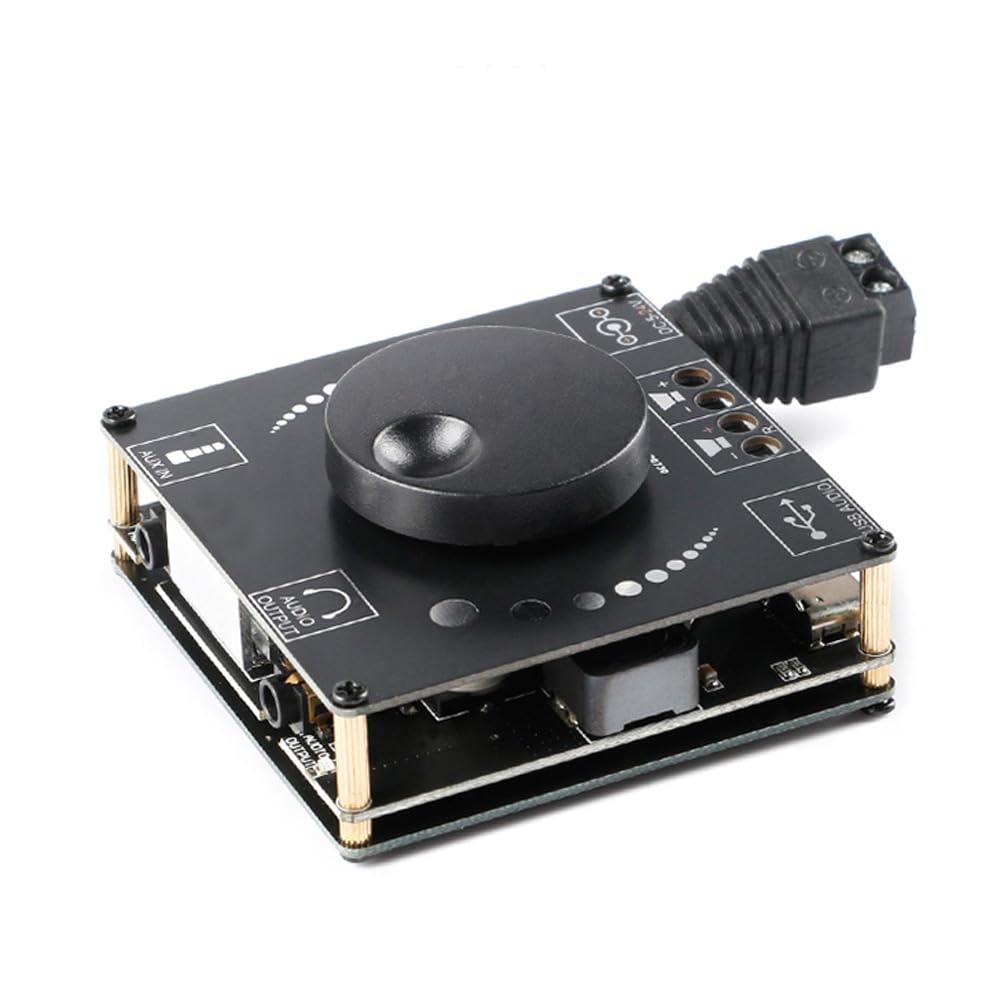
Obraz 4.1: Szczyt view of the XY-AP50H amplifier board, showing the main components including the volume knob, power input, speaker terminals, AUX input, and USB port.

Obraz 4.2: Spód view of the XY-AP50H amplifier board, indicating the USB Audio input, speaker outputs (SPKR, SPKL), and DC 5-24V power input.

Obraz 4.3: Dimensions of the XY-AP50H amplifier board, measuring approximately 60mm by 60mm.
5. Instrukcje konfiguracji
5.1 Połączenie zasilania
- Zapewnij amplifier is powered off and disconnected from any power source.
- Connect a DC 5-27V / 2A or above power adapter to the DC power input jack on the board. Observe polarity if using bare wires.
5.2 Podłączenie głośników
- Identify the left (SPKL) and right (SPKR) speaker output terminals on the board.
- Connect your passive speakers (10W-200W, 4Ω/8Ω) to the corresponding terminals. Ensure correct polarity (+ to + and - to -) for each speaker.
5.3 Opcje wejścia audio
The XY-AP50H supports three audio input methods: Bluetooth, AUX, and USB Sound Card.
5.3.1 Połączenie Bluetooth
- Włącz zasilanie amplifier pokładzie.
- Na urządzeniu źródłowym dźwięku (np. smartfonie, tablecie) włącz Bluetooth i wyszukaj dostępne urządzenia.
- Select "XY-AP50H" from the list to pair. A confirmation sound will indicate successful pairing.
5.3.2 Złącze wejściowe AUX
- Connect a 3.5mm audio cable from your audio source device's headphone jack to the AUX input port on the amplifier pokładzie.
- Ten amplifier will automatically switch to AUX input mode when a cable is detected.
5.3.3 USB Sound Card Function

Obraz 5.1: Illustration of connecting the XY-AP50H to a computer via a data cable to utilize its USB sound card function, providing improved audio output quality.
- Połącz amplifier board to your computer using a USB data cable (Type-C to USB-A or Type-C to Type-C, depending on your computer's ports).
- Most computers will automatically recognize the amplifier as an external sound card.
- If prompted, select the XY-AP50H as the audio output device in your computer's sound settings.
- Open your computer's audio playback software to play music. The amplifier will output the audio.
6. Instrukcja obsługi
6.1 Włączanie/wyłączanie zasilania
Connect or disconnect the DC power supply to power on or off the amplifier pokładzie.
6.2 Regulacja głośności
Rotate the potentiometer knob on the board clockwise to increase volume and counter-clockwise to decrease volume.
6.3 Przełączanie trybu wejściowego
Ten amplifier automatically prioritizes inputs. Bluetooth is typically the default. Connecting an AUX cable will switch to AUX. Connecting via USB to a computer will activate the USB sound card mode.
7. Specyfikacje
| Funkcja | Specyfikacja |
|---|---|
| Model | XY-AP50H |
| Ampukład scalony | TPA3116D2 |
| Wersja Bluetooth | BLE5.0 |
| Moc wyjściowa | 50W + 50W (Stereo) |
| Objętość dostawtage | DC 5-27V / 2A above |
| Odległość transmisji | 15 metrów (bez przeszkód) |
| Liczba kanałów | Podwójne kanały lewy i prawy (stereo) |
| Dostosowane głośniki | 10 W–200 W, 4 Ω/8 Ω |
| Mechanizmy ochrony | Power supply reverse connection protection, short circuit protection, self-recovery overheating protection |
8. Rozwiązywanie Problemów
- Brak dźwięku:
- Check power supply connection and ensure it meets DC 5-27V / 2A or above.
- Sprawdź, czy połączenia głośników są stabilne i prawidłowo spolaryzowane.
- Ensure the correct audio input mode is selected (Bluetooth paired, AUX cable connected, or USB sound card active).
- Dostosuj pokrętło głośności na amplifier i urządzenie źródłowe dźwięku.
- Zniekształcony dźwięk:
- Reduce the volume from both the amplifier i źródło dźwięku.
- Check speaker impedance and power rating to ensure compatibility.
- Ensure power supply is stable and sufficient (at least 2A).
- Rozłączenie Bluetooth:
- Ensure the audio source device is within 15 meters of the amplifier and there are no major obstructions.
- Spróbuj rozparować i ponownie sparować urządzenie.
- Upewnij się, że żadne inne urządzenia nie zakłócają sygnału Bluetooth.
- Przegrzanie:
- Zapewnij odpowiednią wentylację wokół amplifier pokładzie.
- Reduce output volume or check speaker impedance. The board has self-recovery overheating protection, which may temporarily shut down output.
9. Konserwacja
- Zachowaj ampUtrzymuj płytkę drukowaną czystą i wolną od kurzu. Do czyszczenia używaj miękkiej, suchej ściereczki.
- Avoid placing the board in environments with high humidity or extreme temperatures.
- Do not attempt to disassemble or modify the board, as this may void any potential warranty and cause damage.
10. Gwarancja i wsparcie
For warranty information and technical support, please refer to the seller's policies or contact Rakstore customer service directly. Keep your purchase receipt as proof of purchase.