
1. Wprowadzenie
This manual provides detailed instructions for the installation, operation, and maintenance of your UNITOPSCI Double Din Apple CarPlay & Android Auto Car Stereo. Please read this manual thoroughly before using the product to ensure proper functionality and safety.
2. Co znajduje się w pudełku
- 1 x samochodowe radio
- 1 x kamera cofania
- 1 x Remote Control (Battery Not included)
- 1 x Steering Wheel Control (Battery Not included)
- 1 x kabel zasilający
- 1 x kabel głośnikowy
- 1 x Instrukcja obsługi
- 1 x Mikrofon
3. Główne cechy
- Compatible with Apple CarPlay & Android Auto via USB cable connection.
- 7-inch HD Capacitive Touch Screen for clear visuals and smooth operation.
- Built-in Bluetooth 5.1 for hands-free calling and music streaming.
- FM Radio with 18 preset stations.
- Mirror Link function for screen mirroring from smartphones (Android/iOS).
- Includes Backup Camera for safer parking.
- Supports Steering Wheel Control for convenient operation.
- EQ Sound settings (Classic, Pop, Rock, Flat, DSP).
- Multiple playback options: USB, AUX, TF Card input.
- 7 colorful backlight display options.
4. Konfiguracja i instalacja
Prawidłowa instalacja jest kluczowa dla optymalnej wydajności. Jeśli nie masz doświadczenia w okablowaniu car audio, zaleca się zlecenie instalacji urządzenia profesjonaliście.
4.1 Ogólny schemat okablowania
Refer to the following diagram for the general wiring connections of the car stereo. Ensure all connections are secure and correctly matched to your vehicle's wiring harness.

Rysunek 1: Ogólny schemat okablowania
4.2 Okablowanie kamery cofania
The included backup camera requires specific wiring for proper functionality. Connect the red power cable of the camera to the positive back battery supply and the black cable to the negative battery supply. The yellow video input port of the camera connects to the CAM IN port on the rear of the car radio. Locate the wire labeled "BACK" on the car radio's harness and connect it to the positive power supply (typically the reverse light trigger wire). This ensures the display automatically switches to the reversing image when the car is in reverse gear.

Figure 2: Backup Camera Wiring Diagram
5. Instrukcja obsługi
5.1 Apple CarPlay i Android Auto
Connect your smartphone to the car stereo via a USB cable. The unit will automatically detect and launch Apple CarPlay or Android Auto, allowing you to access navigation, music, calls, and messages directly from the stereo's screen. Voice control functions are supported for hands-free operation.

Rysunek 3: Interfejs CarPlay i Android Auto
5.2 Bluetooth 5.1
Enable Bluetooth on your smartphone and search for available devices. Select the car stereo from the list to pair. Once connected, you can make and receive hands-free calls and stream audio directly to the stereo. The built-in microphone ensures clear call quality.

Figure 4: Bluetooth Hands-free Calls
5.3 Radio FM
Access the FM radio function to listen to your favorite stations. The unit supports a radio range of FM 87.5-108.0MHZ and allows you to save up to 18 preset stations for quick access to news, sports, and music.

Figure 5: Stable FM Radio Operation
5.4 Łącze lustrzane
Utilize the Mirror Link function by connecting your smartphone via USB. This feature allows you to mirror your phone's screen content, including videos and navigation maps, directly onto the car stereo's display.

Rysunek 6: Funkcjonalność łącza lustrzanego
Ustawienia dźwięku EQ 5.5
Adjust the audio output to your preference using the built-in EQ sound settings. Choose from predefined modes like Classic, Pop, Rock, Flat, or customize your sound with DSP settings.

Figure 7: Digital Sound Effect Adjustment
5.6 Sterowanie z kierownicy
Connect the steering wheel control wires to enable convenient control of the stereo directly from your steering wheel. This allows you to easily switch songs, adjust volume, and manage phone calls without taking your hands off the wheel.

Rysunek 8: Konfiguracja sterowania z kierownicy
5.7 USB/AUX/TF Card Playback
The unit supports multiple input sources for audio and video playback. Insert a USB drive, TF card, or connect an external device via the AUX input to enjoy your media files.
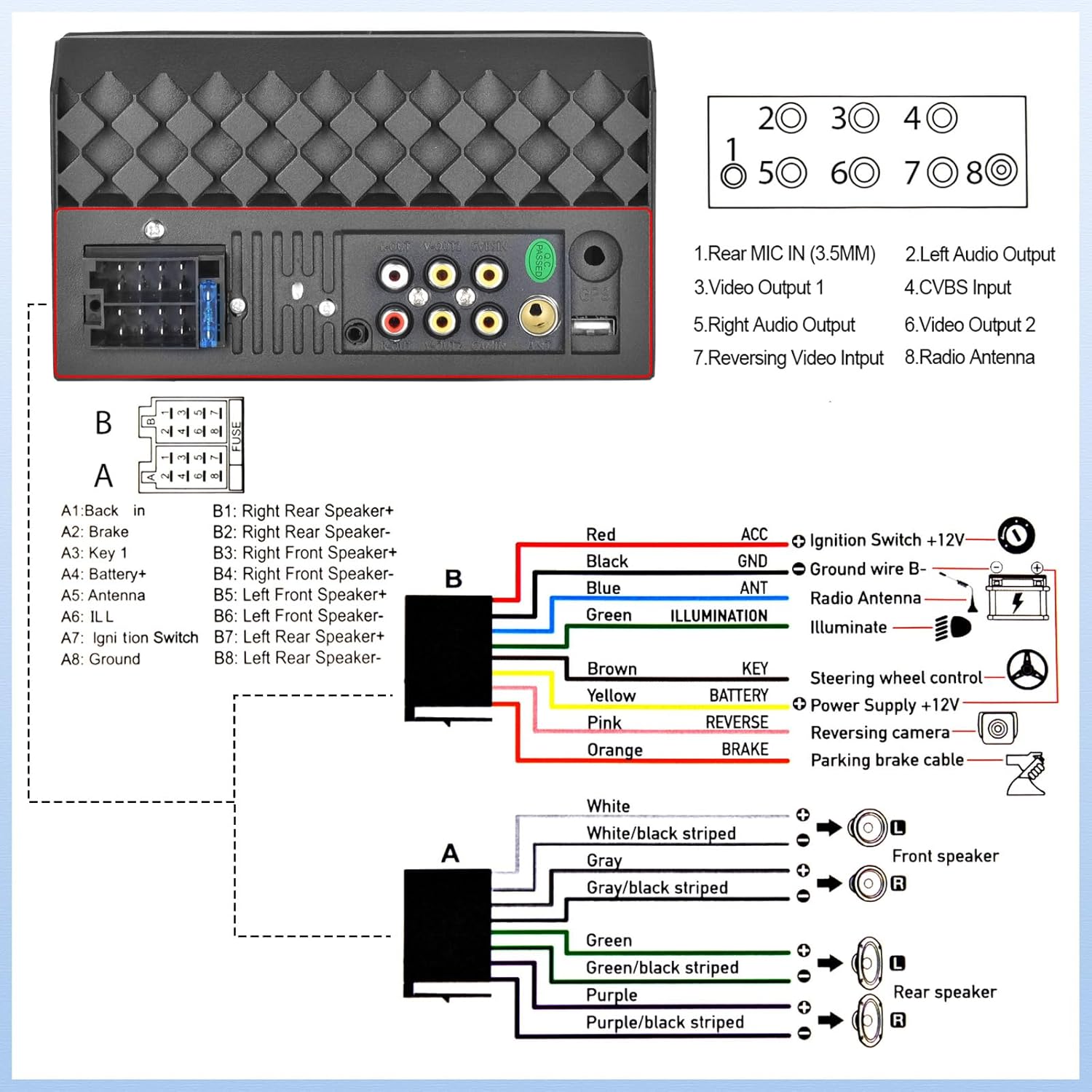
Figure 9: USB/AUX/TF Card Input
6. Konserwacja
Aby zapewnić długą żywotność i optymalną pracę radia samochodowego, należy przestrzegać poniższych wskazówek dotyczących konserwacji:
- Utrzymuj ekran w czystości, używając miękkiej, niepozostawiającej włókien ściereczki. Unikaj środków czyszczących o działaniu ściernym.
- Zapewnij odpowiednią wentylację wokół urządzenia, aby zapobiec przegrzaniu.
- Unikaj wystawiania urządzenia na działanie ekstremalnych temperatur lub bezpośredniego światła słonecznego przez dłuższy czas.
- Regularnie sprawdzaj połączenia przewodów, czy nie są luźne lub skorodowane.
7. Rozwiązywanie Problemów
Jeśli masz problemy z radiem samochodowym, zapoznaj się z poniższymi typowymi problemami i ich rozwiązaniami:
- Brak zasilania: Check all power connections, including the ACC (ignition switch) and B+ (battery) wires. Ensure the fuse is not blown.
- Brak dźwięku: Verify speaker connections are secure and correctly polarized. Check the volume level and EQ settings.
- Problemy z łącznością Bluetooth: Upewnij się, że Bluetooth jest włączony zarówno w zestawie stereo, jak i w telefonie. Spróbuj rozparować i ponownie sparować urządzenia.
- Kamera cofania nie jest wyświetlana: If the camera is powered on but the head unit does not switch to the reversing image, check the trigger wire for the backup camera connection. Ensure it is correctly connected to a positive power supply that activates when reverse gear is engaged.
- Ekran dotykowy nie reaguje: Try resetting the unit (refer to the main unit for a small reset button, if available, or disconnect power briefly).
8. Specyfikacje
| Funkcja | Specyfikacja |
|---|---|
| Wymiary produktu | 2.48 x 7 x 4 cala |
| Waga przedmiotu | 1.1 funta |
| Numer modelu przedmiotu | L2 |
| Technologia łączności | Bluetooth, pomocniczy, USB |
| Typ kontrolera | Android |
| Cechy specjalne | Touchscreen, Backup Camera Input, Android Auto, Built-In Bluetooth, Apple CarPlay |
| Kompatybilne urządzenia | Smartfon |
| Typ złącza | USB 2.0 |
| Tryb wyjścia audio | Mononukleoza |
| Konfiguracja kanału dźwięku przestrzennego | 4.0 |
| Kodowanie wideo | H.264, H.265 |
| Producent | UNITOPSCI |
| Kraj pochodzenia | Chiny |
9. Gwarancja i wsparcie
UNITOPSCI is committed to providing high-quality products and satisfactory services. Your product comes with the following support:
- Replacement Available within 24 Months
- 60-days No Worry to Return
- Lifetime After-Sales Consult and Technical Support
- Szybka odpowiedź w ciągu 16 godzin
W przypadku pytań lub potrzeby pomocy technicznej prosimy o kontakt: UNITOPSCI@126.com


