
IPC672LR-AX4DUPKC
Uniview Instrukcja obsługi kamery kopułkowej IPC672LR-AX4DUPKC 2MP IR WDR 2D/3D DNR LightHunter Active Deterrence Outdoor Network Ultra 265 PoE PTZ
Model: IPC672LR-AX4DUPKC | Marka: Generic (wyprodukowany przez Uni)view)
1. Wprowadzenie
Niniejsza instrukcja zawiera szczegółowe instrukcje dotyczące instalacji, obsługi i konserwacji urządzenia Uni.view IPC672LR-AX4DUPKC 2MP IR WDR 2D/3D DNR LightHunter Aktywna Kamera Odstraszająca Zewnętrzna Sieciowa Ultra 265 PoE PTZ. Ta zaawansowana kamera monitorująca została zaprojektowana do zastosowań zewnętrznych, oferując obrazowanie o wysokiej rozdzielczości, solidne funkcje widzenia nocnego oraz inteligentne funkcje odstraszania.
Do najważniejszych funkcji należą oświetlenie LightHunter zapewniające doskonałą jakość obrazu w słabym oświetleniu, szeroki zakres dynamiki (WDR) zapewniający wyraźny obraz w zmiennych warunkach oświetleniowych oraz zaawansowana redukcja szumów (DNR 2D/3D). Kamera obsługuje kompresję wideo Ultra 265, co zapewnia efektywne wykorzystanie pamięci masowej i pasma, a wbudowany mikrofon i głośnik umożliwiają dwukierunkową transmisję dźwięku, a także sygnalizację świetlną do aktywnego odstraszania. Obiektyw z zoomem elektrycznym zapewnia elastyczne pole widzenia. view korekty.
2. Informacje dotyczące bezpieczeństwa
Przed instalacją i uruchomieniem należy uważnie przeczytać wszystkie instrukcje bezpieczeństwa, aby zapobiec uszkodzeniom i zapewnić prawidłowe funkcjonowanie urządzenia.
- Zasilanie: Używaj wyłącznie określonego zasilania Power over Ethernet (PoE) lub zewnętrznego. Upewnij się, że źródło zasilania spełnia wymagania dotyczące napięcia kamery.tagi wymagania.
- Środowisko instalacji: Zainstaluj kamerę w stabilnym miejscu, które utrzyma jej ciężar. Unikaj bezpośredniego narażenia na ekstremalne temperatury, wilgoć i środowiska korozyjne. Zapewnij odpowiednią wentylację.
- Woda i wilgoć: Kamera posiada klasę ochrony IP66 do użytku na zewnątrz, co zapewnia ochronę przed kurzem i silnymi strumieniami wody. Nie należy jednak zanurzać kamery w wodzie.
- Czyszczenie: Przed czyszczeniem odłącz zasilanie. Użyj miękkiej, suchej ściereczki. Nie używaj silnych detergentów ani środków ściernych.
- Serwisowanie: Nie próbuj demontować ani modyfikować aparatu. Wszelkie czynności serwisowe powierzaj wykwalifikowanemu personelowi.
3. Zawartość opakowania
Sprawdź, czy wszystkie przedmioty znajdują się na miejscu i są w dobrym stanie po rozpakowaniu:
- Uniview Kamera kopułkowa PTZ IPC672LR-AX4DUPKC
- Wspornik montażowy i śruby
- Zestaw złączy wodoodpornych
- Szablon do wiercenia
- Szybki przewodnik
- Karta gwarancyjna (jeśli dotyczy)
4. Koniec produktuview
Kamera IPC672LR-AX4DUPKC łączy zaawansowane funkcje zapewniające niezawodny nadzór.
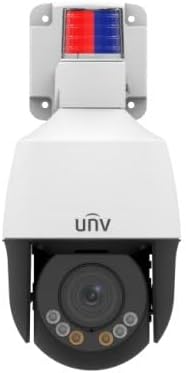
Rycina 4.1: Przód view kamery IPC672LR-AX4DUPKC, na której widać obiektyw kopułkowy, oświetlacze podczerwieni i lampkę alarmową aktywnego odstraszania u góry.
- Obiektyw z zoomem sterowanym silnikiem: Obiektyw z automatycznym ustawianiem ostrości 2.8-12 mm AF zapewniający elastyczne pole widzenia view.
- Oświetlacze IR: Zapewnia światło podczerwone umożliwiające widzenie w nocy do 50 m (164 stóp).
- Ciepłe światło: Dodatkowe oświetlenie zapewniające kolorową widoczność w nocy do 10 m (33 ft).
- Światło alarmowe: Zintegrowane czerwone i niebieskie światło alarmowe zapewniające aktywne odstraszanie.
- Wbudowany mikrofon i głośnik: Umożliwia dwukierunkową komunikację audio.
- Port Ethernet (PoE): Do podłączenia sieci i zasilania.

Rysunek 4.2: Ikony funkcji podkreślające technologię LightHunter, WDR, kompresję Ultra H.265, pamięć Edge, wbudowany mikrofon i zasilanie przez Ethernet (PoE).
Zaawansowane funkcje:
- Oświetlenie LightHunter: Poprawia jakość obrazu przy słabym oświetleniu, zapewniając wyraźne obrazy w trudnych warunkach.
- Optyczny WDR (szeroki zakres dynamiki): Do 120 dB w celu zapewnienia zrównoważonej ekspozycji w scenach zawierających zarówno jasne, jak i ciemne obszary.
- 2D/3D DNR (cyfrowa redukcja szumów): Zmniejsza szum obrazu, zapewniając czystsze strumienie wideo.
- Kompresja Ultra 265: Wydajny standard kompresji wideo, obsługujący także H.265, H.264 i MJPEG.
- Potrójne strumienie: Umożliwia przesyłanie wielu strumieni wideo o różnych rozdzielczościach i przepływnościach.
- ROI (region zainteresowania): Koncentruje zasoby kodowania na określonych obszarach w celu uzyskania wyższej jakości.
5. Konfiguracja i instalacja
Aby poprawnie zainstalować kamerę, wykonaj poniższe czynności.
5.1 Montaż kamery
- Wybierz lokalizację: Wybierz lokalizację na zewnątrz, która zapewnia pożądane viewPod kątem i w zasięgu infrastruktury sieciowej. Weź pod uwagę klasę IP66 kamery, która zapewnia odporność na warunki atmosferyczne.
- Przygotuj powierzchnię: Za pomocą dołączonego szablonu do wiercenia zaznacz otwory na śruby na powierzchni montażowej.
- Wiercenie otworów: Wywierć otwory montażowe zgodnie z szablonem. W przypadku montażu na murze lub płycie gipsowo-kartonowej włóż kołki rozporowe.
- Zamontuj wspornik montażowy: Przymocuj uchwyt montażowy do powierzchni za pomocą dołączonych śrub.
- Podłącz kamerę: Zamontuj kamerę na uchwycie i upewnij się, że jest solidnie zamocowana.
5.2 Podłączenie sieci i zasilania
Kamera obsługuje technologię Power over Ethernet (PoE), co upraszcza instalację. Do przesyłu zasilania i danych potrzebny jest tylko jeden kabel Ethernet.

Rysunek 5.1: Kabel Ethernet służący do zasilania i przesyłania danych w kamerach obsługujących PoE.
- Podłącz kabel Ethernet: Podłącz jeden koniec kabla Ethernet do portu Ethernet w aparacie. Użyj wodoodpornego zestawu połączeniowego, aby zapewnić szczelne połączenie do użytku na zewnątrz.
- Połącz się z przełącznikiem PoE/NVR: Podłącz drugi koniec kabla Ethernet do przełącznika sieciowego obsługującego PoE lub do sieciowego rejestratora wideo (NVR) wyposażonego w porty PoE.
- Alternatywne źródło zasilania (jeśli nie używasz PoE): Jeśli funkcja PoE jest niedostępna, należy podłączyć kompatybilny zasilacz 12 V DC (brak w zestawie) do wejścia zasilania kamery.
- Konfiguracja sieci: Aby zapoznać się z początkową konfiguracją sieci, w tym konfiguracją adresów IP i dostępem do kamery, zapoznaj się z skróconą instrukcją obsługi kamery lub pełną instrukcją obsługi (dostępną w Internecie). web interfejs.
6. Obsługa aparatu
Po zainstalowaniu i skonfigurowaniu możesz rozpocząć korzystanie z Uniview Kamera kopułkowa PTZ.
6.1 Dostęp do transmisji na żywo View
- Za pośrednictwem NVR/DVR: Jeśli podłączony do NVR, uzyskaj dostęp do transmisji na żywo view bezpośrednio przez interfejs NVR lub podłączony monitor.
- Przez Web Przeglądarka: Wprowadź adres IP kamery do web Przeglądarka na komputerze podłączonym do tej samej sieci. Zaloguj się, używając swoich danych.
- Za pośrednictwem aplikacji mobilnej: Pobierz oficjalną wersję Uniview aplikację mobilną (jeśli jest dostępna) i dodaj kamerę do zdalnego sterowania viewing.

Rysunek 6.1: Exampfragment obrazu z wielu kamer wyświetlanego na monitorze.
6.2 Sterowanie PTZ i zoom
Kamera ma funkcje Pan, Tilt, Zoom (PTZ) i obiektyw z zoomem elektrycznym 2.8–12 mm.
- Panoramowanie/pochylanie: Użyj elementów sterujących PTZ w interfejsie NVR, web przeglądarka lub aplikacja mobilna do zdalnej regulacji kamery w poziomie (panoramowanie) i pionie (pochylenie) viewkąty.
- Brzęczenie: Użyj przycisków zoomu, aby optycznie przybliżać i oddalać obraz, dostosowując ogniskową od 2.8 mm (szeroki kąt) do 12 mm (teleobiektyw). Automatyczna regulacja ostrości (AF) zapewnia wyraźne zdjęcia na wszystkich poziomach zoomu.

Rysunek 6.2: Zdalne monitorowanie transmisji z kamer za pomocą tabletu.
6.3 Widzenie nocne i odstraszanie aktywne
- IR Night Vision: Kamera automatycznie przełącza się na tryb IR przy słabym oświetleniu, zapewniając wyraźne czarno-białe obrazy w odległości do 50 m (164 stóp).
- Ciepłe światło: Aby uzyskać lepszą jakość widzenia nocnego, kamera może wykorzystać oświetlacz ciepłego światła o zasięgu do 10 m (33 stóp).
- Odstraszanie aktywne: Skonfiguruj wykrywanie ruchu lub innych zdarzeń, aby uruchomić wbudowaną lampkę alarmową i sygnał dźwiękowy emitowany przez głośnik, odstraszając intruzów.
7. Konserwacja
Regularna konserwacja zapewnia optymalną wydajność i długowieczność aparatu.
- Czyszczenie soczewek: Delikatnie przetrzyj soczewkę miękką, niepozostawiającą włókien ściereczką. W przypadku uporczywych zabrudzeń użyj środka do czyszczenia soczewek przeznaczonego do powierzchni optycznych. Nie używaj materiałów ściernych.
- Sprzątanie mieszkań: Wyczyść obudowę kamery za pomocąamp płótno. Unikaj ostrych środków chemicznych.
- Aktualizacje oprogramowania układowego: Okresowo sprawdzaj producenta webstrona (Uniview) w celu aktualizacji oprogramowania sprzętowego. Aktualizacja oprogramowania sprzętowego może poprawić wydajność, dodać nowe funkcje i zwiększyć bezpieczeństwo.
- Kontrola kabla: Regularnie sprawdzaj wszystkie kable i połączenia pod kątem oznak zużycia lub uszkodzeń, szczególnie w przypadku instalacji na zewnątrz.
8. Rozwiązywanie Problemów
W tej sekcji znajdziesz informacje o typowych problemach i ich rozwiązaniach.
| Problem | Możliwa przyczyna | Rozwiązanie |
|---|---|---|
| Brak zasilania | Brak zasilania PoE, uszkodzony zasilacz, luźne połączenie. | Sprawdź, czy przełącznik PoE/NVR dostarcza zasilanie; sprawdź zasilacz i połączenia. |
| Brak źródła wideo | Problem z siecią; niepoprawny adres IP; kamera niedostępna; blokowanie przez zaporę sieciową. | Sprawdź kabel sieciowy, zweryfikuj adres IP kamery, uruchom ponownie kamerę/NVR/router, sprawdź ustawienia zapory sieciowej. |
| Słaba jakość obrazu | Brudny obiektyw, niewłaściwa ostrość, mała szerokość pasma, niewystarczające oświetlenie. | Wyczyść obiektyw, wyreguluj ostrość/zoom, sprawdź przepustowość sieci, upewnij się, że oświetlenie jest odpowiednie lub włączone jest światło podczerwone/ciepłe. |
| Sterowanie PTZ nie działa | Problem z oprogramowaniem, awaria aparatu, opóźnienie sieciowe. | Uruchom ponownie kamerę, zaktualizuj oprogramowanie sprzętowe, sprawdź stabilność połączenia sieciowego. |
9. Specyfikacje
Szczegółowe dane techniczne kamery IPC672LR-AX4DUPKC.
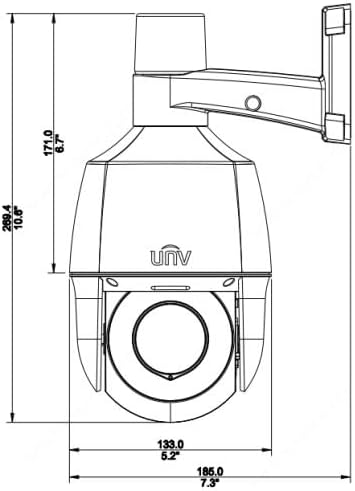
Rysunek 9.1: Rysunek wymiarowy kamery, pokazujący jej rozmiar fizyczny.
| Funkcja | Szczegół |
|---|---|
| Numer modelu | IPC672LR-AX4DUPKC |
| Rozdzielczość przechwytywania wideo | 2MP |
| Obiektyw | Obiektyw z automatyczną regulacją ostrości 2.8–12 mm i zmiennoogniskowy z napędem silnikowym |
| Zakres noktowizora | Do 50 m (164 stóp) podczerwieni, 10 m (33 stopy) ciepłego światła |
| Technologia łączności | Przewodowy (PoE) |
| Protokół łączności | Wi-Fi (do niektórych funkcji/konfiguracji, głównie przewodowe) |
| Kompresja wideo | Ultra 265, H.265, H.264, MJPEG |
| Audio | Wbudowany mikrofon i głośnik |
| Zakres dynamiczny | Do 120 dB optyczny WDR |
| Redukcja szumów | 2D/3D DNR |
| Stopień ochrony przed wnikaniem | IP66 |
| Współczynnik kształtu | Kopuła |
| Wymiary (dł. x szer. x wys.) | 5.2 x 5.2 x 10.6 cala |
| Producent | Uniview |
| Zalecane zastosowania | Bezpieczeństwo na zewnątrz |
| Tryb pracy | Tylko ruch |
| Technologia czujnika fotograficznego | CMOS |
10. Gwarancja i wsparcie
Informacje dotyczące gwarancji można znaleźć w karcie gwarancyjnej dołączonej do produktu lub skontaktować się bezpośrednio ze sprzedawcą/producentem. Pomoc techniczna może być dostępna za pośrednictwem oficjalnej strony producenta. webwitrynę lub kanały obsługi klienta.
Producent: Uniview
Ask a question about this manual
Ask about setup, troubleshooting, compatibility, parts, safety, or missing instructions. Manuals+ will review the question and use this page’s manual context to help answer it.