
eppfun AK3046G
Instrukcja obsługi adaptera audio eppfun AK3046G Pro Bluetooth 5.3
Model: AK3046G Pro
1. Wprowadzenie
The eppfun AK3046G Pro is a versatile Bluetooth 5.3 audio adapter designed to add wireless audio capabilities to various devices. It functions as both a Bluetooth transmitter (TX mode) and a Bluetooth receiver (RX mode), allowing you to stream audio wirelessly to or from non-Bluetooth devices. This manual provides detailed instructions for setup, operation, and maintenance.
Zawartość opakowania
- eppfun AK3046G Pro Bluetooth 5.3 Audio Adapter
- Kabel audio AUX 3.5 mm
- Kabel ładujący USB-C
- Kabel audio optyczny (TOSLINK)
- Koncentryczny kabel audio
- Instrukcja obsługi (ten dokument)
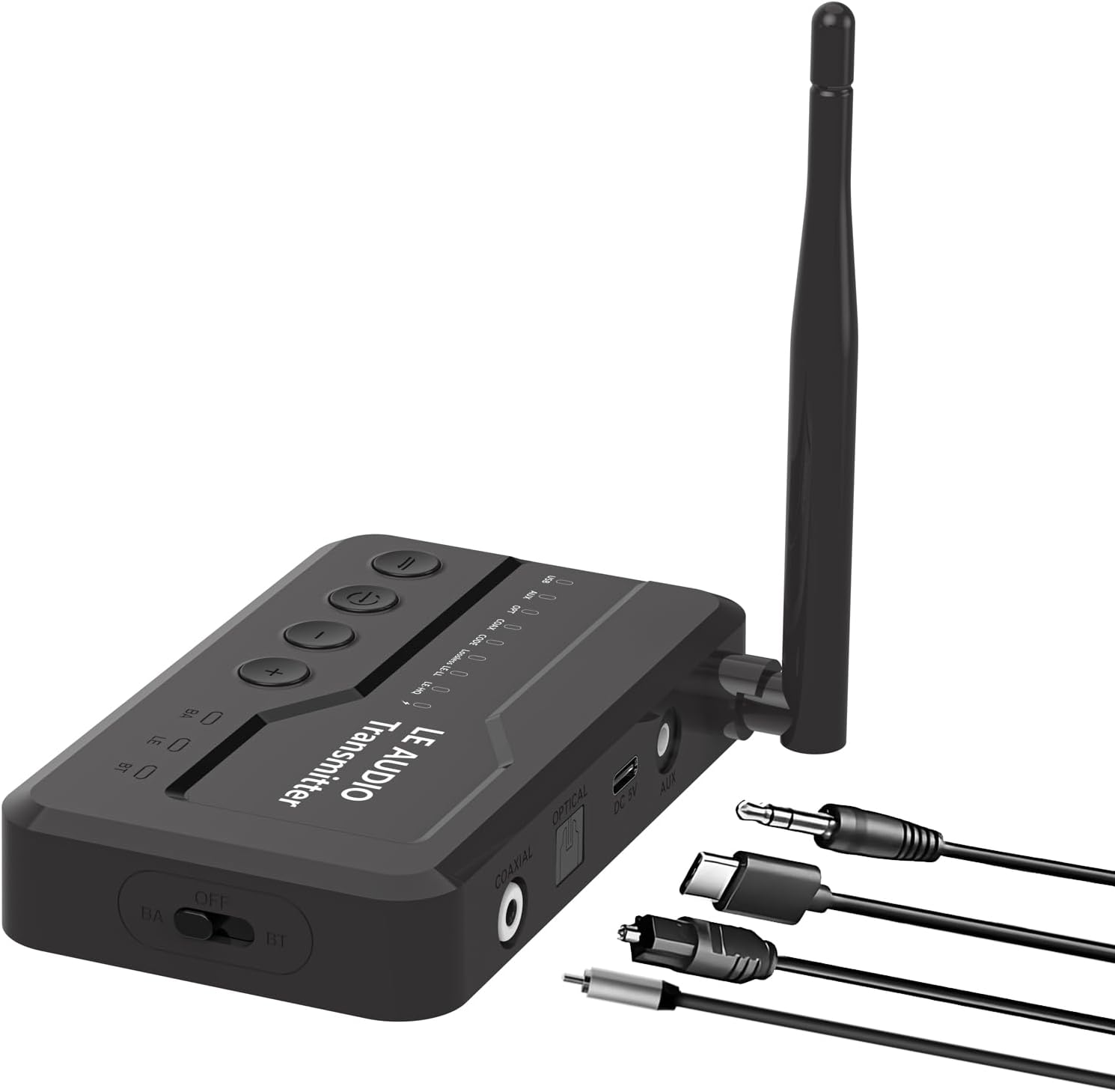
Image 1.1: The eppfun AK3046G Pro Bluetooth 5.3 Audio Adapter shown with its detachable antenna and various included cables: 3.5mm AUX, USB-C charging, optical, and coaxial. The adapter features control buttons on top and input/output ports on the side.
2. Główne cechy
- Technologia Bluetooth 5.3: Ensures stable connection and fast transmission.
- Funkcjonalność 2 w 1: Operates as both a Bluetooth Transmitter (TX) and Receiver (RX).
- Ekran wyświetlacza LED: Shows Bluetooth connection status, volume, battery level, and working mode.
- CVC8.0 Noise Cancellation & DSP: Reduces background noise for clear call quality.
- Wbudowany mikrofon: Umożliwia wykonywanie połączeń bez użycia rąk w trybie RX.
- Wiele wejść/wyjść audio: Supports 3.5mm AUX, Optical, and Coaxial connections.
- Wygodne przyciski sterujące: Easy management of music playback, calls, and volume.
- Ładowanie przez mikro USB: Efficient charging with included cable.
3. Konfiguracja i połączenie
3.1 Urządzenie ponadview
Zapoznaj się z portami i elementami sterującymi urządzenia:
- Górny panel: Power button, Play/Pause, Volume Up (+), Volume Down (-).
- Panel przedni: Wyświetlacz LED.
- Panel boczny: OFF/BA/BT switch (Power/Bypass/Bluetooth mode), Optical IN/OUT, Coaxial IN/OUT, DC 5V (Micro USB charging), AUX IN/OUT.
- Antena: Detachable for improved signal.
Rysunek 3.1: Szczegółowy view of the eppfun AK3046G Pro, highlighting the control buttons (Power, Play/Pause, Volume Up, Volume Down) on the top surface, the LED display, and the various ports on the side including Optical, Coaxial, DC 5V (Micro USB), and AUX. The OFF/BA/BT switch is also visible.
3.2 Ładowanie urządzenia
- Connect the Micro USB charging cable to the DC 5V port on the adapter.
- Connect the other end of the USB cable to a 5V USB power source (e.g., car charger, wall adapter, computer USB port).
- Wyświetlacz LED wskaże stan ładowania. Pełne ładowanie trwa około 35 minut.
3.3 Konfiguracja trybu odbiornika (RX)
Use RX mode to receive audio from a Bluetooth-enabled device (e.g., smartphone) and output it to a non-Bluetooth audio system (e.g., car stereo, wired headphones, home stereo).
- Przełącz na tryb RX: Slide the switch on the side of the adapter to the "BT" position.
- Połącz się z systemem audio:
- For 3.5mm AUX: Connect one end of the 3.5mm AUX cable to the adapter's AUX port and the other end to your audio system's AUX input.
- For Optical: Connect the optical cable to the adapter's OPTICAL port and your audio system's optical input.
- For Coaxial: Connect the coaxial cable to the adapter's COAXIAL port and your audio system's coaxial input.
- Włączanie: Press and hold the power button on the top panel until the LED display illuminates.
- Łączenie w pary: The adapter will automatically enter pairing mode (indicated on the LED display). On your Bluetooth-enabled device (e.g., smartphone), search for "eppfun AK3046G Pro" in the Bluetooth settings and select it to pair.
- Odtwarzanie dźwięku: Once paired, play audio on your Bluetooth device, and it will stream wirelessly to your connected audio system.
3.4 Konfiguracja trybu nadajnika (TX)
Use TX mode to transmit audio from a non-Bluetooth audio source (e.g., TV, PC, MP3 player) to a Bluetooth-enabled audio device (e.g., Bluetooth headphones, Bluetooth speaker).
- Przełącz na tryb TX: Slide the switch on the side of the adapter to the "BT" position.
- Połącz ze źródłem dźwięku:
- For 3.5mm AUX: Connect one end of the 3.5mm AUX cable to the adapter's AUX port and the other end to your audio source's audio output (e.g., headphone jack).
- For Optical: Connect the optical cable to the adapter's OPTICAL port and your audio source's optical output.
- For Coaxial: Connect the coaxial cable to the adapter's COAXIAL port and your audio source's coaxial output.
- Włączanie: Press and hold the power button on the top panel until the LED display illuminates.
- Łączenie w pary: Ensure your Bluetooth headphones or speaker are in pairing mode. The adapter will automatically search for and connect to nearby Bluetooth audio devices. The LED display will show the connection status.
- Odtwarzanie dźwięku: Once connected, play audio from your non-Bluetooth source, and it will transmit wirelessly to your Bluetooth audio device.
4. Działanie
4.1 Włączanie/wyłączanie zasilania
- Włączanie: Naciśnij i przytrzymaj przycisk zasilania przez około 3 sekundy.
- Wyłączone: Naciśnij i przytrzymaj przycisk zasilania przez około 3 sekundy.
4.2 Music Control (RX Mode)
- Odtwórz/Pauza: Naciśnij raz przycisk Odtwórz/Pauza.
- Zwiększenie głośności: Naciśnij przycisk „+”.
- Ściszanie: Naciśnij przycisk „-”.
- Następny utwór: Naciśnij i przytrzymaj przycisk „+”.
- Poprzedni utwór: Naciśnij i przytrzymaj przycisk „-”.
4.3 Call Control (RX Mode)
When connected to a smartphone in RX mode:
- Odbierz połączenie: Naciśnij raz przycisk Odtwórz/Pauza.
- Zakończ połączenie: Naciśnij przycisk Odtwórz/Pauza jeden raz podczas połączenia.
- Odrzuć połączenie: Naciśnij i przytrzymaj przycisk Play/Pause przez 2 sekundy.
- Ponowne wybieranie ostatniego numeru: Naciśnij dwukrotnie przycisk odtwarzania/wstrzymania.
4.4 Wskaźniki wyświetlacza LED
Wyświetlacz LED dostarcza informacji w czasie rzeczywistym:
- Status połączenia Bluetooth: Indicates if a device is connected or in pairing mode.
- Poziom głośności: Pokazuje aktualną głośność dźwięku.
- Poziom naładowania baterii: Wyświetla pozostały poziom naładowania baterii.
- Tryb pracy: Indicates whether the device is in RX (Receiver) or TX (Transmitter) mode.
- Kodek audio: May display the active audio codec (e.g., SBC, aptX).
5. Konserwacja i pielęgnacja
- Ładowanie: Charge the device fully before first use. Recharge when the battery indicator is low. Avoid overcharging for extended periods.
- Czyszczenie: Do czyszczenia urządzenia należy używać miękkiej, suchej ściereczki. Nie należy używać płynnych środków czyszczących ani rozpuszczalników.
- Składowanie: Przechowywać urządzenie w chłodnym i suchym miejscu, z dala od bezpośredniego światła słonecznego i ekstremalnych temperatur.
- Narażenie na działanie wody: This device is not waterproof. Avoid exposure to water or moisture.
6. Rozwiązywanie Problemów
6.1 Urządzenie się nie włącza
- Ensure the device is fully charged. Connect it to a power source using the Micro USB cable and try again.
6.2 Nie można sparować z urządzeniem Bluetooth
- Ensure the adapter is in the correct mode (RX for receiving, TX for transmitting) and the side switch is set to "BT".
- Make sure the adapter is in pairing mode (LED display will indicate).
- Place the adapter and the target Bluetooth device close to each other.
- Turn off and on the Bluetooth function on your pairing device.
- Wyczyść listę parowania Bluetooth na swoim urządzeniu i spróbuj sparować ponownie.
6.3 Brak dźwięku lub niski poziom głośności
- Check all cable connections (AUX, Optical, Coaxial) are secure and correctly inserted.
- Ensure the volume on both the adapter and the connected audio device/source is turned up.
- Verify that the correct input/output source is selected on your audio system (e.g., AUX input on car stereo).
- Confirm the adapter is successfully paired and connected.
6.4 Poor Audio Quality or Disconnections
- Zmniejsz odległość między adapterem i podłączonym urządzeniem Bluetooth.
- Remove any obstacles (walls, large objects) that may interfere with the Bluetooth signal.
- Unikaj silnych zakłóceń elektromagnetycznych pochodzących od innych urządzeń elektronicznych.
- Sprawdź, czy adapter jest całkowicie naładowany.
7. Specyfikacje
| Nazwa modelu | AK3046G Pro |
| Wersja Bluetooth | 5.3 |
| Interfejs sprzętowy | Bluetooth, USB |
| Kompatybilne urządzenia | Car Stereo System, Headphone, Home Stereo System, Smartphone, Speaker |
| Cechy specjalne | Built-In Microphone, LED Display |
| Wejście audio | 3.5mm AUX, Optical, Coaxial |
| Wyjście audio | 3.5mm AUX, Optical, Coaxial, Bluetooth |
| Źródło zasilania | Battery Powered (Lithium-Polymer) |
| Port ładowania | Mikro USB (prąd stały 5 V) |
| Czas pracy trybu RX | Około 7.5 godzin |
| Czas pracy w trybie TX | Około 5 godzin |
| Czas ładowania | Około 35 minut |
| Waga | 0.1 kilograma |
| Wymiary | 12 x 9 x 1 cm (wymiary opakowania) |
8. Gwarancja i wsparcie
eppfun products are designed and manufactured to the highest quality standards. For information regarding warranty coverage, technical support, or customer service, please refer to the official eppfun webOdwiedź naszą stronę lub skontaktuj się z lokalnym dystrybutorem. Zachowaj dowód zakupu na wypadek reklamacji.
Aby uzyskać dalszą pomoc, odwiedź stronę: www.eppfun.com
Ask a question about this manual
Ask about setup, troubleshooting, compatibility, parts, safety, or missing instructions. Manuals+ will review the question and use this page’s manual context to help answer it.