
1. Wprowadzenie
Thank you for choosing the TOHUNZO Cloud LED Lights. This product is designed to create a dynamic and colorful lighting experience in various indoor settings. It features multicolor LED lighting, music synchronization, and control via a remote or a dedicated mobile application. Please read this manual carefully before installation and use to ensure proper operation and safety.

Cloud lights installed in a large room during daytime, showing their appearance when not illuminated.
2. Informacje dotyczące bezpieczeństwa
- Produkt przeznaczony jest wyłącznie do użytku wewnątrz pomieszczeń. Nie wystawiać na działanie wody ani wysokiej wilgotności.
- Ensure the power source is compatible with the product's voltage requirements (7V adapter).
- Handle the cloud material gently to prevent damage or shedding.
- Keep out of reach of children and pets to avoid entanglement or ingestion of small parts.
- Nie próbuj modyfikować ani naprawiać produktu. Skontaktuj się z obsługą klienta, aby uzyskać pomoc.
- Przed czyszczeniem lub konserwacją należy odłączyć urządzenie od źródła zasilania.
3. Zawartość opakowania
Sprawdź, czy w przesyłce znajdują się wszystkie elementy:
- 3 x Cloud Light Units
- 1 x LED Controller with USB Cable
- 1 x Pilot zdalnego sterowania
- Ceiling Buckles / Adhesive Hooks (for installation)
- Instrukcja obsługi
4. Konfiguracja
Follow these steps to install your TOHUNZO Cloud LED Lights:
- Prepare the Clouds: Gently fluff the cloud material to achieve your desired shape. Be careful not to pull too hard to avoid shedding.
- Wybierz lokalizację instalacji: Select a suitable indoor location on your ceiling or wall.
- Mount the Clouds: Use the provided ceiling buckles or adhesive hooks to hang each cloud unit securely. Ensure they are stable.
- Podłącz paski LED: Each cloud unit contains an LED strip. Connect these strips to the main LED controller. The connections are detachable for ease of installation.
- Podłącz zasilanie: Plug the USB cable from the LED controller into a 7V USB adapter (not included) or a compatible USB power source (e.g., USB socket, computer USB interface, power bank).
- Włączanie: Once connected, the lights should power on. If not, check all connections and the power source.
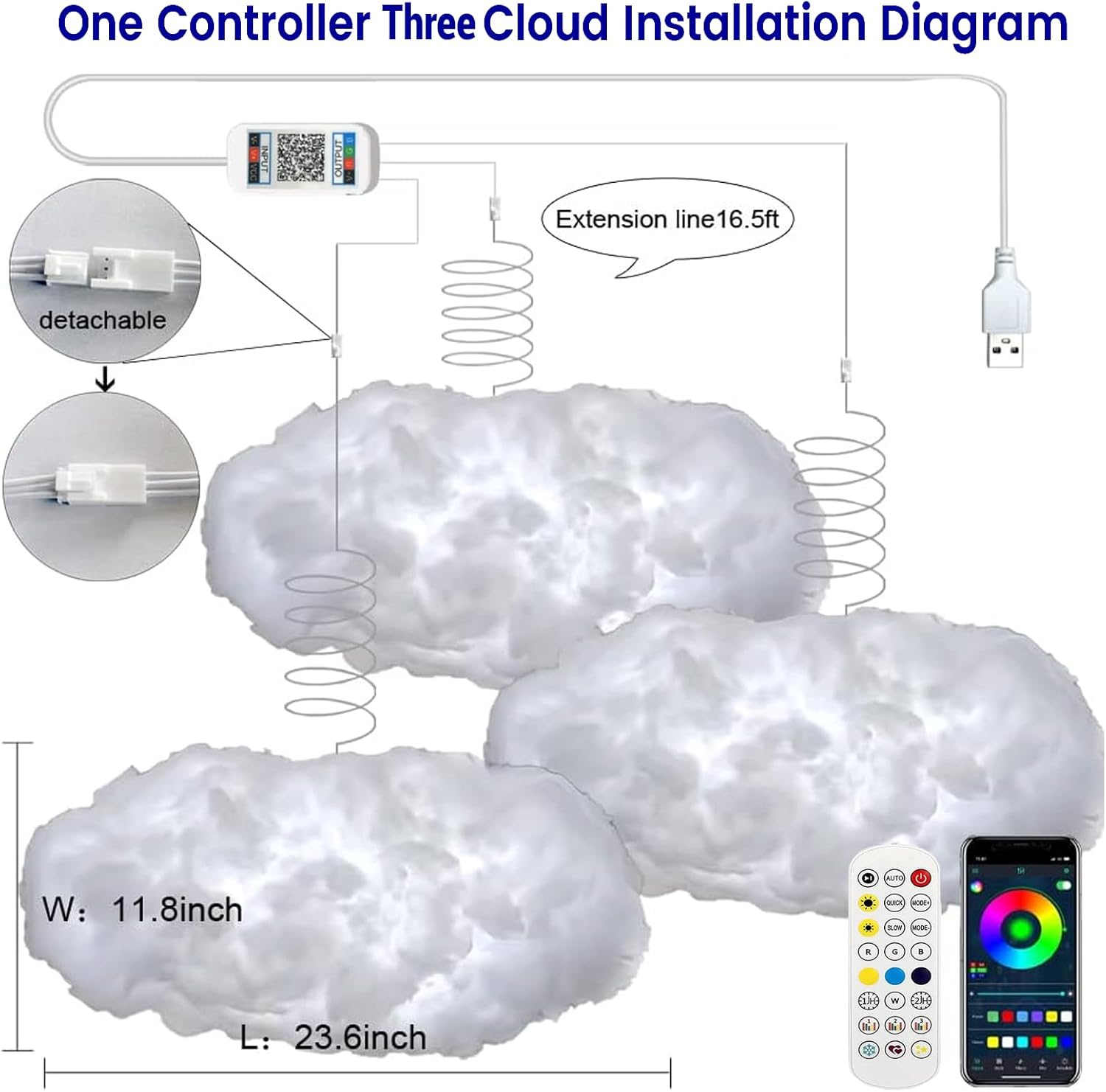
Installation diagram showing three cloud lights connected to a controller and USB power source, with dimensions and control options.
5. Instrukcja obsługi
5.1. Włączanie/wyłączanie zasilania
The cloud lights will power on automatically when connected to a power source. Use the remote control or mobile app to turn them off and on.
5.2. Pilot zdalnego sterowania
The included remote control allows for basic functions such as:
- Turning lights On/Off
- Zmiana kolorów
- Regulacja jasności
- Selecting preset lighting modes
5.3. Mobile App Control (Magic Lantern APP)
For advanced control and features, download the 'Magic Lantern' app on your smartphone. The app connects via Bluetooth.
- Pobierz aplikację: Scan the QR code provided in the packaging or search for 'Magic Lantern' in your app store.
- Włącz Bluetooth: Upewnij się, że Bluetooth jest włączony w Twoim smartfonie.
- Połącz się ze światłami: Open the app and follow the on-screen instructions to connect to your cloud lights.
The app offers extensive features:
- 213+ Style Modes: Choose from a wide variety of dynamic lighting effects.
- Millions of Colors: Customize colors with a color wheel.
- Tryb mikrofonu: Lights react to ambient sounds.
- Synchronizacja muzyki: Lights change color according to the rhythm of music played through the app.
- Ustawienia timera: Zaplanuj automatyczne włączanie/wyłączanie.

Screenshots of the 'Magic Lantern' mobile application interface, showing style modes, mic mode, color selection, timer settings, and music sync.
5.4. Music Sync Mode
The cloud lights feature a built-in microphone that allows them to react to sounds. Additionally, through the mobile app, you can play music, and the lights will synchronize with the melody, creating an immersive atmosphere.

Children singing under colorful cloud lights, illustrating music synchronization.
5.5. Timing Mode
Utilize the mobile app's timing function to set specific schedules for your cloud lights. You can program them to turn on and off automatically at preset times, assisting with sleep and wake-up routines.

Child sleeping and waking up with cloud lights, demonstrating the timing function via a mobile app.
Video demonstrating the TOHUNZO Cloud LED Lights, showcasing lightning effects, color changes via remote control, and mobile app control.
6. Konserwacja
- Czyszczenie: To clean the cloud material, gently dust it with a soft, dry cloth. Avoid using water or cleaning solutions, as this may damage the material or electrical components.
- Obsługiwanie: Always handle the cloud units with care. Excessive pulling or rough handling can cause the cotton material to shed or deform.
- Składowanie: If storing the lights, ensure they are clean and dry. Store them in a cool, dry place away from direct sunlight.
7. Rozwiązywanie Problemów
- Światła się nie włączają:
- Check if the USB cable is securely connected to both the controller and the power source.
- Ensure the 7V USB adapter (if used) is functioning correctly.
- Verify that the remote control or app is sending the 'On' command.
- Pilot nie działa:
- Sprawdź, czy bateria w pilocie wymaga wymiany.
- Ensure there are no obstructions between the remote and the LED controller.
- App not connecting or controlling lights:
- Sprawdź, czy Bluetooth jest włączony na Twoim smartfonie.
- Uruchom ponownie aplikację i spróbuj ponownie się połączyć.
- Sprawdź, czy światła są włączone.
- Cotton material shedding:
- This can occur with rough handling. Handle the clouds gently during installation and adjustment.
- Avoid placing the clouds in high-traffic areas where they might be frequently touched.
- Music sync not working with personal music:
- The app's music sync feature typically works with music played directly through the app or via the built-in microphone reacting to ambient sound. Direct synchronization with external music libraries on your phone may not be supported.
8. Specyfikacje
| Marka | TOHUNZO |
| Numer modelu | FY |
| Number of Cloud Units | 3 |
| Product Dimensions (per cloud) | Approximately 12"D x 24"W x 198"H (Note: 198"H seems like a typo, likely refers to total length of strip or a different dimension. Please refer to product packaging for exact cloud dimensions.) |
| Waga przedmiotu | Approximately 3.47 pounds (total for 3 clouds) |
| Tworzywo | Nylon (Shade), Metal (Base) |
| Typ źródła światła | PROWADZONY |
| Kolor światła | Wielobarwność |
| Źródło zasilania | AC/DC (USB powered, requires 7V adapter) |
| Metoda kontroli | Aplikacja, zdalne sterowanie |
| Zastosowanie wewnątrz/na zewnątrz | Tylko wewnątrz |
| Poziom wodoodporności | Nie jest wodoodporny |
9. Informacje o gwarancji
For warranty details, please refer to the documentation included with your purchase or contact the seller directly. Warranty terms typically cover manufacturing defects for a specified period from the date of purchase.
10. Obsługa klienta
If you encounter any issues or have questions regarding your TOHUNZO Cloud LED Lights, please contact the seller or manufacturer for assistance. Provide your product model number (FY) and purchase details when seeking support.