
1. Wprowadzenie
This manual provides comprehensive instructions for the GBC Dual System Programmable Remote Control, Model 8023389739271. This universal remote is designed to control up to four different audio/video devices, offering flexible programming options and broad compatibility with various brands. Please read this manual carefully before use to ensure proper setup and operation.
2. Koniec produktuview
2.1. Funkcje
- Dual System Programming: Program the remote using an infrared (IR) programmer (e.g., JL1970, sold separately) or via a 3.5mm audio cable connected to a PC or any device with an audio output.
- Kontrola wielu urządzeń: Capable of controlling up to four different devices, including TVs, Satellite receivers, Pay TV boxes, Digital Terrestrial Television (DTT) decoders, DVD players, VCRs, HI-FI systems, PlayStation 2, and Xbox consoles.
- Szeroka kompatybilność: Works with all major TV brands, including Smart TVs such as Samsung, LG, Sony, Philips, Panasonic, Akai, Hisense, Toshiba, Telefunken, Haier, Sharp, Hitachi, and TCL.
- Zachowanie pamięci: The programmed codes are retained even when batteries are replaced.
- Kompleksowa funkcjonalność: Controls all essential functions including Menu, AV input, Teletext, Color, and dedicated buttons for popular streaming services.
2.2. Układ pilota zdalnego sterowania
The GBC Dual System Remote Control features a standard layout with clearly labeled buttons for ease of use. Below is an illustration of the remote control and a description of its key sections.
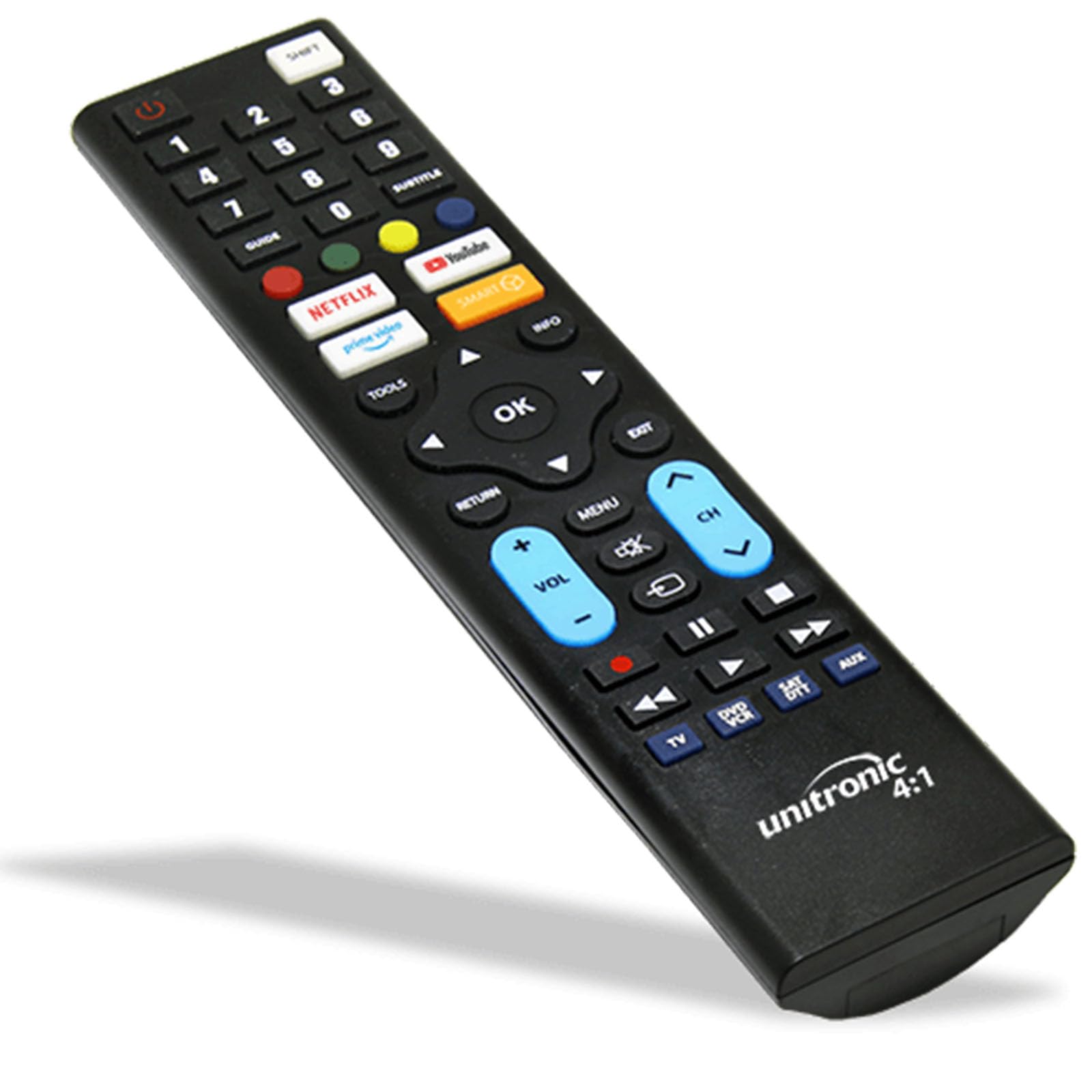
Image: GBC Dual System Programmable Remote Control. The remote is black with various buttons for power, numbers, device selection (TV, DVD/VCR, SAT/DTT, AUX), navigation, volume, channel, and dedicated streaming service buttons (Netflix, YouTube, Amazon Prime Video).
- Przycisk zasilania: Located at the top left, used to turn devices on/off.
- Przyciski wyboru urządzenia: Red oval buttons on the right side (TV, DVD/VCR, SAT/DTT, AUX) to select the device you wish to control.
- Klawiatura numeryczna: Buttons 0-9 for channel selection and data input.
- Klaster nawigacyjny: Central "OK" button surrounded by directional arrows (Up, Down, Left, Right) for menu navigation.
- Kontrola głośności i kanału: Dedykowane przyciski do regulacji głośności (VOL +/-) i zmiany kanału (CH +/-).
- Sterowanie odtwarzaniem: Buttons for Play, Pause, Stop, Fast Forward, Rewind, Next Track, Previous Track.
- Smart TV App Buttons: Dedicated buttons for quick access to popular streaming services like Netflix, YouTube, and Amazon Prime Video.
- Inne przyciski funkcyjne: Includes buttons for Menu, AV input, Teletext, and other specific functions.
3. Konfiguracja
3.1. Instalacja baterii
- Znajdź komorę baterii z tyłu pilota.
- Odsuń pokrywę komory baterii.
- Insert two (2) AAA 1.5V batteries, ensuring correct polarity (+ and -) as indicated inside the compartment.
- Dokładnie zamknij pokrywę komory baterii.
- Note: The remote control retains its programming even when batteries are removed or replaced.
3.2. Programowanie pilota
The GBC Dual System Remote Control can be programmed using two methods:
Method 1: Programming with an IR Programmer (e.g., JL1970)
This method requires a dedicated IR programmer (such as the JL1970, sold separately) and specific software. Refer to the instructions provided with your IR programmer for detailed steps. This method is typically used by technicians or for advanced programming needs.
Method 2: Programming via 3.5mm Audio Cable
This method allows programming the remote control using an audio output from a PC or any device with a 3.5mm headphone jack. This eliminates compatibility issues with operating systems (Windows, macOS, Linux).
- Zaopatrz się w kabel audio 3.5 mm (nie jest dołączony do zestawu).
- Connect one end of the audio cable to the 3.5mm programming port on the remote control (refer to the remote's specific port location, usually on the side or top).
- Connect the other end of the audio cable to the headphone jack of your PC or audio output device.
- Access the GBC programming software or web interface (specific details for this software are not provided in the product description, typically found on the manufacturer's webStrona).
- Follow the on-screen instructions within the programming software to select your device brand and model, and transfer the codes to the remote control.
- Once programming is complete, disconnect the audio cable.
Pre-programmed Option: If you purchased the remote pre-programmed, ensure you provided the exact brand and model of your television (found on the back of the TV) to the seller. In this case, no further programming should be required for the specified device.
4. Instrukcja obsługi
After successful programming, follow these steps to operate your devices:
- Wybierz urządzenie: Naciśnij odpowiedni przycisk wyboru urządzenia (np. TV, DVD / VCR, SAT/DTT, AUX) at the top right of the remote. The indicator light (if present) may illuminate to confirm selection.
- Włączanie/wyłączanie: Naciśnij MOC przycisk, aby włączyć lub wyłączyć wybrane urządzenie.
- Wybór kanału: Use the numeric keypad (0-9) to enter channel numbers directly, or use the CH+ / CH- przyciski służące do przełączania kanałów.
- Regulacja głośności: Użyj Objętość + / TOM- przyciski do regulacji głośności. wciśnij NIEMY przycisk, aby wyciszyć dźwięk.
- Nawigacja po menu: Użyj przycisków ze strzałkami kierunkowymi (UP, W DÓŁ, LEWY, PRAWIDŁOWY) to navigate menus, and press OK aby potwierdzić wybór.
- Input/Source Selection: Użyj AV or WEJŚCIE button (if programmed) to switch between different video inputs (e.g., HDMI 1, HDMI 2).
- Aplikacje Smart TV: Press the dedicated buttons for Netflix, YouTube, Amazon Prime Video, etc., to launch these applications directly on your Smart TV.
- Funkcje odtwarzania: For DVD/VCR or other media players, use the GRAĆ, PAUZA, ZATRZYMYWAĆ SIĘ, FF (Szybko do przodu), REW (Rewind) buttons.
5. Konserwacja
- Wymiana baterii: Replace batteries when the remote's response becomes sluggish or the indicator light (if any) fails to illuminate. Always use two new AAA 1.5V batteries. As noted, programming is retained during battery changes.
- Czyszczenie: Clean the remote control with a soft, dry cloth. Do not use liquid cleaners or abrasive materials, as these can damage the surface or internal components.
- Składowanie: Przechowuj pilota w suchym miejscu, z dala od bezpośredniego światła słonecznego i ekstremalnych temperatur.
6. Rozwiązywanie Problemów
| Problem | Możliwa przyczyna | Rozwiązanie |
|---|---|---|
| Pilot nie obsługuje urządzenia. |
|
|
| Niektóre funkcje nie działają. |
|
|
| Remote indicator light does not flash. |
|
|
7. Specyfikacje
| Marka | GBC |
| Numer modelu | 8023389739271 |
| Technologia łączności | Podczerwieni (IR) |
| Maksymalna liczba obsługiwanych urządzeń | 4 |
| Kompatybilne urządzenia | TV, SAT, Pay TV, DTT, DVD, VCR, HI FI, PS2, Xbox |
| Funkcja specjalna | Dual System Programmable |
| Liczba przycisków | Multiple (including numeric, navigation, volume, channel, and dedicated app buttons) |
| Typ baterii | 2x AAA 1.5V (included) |
| Kolor | Czarny |
| Przechowywanie w pamięci | Yes, codes are retained during battery replacement. |
8. Wsparcie i gwarancja
For technical assistance, programming inquiries, or warranty information, please contact the seller or manufacturer directly. Refer to your purchase documentation for specific contact details.
A product information sheet (PDF) from the supplier may be available for additional details. Please check the product listing or manufacturer's website for downloadable resources.