
LEMNOI SG7
LEMNOI SG7 Educational Day/Night Alarm Clock for Children - User Manual
Model: SG7
Wstęp
This manual provides detailed instructions for the setup, operation, and maintenance of your LEMNOI SG7 Educational Day/Night Alarm Clock. Please read it thoroughly to ensure proper use and to maximize the product's features.
Informacje dotyczące bezpieczeństwa
- Trzymaj urządzenie z dala od wody i wilgoci.
- Nie wystawiać na działanie ekstremalnych temperatur.
- Do ładowania należy używać wyłącznie dołączonego kabla USB-C.
- Przechowywać poza zasięgiem małych dzieci, aby zapobiec ryzyku zadławienia się małymi elementami.
- Nie próbuj samodzielnie demontować ani naprawiać urządzenia. W przypadku problemów skontaktuj się z obsługą klienta.
Zawartość opakowania
Proszę sprawdzić, czy w paczce znajdują się następujące elementy:
- LEMNOI SG7 Educational Day/Night Alarm Clock
- Kabel ładujący USB-C
- Instrukcja obsługi
Produkt ponadview
The LEMNOI SG7 is designed to assist children with sleep training and morning routines. It features:
- Day/Night Educational Icons: Green sun for wake-up, blue moon for sleep.
- 5-kolorowa lampka nocna LED: Regulowana jasność.
- 7 Musical Alarm Options: Gentle wake-up sounds.
- Podwójny alarm i funkcja drzemki: Customizable for weekdays and weekends.
- Digital Display with Temperature Monitor: 12/24 hour format, F/C conversion.
- Touch/Sound Activated Screen: Ekran wyłącza się po 20 sekundach bezczynności.
- Wbudowana bateria litowa 2000 mAh: Ładowanie przez USB-C.

Przód view of the LEMNOI SG7 alarm clock, displaying time, temperature, and day/night icons.
Organizować coś
1. Ładowanie początkowe
Before first use, fully charge the alarm clock. Connect the provided USB-C cable to the charging port on the back of the device and plug it into a compatible USB power adapter (not included).
- Podczas ładowania zaświeci się kontrolka ładowania.
- Pełne naładowanie trwa zazwyczaj około 3 godzin.
- The battery icon on the display will show charging status.
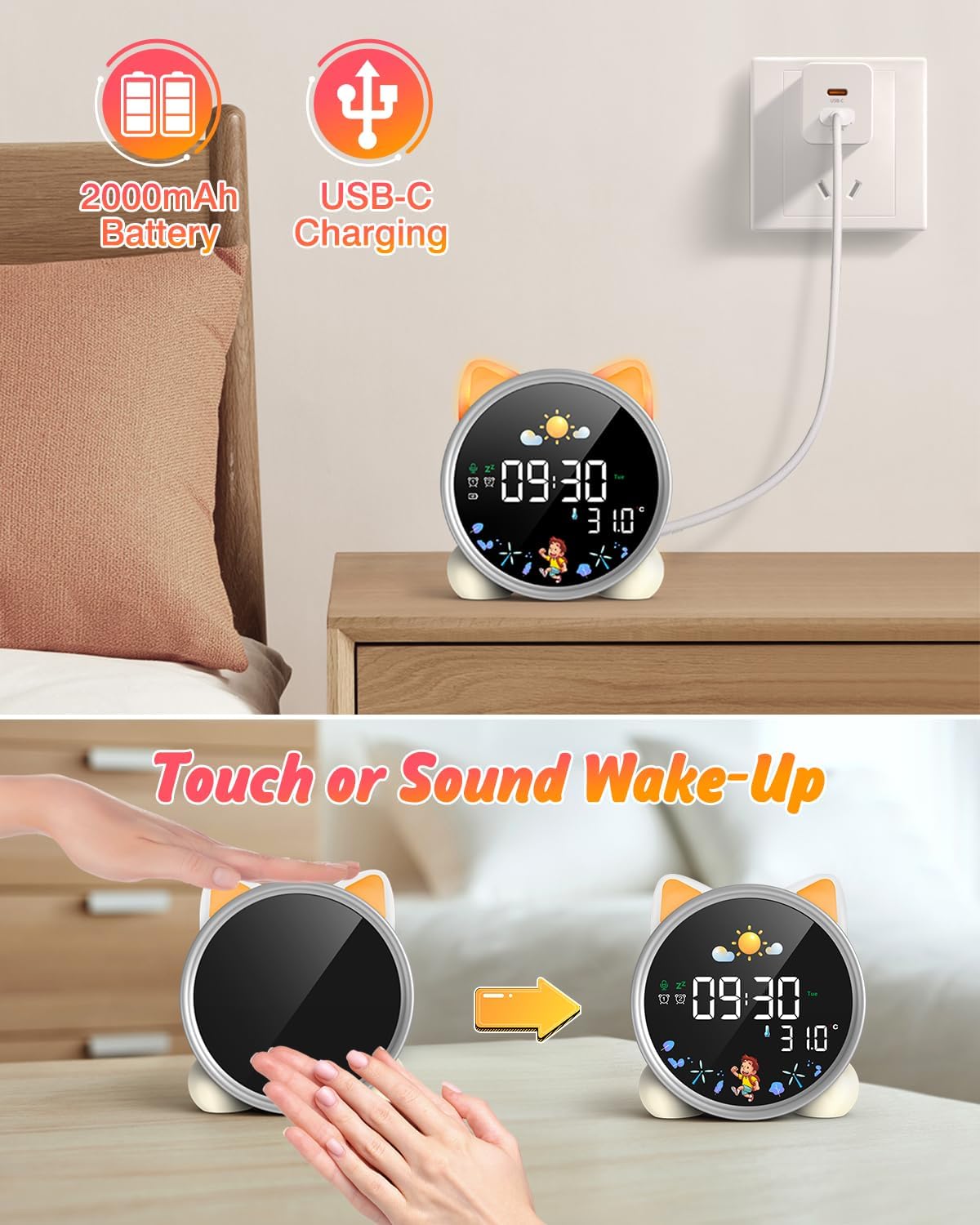
The alarm clock being charged via its USB-C port.
2. Włączanie/wyłączanie zasilania
The device powers on automatically when connected to power. To manually power on/off or wake the screen:
- Ekran wybudzenia: Tap the device or make a sound near it. The screen will illuminate for 20 seconds.
- Włączanie/wyłączanie: The device is designed to be always on for alarm functions.
Activating the screen by tapping the device.
Instrukcja obsługi
1. Ustawianie czasu i daty
The alarm clock supports 12/24 hour format and displays the day of the week. Specific buttons for setting are not detailed in the provided text, but typically involve a "Set" or "Mode" button.
- Refer to the physical manual for exact button functions (e.g., "SET" button).
- Naciśnij i przytrzymaj przycisk „SET”, aby wejść w tryb ustawiania czasu.
- Use "+" and "-" buttons to adjust hours, minutes, and other settings.
- Naciśnij przycisk „SET” ponownie, aby potwierdzić każde ustawienie i przejść do następnego.
2. Day/Night Educational Mode
This feature uses color-changing lights and icons to signal wake-up and sleep times.
- Obudź się: Green light and sun icon appear to indicate it's time to wake up.
- Spać: Blue light and moon icon appear to indicate it's time to sleep.

Day/Night mode with green sun for wake-up and blue moon for sleep.
3. Dual Alarms and Snooze Function
Set two independent alarms for different routines.
- Ustawianie alarmów: The dual alarms can be customized for any day from Monday to Sunday. Consult the full manual for specific steps to set Alarm 1 and Alarm 2.
- Drzemka: When an alarm sounds, press the "SNOOZE" button on top for an additional 9 minutes of sleep. This can be repeated up to 3 times.

Illustration of the snooze function and dual alarm capability.
4. Night Light (5 Colors & Brightness Levels)
The alarm clock functions as a night light with 5 color options and adjustable brightness.
- Opcje kolorów: Yellow, Blue, Purple, White, and Gradient.
- Jasność: 3 levels of brightness (0%, 30%, 70%, 100%) for the screen display. The night light itself also has adjustable brightness.
- Refer to the physical manual for instructions on cycling through colors and adjusting brightness.

The 5 available night light colors and screen brightness options.
5. Music and Sound Machine
The alarm clock offers 7 musical options for a gentle wake-up or soothing sleep environment.
- 7 musical options are available.
- Refer to the physical manual for instructions on selecting and setting music.

The 7 sound options available for the alarm clock.
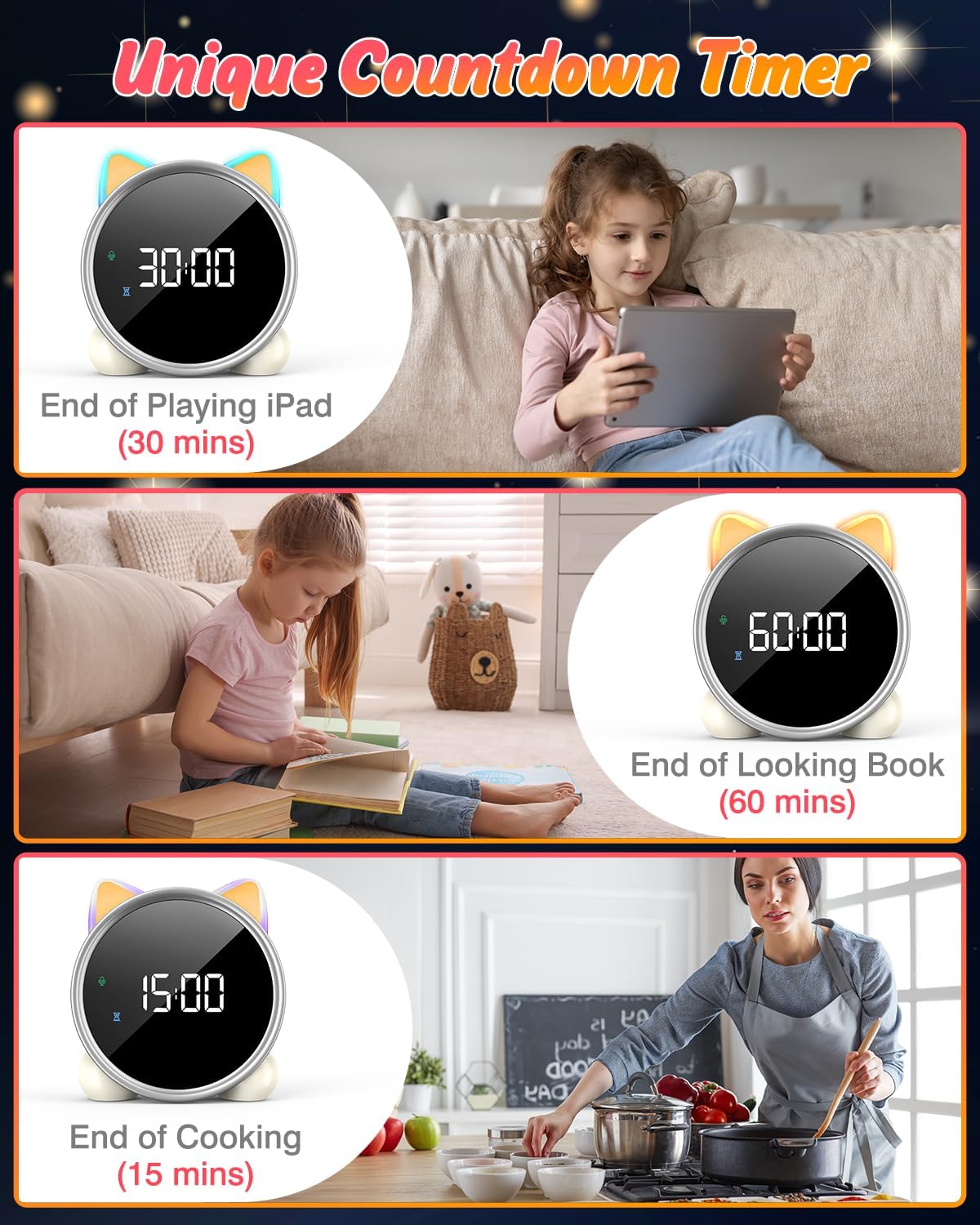
6. Timer odliczający
A unique countdown timer feature can be used for various activities.
- Useful for managing screen time, reading sessions, or cooking.
- Refer to the physical manual for instructions on setting the countdown timer.
Examples of the countdown timer in use for various activities.
7. Wyświetlacz temperatury
The alarm clock displays the ambient temperature and supports both Celsius and Fahrenheit units.
- Supports F/C temperature conversion.
- Refer to the physical manual for instructions on switching between units.
8. Screen Activation (Touch/Sound)
The screen can be activated by touch or sound and will automatically turn off after a period of inactivity to save power.
- Tap the device or make a sound to wake the screen.
- The screen will turn off after 20 seconds of no interaction.
Konserwacja
- Czyszczenie: Przetrzyj urządzenie miękką, suchą ściereczką. Nie używaj środków czyszczących o właściwościach ściernych ani rozpuszczalników.
- Składowanie: Przechowywać w chłodnym i suchym miejscu, jeżeli produkt nie będzie używany przez dłuższy czas.
- Pielęgnacja baterii: Aby przedłużyć żywotność baterii, unikaj częstego całkowitego rozładowywania. Naładuj baterię, gdy pojawi się wskaźnik niskiego poziomu naładowania baterii.
Rozwiązywanie problemów
| Problem | Możliwa przyczyna | Rozwiązanie |
|---|---|---|
| Screen does not turn on. | Niski poziom baterii lub urządzenie jest wyłączone. | Charge the device using the USB-C cable. Tap the device or make a sound to activate the screen. |
| Bateria szybko się rozładowuje. | Night light mode consumes more power. | It is recommended to keep the device plugged in when using night light mode for extended periods. Ensure the screen brightness is not set too high if battery life is a concern. |
| Trudności z ustawieniem czasu/alarmu. | Nieprawidłowa kolejność przycisków lub nieznajomość sterowania. | Refer to the "Operating Instructions" section and the detailed physical manual for precise button functions and sequences. |
| Screen remains on constantly. | Possible setting error or malfunction. | Ensure the screen auto-off feature is enabled (if applicable, check manual). If the issue persists, try a soft reset (if available, check manual) or contact customer support. |
Specyfikacje
- Marka: LEMNOI
- Numer modelu: SG7
- Kolor: Róża
- Wymiary produktu (dł. x szer. x wys.): Wymiary 13.1 x 3.81 x 14.5 cm
- Tworzywo: Plastikowy
- Cechy: Adjustable brightness, Snooze function
- Waga przedmiotu: 265 gramów
- Typ wyświetlacza: Cyfrowy
- Źródło zasilania: Battery Powered (Built-in 2000mAh Lithium Battery, USB-C charging)
- Typ pokoju: Sypialnia
- Kształt: Kot
- Zastosowanie wewnątrz / na zewnątrz: Wnętrz
Gwarancja i wsparcie
For warranty information or technical support, please refer to the contact details provided with your purchase or visit the official LEMNOI webZachowaj dowód zakupu na wypadek roszczeń gwarancyjnych.
Ask a question about this manual
Ask about setup, troubleshooting, compatibility, parts, safety, or missing instructions. Manuals+ will review the question and use this page’s manual context to help answer it.