Wstęp
The Linksys 5G AX1800 Mobile Hotspot is a portable device designed to provide high-speed 5G and WiFi 6 connectivity for multiple devices. With its ultra-thin design and long battery capacity, it allows you to stay connected on the go. This manual provides essential information for the proper setup, operation, maintenance, and troubleshooting of your mobile hotspot.
Główne cechy obejmują:
- Portable 5G supersonic speed and bandwidth.
- WiFi 6 speeds up to 1.8 Gbps (AX1800).
- Supports connection for 15+ devices simultaneously.
- Ultra-thin and lightweight design for maximum convenience.
- Wytrzymała bateria zapewniająca długotrwałe użytkowanie.
- Powered by leading-edge 5G technology by Qualcomm.
Rycina 1: Przód view of the Linksys 5G AX1800 Mobile Hotspot, showing LED indicators for battery, 5G/LTE, and Wi-Fi status.
Organizować coś
1. Zainstaluj kartę SIM
The Linksys 5G AX1800 Mobile Hotspot requires a Nano-SIM card for 5G/LTE connectivity. Ensure the device is powered off before inserting the SIM card.
- Znajdź pokrywę gniazda karty SIM z boku urządzenia.
- Delikatnie otwórz pokrywę.
- Włóż kartę Nano-SIM do gniazda złotymi stykami skierowanymi w dół i dokładnie wyrównaj nacięty róg.
- Zamknij dokładnie pokrywę gniazda karty SIM.

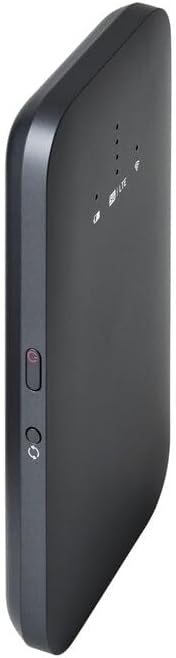
Rysunek 2: Strona view of the mobile hotspot, highlighting the SIM card slot cover.
2. Naładuj urządzenie
Before first use, fully charge the mobile hotspot. Use the provided charging cable and a compatible USB power adapter.
- Connect one end of the USB cable to the charging port on the device.
- Podłącz drugi koniec do zasilacza USB lub portu USB komputera.
- The battery indicator LED will show charging status. Allow several hours for a full charge.

Rysunek 3: Dół view of the mobile hotspot, showing the USB-C charging port.
3. Włączanie/wyłączanie zasilania
To power on the device, press and hold the power button located on the side until the LED indicators light up. To power off, press and hold the power button again until the indicators turn off.

Rysunek 4: Strona view of the mobile hotspot, indicating the location of the power button.
Instrukcja obsługi
1. Podłączanie urządzeń do sieci Wi-Fi
Once powered on, the mobile hotspot will broadcast a Wi-Fi network. You can connect up to 15+ devices simultaneously.
- Na swoim urządzeniu (smartfonie, laptopie, tablecie) otwórz ustawienia Wi-Fi.
- Szukaj dostępne sieci Wi-Fi.
- Select the network name (SSID) of your Linksys Mobile Hotspot. The default SSID and password are usually found on a sticker inside the device or on its packaging.
- Po wyświetleniu monitu wprowadź hasło Wi-Fi.
- Your device should now be connected to the internet via the mobile hotspot.
2. Zrozumienie wskaźników LED
The LED indicators on the front of the device provide important status information:
- Wskaźnik baterii: Pokazuje aktualny poziom naładowania baterii i stan ładowania.
- 5G/LTE Indicator: Indicates the mobile network connection status (e.g., solid blue for 5G, solid green for LTE, blinking for searching).
- Wskaźnik Wi-Fi: Shows if the Wi-Fi network is active and broadcasting.
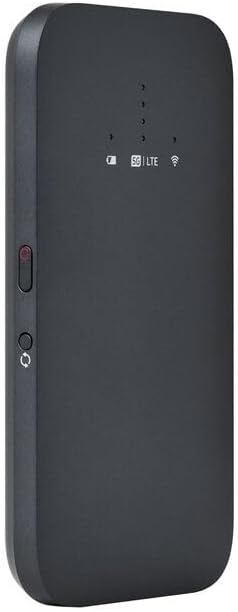
Rysunek 5: Przód kątowy view of the mobile hotspot, clearly showing the LED indicators for battery, 5G/LTE, and Wi-Fi.
3. Dostęp do Web Interfejs zarządzania
For advanced settings, such as changing the Wi-Fi name or password, managing connected devices, or checking data usage, you can access the device's web interfejs zarządzania.
- Ensure your device is connected to the mobile hotspot's Wi-Fi network.
- Otwórz web przeglądarka (np. Chrome, Firefox, Safari).
- Enter the default IP address for the hotspot (usually
192.168.1.1or192.168.0.1, refer to the device's documentation or sticker for the exact address) into the address bar and press Enter. - Log in using the default username and password (also found on the device sticker or documentation). It is highly recommended to change the default password for security.
Konserwacja
1. Pielęgnacja baterii
- Unikaj wystawiania urządzenia na działanie ekstremalnych temperatur.
- Nie należy pozostawiać urządzenia całkowicie rozładowanego przez dłuższy czas.
- Należy używać wyłącznie oryginalnych lub certyfikowanych, kompatybilnych akcesoriów do ładowania.
2. Czyszczenie
Przetrzyj urządzenie miękką, suchą, niepozostawiającą włókien ściereczką. Nie używaj płynnych środków czyszczących ani aerozoli bezpośrednio na urządzeniu.
3. Aktualizacje oprogramowania sprzętowego
Okresowo sprawdzaj dostępność aktualizacji oprogramowania sprzętowego za pomocą web management interface. Keeping the firmware updated ensures optimal performance and security.
Rozwiązywanie problemów
Brak połączenia internetowego
- Sprawdź, czy karta SIM została prawidłowo włożona i aktywowana przy użyciu pakietu danych.
- Check the 5G/LTE indicator on the device. If it's blinking or off, the device may be searching for a network or have no signal.
- Restart the mobile hotspot and your connected device.
- Verify that your data plan has not been exhausted.
Niska prędkość Wi-Fi
- Move closer to the mobile hotspot to improve signal strength.
- Reduce the number of connected devices or data-intensive activities.
- Sprawdź, czy w Twojej okolicy nie występuje przeciążenie sieci.
Device Not Connecting to Hotspot
- Ensure the Wi-Fi indicator on the hotspot is active.
- Sprawdź dokładnie hasło Wi-Fi.
- Restart both the hotspot and the device you are trying to connect.
Przywracanie ustawień fabrycznych
If issues persist, you may perform a factory reset. This will revert all settings to their default values, including Wi-Fi name and password. Refer to the device's specific instructions for the reset procedure, usually involving a small reset button.
Specyfikacje
| Funkcja | Szczegół |
|---|---|
| Marka | Linksys |
| Nazwa modelu | FGHSAX1800 |
| Numer modelu przedmiotu | FGHSAX1800-AH |
| Technologia łączności | 5G |
| Wi-Fi standard | WiFi 6 (AX1800) |
| Szybkość przesyłu danych | Do 1.8 gigabitów na sekundę |
| Klasa pasma częstotliwości | Dwuzakresowy |
| Typ anteny | Wewnętrzny |
| Cechy specjalne | Tryb punktu dostępu |
| Zawarte komponenty | GNIAZDO KARTY SIM |
| Tomtage | 12 wolty |
| Wymiary opakowania | Wymiary 14 x 7.5 x 1.55 cm |
| Waga przedmiotu | 185 gramów |
Gwarancja i wsparcie
For warranty information and technical support, please refer to the warranty card included with your product or visit the official Linksys support webStrona internetowa. Zazwyczaj można tam znaleźć odpowiedzi na często zadawane pytania, pliki do pobrania sterowników i dane kontaktowe do działu obsługi klienta.
Linksys Official Support: https://www.linksys.com/support