
1. Wprowadzenie
This manual provides essential information for the safe and efficient operation of your JVC XS-N318B Portable Bluetooth Speaker. Please read it thoroughly before use and retain it for future reference. Your speaker features Bluetooth and Wi-Fi connectivity, integrated Alexa voice control, 360-degree omnidirectional audio with Dolby technology, and a long-lasting battery for extended playtime. It is also designed with IPX4 splash resistance for outdoor use.
2. Koniec produktuview
2.1 Zawartość opakowania
- JVC XS-N318B Portable Bluetooth Speaker
- Kabel ładujący
- Zdalne sterowanie
- Instrukcja obsługi
2.2 Elementy głośnikowe i sterowanie
The JVC XS-N318B speaker features an intuitive control panel located on the top surface, along with indicator lights for connectivity status. A remote control is also included for convenient operation from a distance.
- Przycisk zasilania: Press and hold to turn the speaker On or Off.
- Głośność + przycisk: Zwiększa głośność odtwarzania.
- Głośność - Przycisk: Zmniejsza głośność odtwarzania.
- Przycisk Odtwórz/Pauza: Controls audio playback (play/pause).
- Tap Button (Alexa): Activates the Alexa voice assistant.
- Wskaźnik Bluetooth: Zapala się po połączeniu przez Bluetooth.
- Wskaźnik Wi-Fi: Illuminates when connected to a Wi-Fi network.
- Wskaźnik pomocniczy: Illuminates when an auxiliary device is connected.

Rycina 1: Przód view of the JVC XS-N318B Portable Bluetooth Speaker, showcasinze względu na jego elegancki wygląd.

Rysunek 2: Strona view of the JVC XS-N318B Portable Bluetooth Speaker, highlighting its compact form factor.

Rysunek 3: Tył view of the JVC XS-N318B Portable Bluetooth Speaker, showing the rear panel.
3. Konfiguracja
3.1 Ładowanie głośnika
Before initial use, fully charge the speaker. Connect the provided charging cable to the speaker's charging port and a compatible 5V USB power adapter (not included). The charging indicator will show the charging status and turn off when fully charged. A full charge provides up to 9 hours of playtime.

Figure 4: The JVC XS-N318B speaker is equipped with a built-in 7.4V 6600mAh lithium battery, offering extended playtime.
3.2 Włączanie/wyłączanie
To power on the speaker, press and hold the Power button until the indicator lights illuminate. To power off, press and hold the Power button again until the lights turn off.
3.3 parowanie Bluetooth
- Ensure the speaker is powered on and the Bluetooth indicator is blinking, indicating it is in pairing mode.
- Na swoim urządzeniu mobilnym włącz Bluetooth i wyszukaj dostępne urządzenia.
- Select "JVC XS-N318B" from the list of devices.
- Once paired, the Bluetooth indicator on the speaker will glow steadily.
3.4 Połączenie Wi-Fi
For Wi-Fi streaming and Alexa functionality, connect your speaker to a Wi-Fi network. Refer to the JVC Connect app (if applicable, or general Wi-Fi setup instructions) for detailed steps on connecting your speaker to your home network. The Wi-Fi indicator will illuminate steadily once connected.
3.5 wejścia pomocnicze
To connect an external audio device via the auxiliary input, use a 3.5mm audio cable (not included). Plug one end into the speaker's Aux-In port and the other into your device's headphone jack. The Aux indicator will illuminate.

Figure 5: The JVC XS-N318B offers seamless connectivity options including Bluetooth, Wi-Fi, and Aux In.
4. Instrukcja obsługi
4.1 Odtwarzanie dźwięku
Once connected via Bluetooth, Wi-Fi, or Aux-In, begin playing audio from your source device. Use the Play/Pause button on the speaker or remote to control playback. The speaker delivers 20 Watts RMS output for clear audio.

Figure 6: Experience crystal-clear audio with 20 Watts of output power from your JVC XS-N318B speaker.
4.2 Kontrola głośności i ścieżki
Adjust the volume using the Volume + and Volume - buttons on the speaker's top panel or the dedicated buttons on the remote control. For track selection, use the remote control's track navigation buttons.
4.3 Korzystanie ze sterowania głosowego Alexa
With Wi-Fi connected and Alexa configured (via the JVC Connect app or Amazon Alexa app), tap the Tap Button (Alexa icon) on the speaker to activate Alexa. You can then issue voice commands for music playback, information, smart home control, and more.
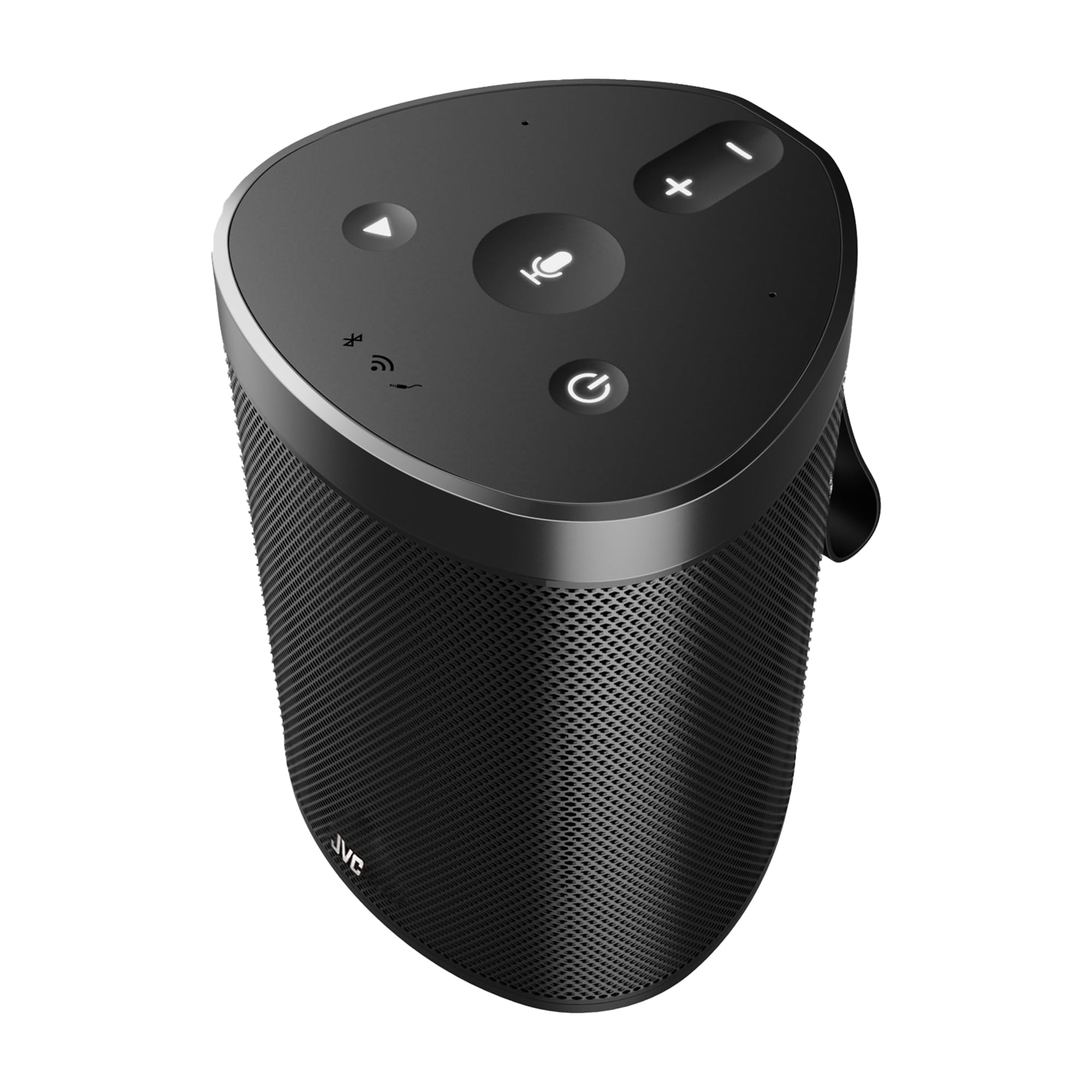
Figure 7: Control your music and more using just your voice with built-in Alexa support on the JVC XS-N318B speaker.
4.4 360-Degree Omnidirectional Audio and Dolby
The JVC XS-N318B is engineered with 360-degree omnidirectional audio and dual stereo speakers powered by Dolby technology, providing immersive sound that fills your space evenly.
5. Konserwacja
5.1 Czyszczenie
To clean the speaker, use a soft, dry, lint-free cloth. Do not use abrasive cleaners, waxes, or solvents. Ensure no liquids enter the speaker openings.
5.2 Pielęgnacja baterii
To prolong battery life, avoid fully discharging the speaker frequently. Recharge the battery regularly, even if the speaker is not in use for extended periods. Store the speaker in a cool, dry place.
5.3 Wodoodporność (IPX4)
The JVC XS-N318B speaker has an IPX4 rating, meaning it is resistant to splashes of water from any direction. It is suitable for outdoor use and can withstand light rain or splashes. Do not submerge the speaker in water or expose it to pressurized water jets.

Figure 8: The JVC XS-N318B speaker is IPX4 waterproof, making it suitable for use in splash-prone environments.
6. Rozwiązywanie Problemów
- Brak zasilania: Ensure the speaker is charged. Connect the charging cable and allow it to charge for a few minutes before attempting to power on again.
- Brak dźwięku: Check the volume level on both the speaker and your connected device. Ensure the correct input source (Bluetooth, Wi-Fi, Aux) is selected and active.
- Problemy z parowaniem Bluetooth: Make sure the speaker is in pairing mode (blinking Bluetooth indicator). Turn off and on Bluetooth on your device, and try pairing again. Ensure no other devices are currently connected to the speaker.
- Problemy z połączeniem Wi-Fi: Verify your Wi-Fi network is active and within range. Re-attempt the Wi-Fi setup process via the JVC Connect app.
- Alexa nie odpowiada: Ensure the speaker is connected to Wi-Fi and your Alexa account is properly linked. Tap the Alexa button to activate it before speaking your command.
- Pilot nie działa: Sprawdź baterię w pilocie. Upewnij się, że między pilotem a głośnikiem nie ma żadnych przeszkód.
7. Specyfikacje
| Marka | JVC |
| Numer modelu | XS-N318B |
| Maksymalna moc wyjściowa głośnika | 20 W RMS |
| Technologia łączności | Bluetooth, Wi-Fi, Aux |
| Tryb wyjścia audio | Stereo (Dual Stereo Speakers) |
| Wejście Voltage | 5 wolty |
| Tworzywo | Plastikowy |
| Typ głośnika | Plenerowy |
| Kolor | Czarny |
| Maksymalny zasięg (Bluetooth) | 10 metrów |
| Stosunek sygnału do szumu | 70dB |
| Źródło zasilania | Zasilany bateryjnie |
| Typ baterii | 1 Lithium Ion (7.4V 6600mAh) |
| Przybliżony czas gry | Do 9 godzin |
| Ocena odporności na wodę | IPX4 (odporność na zachlapanie) |
| Wymiary (szer. x wys.) | Około 12.7 cm x 17.2 cm |
| Kraj pochodzenia | Chiny |
8. Gwarancja i wsparcie
8.1 Informacje o gwarancji
Your JVC XS-N318B Portable Bluetooth Speaker comes with a 1 rok gwarancji od daty zakupu. Niniejsza gwarancja obejmuje wady produkcyjne powstałe w wyniku normalnego użytkowania. Prosimy zachować dowód zakupu na wypadek roszczeń gwarancyjnych. Gwarancja nie obejmuje uszkodzeń spowodowanych niewłaściwym użytkowaniem, wypadkami, nieautoryzowanymi modyfikacjami ani normalnym zużyciem.
8.2 Obsługa klienta
For technical assistance, warranty inquiries, or further information, please refer to the official JVC website or contact your local JVC customer support. Contact details can typically be found on the product packaging or the official brand webstrona.


