
TecTake 404950
tectake® Foldable Exercise Bike User Manual
Brand: TecTake | Model: 404950
1. Informacje dotyczące bezpieczeństwa
Please read this entire manual before assembling and using the exercise bike. Keep this manual for future reference.
- Przed rozpoczęciem jakiegokolwiek programu ćwiczeń skonsultuj się z lekarzem, zwłaszcza jeśli cierpisz na jakieś schorzenia.
- This product is designed for home use only. Do not use it in a commercial or institutional setting.
- The maximum user weight capacity for this exercise bike is 100 kg (220 funta)Nie przekraczaj tego limitu.
- Keep children and pets away from the exercise bike during use.
- Place the exercise bike on a flat, stable surface. Ensure there is adequate clear space around the bike for safe operation.
- Noś odpowiednią odzież i obuwie sportowe. Unikaj luźnych ubrań, które mogłyby zostać wciągnięte przez ruchome części.
- Inspect the bike before each use for any loose or worn parts. Do not use if any damage is found.
- Natychmiast przerwij ćwiczenia, jeśli poczujesz osłabienie, zawroty głowy lub ból.
2. Koniec produktuview
The tectake® Foldable Exercise Bike is a compact and efficient fitness solution designed for effective leg, waist, and glute training. Its robust steel tube construction ensures stability and durability, while its foldable design allows for space-saving storage.
Główne cechy:
- Quiet operation with a foldable design.
- Robust X-shaped frame made of powder-coated steel.
- Flywheel with belt system and wear-resistant magnetic brake.
- Eight adjustable resistance levels via a rotary knob.
- Seven-position height-adjustable saddle.
- Padded handlebars with integrated pulse measurement.
- Non-slip pedal surface with adjustable foot straps.
- Rubber end caps for secure footing.
- Training computer with clear LCD display.

3. Instalacja i montaż
The tectake exercise bike is designed for quick and easy assembly. All necessary mounting materials are included.
3.1 Zawartość opakowania:
- Exercise Bike main frame and components
- Instrukcja montażu
- Mounting Material (screws, nuts, tools)
3.2 Kroki montażu:
- Carefully unpack all components and verify against the parts list in the included assembly instructions.
- Attach the front and rear stabilizers to the main frame using the provided bolts and nuts.
- Przymocuj pedały do korby. Zwróć uwagę, że lewy pedał ma odwrotny gwint.
- Install the seat post and saddle, ensuring it is securely fastened.
- Attach the handlebars to the main frame, connecting any necessary sensor cables for the computer.
- Insert 2 x AA 1.5V batteries into the training computer (batteries not included).
- Connect the pulse sensor cables from the handlebars to the computer.
- Ensure all connections are tight and secure before first use.
4. Instrukcja obsługi
4.1 Adjusting Seat Height:
The saddle can be adjusted to seven different height positions to accommodate users up to 180 cm (5'11").
- Odkręć pokrętło regulacyjne znajdujące się na sztycy siodełka.
- Raise or lower the saddle to your desired height. Ensure your leg has a slight bend at the knee when the pedal is at its lowest point.
- Tighten the adjustment knob securely to lock the saddle in place.
4.2 Regulacja oporu:
The bike features eight levels of magnetic resistance, allowing you to customize your workout intensity.

- Locate the rotary knob on the main frame, typically below the handlebars.
- Obróć pokrętło zgodnie z ruchem wskazówek zegara, aby zwiększyć opór (wyższe wartości przy trudniejszych ćwiczeniach).
- Obróć pokrętło w kierunku przeciwnym do ruchu wskazówek zegara, aby zmniejszyć opór (im niższe wartości, tym łatwiejszy trening).
4.3 Using the Training Computer:
The LCD training computer tracks important workout data.


- Funkcje wyświetlacza: The computer typically displays Time, Speed, Distance, Calories, and Pulse (heart rate). Some models may have a 'Scan' mode that cycles through these metrics automatically.
- Pomiar pulsu: Grip the padded handlebars firmly with both hands. Ensure your palms are in contact with the metal sensors. Your pulse will be displayed on the screen after a few seconds.
- Przycisk trybu: Press the 'Mode' button to cycle through the different display functions or to select a specific function to view.
- Przycisk resetowania: Press and hold the 'Reset' button to clear all current workout data.


5. Konserwacja
5.1 Czyszczenie:
- Wytrzyj rower reklamąamp Po każdym użyciu przetrzyj ściereczką pot i kurz.
- Nie należy używać środków czyszczących o właściwościach ściernych ani rozpuszczalników, gdyż mogą one uszkodzić wykończenie lub podzespoły elektroniczne.
- Keep the LCD display clean and dry.
5.2 Przechowywanie:
Thanks to its practical foldable function, the exercise bike can be stored compactly when not in use.
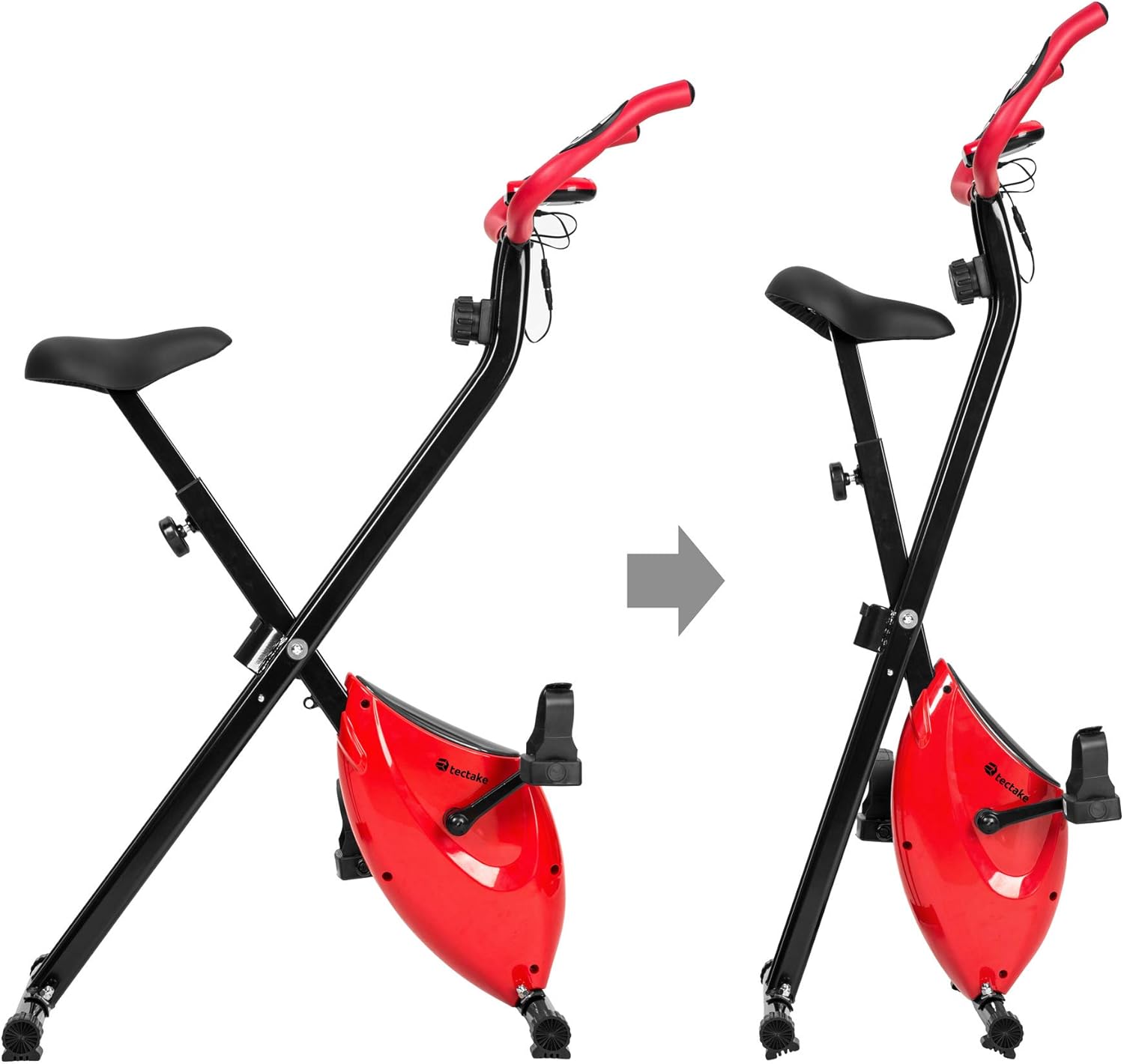
- To fold the bike, follow the instructions in the assembly manual or reverse the setup steps for folding.
- Przechowuj rower w suchym i chłodnym miejscu, z dala od bezpośredniego światła słonecznego i ekstremalnych temperatur.
- Ensure the bike is stable and secure in its folded position to prevent accidental tipping.
6. Rozwiązywanie Problemów
If you encounter any issues with your tectake exercise bike, please refer to the following common troubleshooting tips:
- Wyświetlacz komputera nie działa:
- Check if the batteries (2 x AA 1.5V) are correctly installed and not depleted. Replace if necessary.
- Ensure all cable connections to the computer are secure.
- No Pulse Reading:
- Ensure your hands are firmly gripping both metal sensors on the handlebars.
- Make sure the pulse sensor cables are properly connected to the computer.
- Nietypowe dźwięki podczas pracy:
- Check all bolts and nuts, especially on the frame and pedals, to ensure they are tight.
- Ensure the bike is on a flat and stable surface.
- Opór nie zmienia się:
- Verify that the resistance knob is turning freely and engaging with the internal mechanism.
- Jeśli problem będzie się powtarzał, skontaktuj się z obsługą klienta.
For issues not covered here, please refer to the detailed assembly instructions or contact TecTake customer support.
7. Specyfikacje
| Funkcja | Specyfikacja |
|---|---|
| Numer modelu | 404950 |
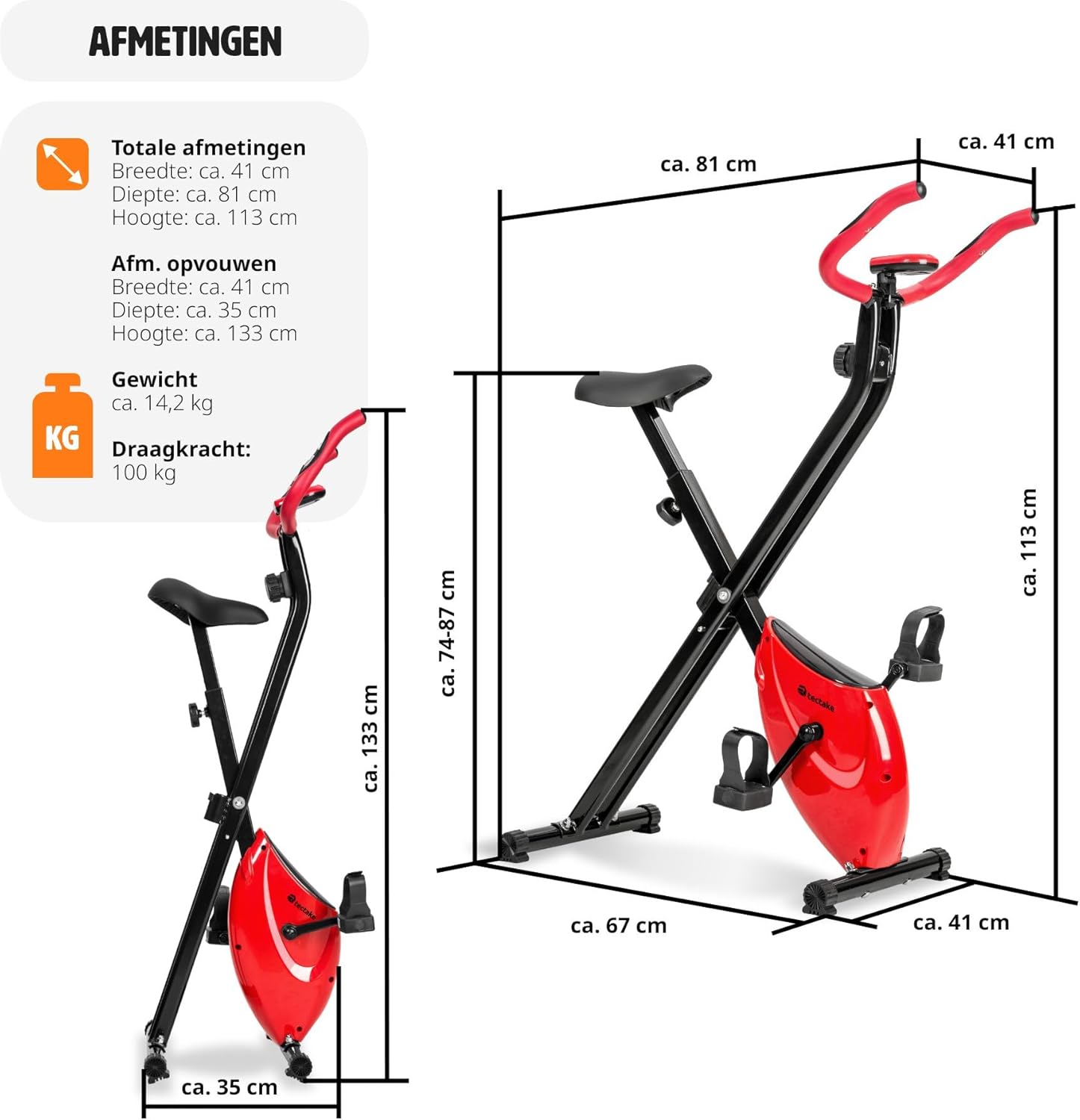
| Wymiary całkowite (dł. x szer. x wys.) | Około 81 x 41 x 113 cm (31.9 x 16.1 x 44.5 cala) |
| Wymiary po złożeniu (dł. x szer. x wys.) | Około 41 x 35 x 133 cm (16.1 x 13.8 x 52.4 cala) |
| Waga | Około 14.2 kg (31.3 funty) |
| Maksymalna waga użytkownika | 100 kg (220 funta) |
| Zalecany maksymalny wzrost użytkownika | Up to 180 cm (5'11") |
| Regulacja wysokości siodełka | 7 positions (approx. 68-81 cm / 26.8-31.9 inches) |
| System oporu | Magnetyczny, 8 poziomów |
| Training Computer Power | 2 baterie AA 1.5 V (brak w zestawie) |
| Materiał główny | Powder-coated steel, ABS plastic, Polypropylene, NBR rubber, Polyurethane |
| Kolor | Czerwony / Czarny |
8. Gwarancja i wsparcie
For warranty information, technical support, or to order replacement parts, please contact TecTake customer service. Refer to the contact details provided with your purchase documentation or visit the official TecTake webstrona.
Kontaktując się z pomocą techniczną, przygotuj numer modelu (404950) i dowód zakupu.