
Wstęp
Dziękujemy za zakupasing the Funistree Cell Phone Stand with Wireless Bluetooth Speaker. This device combines a versatile phone stand with a high-quality Bluetooth speaker and a white noise machine, designed to enhance your audio and viewing experience. Please read this manual carefully before use to ensure proper operation and to maximize the product's lifespan.
Produkt ponadview
The Funistree H77 is a multi-functional device featuring a detachable phone stand and a wireless Bluetooth speaker. Its innovative design allows for independent use of the speaker and the stand, or combined for an integrated entertainment solution.
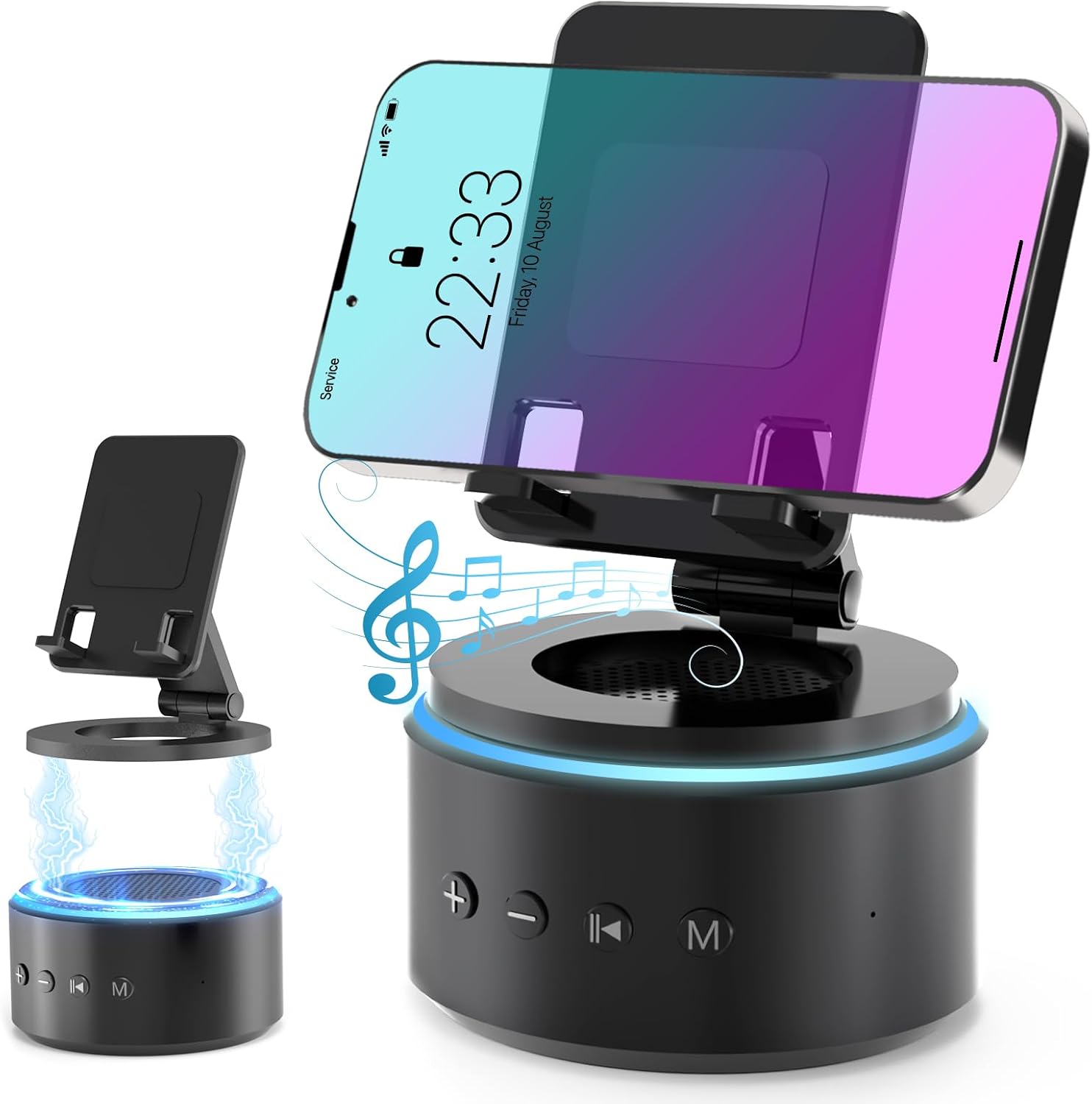
Image: The Funistree H77 device, illustrating its 2-in-1 design with the phone stand attached to the speaker base and also shown detached.
Główne cechy:
- Konstrukcja 2 w 1 z możliwością odłączenia: The phone stand magnetically connects to the Bluetooth speaker, allowing for combined or separate use.
- Adjustable & Portable Stand: Oferuje wiele viewing angles and includes a hanging design for easy portability.
- Dźwięk stereo HD: Equipped with a dual stereo system for enhanced bass, clear highs, and balanced midrange.
- Maszyna generująca biały szum: Features 10 soothing white noise sounds with an auto-off timer (15, 30, or 60 minutes).
- Stabilna podstawa: Anti-slip silicone pads ensure device stability.
- Długa żywotność baterii: Optimized 1800 mAh battery for extended use.
Zawartość opakowania
Proszę sprawdzić, czy w paczce znajdują się następujące elementy:
- Funistree Cell Phone Stand with Wireless Bluetooth Speaker (Model H77)
- Kabel ładujący USB
- Instrukcja obsługi
Note: Contents may vary slightly. If any items are missing or damaged, please contact customer support.
Organizować coś
Ładowanie urządzenia:
- Locate the charging port on the speaker base.
- Connect the provided USB charging cable to the speaker.
- Podłącz drugi koniec kabla USB do kompatybilnego zasilacza USB (nie ma go w zestawie) lub do portu USB komputera.
- Zaświeci się kontrolka ładowania. Po pełnym naładowaniu kontrolka może zmienić kolor lub zgasnąć.
Initial charge time is approximately 2-3 hours.
Assembling the Phone Stand and Speaker:
The phone stand and speaker connect magnetically.
- Align the magnetic base of the phone stand with the top surface of the speaker.
- The magnets will snap the two components together securely.
- To detach, simply pull the phone stand upwards from the speaker base.

Obraz: Zbliżenie view demonstrating the magnetic connection between the phone stand and the speaker base.
Instrukcja obsługi
Włączanie/wyłączanie:
- To power on, press and hold the Power button (usually marked with a power symbol) on the speaker base for a few seconds until you hear an audible prompt or see an indicator light.
- Aby wyłączyć urządzenie, naciśnij i przytrzymaj przycisk zasilania ponownie przez kilka sekund.
Parowanie Bluetooth:
- Ensure the speaker is powered on and in pairing mode (indicated by a flashing LED light, usually blue). If not, briefly press the Bluetooth button (if available) or power cycle the device.
- Na urządzeniu mobilnym (smartfonie, tablecie itp.) przejdź do ustawień Bluetooth.
- Szukaj available devices. The speaker will appear as "H77" or "Funistree H77".
- Select the speaker from the list to pair. Once paired, you will hear a confirmation sound, and the LED light will become solid.
- Teraz możesz odtwarzać dźwięk ze swojego urządzenia przez głośnik.

Image: The Funistree H77 in use, with a smartphone mounted on the stand, playing music, and a laptop nearby, illustrating its versatile functionality.
White Noise Function:
The speaker includes 10 built-in white noise sounds to aid relaxation or concentration.
- Press the 'M' (Mode) button to cycle through the white noise sounds.
- To set a timer for the white noise, press the Timer button (if available) or refer to the specific button layout on your device. The available timer settings are 15, 30, or 60 minutes. The device will automatically turn off after the selected duration.

Image: Visual representation of the 10 white noise options (Ocean, Wind, Rain, Bird, Heartbeat, Campfire, Thunderstorm, Brook, Fan, Piano) and timer settings, with a person sleeping, indicating the relaxation benefits.
Regulacja głośności i odtwarzania:
- Zwiększenie głośności: Naciśnij przycisk '+'.
- Ściszanie: Naciśnij przycisk '-'.
- Odtwórz/Pauza: Press the Play/Pause button (usually marked with a triangle/two vertical bars).
- Następny utwór: Press the '>>|' button.
- Poprzedni utwór: Press the '|<<' button.
Korzystanie z podstawki pod telefon:
The phone stand is adjustable to provide optimal viewkąty.
- Place your smartphone or tablet securely on the stand's cradle.
- Adjust the angle of the stand by gently pushing or pulling the articulated arm to your desired viewpozycja.
- The stand features anti-slip silicone pads to prevent your device from sliding.

Obraz: Szczegółowy view highlighting the adjustable angle mechanism and the anti-slip silicone pads on the phone stand and base for secure device placement.
Ruchliwość:
The speaker can be carried easily using its integrated hanging design.

Image: A woman outdoors, holding the Funistree speaker by its hanging rope, demonstrating its portability for outdoor activities.
Konserwacja
- Czyszczenie: Use a soft, dry cloth to wipe the surface of the device. Do not use abrasive cleaners, alcohol, or chemical solvents, as these may damage the finish.
- Składowanie: Jeśli urządzenie nie będzie używane przez dłuższy czas, należy je przechowywać w chłodnym i suchym miejscu, z dala od bezpośredniego światła słonecznego i ekstremalnych temperatur.
- Pielęgnacja baterii: Aby przedłużyć żywotność baterii, unikaj częstego całkowitego rozładowywania baterii. Regularnie ładuj urządzenie, nawet jeśli nie jest aktywnie używane.
- Unikaj wody: This device is not waterproof. Keep it away from water, moisture, and excessive humidity.
- Zachowaj ostrożność: Unikaj upuszczania i narażania urządzenia na silne uderzenia.
Rozwiązywanie problemów
| Problem | Możliwa przyczyna | Rozwiązanie |
|---|---|---|
| Urządzenie nie włącza się. | Niski poziom naładowania baterii. | Całkowicie naładuj urządzenie. |
| Nie można sparować przez Bluetooth. | Speaker not in pairing mode; Bluetooth disabled on source device; device too far. | Ensure speaker is in pairing mode. Enable Bluetooth on your device. Move devices closer (within 10 meters). Forget previous pairings and try again. |
| Brak dźwięku lub niski poziom głośności. | Volume too low on speaker or source device; device not properly paired. | Increase volume on both speaker and source device. Re-pair the device. |
| White noise function not working. | Wybrano niewłaściwy tryb. | Press the 'M' (Mode) button to cycle to the white noise function. |
| Podstawka pod telefon jest niestabilna. | Device not placed correctly; surface is uneven. | Ensure phone is centered on the cradle. Place the stand on a flat, stable surface. |
If the problem persists, please contact Funistree customer support.
Specyfikacje
| Numer modelu | H77 |
| Wymiary produktu | 4.53 x 4.13 x 4.37 cala |
| Waga przedmiotu | 15.8 uncji |
| Typ baterii | 1 bateria litowo-jonowa (w zestawie) |
| Pojemność baterii | 1800 mAh |
| Łączność | Bluetooth |
| Dźwięki białego szumu | 10 types (Ocean, Wind, Rain, Bird, Heartbeat, Campfire, Thunderstorm, Brook, Fan, Piano) |
| Ustawienia timera | 15, 30, 60 minut |
| Kompatybilne urządzenia | Smartphones, Tablets (iPhone, Galaxy, LG, iPad, Samsung Tab, Sony, etc.) |
Informacje dotyczące bezpieczeństwa
- Nie rozmontowuj, nie naprawiaj ani nie modyfikuj urządzenia. Może to spowodować uszkodzenie, porażenie prądem lub pożar.
- Keep the device away from heat sources, direct sunlight, and high temperatures.
- Nie wystawiaj urządzenia na działanie wody lub innych płynów.
- Do not use the device in environments with strong electromagnetic interference.
- Przechowywać w miejscu niedostępnym dla dzieci i zwierząt domowych.
- Urządzenie i baterię należy utylizować w sposób odpowiedzialny, zgodnie z lokalnymi przepisami. Nie wyrzucać razem z odpadami domowymi.
Gwarancja i wsparcie
Funistree products are designed and manufactured to the highest quality standards. For warranty information and customer support, please refer to the warranty card included with your purchase or visit the official Funistree website. If you encounter any issues or have questions regarding your product, please contact our customer service team.
Aby uzyskać dalszą pomoc, odwiedź stronę: Funistree Official Store on Amazon