
HICON HICON
Instrukcja obsługi fotela gamingowego HICON Incanto
Model: HICON
Marka: HICON
1. Wprowadzenie
Welcome to the user manual for your HICON Incanto Gaming Chair. This manual provides essential information on the assembly, operation, maintenance, and troubleshooting of your new chair. Designed for optimal comfort and ergonomic support, the HICON Incanto chair is suitable for extended periods of gaming or office work. Please read this manual carefully to ensure proper use and to maximize the lifespan of your product.

Figure 1: HICON Incanto Gaming Chair, a black chair with red stitching, featuring a headrest, lumbar pillow, and footrest.
2. Instalacja i montaż
While specific step-by-step assembly instructions are not provided in detail, the general assembly process for the HICON Incanto Gaming Chair involves connecting the main components. It is recommended to lay out all parts before beginning assembly.
- Zamontuj oparcie do podstawy siedziska.
- Insert the gas lift cylinder into the five-star base.
- Connect the assembled seat and backrest to the gas lift and base.
- Attach the armrests and any additional cushions (headrest, lumbar support).
- Ensure all screws and bolts are securely tightened before using the chair.
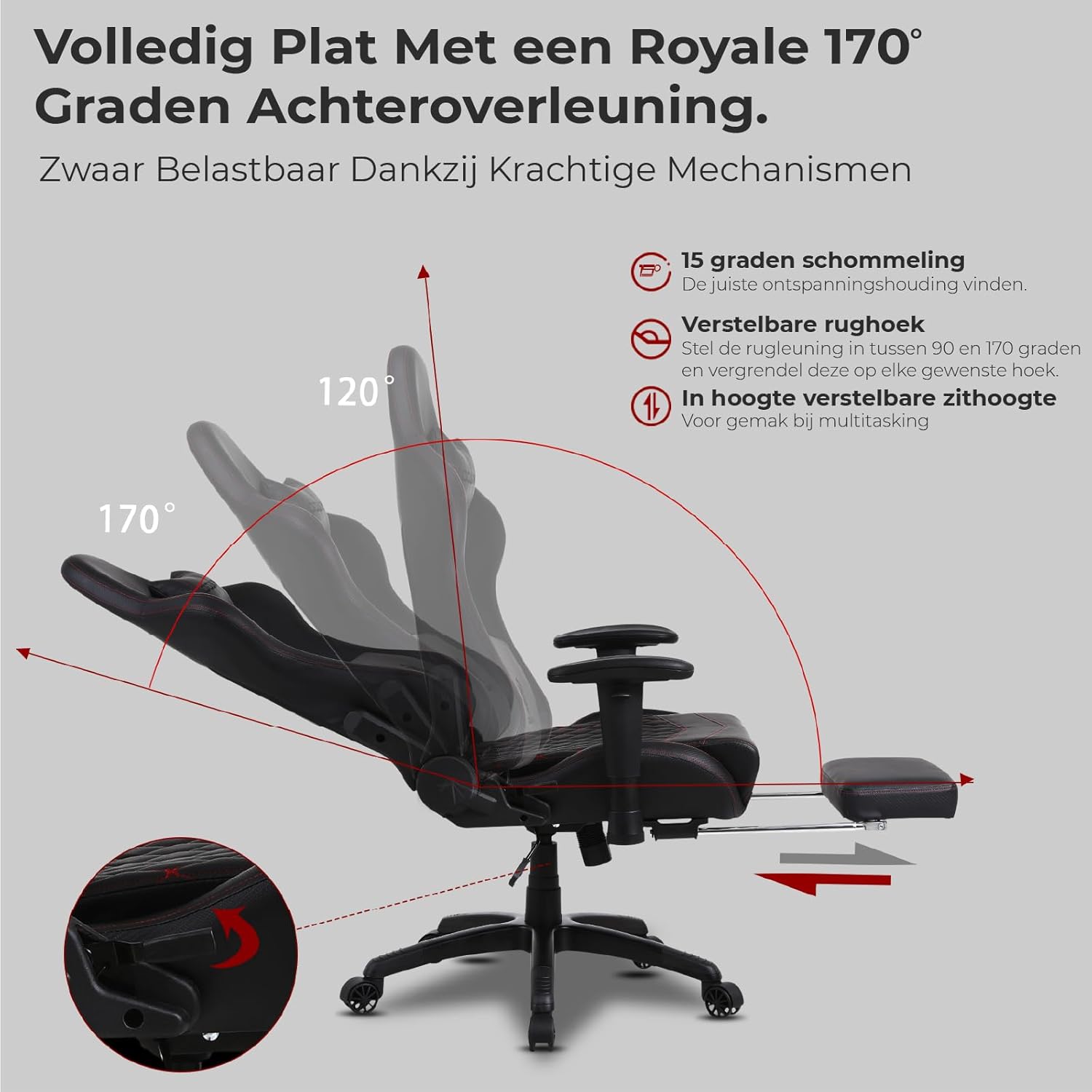
Figure 2: Illustration of the robust metal frame integrated within the chair's structure, ensuring durability and safety.

Figure 3: Components for adjustable seat height, including a heavy-duty Class 4 gas lift, and the USB connection for the massage function.
3. Instrukcja obsługi
The HICON Incanto Gaming Chair offers multiple adjustment features to customize your seating experience for maximum comfort and ergonomic support.
3.1. Regulacja wysokości siedziska
The chair features a Class 4 heavy-duty gas lift for smooth and precise seat height adjustment. To adjust, locate the lever under the seat (typically on the right side). Pull the lever upwards while applying or releasing your weight to move the seat up or down. Release the lever to lock the height. The correct height allows your feet to be flat on the floor with your knees bent at a 90-110 degree angle.
3.2. Funkcja odchylania i kołysania oparcia
The backrest can be reclined from 90° (upright) to a full 170° (nearly flat) for various relaxation postures. Use the recline lever on the side of the chair to adjust and lock the backrest at your desired angle. The chair also offers a 15-degree rocking motion for dynamic sitting. It is recommended not to fix the backrest in a rigid position but to allow some flexibility for movement.

Figure 4: Illustration of the chair's recline capabilities, showing angles from 90° to 170°, and the 15-degree rocking function.
3.3. Lumbar Support and Massage Function
The adjustable lumbar support cushion is designed to provide crucial support to your lower back. Position it to fit the natural curve of your lower back. This cushion also includes a USB-powered massage function to alleviate fatigue during long sessions. Connect the USB cable to a compatible power source (e.g., power bank, USB adapter) to activate the massage feature.
3.4. Regulacja podłokietnika
Adjust the height and width of the armrests to ensure your arms are at approximately a 90-degree angle, allowing your forearms to rest comfortably on your desk. Ensure the armrests are at the same height as your desk and provide adequate elbow support. Adjust the width to keep your elbows close to your body for optimal comfort.
3.5. Extendable Footrest
For ultimate relaxation, the chair is equipped with an extendable footrest. Pull it out from under the seat when reclining to support your legs and feet, allowing you to fully stretch out and relax.

Figure 5: The extendable footrest, shown in its extended position for leg support.
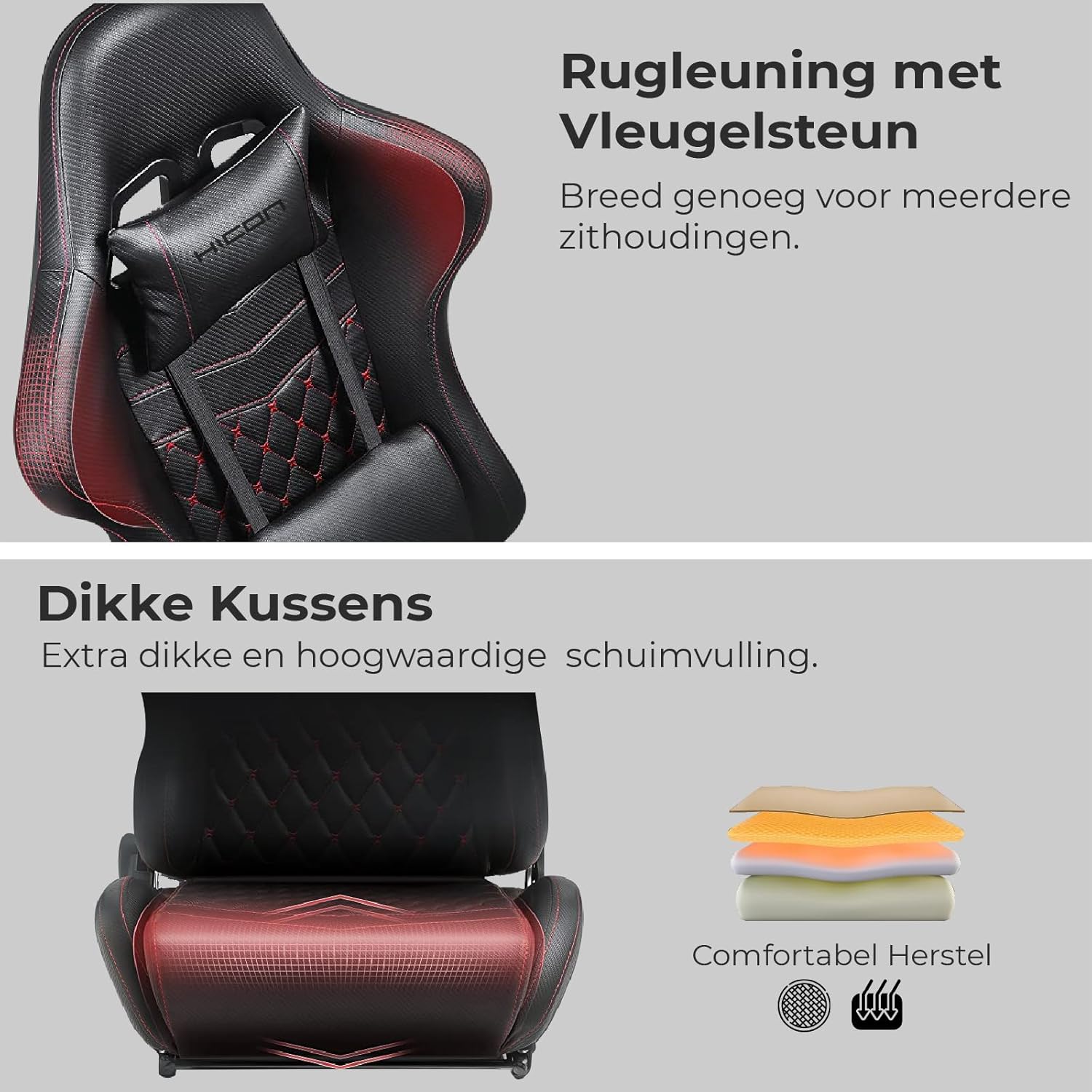
Figure 6: Detail of the backrest with wing support, designed for broad seating postures.

Rysunek 7: Przekrój poprzeczny view of the thick, high-density foam cushioning for enhanced comfort and durability.
4. Konserwacja
Proper maintenance will extend the life and appearance of your HICON Incanto Gaming Chair.
- Czyszczenie: Regularly wipe the PU leather surfaces with a soft, damp cloth. For stubborn stains, use a mild soap solution and wipe dry immediately. Avoid using harsh chemicals, abrasive cleaners, or solvents, as these can damage the material.
- Sprawdzenie sprzętu: Periodically check all screws, bolts, and connections to ensure they are tight. Re-tighten any loose hardware to maintain stability and prevent squeaking.
- Pielęgnacja kół: Keep the chair's wheels clean from dust, hair, and debris to ensure smooth movement and prevent scratching your floor.
- Pielęgnacja poduszek: The headrest and lumbar cushions can be removed for cleaning. Follow the same cleaning instructions as for the chair's main upholstery.
5. Rozwiązywanie Problemów
If you encounter any issues with your HICON Incanto Gaming Chair, refer to the following common problems and solutions:
- Piszczące dźwięki:
Możliwa przyczyna: Loose connections or friction between moving parts.
Rozwiązanie: Check all bolted connections and tighten them securely. If squeaking persists, apply a small amount of silicone-based lubricant to the moving parts of the mechanism or where components rub together. - Difficulty Adjusting Seat Height:
Możliwa przyczyna: Dźwignia podnośnika gazowego nie jest całkowicie załączona lub siłownik podnośnika gazowego jest uszkodzony.
Rozwiązanie: Ensure the height adjustment lever is fully pulled or pushed. If the issue persists, the gas lift cylinder may need replacement. Contact customer support for assistance. - Krzesło jest chwiejne:
Możliwa przyczyna: Loose connections in the base or seat.
Rozwiązanie: Verify that all screws connecting the seat to the mechanism, and the mechanism to the gas lift, as well as the casters to the base, are securely fastened. - Oparcie nie odchyla się/nie blokuje:
Możliwa przyczyna: Zacięty mechanizm odchylania lub dźwignia nie jest całkowicie zablokowana.
Rozwiązanie: Ensure the recline lever is fully engaged or disengaged. Check for any obstructions around the mechanism.
6. Specyfikacje
| Funkcja | Specyfikacja |
|---|---|
| Marka | IN.HOMEXL |
| Numer modelu | HICON |
| Wymiary produktu | 1 x 1 x 1 cm; 23 kg (approx. 10D x 10B x 10H millimeters) |
| Producent | HICON |
| Waga przedmiotu | 23 kilograma |
| Zalecana maksymalna waga | 150 kilograma |
| Styl | Nowoczesny |
| Wzór | Solidny |
| Typ pokoju | Biuro |
| Zawarte komponenty | Cushion (Headrest and Lumbar) |
| Pierwsza dostępna data | 18 października 2023 r. |
7. Gwarancja i wsparcie
For warranty information, product support, or to inquire about replacement parts, please contact HICON customer service through your original point of purchase. It is advisable to retain your purchase receipt as proof of purchase for any warranty claims.
Ask a question about this manual
Ask about setup, troubleshooting, compatibility, parts, safety, or missing instructions. Manuals+ will review the question and use this page’s manual context to help answer it.