
1. Wprowadzenie
Welcome to the KRUPS Sensation C10 EA910A10 Superautomatic Coffee Machine user manual. This guide provides comprehensive instructions for the safe and efficient operation, maintenance, and troubleshooting of your new coffee machine. Please read this manual thoroughly before first use and keep it for future reference.
2. Ważne instrukcje bezpieczeństwa
Aby zapewnić bezpieczną obsługę, należy zawsze przestrzegać poniższych podstawowych środków ostrożności:
- Przed użyciem urządzenia należy przeczytać całą instrukcję.
- Nie zanurzaj urządzenia, przewodu zasilającego ani wtyczki w wodzie ani innych płynach.
- Urządzenie przeznaczone jest wyłącznie do użytku domowego.
- Upewnij się, że objętośćtagWartość podana na urządzeniu odpowiada napięciu w sieci.tage.
- Zawsze odłączaj urządzenie od gniazdka elektrycznego przed czyszczeniem lub gdy nie jest używane.
- Nie używaj żadnego urządzenia, jeśli przewód lub wtyczka są uszkodzone, ani po awarii urządzenia lub po jego uszkodzeniu w jakikolwiek sposób.
- Trzymaj dzieci z dala od urządzenia podczas pracy.
- Używaj wyłącznie akcesoriów zalecanych przez producenta.
- Avoid contact with hot surfaces, such as the coffee spouts or steam nozzle.
3. Składniki produktu
Familiarize yourself with the main components of your KRUPS Sensation C10 EA910A10 coffee machine:
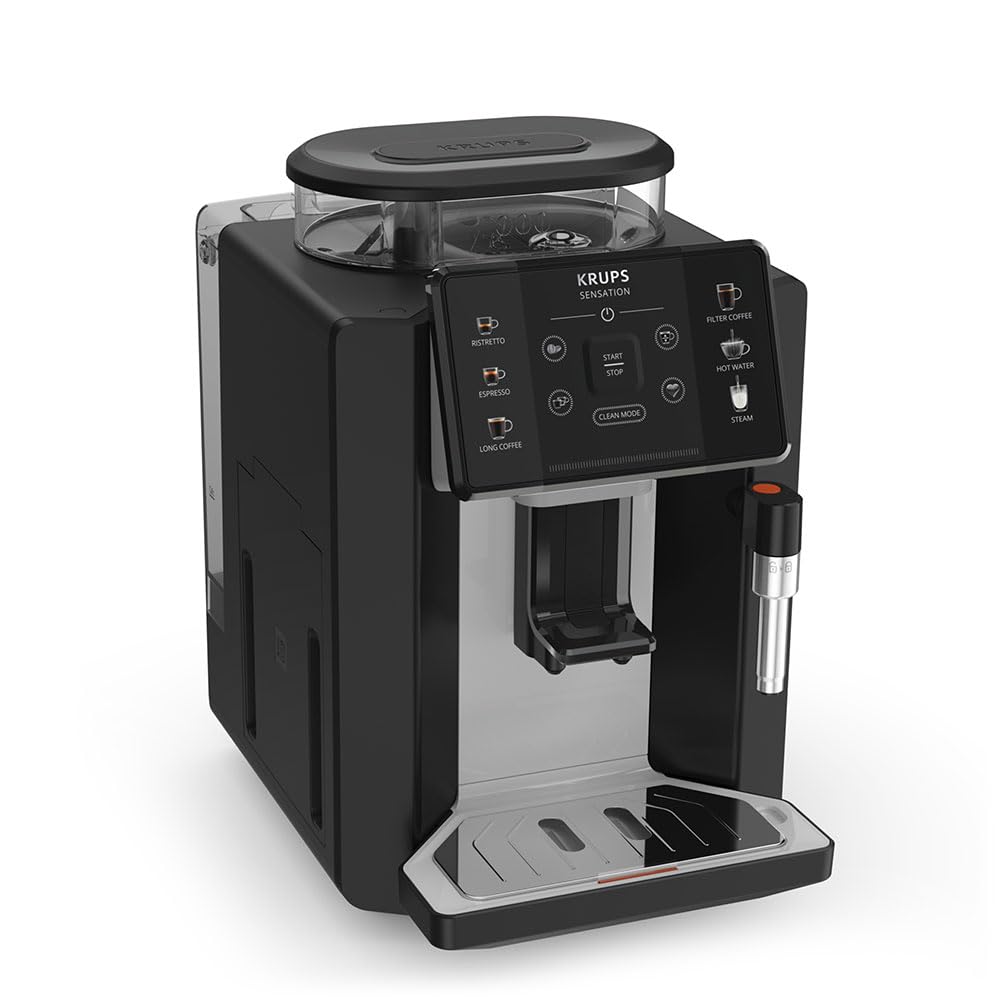
Obraz: Przód-prawa strona view of the KRUPS Sensation C10 EA910A10 Superautomatic Coffee Machine, showing the bean hopper, control panel, coffee spouts, and drip tray. Two cups of coffee are being dispensed.
- Pojemnik na fasolę z pokrywką
- Zbiornik na wodę
- Control Panel (Touchscreen)
- Coffee Spouts (Adjustable)
- Drip Tray with Grid
- Pojemnik na fusy z kawy
- Steam Nozzle / Hot Water Spout
- Podłączenie przewodu zasilającego
4. Konfiguracja początkowa
4.1. Rozpakowywanie
- Ostrożnie wyjmij ekspres do kawy z opakowania.
- Usuń wszystkie materiały opakowaniowe, łącznie z foliami ochronnymi i naklejkami.
- Urządzenie należy ustawić na stabilnej, płaskiej i odpornej na ciepło powierzchni, z dala od źródeł wody i ciepła.
4.2. Przygotowanie do pierwszego użycia
- Wypłucz zbiornik na wodę: Remove the water tank, rinse it thoroughly with fresh water, and fill it to the MAX level. Reinsert the tank securely.
- Napełnij pojemnik na ziarna kawy: Open the lid of the bean hopper and fill it with fresh coffee beans. Do not use ground coffee in the bean hopper.
- Podłączenie zasilania: Podłącz przewód zasilający do urządzenia, a następnie do uziemionego gniazdka elektrycznego.
- Początkowy cykl płukania: The machine will prompt you to perform an initial rinse cycle. Follow the instructions on the touchscreen. This primes the system and cleans internal components.
5. Instrukcja obsługi
5.1. Panel sterowania zamkniętyview

Image: A hand interacting with the intuitive touchscreen control panel of the KRUPS Sensation C10 EA910A10, highlighting its ease of use.
The KRUPS Sensation C10 EA910A10 features an intuitive touchscreen control panel for easy operation. Key functions include:
- Ristretto: For a very short, concentrated espresso.
- Wyrażone: For a classic espresso shot.
- Długa kawa: Do większej ilości kawy.
- Kawa przefiltrowana: For a milder, filter-style coffee.
- Tarapaty: Do herbaty i innych gorących napojów.
- Para: Do spieniania mleka.
- Uruchom/zatrzymaj: To begin or end a brewing cycle.
- Tryb czyszczenia: Initiates cleaning cycles.
- Coffee Strength/Volume Adjustment: Icons to customize your drink.
5.2. Przyrządzanie kawy
To brew a coffee beverage:
- Sprawdź, czy zbiornik na wodę jest napełniony i czy w pojemniku na ziarna znajduje się wystarczająca ilość ziaren.
- Place a cup under the coffee spouts. Adjust the spout height if necessary.
- Select your desired coffee type (e.g., Espresso, Long Coffee) from the touchscreen.
- Adjust coffee strength and volume using the on-screen options if desired.
- Naciśnij przycisk „Start”, aby rozpocząć parzenie.
- Ekspres zmieli ziarna kawy, zaparzy kawę i naleje ją do Twojej filiżanki.
- The machine will automatically stop when the brewing is complete.

Image: A selection of coffee beverages, including espresso, long coffee, and a milk-based drink, demonstrating the versatility of the KRUPS Sensation C10 EA910A10.
5.3. Funkcja ciepłej wody
- Umieść filiżankę pod kranikiem gorącej wody.
- Select the "Hot Water" option on the touchscreen.
- Press "Start" to dispense hot water. Press "Stop" to cease dispensing.
5.4. Steam Function (for milk frothing)
- Napełnij dzbanek zimnym mlekiem.
- Umieść dyszę pary w mleku.
- Select the "Steam" option on the touchscreen.
- Press "Start" to activate the steam. Move the pitcher up and down to froth the milk.
- Press "Stop" when desired froth is achieved.
- Ważny: Clean the steam nozzle immediately after use to prevent milk residue buildup.
6. Konserwacja i czyszczenie
Regularne czyszczenie i konserwacja zapewniają optymalną wydajność i długowieczność ekspresu do kawy.
6.1. Codzienne czyszczenie
- Tacka ociekowa i pojemnik na fusy po kawie: Codziennie lub gdy ekspres poprosi o to, opróżniaj i płucz tackę ociekową oraz pojemnik na fusy po kawie.
- Wylewki do kawy: Wytrzyj wylewki kawy wodąamp płótno.
- Zbiornik na wodę: Codziennie płucz zbiornik na wodę świeżą wodą.
6.2. Odkamienianie
The machine will indicate when descaling is required. Follow the on-screen instructions and use a KRUPS-approved descaling solution.

Image: A hand inserting a cleaning tablet into the designated slot of the KRUPS Sensation C10 EA910A10, illustrating the ease of the cleaning process.
6.3. Wymiana filtra wody
If your machine uses a water filter, replace it every 2-3 months or as indicated by the machine to ensure optimal water quality and prevent limescale buildup.
7. Rozwiązywanie Problemów
Aby zapoznać się z najczęstszymi problemami i ich rozwiązaniami, zapoznaj się z poniższą tabelą.
| Problem | Możliwa przyczyna / rozwiązanie |
|---|---|
| Maszyna się nie włącza. | Check if the power cord is securely plugged into the machine and the electrical outlet. Ensure the outlet is functional. |
| Kawa nie jest podawana. | Water tank empty: Fill the water tank. Bean hopper empty: Fill with coffee beans. Coffee grounds container full: Empty and clean. Descaling required: Perform descaling cycle. |
| Kawa jest za słaba. | Adjust coffee strength settings on the control panel. Check if the bean hopper is sufficiently filled. Ensure fresh beans are used. |
| Z urządzenia wycieka woda. | Check if the water tank is correctly inserted. Ensure the drip tray is properly positioned. If leakage persists, contact customer support. |
| "Clean Mode" alert persists. | Perform the indicated cleaning cycle (e.g., descaling, rinsing). Ensure all removable parts are clean and correctly reinserted. |
| Steam nozzle not frothing milk effectively. | Clean the steam nozzle thoroughly after each use to prevent blockages. Ensure cold milk is used. |
| Grinder is unusually loud or not grinding. | Check for foreign objects in the bean hopper. Ensure the bean hopper is not empty. Contact customer support if the issue persists. |
8. Specyfikacje techniczne
| Funkcja | Specyfikacja |
|---|---|
| Numer modelu | EA910A10 |
| Marka | KRUPS |
| Tomtage | 145 wolty |
| Moc | 1450 watów |
| Tworzywo | Stal |
| Waga produktu | 7.5 kilogramów |
| Interfejs | Ekran dotykowy |

Image: The KRUPS Sensation C10 EA910A10 coffee machine with indicated dimensions: 24 cm width, 34.6 cm depth, and 36.4 cm height.
9. Informacje o gwarancji
Your KRUPS Sensation C10 EA910A10 Superautomatic Coffee Machine is covered by a manufacturer's warranty. Please refer to the warranty card included in your product packaging for specific terms, conditions, and duration. Keep your proof of purchase for warranty claims.
10. Obsługa klienta
For further assistance, technical support, or spare parts, please contact KRUPS customer service. Contact details can typically be found on the KRUPS official webmiejscu lub w dokumentacji gwarancyjnej dołączonej do urządzenia.