
Wstęp
Thank you for choosing the INSMART 260H Smart Body Fat Scale. This device is designed to provide a comprehensive analysis of your body composition using advanced Bio-electrical Impedance Analysis (BIA) technology. It measures 18 key body indicators, helping you track your health and fitness progress accurately. For optimal performance and longevity, please read this manual carefully before use and keep it for future reference.
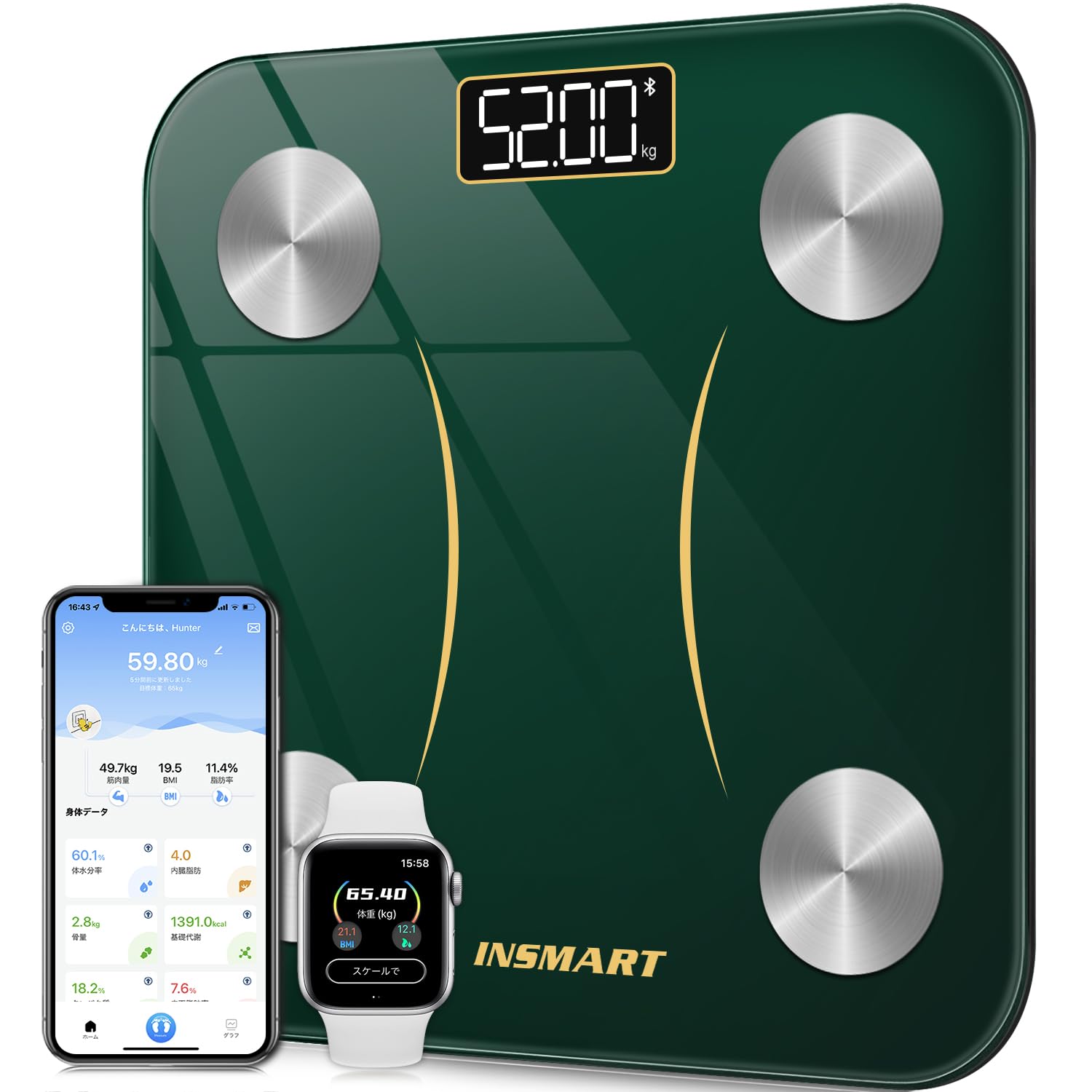
The INSMART 260H Smart Body Fat Scale, featuring a sleek design and advanced measurement capabilities.
Organizować coś
1. Rozpakowanie i instalacja baterii
- Ostrożnie wyjmij wagę z opakowania.
- Otwórz komorę baterii znajdującą się na spodzie wagi.
- Insert the required batteries (usually AAA, check packaging for specifics) ensuring correct polarity (+/-).
- Dokładnie zamknij komorę baterii.
2. Pobieranie aplikacji i początkowe parowanie
The INSMART 260H scale connects to your smartphone via Bluetooth for comprehensive data tracking. Download the "INSMART HEALTH" app from your device's app store.
- Szukaj "INSMART HEALTH" in the Apple App Store (for iOS) or Google Play Store (for Android).
- Pobierz i zainstaluj aplikację.
- Upewnij się, że Bluetooth jest włączony w Twoim smartfonie.
- Open the INSMART HEALTH app and create a user profile.
- Wejdź na wagę, aby ją aktywować. Waga automatycznie spróbuje sparować się z aplikacją. Postępuj zgodnie z instrukcjami wyświetlanymi na ekranie, aby dokończyć proces parowania.

Connect your INSMART 260H scale via Bluetooth to the INSMART HEALTH app, available for free download on iOS and Android. The app also syncs with popular health platforms like Fitbit, Google Fit, and Apple Health.

Utwórz wielu użytkowników profiles within the INSMART HEALTH app, allowing the entire family to track their fitness progress together.
Instrukcja obsługi
1. Wykonywanie pomiaru
- Umieść wagę na twardej, płaskiej powierzchni. Unikaj dywanów i nierównych podłóg, aby uzyskać dokładne odczyty.
- Upewnij się, że Twoje stopy są czyste i suche.
- Step onto the scale barefoot. Stand still with your feet evenly placed on the electrodes (metal pads).
- The scale will automatically power on and display your weight. It will then proceed to measure other body composition metrics.
- Remain on the scale until all measurements are complete and displayed on the scale's screen or synced to the app.

The INSMART 260H scale measures multiple health metrics, including BMI, BMR, and muscle mass, providing a comprehensive overview składu Twojego ciała.
2. Zrozumienie pomiarów
The INSMART 260H scale measures 18 body indicators, providing a detailed insight into your health. These include:

The INSMART 260H scale provides comprehensive analysis of 18 key body indicators, offering a detailed understanding of your health and fitness.
3. Using the INSMART HEALTH App
The INSMART HEALTH app is your central hub for tracking and analyzing your health data. It allows you to:
- View all 18 body indicators in an easy-to-understand format.
- Track your progress over daily, weekly, monthly, and yearly periods.
- Set goals and monitor your achievements.
- Sync data with other popular health apps like Fitbit, Google Fit, and Apple Health.
- Zarządzaj wieloma użytkownikami profiledla członków rodziny.

The INSMART HEALTH app allows you to track your body composition changes over time, providing daily, weekly, monthly, and yearly trends for metrics like weight and body fat.

The INSMART 260H scale can store measurements and display them directly on its LED screen, even without a smartphone present, after initial Bluetooth pairing. Data will sync to the app when connected again.
Konserwacja
1. Czyszczenie
- Przetrzyj powierzchnię wagi miękką,amp płótno.
- Nie należy używać środków czyszczących o właściwościach ściernych ani zanurzać wagi w wodzie.
- Keep the scale dry to prevent damage to electronic components.
2. Przechowywanie
- Przechowuj wagę w chłodnym i suchym miejscu.
- Unikaj umieszczania ciężkich przedmiotów na wadze, gdy nie jest używana.
3. Wymiana baterii
- If the display becomes dim or shows a low battery indicator, replace the batteries.
- Zawsze wymieniaj wszystkie baterie na nowe tego samego typu.
- Stare baterie należy utylizować zgodnie z lokalnymi przepisami.
Rozwiązywanie problemów
If you encounter issues with your INSMART 260H scale, please refer to the following common problems and solutions:
1. Scale Not Turning On / No Display
- Sprawdź, czy baterie są prawidłowo zainstalowane i nie są rozładowane. W razie potrzeby wymień je.
- Upewnij się, że waga jest umieszczona na twardej, płaskiej powierzchni.
2. Inaccurate Measurements
- Upewnij się, że waga jest umieszczona na twardej, płaskiej i równej powierzchni.
- Make sure your feet are clean, dry, and in direct contact with the electrodes.
- Unikaj poruszania się podczas pomiaru.
- Calibrate the scale by stepping on it briefly, then stepping off, and waiting for it to display "0.0" before taking a measurement.
3. Problemy z połączeniem Bluetooth
If your scale is not connecting to the INSMART HEALTH app:

If you experience Bluetooth connection issues, ensure your phone's mobile data/Wi-Fi and GPS are on. Open the app, register the device, and attempt pairing. If problems persist, follow the in-app troubleshooting steps.
- Upewnij się, że Bluetooth jest włączony w Twoim smartfonie.
- Make sure the INSMART HEALTH app has location permissions enabled (required for Bluetooth pairing on some devices).
- Uruchom ponownie smartfon i wagę (poprzez wyjęcie i ponowne włożenie baterii).
- Try re-pairing the device within the app settings.
- Upewnij się, że żadne inne urządzenie nie jest aktywnie połączone z wagą poprzez Bluetooth.
Specyfikacje
| Funkcja | Specyfikacja |
|---|---|
| Marka | Niepowodzenie. |
| Numer modelu | 260H |
| Zakres pomiaru | 3 kg - 180 kg |
| Dokładność pomiaru | 100 gramów |
| Body Indicators Measured | 18 (e.g., Weight, BMI, Body Fat, Muscle Mass, BMR) |
| Łączność | Bluetooth |
| Typ wyświetlacza | Cyfrowa dioda LED |
| Tworzywo | Szkło hartowane |
| Źródło zasilania | Batteries (not specified, typically AAA) |
| Pochodzenie | Chiny |

The INSMART 260H features four high-precision sensors, a durable tempered glass surface, and non-slip, stable pads for accurate and safe measurements.

The scale utilizes advanced Bio-electrical Impedance Analysis (BIA) technology with four high-precision sensors for accurate body composition measurements.

Unlike traditional scales, the INSMART 260H uses advanced ITO coating technology, providing a larger sensor area for consistent and accurate measurements regardless of foot placement.
Gwarancja i wsparcie
1. Informacje o gwarancji
The INSMART 260H Smart Body Fat Scale comes with a 1-year warranty from the date of purchase. This warranty covers manufacturing defects and malfunctions under normal use. It does not cover damage caused by misuse, accidents, or unauthorized modifications.
2. Obsługa klienta
For any questions, technical assistance, or warranty claims, please contact INSMART customer support. Refer to the product packaging or the INSMART official webstrona zawierająca najbardziej aktualne dane kontaktowe.