
Wstęp
Thank you for choosing the Xiaomi Robot Vacuum E12. This intelligent robotic vacuum cleaner is designed to provide efficient and thorough cleaning for your home, featuring powerful suction, smart navigation, and app control. This manual provides essential information for the safe and effective operation, maintenance, and troubleshooting of your device. Please read this manual carefully before use and retain it for future reference.
Produkt ponadview
Główne cechy
- Mocne ssanie: Up to 4000 Pa suction power for effective cleaning on various surfaces.
- Kontrola aplikacji: Manage and schedule cleaning tasks conveniently via the Xiaomi Home app.
- Efficient Cleaning Route: Intelligent navigation system ensures organized and comprehensive cleaning coverage.
- Inteligentny zbiornik na wodę: Automatically dispenses water for effective mopping.
- Kompleksowe czujniki: Equipped with multiple sensors for obstacle avoidance and complete area coverage.
Komponenty
Familiarize yourself with the main components of your Xiaomi Robot Vacuum E12.

Rysunek 1: Góra view of the Xiaomi Robot Vacuum E12, showing the main unit and an included mop pad.

Rycina 2: Przód view of the robot vacuum, highlighting the bumper and sensor area.
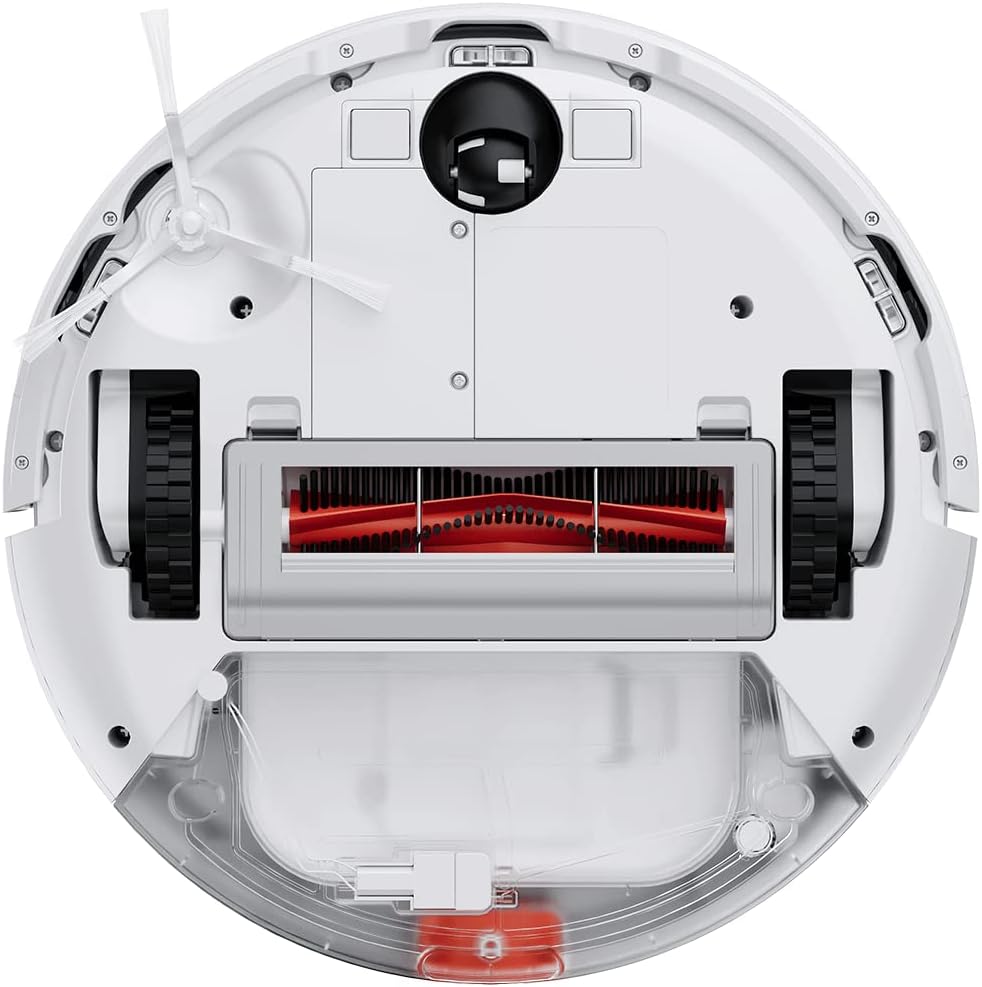
Figure 3: Underside of the robot vacuum, showing the main brush, side brushes, wheels, and dustbin/water tank compartment.

Figure 4: The robot vacuum with the mop attachment installed, ready for wet cleaning.
Organizować coś
1. Rozpakowywanie
- Ostrożnie wyjąć wszystkie elementy z opakowania.
- Usuń wszystkie folie ochronne i materiały opakowaniowe z robota i stacji ładującej.
- Sprawdź, czy wszystkie akcesoria wymienione w liście przewozowym są obecne.
2. Umiejscowienie stacji ładującej
- Umieść stację ładującą przy ścianie, na twardej, równej powierzchni.
- Upewnij się, że po obu stronach doku i przed nim jest co najmniej 0.5 metra (1.6 stopy) wolnej przestrzeni.
- Podłącz zasilacz do stacji ładującej i podłącz go do gniazdka elektrycznego.
- Ensure the power cable is neatly tucked away to prevent entanglement.
3. Opłata początkowa
- Place the robot vacuum onto the charging dock, ensuring the charging contacts align.
- The robot will automatically power on and begin charging. Allow it to fully charge before first use (approximately 4-6 hours).
- Kontrolka na robocie pokaże stan ładowania.
4. Xiaomi Home App Connection
- Download the "Xiaomi Home" app from your mobile device's app store (Google Play Store or Apple App Store).
- Open the app and create a Xiaomi account or log in if you already have one.
- Kliknij ikonę „+” w prawym górnym rogu, aby dodać urządzenie.
- Follow the on-screen instructions to connect your robot vacuum to the app. This typically involves resetting the Wi-Fi on the robot and connecting your phone to the robot's temporary Wi-Fi network.
- Po połączeniu możesz sterować robotem, view cleaning maps, set schedules, and access additional features.
Instrukcja obsługi
Rozpoczęcie cyklu czyszczenia
- Za pomocą przycisków robota: Press the Power button once to start a general cleaning cycle. Press it again to pause. Press and hold to send the robot back to the charging dock.
- Via Xiaomi Home App: Open the app, select your robot vacuum, and tap the "Clean" button. You can also select specific cleaning modes (e.g., Spot Clean, Edge Clean) or adjust suction power.

Figure 5: Illustration of the robot vacuum following an efficient, organized cleaning path to cover the entire floor area.
Korzystanie z funkcji mopowania
- Fill the water tank with clean water. Do not use detergents or corrosive liquids.
- Attach the mop pad securely to the water tank module.
- Install the water tank module into the robot vacuum according to the instructions.
- Start a cleaning cycle. The robot will automatically dispense water for mopping.
- Notatka: The mopping function is best suited for hard floors. Avoid using it on carpets or rugs.
Planowanie sprzątania
Use the Xiaomi Home app to set up cleaning schedules. You can specify cleaning times, days of the week, and even cleaning modes for automated cleaning.

Figure 6: The robot vacuum's low profile allows it to clean effectively under beds and other furniture.
Konserwacja
Regular maintenance ensures optimal performance and extends the lifespan of your robot vacuum. Always power off the robot before performing any maintenance.
1. Opróżnianie pojemnika na śmieci
- Naciśnij przycisk zwalniający pojemnik na kurz i wyciągnij pojemnik na kurz.
- Otwórz pokrywę kosza na śmieci i opróżnij jego zawartość do kosza.
- W razie konieczności opłucz kosz na śmieci wodą i upewnij się, że jest całkowicie suchy przed ponownym montażem.
2. Czyszczenie filtra
- Wyjmij filtr ze śmietnika.
- Tap the filter gently to remove dust. You can also rinse it under running water.
- Allow the filter to air dry completely for at least 24 hours before re-installing. Do not use a dryer or direct sunlight.
- Wymieniaj filtr co 3–6 miesięcy, zależnie od intensywności użytkowania.
3. Czyszczenie szczotki głównej
- Odwróć robota i zdejmij pokrywę głównej szczotki.
- Podnieś szczotkę główną.
- Za pomocą narzędzia czyszczącego (jeśli jest dołączone) lub nożyczek usuń wszelkie włosy i zanieczyszczenia nagromadzone wokół szczotki.
- Re-install the main brush and cover.
4. Czyszczenie szczotki bocznej
- Gently pull the side brush to remove it.
- Usuń wszelkie włosy i zanieczyszczenia.
- Re-attach the side brush, ensuring it clicks into place.
5. Czyszczenie czujników i styków ładowania
- Wipe the cliff sensors (located on the bottom of the robot) and wall sensors (on the side bumper) with a clean, dry cloth.
- Clean the charging contacts on both the robot and the charging dock with a dry cloth.

Figure 7: Diagram illustrating the function of the cliff sensors, which prevent the robot from falling down stairs or off ledges.
Rozwiązywanie problemów
If your robot vacuum encounters an issue, refer to the following common problems and solutions.
| Problem | Możliwa przyczyna | Rozwiązanie |
|---|---|---|
| Robot się nie włącza. | Low battery; not properly charged. | Umieść robota w stacji ładującej i upewnij się, że jest w pełni naładowany. |
| Robot nie może wrócić do stacji ładującej. | Charging dock is obstructed or out of reach; low battery. | Ensure the charging dock is in an open area. Manually place the robot on the dock if needed. |
| Słaba skuteczność czyszczenia. | Pełny kosz na śmieci; szczotki splątane; zatkany filtr. | Empty dustbin, clean main brush and side brushes, clean or replace filter. |
| Robot często się zacina. | Przeszkody (kable, dywany); brudne czujniki. | Clear the cleaning area of obstacles. Clean all sensors. |
| Funkcja mopowania nie działa. | Zbiornik na wodę jest pusty; nakładka mopa nie jest prawidłowo zamocowana. | Fill the water tank. Ensure the mop pad is securely attached. |
| Problemy z połączeniem aplikacji. | Incorrect Wi-Fi password; robot too far from router; temporary network glitch. | Ensure correct Wi-Fi details. Move robot closer to router. Restart robot and router. Try re-pairing via the app. |
For persistent issues not covered here, please refer to the Xiaomi Home app's help section or contact Xiaomi customer support.
Specyfikacje
| Funkcja | Szczegół |
|---|---|
| Marka | XIAOMI |
| Numer modelu | BHR7331EU |
| Wymiary produktu | 12.6" dł. x 3.15" szer. x 12.6" wys. |
| Waga przedmiotu | 10.14 funta |
| Moc ssania | Do 4000 Pa |
| Źródło zasilania | Zasilanie bateryjne (w zestawie 1 bateria litowo-jonowa) |
| Metoda kontroli | App (Xiaomi Home) |
| Funkcja specjalna | Programowalny |
| Zawarte komponenty | Robot Vacuum, Charging Dock, Power Adapter, Water Tank, Mop Pad, Side Brush, Cleaning Tool |
Informacje dotyczące bezpieczeństwa
Aby zapobiec obrażeniom lub szkodom, należy przeczytać i stosować się do wszystkich instrukcji bezpieczeństwa.
- Z urządzenia mogą korzystać dzieci w wieku od 8 lat oraz osoby o ograniczonej sprawności fizycznej, sensorycznej lub umysłowej, a także osoby nieposiadające odpowiedniego doświadczenia lub wiedzy, jeśli znajdują się pod nadzorem lub zostały poinstruowane na temat bezpiecznego korzystania z urządzenia i rozumieją związane z tym zagrożenia.
- Dzieci nie mogą bawić się urządzeniem. Czyszczenie i konserwacja użytkownika nie mogą być wykonywane przez dzieci bez nadzoru.
- Nie należy używać robota odkurzającego na mokrych powierzchniach ani w miejscach, w których znajduje się stojąca woda.
- Nie używaj robota do podnoszenia dużych i ostrych przedmiotów ani materiałów palących się/dymiących.
- Trzymaj włosy, luźne ubrania, palce i inne części ciała z dala od otworów i ruchomych części.
- Ensure the charging dock is placed in a stable location to prevent tipping.
- Only use the original power adapter and charging dock provided with the product.
- Do not expose the robot to direct sunlight or extreme temperatures.
- The product contains batteries that are only replaceable by skilled persons.
- Ważna uwaga: This robot vacuum is primarily designed for hard floors. It is not recommended for cleaning carpets, especially thick pile carpets, as stated in some product information.
Gwarancja i wsparcie
Aby uzyskać informacje dotyczące gwarancji, zapoznaj się z kartą gwarancyjną dołączoną do produktu lub odwiedź oficjalną stronę internetową Xiaomi webstrona.
If you require technical support or have questions regarding your Xiaomi Robot Vacuum E12, please contact Xiaomi customer service through their official website or the Xiaomi Home app. Provide your model number (BHR7331EU) and purchase details when contacting support.
Oficjalny Xiaomi Webstrona: www.mi.com