
MOBAPAD PRO-HD
MOBAPAD Hall Effect Drift-Proof Wireless Switch Controller User Manual
Model: PRO-HD | Brand: MOBAPAD
Wstęp
This manual provides comprehensive instructions for the MOBAPAD Hall Effect Drift-Proof Wireless Switch Controller. Designed for enhanced gaming, this controller features advanced contactless joystick technology, ensuring a longer lifespan, greater durability, and smoother operation compared to traditional designs. Its drift-proof performance guarantees precise and accurate control input. Experience enhanced gaming with realistic HD Rumble feedback, simulating various tactile sensations for deeper immersion.
Główne cechy
- Hall Electromagnetic Joysticks: Contactless technology for drift-proof, precise control and extended durability.
- HD Rumble: Generated by ALPS dual-axis linear motors for realistic vibrations and tactile feedback.
- Mechanical Face Buttons: Durable buttons with a 5 million click lifespan, offering shorter throw, faster rebound, and instant trigger response.
- Żyroskop 6-osiowy: Supports motion sensing for compatible games.
- Local Macro Programming: Create and store macros directly on the controller without external software.
- Funkcja turbo: Independent Turbo button with two auto-shooting setups for rapid input.
- Czytnik NFC: Super sensitive NFC reader for Amiibo compatibility.
- Interchangeable D-Pad: Customize your D-pad with included options.
- Remappable Back Paddles: Two programmable back paddles (M1, M2) for personalized control, which can also be disabled.
- Długa żywotność baterii: Equipped with a 1000mAh rechargeable lithium battery, providing approximately 30 hours of usage.
- Zgodność z wieloma platformami: Connects wirelessly to Nintendo Switch (Pro/Lite/OLED), PC (via Bluetooth or wired), iOS (version 13 and above), and Android devices.
Zawartość opakowania
- 1 x MOBAPAD Hall Effect Wireless Switch Controller
- 1 x kabel do ładowania USB-C na USB-A
- 1 x Interchangeable Cross-shaped D-Pad
- 1 x User Manual / Startup Guide

Image: The MOBAPAD controller in its packaging, showing the main unit and included accessories.
Organizować coś
Łączenie z Nintendo Switch
- Na konsoli Nintendo Switch przejdź do menu HOME.
- Select "Controllers" from the bottom menu.
- Choose "Change Grip/Order".
- On the MOBAPAD controller, press the small pairing button located on the back (next to the M1/M2 buttons) once. The "M" logo will light up, and the channel LED will flash.
- Once the controller is detected by the Switch, the channel LED will become solid, indicating a successful connection.

Image: The MOBAPAD controller connected and interacting with a Nintendo Switch console.
Connecting to PC (Windows) via Bluetooth
- Ensure the controller is powered off (no LED lights).
- Press and hold the Home button (M logo) until the middle channel LED flashes quickly.
- On your PC, go to Bluetooth settings and search for "MOBAPAD PRO-HD".
- Select the device to pair. Once connected, the LED will become solid.
Connecting to PC via Wired Connection
Connect the controller to your PC using the provided USB-C cable. The controller will automatically switch to wired mode. For Windows 10 and Steam games that support controller input, the mode is set to "Switch Pro mode".
Connecting to Apple Devices (iOS Version 13 or Above)
- Ensure the controller is powered off (no LED lights).
- Press and hold the Home button (M logo) until the middle channel LED flashes quickly.
- Go to your iOS device's Bluetooth settings and search for "Xbox Wireless Controller".
- Select the device to pair. Once connected, your phone will display "Connected" and the middle channel LED will become solid.
Łączenie z urządzeniami z systemem Android
- Ensure the controller is powered off (no LED lights).
- Press and hold the Home button (M logo) until the middle channel LED flashes quickly.
- Go to your Android device's Bluetooth settings and search for "MOBAPAD PRO-HD".
- Select the device to pair. Once connected, your phone will display "Connected" and the middle channel LED will become solid.
Instrukcja obsługi
Układ i funkcje kontrolera
Obraz: Przód view of the MOBAPAD controller, highlighting buttons and joysticks.
- Przyciski A/B/X/Y: Mechanical face buttons for crisp, responsive input.
- Joysticki z efektem Halla: Contactless joysticks for precise, drift-free movement.
- Pad kierunkowy: Interchangeable D-pad (comes with a circular and a cross-shaped option).
- Przycisk Turbo: Activates rapid-fire function.
- Macro Programming Button: Used to record and execute complex button sequences.
- Przycisk zrzutu ekranu: Wykonuje zrzuty ekranu w grze.
- Przycisk Home: Powrót do ekranu głównego.
- Obszar NFC: Located near the Home button, supports Amiibo scanning.
- Port USB-C: Located on the top, used for charging and wired connection.
- M1/M2 Back Paddles: Two remappable buttons on the underside for custom commands.
- Przycisk parowania: Small button on the back for initiating Bluetooth pairing.
- Zresetuj otwór: Small pinhole for resetting the controller if needed.
Wymienny pad kierunkowy
The controller comes with two D-pad options: a pre-installed circular D-pad and an additional cross-shaped D-pad. To change the D-pad, simply lift the current D-pad off the controller and align the new D-pad with the magnetic base, then gently press it into place.
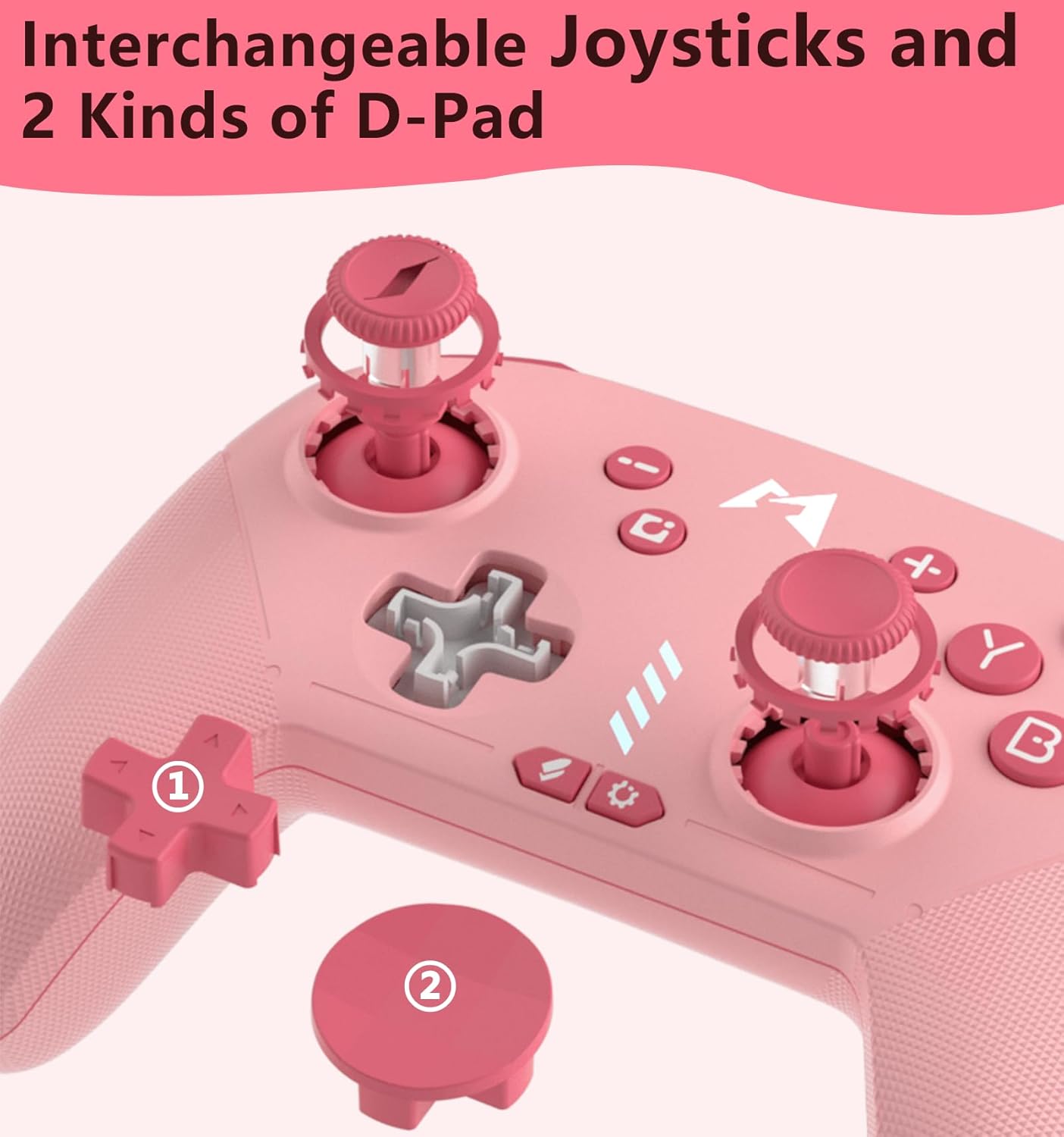
Obraz: Zbliżenie view of the interchangeable D-pad mechanism and the two D-pad styles.
Programowanie makr
The MOBAPAD controller supports local macro programming. Refer to the included startup guide for detailed steps on how to record and assign macros to the M1 and M2 back paddles.
Funkcja automatycznego wyłączania
The controller features an auto-off function to conserve battery. If connected to a Nintendo Switch, the controller will go to sleep when the Switch enters sleep mode. If not connected to any device, the controller will automatically power off after 15 minutes of inactivity.
Konserwacja
- Kontroler należy utrzymywać w czystości, przecierając go miękką, suchą ściereczką.
- Unikaj wystawiania kontrolera na działanie ekstremalnych temperatur, bezpośredniego światła słonecznego i wilgoci.
- Store the controller in a safe place to prevent physical damage.
Rozwiązywanie problemów
- Kontroler nie łączy się: Ensure the controller is fully charged. Try resetting the controller by inserting a thin object into the reset hole on the back. Re-initiate the pairing process on both the controller and your device.
- Opóźnienie lub rozłączenie sygnału wejściowego: Ensure you are within the effective range of your device's Bluetooth. Minimize interference from other wireless devices.
- Przyciski nie reagują: Check if the controller is charged. If the issue persists, try resetting the controller.
Specyfikacje
| Funkcja | Szczegół |
|---|---|
| Numer modelu | PRO HD |
| Producent | Dongguan Heng xun Energy Technology CO., Ltd. |
| Pojemność baterii | Bateria litowa 1000mAh |
| Szacowana żywotność baterii | ~30 godzin |
| Port ładowania | USB-C |
| Technologia joysticka | ALPS Hall-Effect (Drift-Proof) |
| Opinie o Rumble | HD Rumble (ALPS Dual-Axis Linear Motors) |
| Sterowanie ruchem | Żyroskop osi 6 |
| Typ przycisku | Mechanical Face Buttons |
| Obsługa NFC | Yes (for Amiibo) |
Gwarancja i wsparcie
For warranty information and technical support, please refer to the documentation included with your product or visit the official MOBAPAD webZachowaj paragon jako dowód zakupu.
Ask a question about this manual
Ask about setup, troubleshooting, compatibility, parts, safety, or missing instructions. Manuals+ will review the question and use this page’s manual context to help answer it.