
Wstęp
This manual provides essential instructions for the installation, operation, and maintenance of your Fermax Sup Milo Digital Intercom System. Please read this manual thoroughly before installation and use to ensure proper function and safety. Keep this manual for future reference.
The Fermax Sup Milo Digital Intercom System is designed to provide clear communication and enhanced security for residential and commercial premises. It integrates advanced technology with a robust design to offer reliable access control and communication solutions.
Informacje dotyczące bezpieczeństwa
Always follow basic safety precautions to reduce the risk of fire, electric shock, and injury to persons. This product should only be installed and serviced by qualified personnel.
- Odłącz zasilanie przed instalacją lub serwisowaniem.
- Nie wystawiać urządzenia na działanie deszczu i wilgoci.
- Upewnij się, że wszystkie połączenia przewodów są solidne i zgodne z lokalnymi przepisami elektrycznymi.
- Nie próbuj samodzielnie naprawiać urządzenia. Wszelkie naprawy zlecaj wykwalifikowanemu personelowi serwisowemu.
Zawartość opakowania
Przed rozpoczęciem instalacji sprawdź, czy wszystkie komponenty są obecne. Pakiet zazwyczaj zawiera:
- Fermax Sup Milo Digital Intercom Unit (Aluminum Plate)
- Sprzęt montażowy
- Connection cables (may vary by kit)
- Instrukcja obsługi (ten dokument)
Note: Specific components may vary based on the purchased kit.
Konfiguracja i instalacja
This section outlines the general steps for installing the Fermax Sup Milo Digital Intercom System. Professional installation is recommended.
1. Przygotowanie terenu
- Choose a suitable mounting location, typically near an entrance, at an accessible height.
- Upewnij się, że powierzchnia jest płaska i stabilna.
- Verify access to necessary power and communication wiring.
2. Montaż urządzenia
- Carefully remove the front panel of the intercom unit to access mounting holes.
- Position the unit and mark the drilling points on the wall.
- W razie potrzeby wywierć otwory i włóż odpowiednie kotwy ścienne.
- Secure the intercom unit to the wall using the provided mounting screws.
3. Połączenia okablowania
Refer to the wiring diagram specific to your system configuration. General connections include:
- Zasilanie: Connect to a stable 100V power source. Ensure correct polarity.
- Communication Bus: Connect the digital bus lines to the indoor units and central control unit.
- Otwieranie drzwi: Connect the door release mechanism (e.g., electric strike) to the designated terminals.
- Wejścia/wyjścia pomocnicze: Connect any additional devices such as external cameras or sensors as required.
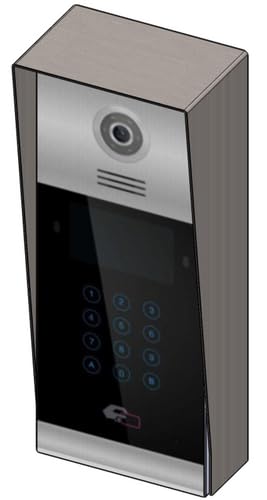 Obraz 1: Przód view of the Fermax Sup Milo Digital Intercom System, showing the aluminum plate and digital keypad. This image illustrates the exterior design of the main unit.
4. Pierwsze uruchomienie i konfiguracja
- Once all wiring is complete and secure, restore power to the system.
- The unit will perform a self-test. Observe any indicator lights or sounds.
- Follow the system's programming guide (usually provided separately or accessible via a master unit) to configure apartment numbers, access codes, and other settings.
Instrukcja obsługi
Making a Call from the Outdoor Panel
- To call an apartment: Enter the apartment number using the digital keypad.
- Press the "Call" button (often represented by a bell icon or similar).
- The indoor unit will ring. Once answered, communication can begin.
Receiving a Call and Opening the Door (Indoor Unit)
- When the indoor unit rings, press the "Answer" button to establish communication with the visitor.
- To open the door, press the "Door Release" button on your indoor unit.
- Drzwi zostaną odblokowane na chwilę.
Using Access Codes
If configured, authorized users can enter a pre-programmed access code on the outdoor digital keypad to unlock the door without needing to call an indoor unit.
- Enter your personal access code using the digital keypad.
- Press the "Enter" or "Door Release" button.
- Drzwi się odblokują.
Konserwacja
Regular maintenance ensures the longevity and optimal performance of your Fermax intercom system.
Czyszczenie
- Wyczyść zewnętrzną część urządzenia miękką ściereczką, damp płótno.
- Nie należy używać środków czyszczących o działaniu ściernym, rozpuszczalników ani środków chemicznych w sprayu, gdyż mogą one uszkodzić wykończenie i podzespoły elektroniczne.
- Upewnij się, że do otworów urządzenia nie dostanie się żadna ciecz.
Inspekcje
- Periodically check for any visible damage to the unit or wiring.
- Sprawdź, czy wszystkie śruby montażowe są dokręcone.
- Test the communication and door release functions regularly.
Aktualizacje oprogramowania
If applicable, consult your installer or Fermax support for information on firmware updates that may improve performance or add new features.
Rozwiązywanie problemów
W tej sekcji omówiono typowe problemy, z którymi możesz się spotkać. W przypadku bardziej złożonych problemów skontaktuj się z pomocą techniczną.
| Problem | Możliwa przyczyna | Rozwiązanie |
|---|---|---|
| No communication with indoor unit. |
|
|
| Otwieranie drzwi nie działa. |
|
|
| Klawiatura nie reaguje. |
|
|
Specyfikacje
Technical specifications for the Fermax Sup Milo Digital Intercom System (Model: 8424299951713).
- Model: Fermax Sup Milo Digital Intercom System
- Numer części: 8424299951713
- Producent: Fermax
- Wymiary (opakowanie): Około 0.1 x 0.1 x 0.1 cm
- Waga (jednostka): 108 gram
- Tworzywo: Metal, Plastic, Polycarbonate (Aluminum Plate)
- Źródło zasilania: External Power Supply (100V)
- Tomtage: 100 V
- Cotage: 100 W
- Wymagane baterie: NIE
- Kolor: Multicolored (referring to internal components or subtle design elements, main plate is aluminum)
Informacje o gwarancji
Fermax products are manufactured to high-quality standards. For specific warranty terms and conditions, please refer to the warranty card included with your product or visit the official Fermax webZachowaj dowód zakupu na wypadek roszczeń gwarancyjnych.
Typically, warranty covers manufacturing defects for a specified period from the date of purchase. Damage due to improper installation, misuse, or unauthorized repairs is generally not covered.
Obsługa klienta
If you require technical assistance, have questions about your product, or need to report a problem, please contact your local Fermax distributor or visit the official Fermax webwitryna zawierająca zasoby pomocy.
Webstrona: www.fermax.pl
Kontaktując się z pomocą techniczną, przygotuj numer modelu (8424299951713) i dane dotyczące zakupu.