
1. Wprowadzenie
Thank you for choosing the PayLessHere Ergonomic Mesh Office Chair. This chair is designed to provide comfort and support during extended periods of sitting. Featuring a breathable mesh back, adjustable height, lumbar support, and 360-degree swivel wheels, it is suitable for various office and home environments. Please read this manual carefully before assembly and use to ensure proper function and longevity of your chair.
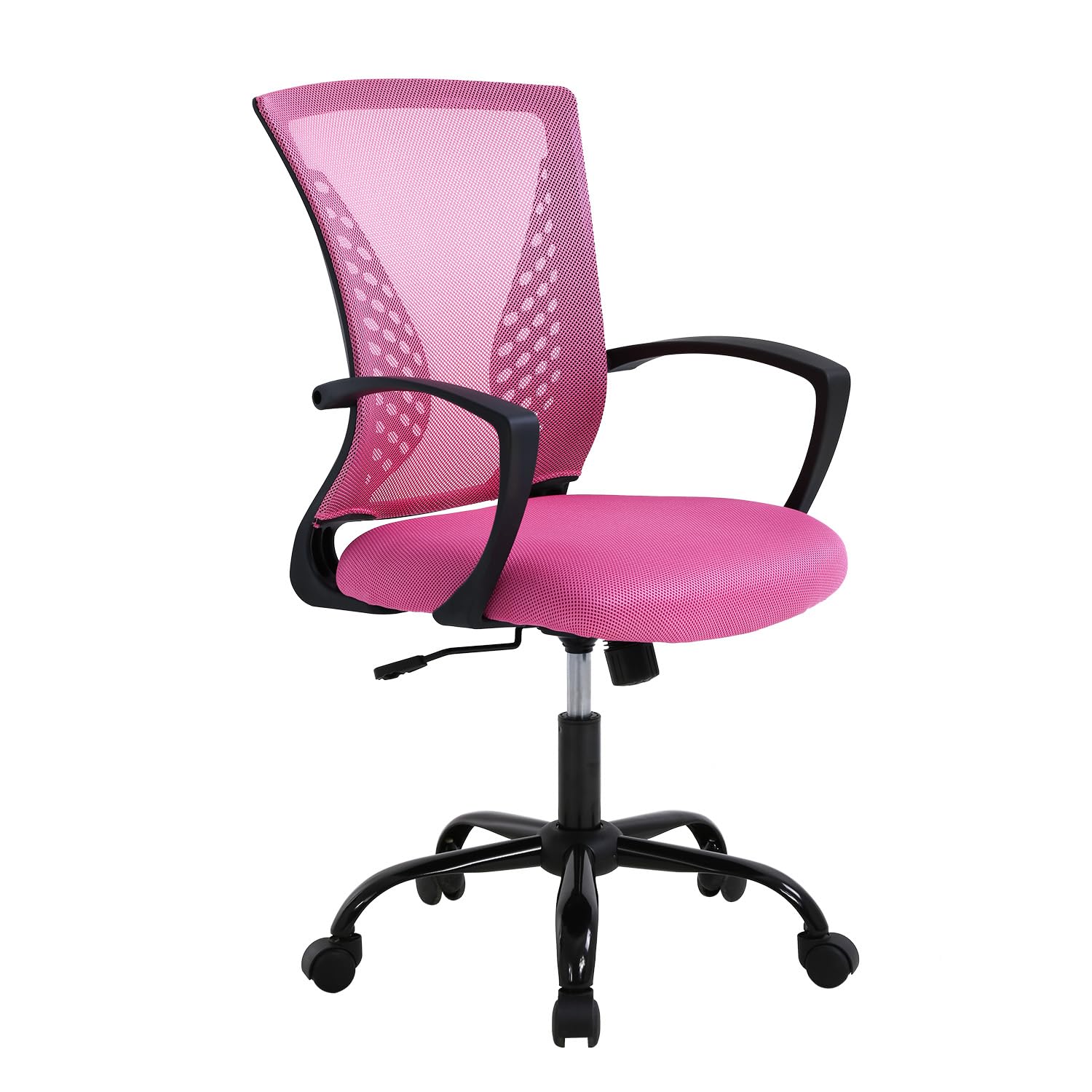
Image 1.1: The PayLessHere Ergonomic Mesh Office Chair in Pink.
2. Zawartość opakowania
Przed rozpoczęciem montażu upewnij się, że wszystkie elementy są kompletne i nieuszkodzone. Jeśli brakuje którejkolwiek części lub jest ona uszkodzona, skontaktuj się z obsługą klienta.
- Oparcie krzesła
- Poduszka siedziska
- Podłokietniki (2)
- Siłownik gazowy
- Base with Wheels (5-star base)
- Sprzęt montażowy (śruby, podkładki, klucz imbusowy)
Ilustracja 2.1: Wszystkie elementy dołączone do zestawu, gotowe do montażu.
3. Instalacja i montaż
The PayLessHere Office Chair is designed for easy assembly. Follow these steps carefully to ensure correct setup.
- Zamontuj koła do podstawy: Insert each of the five wheels into the openings at the end of the chair base. Push firmly until they click into place.
- Włóż podnośnik gazowy: Umieść cylinder podnośnika gazowego w środkowym otworze złożonej podstawy krzesła.
- Zamontuj podłokietniki na siedzisku: Secure the armrests to the underside of the seat cushion using the provided screws and Allen wrench. Ensure they are oriented correctly.
- Zamontuj oparcie na siedzisku: Align the backrest with the seat cushion and secure it using the remaining screws. Do not overtighten.
- Podłączanie zespołu siedziska do podnośnika gazowego: Ostrożnie umieść zmontowane siedzisko i oparcie na siłowniku podnośnika gazowego, upewniając się, że mechanizm środkowy jest wyrównany z górną częścią podnośnika. Dociśnij mocno, aby zabezpieczyć.
Your chair is now assembled and ready for use. Verify all connections are secure before sitting.
4. Instrukcja obsługi
Familiarize yourself with the chair's adjustable features to optimize your comfort and support.
4.1. Regulacja wysokości
Aby wyregulować wysokość krzesła, znajdź dźwignię po prawej stronie, pod siedziskiem. Siedząc, pociągnij dźwignię do góry, aby obniżyć krzesło. Aby podnieść krzesło, wstań i pociągnij dźwignię do góry. Puść dźwignię na żądanej wysokości.

Image 4.1: The height adjustment lever and regulating interval (37.4-40.4 inches).
4.2. Rocking Mode and Tilt Control
The chair features a rocking mode for relaxation. To activate, pull the same lever (used for height adjustment) outwards. To lock the chair in an upright position, push the lever inwards. The tension of the rocking motion can be adjusted by turning the round knob located under the seat, towards the front. Turn clockwise to increase tension, counter-clockwise to decrease.

Image 4.2: Instructions for engaging rocking mode (115° tilt) and adjusting tension control.
4.3. 360-Degree Swivel and Mobility
The chair is equipped with 360-degree swivel wheels, allowing for easy movement and rotation within your workspace. The wheels are designed for smooth, quiet operation on hard floors.

Image 4.3: The chair's rotation wheels provide 360-degree movement and stable support.
4.4. Lumbar Support and Ergonomics
The chair features a biomimetic backrest design with integrated lumbar support to promote healthy posture and reduce back strain. The mesh material conforms to your back for optimal comfort.

Image 4.4: The biomimetic backrest design provides scientific radians to effectively support your waist.
5. Konserwacja
Właściwa konserwacja przedłuży żywotność i wygląd Twojego krzesła biurowego.
- Czyszczenie: Wyczyść za pomocą reklamyamp cloth. Avoid harsh chemicals or abrasive cleaners, which can damage the mesh fabric or frame.
- Kontrola: Okresowo sprawdzaj wszystkie śruby i połączenia, aby upewnić się, że są dobrze dokręcone. W razie potrzeby dokręć.
- Poruszający: When moving the chair, lift it rather than dragging it to prevent damage to the wheels or floor.
- Limit wagowy: Nie należy przekraczać maksymalnej zalecanej wagi wynoszącej 250 funtów.
6. Rozwiązywanie Problemów
If you encounter any issues with your PayLessHere Office Chair, refer to the following common problems and solutions:
- Krzesło tonie lub nie utrzymuje się w górze: Zazwyczaj wskazuje to na problem z siłownikiem podnośnika gazowego. Upewnij się, że dźwignia regulacji wysokości jest całkowicie zablokowana. Jeśli problem nie ustąpi, podnośnik gazowy może wymagać wymiany.
- Krzesło się chwieje: Check all assembly screws to ensure they are securely tightened. A loose connection can cause instability.
- Koła nie toczą się płynnie: Inspect the wheels for any debris (hair, lint) that might be obstructing their movement. Clean as necessary. Ensure the chair is used on an appropriate surface (hard floor recommended).
- Piszczące dźwięki: Apply a small amount of silicone-based lubricant to moving parts, such as the gas lift or tilt mechanism, if squeaking occurs.
If these solutions do not resolve the issue, please contact PayLessHere customer support for further assistance.
7. Specyfikacje
| Funkcja | Szczegół |
|---|---|
| Marka | PayLessHere |
| Nazwa modelu | Krzesło biurowe |
| Kolor | Różowy |
| Tworzywo | Mesh (back), Fabric (seat), Metal (frame) |
| Wymiary produktu (Gł. x Szer. x Wys.) | 17" gł. x 19" szer. x 40" wys. |
| Waga przedmiotu | 21 funtów |
| Maksymalna zalecana waga | 250 funtów |
| Regulowane funkcje | Height, Tilt/Rocking Mode, Lumbar Support |
| Ruch | 360-Degree Swivel Wheels |
| Wymagany montaż | Tak |
| Instrukcje pielęgnacji produktu | Wytrzeć |
| Zalecane zastosowania | Office, Study, Bedroom, Meeting Room |
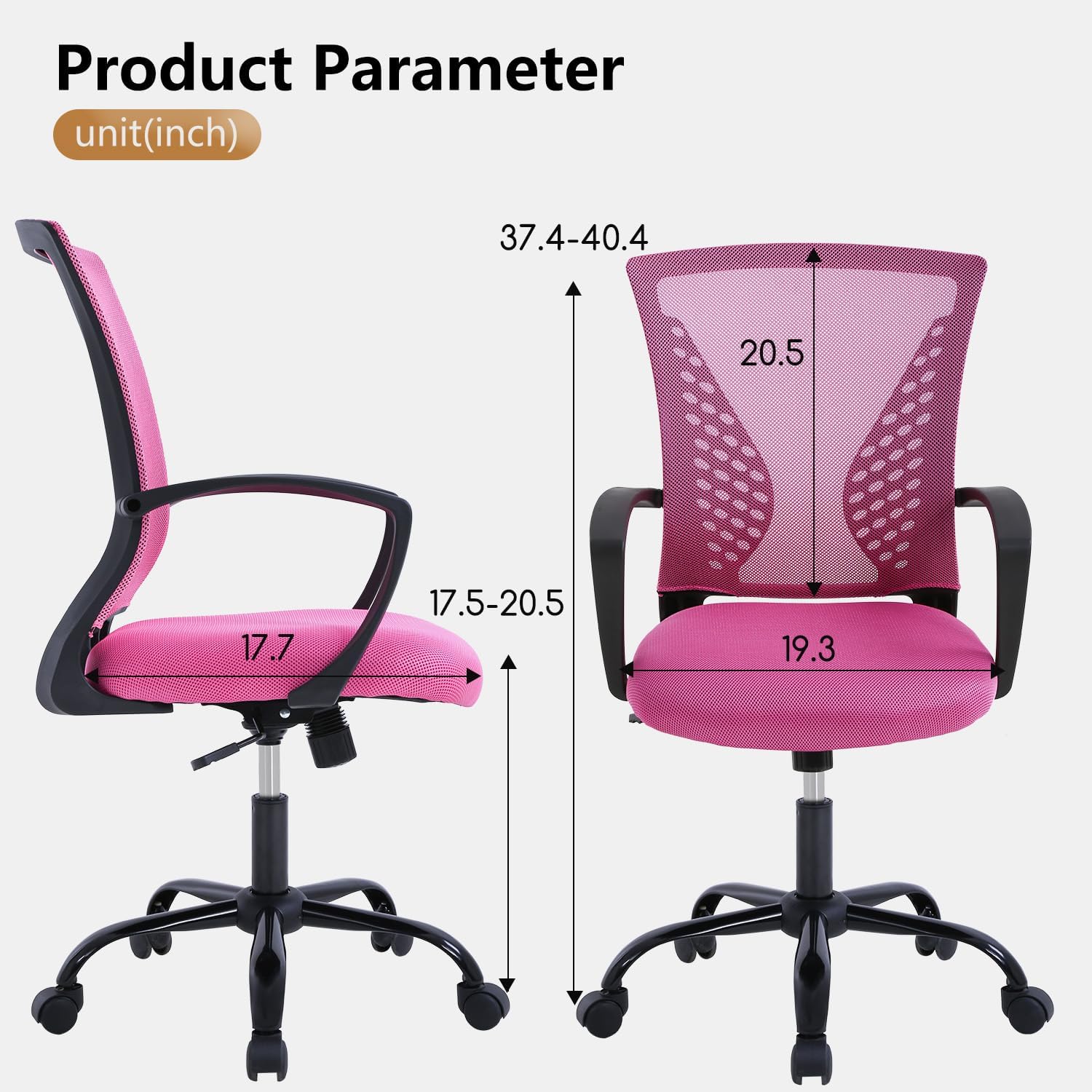
Image 7.1: Detailed product parameters and dimensions in inches.
8. Gwarancja i wsparcie
For warranty information, product support, or to purchase replacement parts, please contact PayLessHere customer service. Refer to your purchase documentation for specific contact details or visit the official PayLessHere webstrona.
Zależy nam na dostarczaniu wysokiej jakości produktów i doskonałej obsługi klienta. Twoja satysfakcja jest naszym priorytetem.