
1. Wprowadzenie
This manual provides detailed instructions for the safe and effective operation of your Dragonhawk Wireless Tattoo Gun Machine, Model YZBTD. Please read this manual thoroughly before using the device to ensure proper setup, operation, and maintenance. This machine is designed for professional tattoo artists and beginners, offering versatility and reliable performance.
2. Informacje dotyczące bezpieczeństwa
Always prioritize safety when operating tattoo equipment. Failure to follow these guidelines may result in injury or damage to the device.
- Tylko do użytku zewnętrznego: This device is intended for tattooing on skin.
- Sterylizacja: Ensure all needles, cartridges, and contact surfaces are properly sterilized before each use.
- Źródło zasilania: Należy używać wyłącznie dołączonego kabla ładującego i kompatybilnych zasilaczy.
- Bezpieczeństwo baterii: Do not expose batteries to extreme temperatures or puncture them. Dispose of used batteries responsibly.
- Obsługiwanie: Handle the machine with care. Avoid dropping or subjecting it to strong impacts.
- Wilgoć: Keep the device dry. It is water-resistant, but not waterproof. Avoid submerging it in liquids.
- Dzieci: Przechowywać w miejscu niedostępnym dla dzieci.
3. Koniec produktuview & Składniki
The Dragonhawk Wireless Tattoo Gun Machine YZBTD is a cordless pen-style rotary tattoo machine featuring an adjustable stroke length and a powerful coreless motor.

Rysunek 3.1: Koniecview of the tattoo machine's control panel and battery.
Kluczowe komponenty:
- Korpus maszyny: Main housing containing the motor and drive system.
- Paczka baterii: Detachable power source with OLED display and control buttons.
- Regulowany uchwyt: Rotates to adjust needle depth.
- Stroke Adjustment Knob: Allows selection of 7 stroke lengths (2.4mm - 4.2mm).
- Needle Cartridge Slot: Where tattoo needle cartridges are inserted.
- Port ładowania typu C: Do ładowania akumulatora.
4. Konfiguracja
4.1 Instalacja baterii
The machine comes with two replaceable batteries to ensure continuous operation.
- Upewnij się, że urządzenie jest wyłączone.
- Gently twist the battery pack counter-clockwise to detach it from the machine body.
- Align a charged battery pack with the machine body and twist clockwise until securely fastened.

Figure 4.1: The machine is equipped with two replaceable batteries for extended use.
4.2 Montaż wkładu igłowego
Use only compatible Dragonhawk cartridge needles for optimal performance.
- Wybierz odpowiedni wkład igłowy.
- Insert the needle cartridge into the machine's slot, pushing firmly until it clicks into place.
- To remove, twist the cartridge slightly and pull it out.

Figure 4.2: Proper insertion of a needle cartridge into the machine.
5. Instrukcja obsługi
Aby zapewnić efektywną obsługę urządzenia, należy zapoznać się z panelem sterowania.
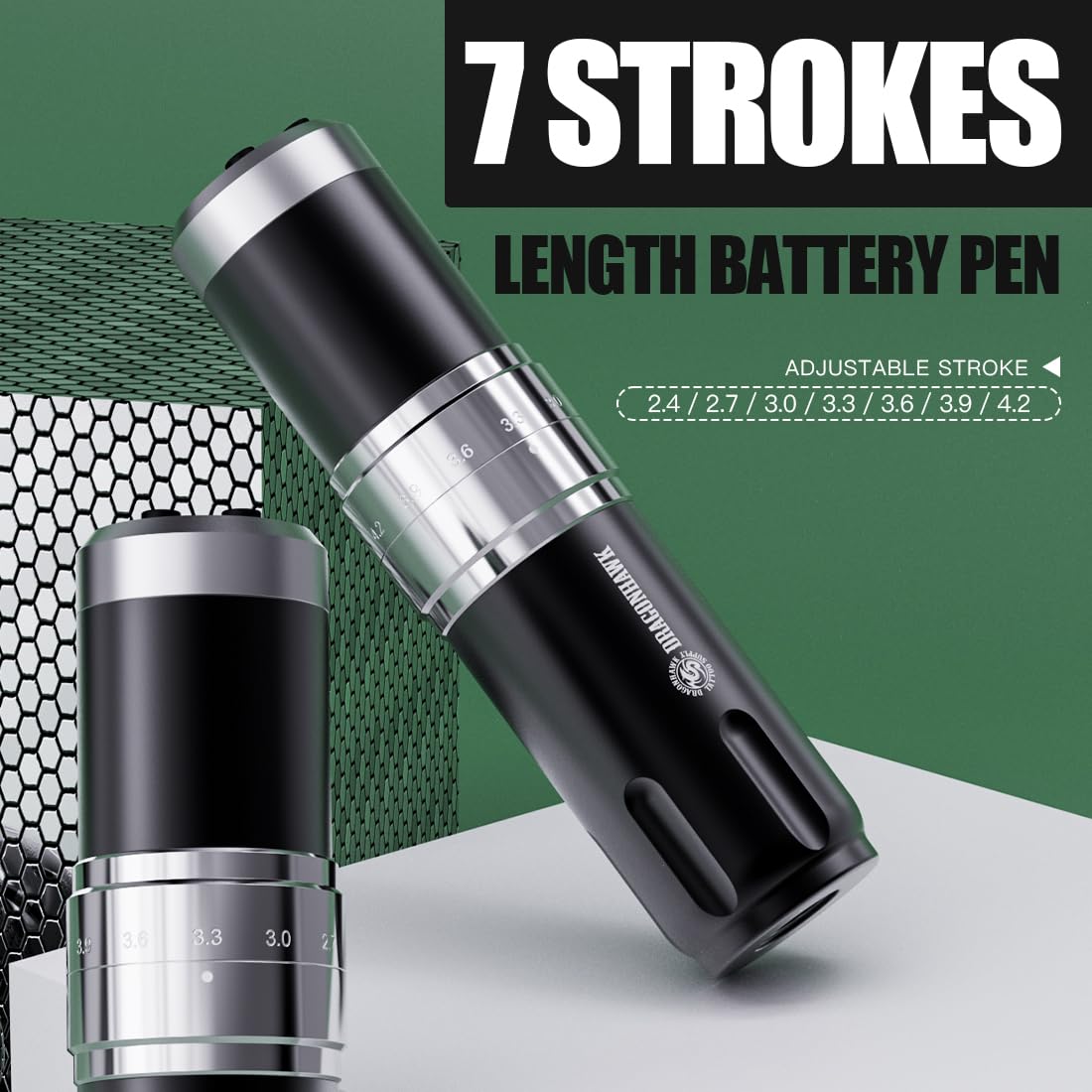
Figure 5.1: Control panel and stroke adjustment.
5.1 Włączanie/wyłączanie zasilania
- Naciśnij i przytrzymaj 'O' (Switch Button) for a few seconds to power the machine on or off.
- The OLED display will show the current voltage i poziom naładowania baterii.
5.2 Regulacja głośnościtage
- Użyj '+' (Voltage Increase Key) I '-' (Voltage Reduction Key) buttons to adjust the voltage w krokach co 0.1 V.
- Zalecana objętośćtagZakres to 4V-12V.
5.3 Changing Mode (Liner/Shader)
- Naciśnij 'M' (Switch Mode) button to switch between Liner (L) and Shader (S) gears.
- The machine automatically memorizes the voltage settings for each mode.
5.4 Regulacja długości skoku
The machine offers 7 adjustable stroke lengths from 2.4mm to 4.2mm.
- Rotate the adjustment knob located on the machine body to select the desired stroke length.
- Available lengths: 2.4mm, 2.7mm, 3.0mm, 3.3mm, 3.6mm, 3.9mm, 4.2mm.

Figure 5.2: Adjusting the stroke length by rotating the knob.
5.5 Oficjalny film o produkcie
Video 5.1: An official video demonstrating the features and operation of the Dragonhawk Fold3 Wireless Tattoo Gun.
6. Konserwacja
6.1 Czyszczenie
- Zawsze odłączaj zasilanie przed czyszczeniem.
- Wipe the machine body with a soft, damp cloth and a mild disinfectant.
- Do not use abrasive cleaners or submerge the machine in liquid.
- Ensure no liquid enters the motor or charging port.
6.2 Ładowanie
The machine is equipped with a Type-C charging port.
- Connect the provided Type-C cable to the charging port on the battery pack.
- Connect the other end to a compatible USB power adapter.
- Pełne naładowanie trwa około 1.5 godzin.
- The battery indicator on the OLED display will show charging status.
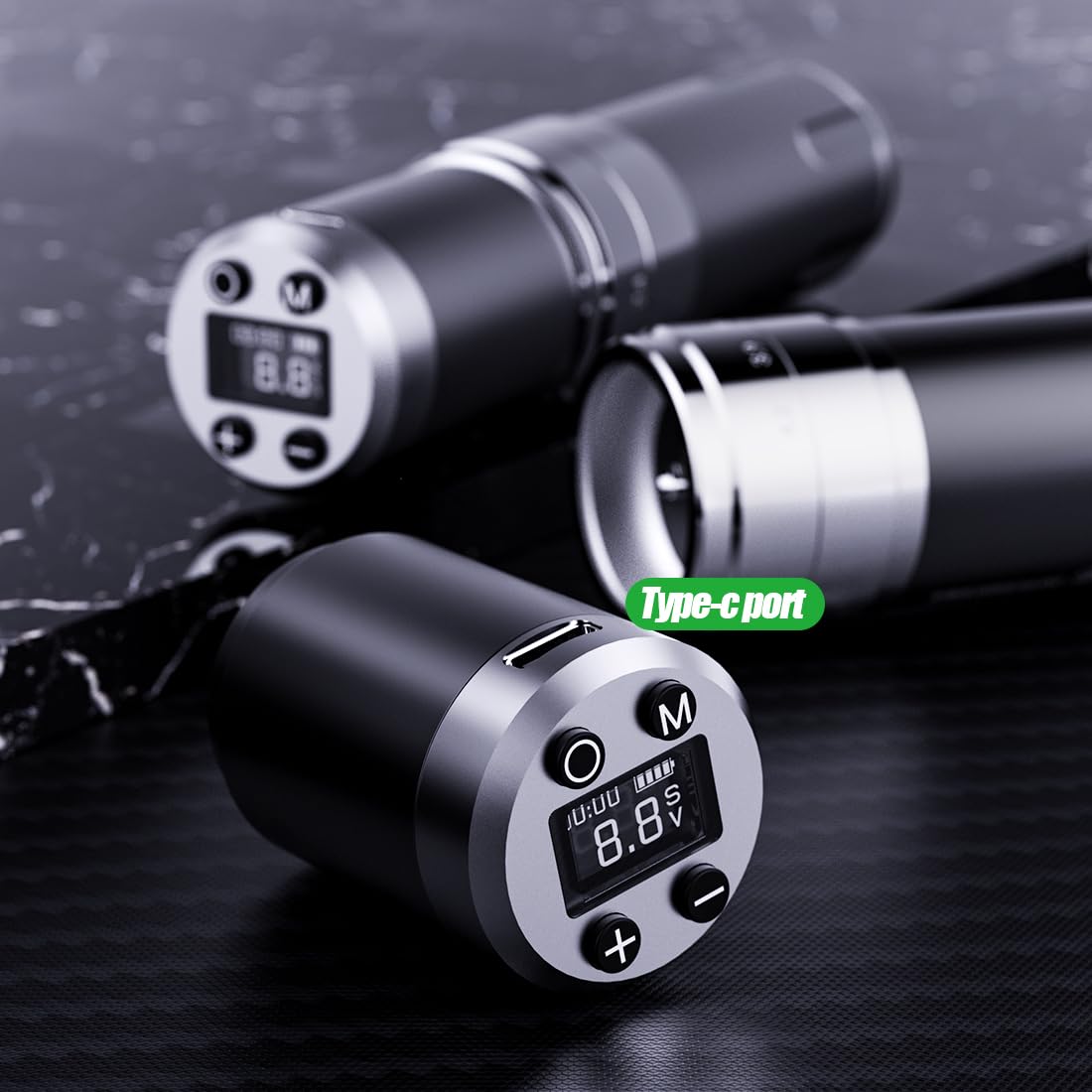
Figure 6.1: Type-C charging port on the battery pack.
6.3 Pielęgnacja baterii
- Aby przedłużyć żywotność baterii, należy unikać częstego całkowitego rozładowywania baterii.
- Store the machine and spare batteries in a cool, dry place when not in use.
- If storing for an extended period, charge the batteries to about 50-60% capacity.
7. Rozwiązywanie Problemów
Aby zapoznać się z najczęstszymi problemami i ich rozwiązaniami, zapoznaj się z poniższą tabelą.
| Problem | Możliwa przyczyna | Rozwiązanie |
|---|---|---|
| Maszyna się nie włącza | Low battery; Battery not properly installed; Power button not pressed correctly. | Charge the battery; Reinstall the battery pack securely; Press and hold the power button firmly. |
| Needle not moving | Needle cartridge not installed correctly; Stroke length set too low; Motor issue. | Reinstall needle cartridge; Adjust stroke length; Contact support if motor issue persists. |
| Tomtage display flickering | Loose battery connection; Low battery. | Ensure battery is securely attached; Charge the battery. |
| Przegrzanie maszyny | Długotrwałe, ciągłe użytkowanie; Wysoka objętośćtagustawienie. | Allow machine to cool down; Reduce voltage jeśli to konieczne. |
8. Specyfikacje
Technical details of the Dragonhawk Wireless Tattoo Gun Machine YZBTD.
| Funkcja | Szczegół |
|---|---|
| Numer modelu | YZBTD |
| Wymiary produktu | 3.94 x 3.94 x 7.87 cala |
| Waga przedmiotu | 10.58 uncji (300 grama) |
| Silnik | Mcore Coreless Motor |
| Długości skoku | 7 adjustable (2.4mm - 4.2mm) |
| Tomtage Zakres | 4 V - 12 V |
| Pojemność baterii | 1500 mAh (na baterię) |
| Żywotność baterii | 6-8 hours (per battery) |
| Czas ładowania | Około 1.5 godzin |
| Port ładowania | Typ C |
| Poziom wodoodporności | Wodoodporny |
9. Gwarancja i pomoc techniczna
Dragonhawk is committed to providing high-quality products and excellent customer service.
- Zakres produktu: Dragonhawk products typically include coverage for manufacturing defects. Please refer to your purchase documentation for specific warranty terms.
- Wsparcie techniczne: For video tutorials, setup guides, and professional tips, visit Youtube.com/@Dragonhawkofficial.
- Obsługa klienta: For any inquiries or issues with your order, please reach out through Amazon's messaging system.
- Zwroty: W przypadku tego produktu obowiązuje 30-dniowa polityka zwrotu i wymiany.