
FLEXISPOT ET365W
FLEXISPOT E6 Essential Dual Motor Standing Desk Frame User Manual
Model: ET365W (White Frame, 3 Stage Lite Leg)
Ważne informacje dotyczące bezpieczeństwa
Przed montażem i użytkowaniem należy przeczytać i zrozumieć wszystkie instrukcje. Nieprzestrzeganie tych instrukcji może spowodować obrażenia ciała lub uszkodzenie produktu.
- Aby zapewnić stabilność, należy zawsze dokładnie przestrzegać instrukcji montażu.
- Nie przekraczać maksymalnego limitu wagi 220 funta (100 kg).
- Keep the desk and its electrical components away from water and other liquids.
- Always turn off and unplug the desk when not in use or when leaving the room.
- Keep the desk area clear of obstacles to prevent tripping or collision.
- Always supervise children when using the desk.
- Przed użyciem sprawdź, czy wszystkie śruby są mocno dokręcone.
Produkt ponadview
The FLEXISPOT E6 Essential Dual Motor Standing Desk Frame provides a versatile and ergonomic workspace solution. Featuring a robust 3-stage lift system and quiet dual motors, it allows for seamless transitions between sitting and standing positions.
Główne cechy:
- 3-Stage Lift System: Offers a wide height adjustment range from 23.6 inches to 48.8 inches, accommodating various user heights.
- Quiet Dual Motors: Operates with less than 50 dB noise level and supports a weight capacity of up to 220 lbs (100 kg).
- Programowalny kontroler: Features a convenient control panel with four memory presets for quick height adjustments.
- Trwała konstrukcja: Built with a strong metal base for stability and longevity.

Image: The FLEXISPOT E6 Essential Dual Motor Standing Desk Frame in white, featuring the integrated control panel.
Zawartość opakowania
Przed rozpoczęciem montażu należy sprawdzić, czy wszystkie elementy są kompletne i nieuszkodzone. W przypadku braku lub uszkodzenia jakiejkolwiek części prosimy o kontakt z obsługą klienta.
- 1. Wspornik boczny x2
- 2. Left beam x2
- 3. Right beam x2
- 4. Kolumna x2
- 5. Klawiatura x1
- 6. Zasilacz x1
- 7. Cokół x2
- 8. Kabel zasilający AC x1
- 9. Przedłużacz x1
- 10. Zacisk kablowy x4
- 11. T-Socket Wrench x1
- 12. Adapter bracket x1

Image: All frame components laid out for inspection.
Instrukcja montażu
Follow these steps carefully to assemble your FLEXISPOT E6 Essential Standing Desk Frame. It is recommended to have two people for assembly.
Video: Official FLEXISPOT E6 Essential Standing Desk Installation Guide. This video provides a visual walkthrough of the assembly process.
Step 1: Assemble the Cross Beams
Connect the left and right beams (parts 2 and 3) using the provided screws (C) and the T-Socket Wrench (11). Ensure screws are aligned with square holes and pressed tightly. The length of the cross beams can be adjusted to fit a desktop of 51-59 inches (1300-1500mm).

Image: Illustration showing the connection of the left and right beams.
Step 2: Attach Columns to Cross Beams
Attach the two columns (part 4) to the assembled cross beams using screws (A) and the T-Socket Wrench (11). Pre-tighten all screws for the cross beams, then tighten them simultaneously for a secure fit. Prioritize installing diagonal screws first.

Image: Visual guide for attaching the columns to the cross beams.
Step 3: Install Pedestals
Secure the pedestals (part 7) to the bottom of the columns using screws (E) and the T-Socket Wrench (11).

Image: Diagram showing the attachment of the pedestals to the columns.
Step 4: Attach Adapter Bracket and Keypad
Mount the adapter bracket (part 12) and the keypad (part 5) to the underside of your chosen desktop. Ensure the curved edge of the keypad is flush with the edge of the table top. Use screws (F) and a drill for this step. Make sure the keypad is on the same side as the adapter bracket.

Image: Illustration of attaching the adapter bracket and keypad to the desktop.
Krok 5: Podłącz okablowanie
Connect all necessary cables: the keypad to the control box, the motors to the control box, the power adapter (part 6) to the control box, and the AC power cable (part 8) to the power adapter. Use cable clips (part 10) to manage and secure the cables neatly under the desktop.

Image: Diagram showing the proper routing and connection of all electrical cables.
Instrukcja obsługi
The FLEXISPOT E6 Essential features an intuitive programmable controller for easy height adjustment.

Image: The intelligent keypad with LED display and buttons for height adjustment and memory presets.
Funkcje kontrolera:
- Strzałki w górę/w dół (▲ / ▼): Press and hold to manually adjust the desk height up or down. The LED display will show the current height.
- Ustawienia pamięci (1, 2, 3, 4): The controller allows you to save up to four preferred height settings.
- Dostosuj wysokość biurka do swoich potrzeb, korzystając ze strzałek w górę/w dół.
- Naciśnij przycisk „M”. Na wyświetlaczu pojawi się „S-”.
- Immediately press one of the number buttons (1, 2, 3, or 4) to save the current height to that preset.
- Aby przywołać zapisaną wysokość, wystarczy nacisnąć odpowiedni przycisk numeryczny.
- Funkcja zapobiegająca kolizjom: The desk is equipped with an anti-collision system. If the desktop encounters an obstacle while moving, it will automatically stop and reverse slightly to prevent damage.
Specyfikacja produktu
| Funkcja | Szczegół |
|---|---|
| Numer modelu | ET365W |
| Marka | ELASTYCZNI |
| Kolor | Biała ramka |
| Product Dimensions (Frame) | 43.3"D x 23.6"W x 23.6"H (Adjustable width for desktop) |
| Zakres regulacji wysokości | 23.6 inches (Minimum) to 48.8 inches (Maximum) |
| Mechanizm podnoszący | Electric Dual Motor, 3-Stage Lift System |
| Maksymalna nośność | 220 funta (100 kg) |
| Poziom hałasu | Mniej niż 50 dB |
| Materiał bazowy | Metal |
| Zawarte komponenty | Installation Tools and Wire |
| UPC | 810072845221 |
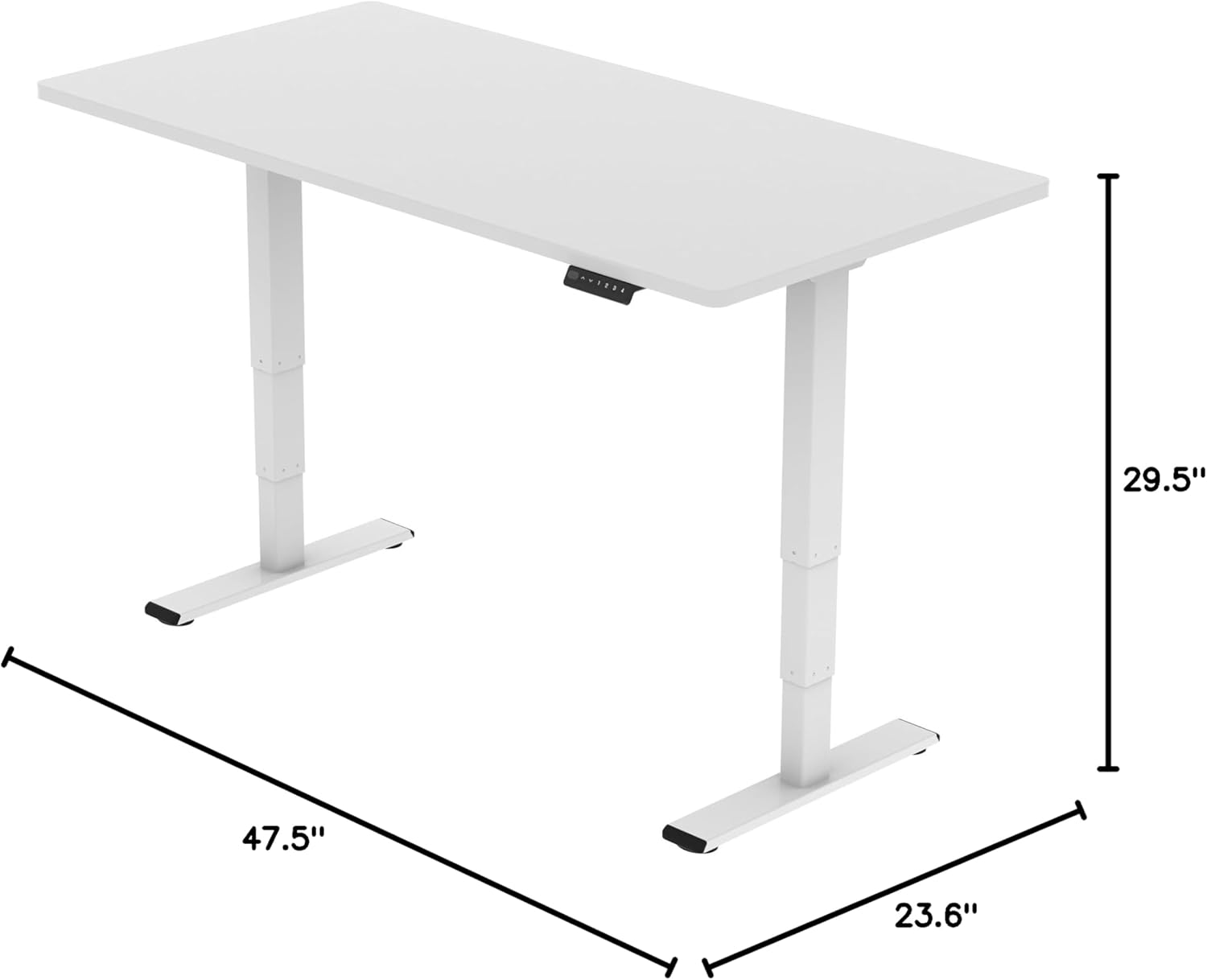
Image: Diagram illustrating the adjustable dimensions of the desk frame.
Konserwacja
Regular maintenance ensures the longevity and optimal performance of your standing desk frame.
- Czyszczenie: Przetrzyj ramę biurka miękką szmatką.amp szmatką. Unikaj stosowania silnych środków chemicznych lub ściernych środków czyszczących, które mogłyby uszkodzić wykończenie.
- Zarządzanie kablami: Periodically check that all cables are securely fastened and not pinched or tangled. Re-organize with cable clips if necessary.
- Elementy złączne: Occasionally check all screws and bolts to ensure they are tight. Re-tighten if any feel loose.
- Kontrola przeszkód: Ensure there are no obstructions in the path of the desk's movement, especially underneath the desktop.
Rozwiązywanie problemów
If you encounter any issues with your FLEXISPOT E6 Essential Standing Desk Frame, refer to the common problems and solutions below.
- Desk not moving or unresponsive:
- Sprawdź wszystkie połączenia kabli, aby upewnić się, że są prawidłowo podłączone.
- Verify that the power adapter is correctly connected to a working power outlet.
- Perform a reset: Unplug the desk from the power outlet for 10-15 seconds, then plug it back in.
- Nierównomierna regulacja wysokości:
- Upewnij się, że biurko jest ustawione na równej powierzchni.
- Check for any obstructions under the desk that might impede one leg's movement.
- Contact customer support if the issue persists after checking connections and obstructions.
- Desk stops unexpectedly during movement:
- This may be the anti-collision feature activating. Check for any obstacles in the desk's path.
- Ensure the weight on the desk does not exceed the maximum capacity of 220 lbs.
Gwarancja i wsparcie
FLEXISPOT is committed to providing high-quality products and excellent customer service.
- Zakres gwarancji: Enjoy peace of mind with our 5-letnia gwarancja on the desk frame and motor, and 2-letnia ochrona on the control panel and electronics.
- Obsługa klienta: For any questions, assistance with assembly, troubleshooting, or warranty claims, please visit the official FLEXISPOT webodwiedź witrynę lub skontaktuj się bezpośrednio z działem obsługi klienta.
- Zasoby internetowe: Additional resources, including FAQs and detailed video tutorials, may be available on the FLEXISPOT Store.
Video: "Welcome to FLEXISPOT'S Mega Factory" - Showcasing the manufacturing process and commitment to quality.