
JOYEAUTO WJPO-1 (PCM3.1)
Instrukcja obsługi dekodera zestawu modernizacyjnego CarPlay firmy JOYEAUTO
Model: WJPO-1 (PCM3.1)
1. Wprowadzenie i koniecview
This manual provides detailed instructions for the installation, operation, and maintenance of the JOYEAUTO CarPlay Retrofit Kit Decoder. This device is designed to integrate advanced smartphone functionalities like Wireless Apple CarPlay, Wired Android Auto, and Mirror Link into your vehicle's existing infotainment system, enhancing your driving experience with modern connectivity.
The retrofit kit allows seamless use of navigation, music, calls, and messaging directly through your car's display and controls, maintaining the original system's aesthetics and functionality.
2. Zgodność
The JOYEAUTO CarPlay Retrofit Kit Decoder (Model: WJPO-1) is compatible with Porsche PCM3.1 head units manufactured between 2010 and 2016. This includes the following models:
- Porsche Cayenne (2010-2016)
- Porsche Macan (2010-2016)
- Porsche Cayman (2010-2016)
- Porsche Panamera (2010-2016)
- Porsche Boxster (2010-2016)
- Porsche 991 (2010-2016)
- Porsche 718 (2010-2016)
- Porsche 911 (2010-2016)
Ważna uwaga: Ensure your car's control panel has a "NAVI" button. This kit will nie work with head units that have a "CD-AUX" button instead of "NAVI". If you are unsure about compatibility, please consult the seller with photos of your car's display and model year information before purchase.
3. Główne cechy
Wireless Apple CarPlay & Wired Android Auto

The main product image shows the JOYEAUTO multimedia video interface unit and its integration into a Porsche vehicle's infotainment system. The car's screen displays the Apple CarPlay interface with various app icons, while a smartphone is shown wirelessly connected, demonstrating the seamless integration of smartphone features into the car's display.
Experience full-screen Apple CarPlay functionality wirelessly, allowing access to Apple Maps, navigation, phone calls, and music streaming via Spotify or Apple Music. The built-in microphone supports Siri functions and Bluetooth calls. For Android users, a wired (USB cable) connection enables Android Auto, providing navigation, phone calls, and online music playback. This system eliminates the need for a phone holder, promoting safer and more enjoyable driving.

This image illustrates the benefit of the CarPlay retrofit kit by showing a 'Before' state with a smartphone mounted in a bulky phone holder on the dashboard, and an 'After' state where the phone holder is removed, and the car's built-in screen displays a navigation map, indicating the integration of smartphone functions directly into the vehicle's system.

The image displays the interior of a car with the infotainment screen showing the Android Auto interface. An Android smartphone is connected via a cable, emphasizing the wired Android Auto capability. The screen displays various Android Auto applications, demonstrating how the system allows users to stay connected and hands-free while driving.
Funkcjonalność łącza lustrzanego

This image demonstrates the Mirror Link feature, where content from a smartphone (in this case, a video) is mirrored directly onto the car's infotainment screen. A hand is shown holding the smartphone, which displays the same content as the car screen, highlighting the ability to view phone software and media on the larger vehicle display.
The system supports wired Mirror Link for both iPhone and Android devices. This feature allows you to display your phone's screen content, including videos and applications, directly onto your car's infotainment display. This is ideal for passengers to watch movies or use phone applications on a larger screen.
USB Flash Playing

The image illustrates the USB Flash Playing capability, showing the car's infotainment screen displaying a music playback interface. A USB flash drive icon is visible, indicating that media is being played directly from a USB device. This feature allows users to enjoy their stored music while also charging their iPhone via the USB connection.
Connect a USB cable to play media directly from a USB flash drive. The system supports various media formats and allows you to use navigation apps like Waze or Google Maps while simultaneously charging your iPhone.
4. Konfiguracja i instalacja
The JOYEAUTO CarPlay Retrofit Kit is designed for a plug-and-play installation, seamlessly integrating with your vehicle's original system. No cutting or splicing of original car wires is required, preserving your car's integrity and warranty.
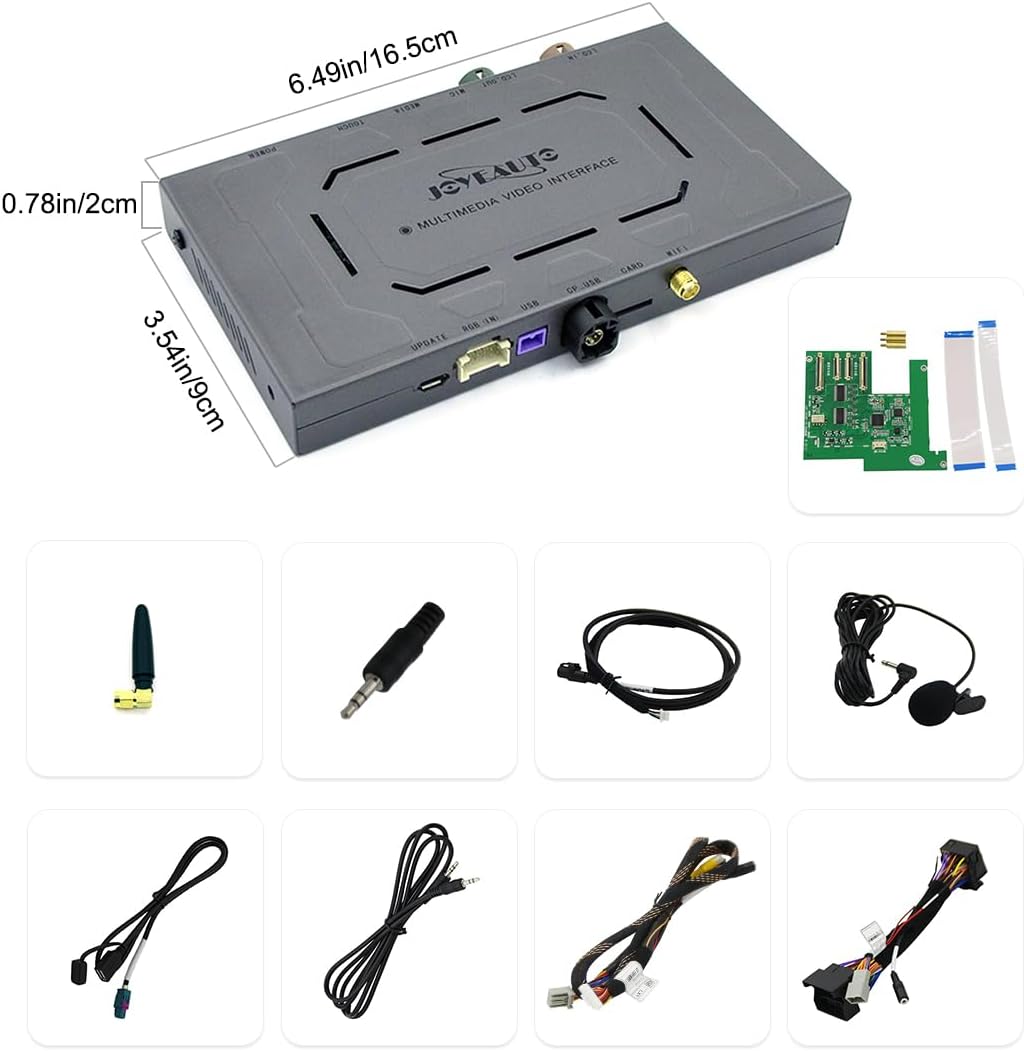
Na tym obrazie przedstawiono szczegółowo view of the JOYEAUTO multimedia video interface unit, including its dimensions (6.49in/16.5cm length, 3.54in/9cm width, 0.78in/2cm thickness). Below the main unit, various included components and cables are displayed, such as an antenna, audio jack, USB cables, and wiring harnesses, illustrating the complete set of parts for installation.
Kroki instalacji:
- Carefully remove the necessary trim panels and the original head unit from your vehicle.
- Connect the provided wiring harnesses between the original head unit and the JOYEAUTO decoder, ensuring all connections are secure.
- Install the decoder unit in a suitable location behind the dashboard.
- Reconnect the original head unit and reassemble the trim panels.
- Before fully completing the reassembly, it is crucial to test all features to ensure proper functionality.
For a detailed, step-by-step installation guide, please refer to the official installation video. A QR code for this video is typically found on the product packaging. If you are not confident in performing the installation yourself, it is highly recommended to seek assistance from a qualified specialist to avoid damage to your vehicle's original wiring or components.
5. Instrukcja obsługi
The JOYEAUTO CarPlay Retrofit Kit allows you to control CarPlay and Android Auto using your car's original controls, including the steering wheel buttons and rotary knob.
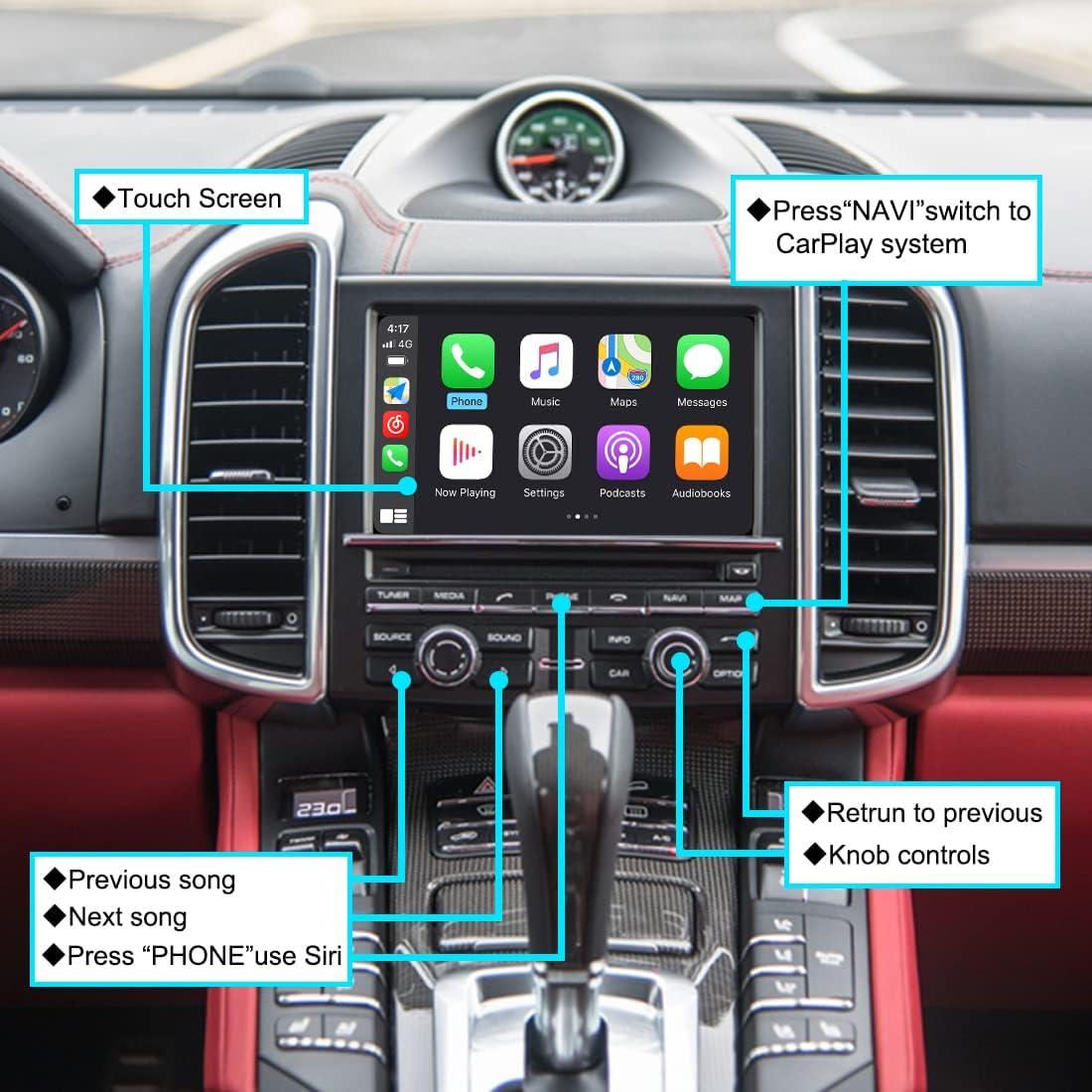
This detailed diagram highlights the interaction points on the Porsche PCM3.1 infotainment system for controlling the integrated CarPlay. It points out the 'Touch Screen' for direct interaction, the 'NAVI' button to switch to the CarPlay system, the 'PHONE' button to activate Siri, and the knob controls for navigation within the CarPlay interface, along with buttons for previous/next song and returning to the previous screen.
Switching to CarPlay/Android Auto:
- Press the "NAVI" button on your car's control panel to switch to the CarPlay or Android Auto system.
Sterowanie systemem:
- Ekran dotykowy: Interact directly with the CarPlay/Android Auto interface via the car's touch screen.
- Sterowanie pokrętłem: Use the original rotary knob to navigate through menus and select options within the CarPlay/Android Auto interface.
- Przyciski na kierownicy: Utilize your steering wheel controls for functions such as volume adjustment, track skipping (previous/next song), and answering/ending calls.
- Aktywacja Siri: Press the "PHONE" button on your control panel to activate Siri for voice commands.
6. Konserwacja
The JOYEAUTO CarPlay Retrofit Kit Decoder requires minimal maintenance. To ensure optimal performance and longevity:
- Utrzymuj urządzenie i połączenia w czystości, bez kurzu i zanieczyszczeń.
- Avoid exposing the unit to extreme temperatures or direct moisture.
- Sprawdź, czy wszystkie kable są solidnie podłączone i nie są ściśnięte lub naciągnięte.
7. Rozwiązywanie Problemów
If you encounter issues with your JOYEAUTO CarPlay Retrofit Kit, consider the following troubleshooting steps:
- Brak obrazu/czarny ekran: Verify all cable connections are secure. Ensure the "NAVI" button is pressed to switch to the CarPlay system.
- Brak dźwięku: Check the audio input settings on your car's original head unit. Ensure the volume is turned up on both your phone and the car system.
- Connectivity Issues (Wireless CarPlay/Wired Android Auto): For wireless CarPlay, ensure Bluetooth and Wi-Fi are enabled on your iPhone. For wired Android Auto, try a different USB cable and ensure your Android phone's USB debugging settings are correct if prompted.
- Brak reakcji elementów sterujących: Restart your car's ignition. If the issue persists, recheck the wiring connections to the decoder.
- System Freezing: Disconnect and reconnect your phone. If the system remains frozen, turn off your car's ignition, wait a few minutes, and restart.
If these steps do not resolve the issue, please contact JOYEAUTO customer support for further assistance.
8. Specyfikacje
| Atrybut | Wartość |
|---|---|
| Marka | JOYEAUTO |
| Model | WJPO-1 (PCM3.1) |
| Technologia łączności | Bluetooth, USB, Wi-Fi |
| Cechy specjalne | Android Auto, Apple CarPlay, wbudowany Bluetooth |
| Kompatybilne urządzenia | Smartfon, głośnik |
| Typ złącza | USB |
| Moc wyjściowa | 180 watów |
| Waga przedmiotu | 2.6 funta |
| Wymiary opakowania | 8.8 x 6.5 x 3.7 cala |
9. Gwarancja i wsparcie
The JOYEAUTO CarPlay Retrofit Kit Decoder comes with a 1-letnia gwarancja od daty zakupu. Niniejsza gwarancja obejmuje wady produkcyjne i zapewnia, że produkt działa zgodnie z przeznaczeniem przy normalnym użytkowaniu.
Obsługa klienta:
For any questions, technical assistance, or warranty claims, please contact the seller or JOYEAUTO customer support. Providing details such as your purchase date, order number, and a description of the issue will help expedite the support process.
It is recommended to test all features immediately after installation to ensure everything is working correctly before completing the full reassembly of your vehicle's interior.
Powiązane dokumenty - WJPO-1 (PCM3.1)
 |
ZZ2 IT3-PCM3.1A: Zaawansowana integracja CarPlay/Android Auto dla Porsche PCM3.1 Szczegółowy przewodnik instalacji i użytkowania modułu ZZ2 IT3-PCM3.1A, umożliwiającego zaawansowaną integrację Apple CarPlay i Android Auto w pojazdach Porsche wyposażonych w nawigację PCM3.1. Zawiera informacje o komponentach.view, kroki instalacji, opcje konfiguracji i rozwiązywanie problemów. |
 |
LEXXSON CarPlay Android Auto Upgrade User Manual for Chrysler 300 Series This user manual provides comprehensive instructions for the LEXXSON Screen Upgrade Decoder Box Interface, enabling wireless CarPlay and Android Auto functionality for Chrysler 300 Series vehicles (2011-2016). Learn about installation, setup, connection methods, and features like mirroring and USB video playback. |
 |
Ezonetronics Wireless CarPlay and Android Auto Retrofit Kit for Porsche PCM 3.1 - User Guide Comprehensive user guide for the Ezonetronics Wireless CarPlay and Android Auto retrofit kit designed for Porsche PCM 3.1 systems. This guide details functional statements, system compatibility, wireless connection methods for CarPlay, Android Auto, and screen mirroring, sound output options, reversing settings, kit contents, cable connections, and steering wheel control mapping. |
 |
ZZ2 IT3-PCM3: Advanced CarPlay/Android Auto Integration for Porsche PCM3.0 Vehicles Comprehensive guide for installing and configuring the ZZ2 IT3-PCM3 module to enable Apple CarPlay and Android Auto in Porsche vehicles equipped with PCM3.0 navigation. Covers component identification, car compatibility, detailed modification and installation procedures, audio playback options, connectivity setup, user interface navigation, system settings, and troubleshooting FAQs. |
 |
Porsche PCM3.1 User Manual and Installation Guide Comprehensive user manual and installation guide for the Porsche PCM3.1 system, covering features like CarPlay, Android Auto, AirPlay, Bluetooth, audio settings, and camera connections. |
 |
Moduł CARABC Wireless Carplay i Android Auto dla Porsche PCM3.1 – instrukcja obsługi Szczegółowa instrukcja obsługi modułu CARABC Wireless CarPlay i Android Auto kompatybilnego z systemami Porsche PCM3.1. Dowiedz się więcej o instalacji, funkcjach takich jak dublowanie ekranu i nośniki USB, specyfikacji systemu, obsłudze i rozwiązywaniu problemów. Zawiera wskazówki dotyczące korzystania z oryginalnych przycisków samochodowych i elementów sterujących na kierownicy. |
Ask a question about this manual
Ask about setup, troubleshooting, compatibility, parts, safety, or missing instructions. Manuals+ will review the question and use this page’s manual context to help answer it.