
1. Koniec produktuview
The ARPHA B25 is a dual-channel dash cam system designed to record both front and rear views of your vehicle. It features 5K resolution for the front camera and 1080P for the rear, ensuring clear video capture. Key functionalities include 5G WiFi for fast data transfer, Advanced Driving Assistant System (ADAS), built-in GPS for location and speed tracking, voice control for hands-free operation, Wide Dynamic Range (WDR) for enhanced night vision, a G-Sensor for emergency video locking, and 24-hour parking monitoring capabilities.

Figure 1: ARPHA B25 Dash Cam with accessories and app interface.
2. Co jest zawarte
Sprawdź, czy w przesyłce znajdują się wszystkie wymienione poniżej elementy:
- Jednostka kamery przedniej
- Tylna kamera
- Karta TF 64 GB (wstępnie zainstalowana lub osobna)
- Car Charger (12V adapter)
- Cable Clips / Pry Tool
- Podkładki samoprzylepne 3M
- Type-C Adapter Cable
- Kabel zasilający USB typu C (3.4 m/12 stóp)
- Folie elektrostatyczne
- Instrukcja obsługi

Figure 2: All components included in the ARPHA B25 Dash Cam package.
3. Konfiguracja i instalacja
3.1 Przygotowanie
- Czysta szyba przednia: Upewnij się, że obszar na przedniej szybie, w którym zostanie zamontowana kamera samochodowa, jest czysty i suchy.
- Zastosuj folię elektrostatyczną: Apply the provided electrostatic film to the desired mounting location on the windshield. This helps protect your windshield and makes removal easier.
- Włóż kartę SD: Insert the provided 64GB TF card into the dash cam's SD card slot. The device supports up to 256GB Class 10 U3 speed micro SD cards.
3.2 Montaż przedniej kamery
- Attach the front camera to the electrostatic film using the 3M adhesive pad on the camera mount. Position it centrally, ideally behind the rearview lustro, aby nie zasłaniać view.
- Ustaw obiektyw kamery tak, aby wyraźnie uchwycił drogę przed Tobą.
3.3 Podłączanie zasilania
- Connect the Type-C USB Power Cable to the dash cam's power input.
- Route the power cable along the edge of the windshield and dashboard, using the provided cable clips and pry tool to tuck it neatly out of sight.
- Podłącz ładowarkę samochodową do gniazda zasilania 12 V w pojeździe.
3.4 Instalowanie kamery cofania
- Connect the rear camera cable to the main front camera unit.
- Route the rear camera cable from the front unit to the rear window, tucking it along the vehicle's headliner and side panels.
- Attach the rear camera to the upper center of your rear window using its adhesive pad.

Rysunek 3: Zalecany sposób prowadzenia kabli w celu zapewnienia czystej instalacji.
4. Instrukcja obsługi
4.1 Włączanie/wyłączanie zasilania
Kamera samochodowa włączy się automatycznie i rozpocznie nagrywanie po włączeniu zapłonu pojazdu. Wyłączy się automatycznie po wyłączeniu zapłonu.
4.2 Tryby nagrywania
- Nagrywanie w pętli: The dash cam continuously records video in 1, 3, or 5-minute segments. When the SD card is full, the oldest unlocked footage zostanie automatycznie nadpisane.
- Emergency Lock Video (G-Sensor): In the event of a sudden impact or collision, the built-in G-Sensor will automatically detect the event and lock the current 1-minute video segment, preventing it from being overwritten.

Figure 4: Emergency Lock Video automatically saves critical footage podczas uderzeń.
4.3 Łączność Wi-Fi 5G
The dash cam features 5G WiFi for high-speed wireless connection to your smartphone. Download the ARPHA Vision aplikację ze sklepu z aplikacjami na Twoim urządzeniu.
- Włącz Bluetooth w swoim smartfonie.
- Open the ARPHA Vision app and follow the on-screen prompts to connect to the dash cam's WiFi network.
- Po połączeniu możesz view live video, playback recorded footage, pobierz filena swój telefon i udostępnij je.
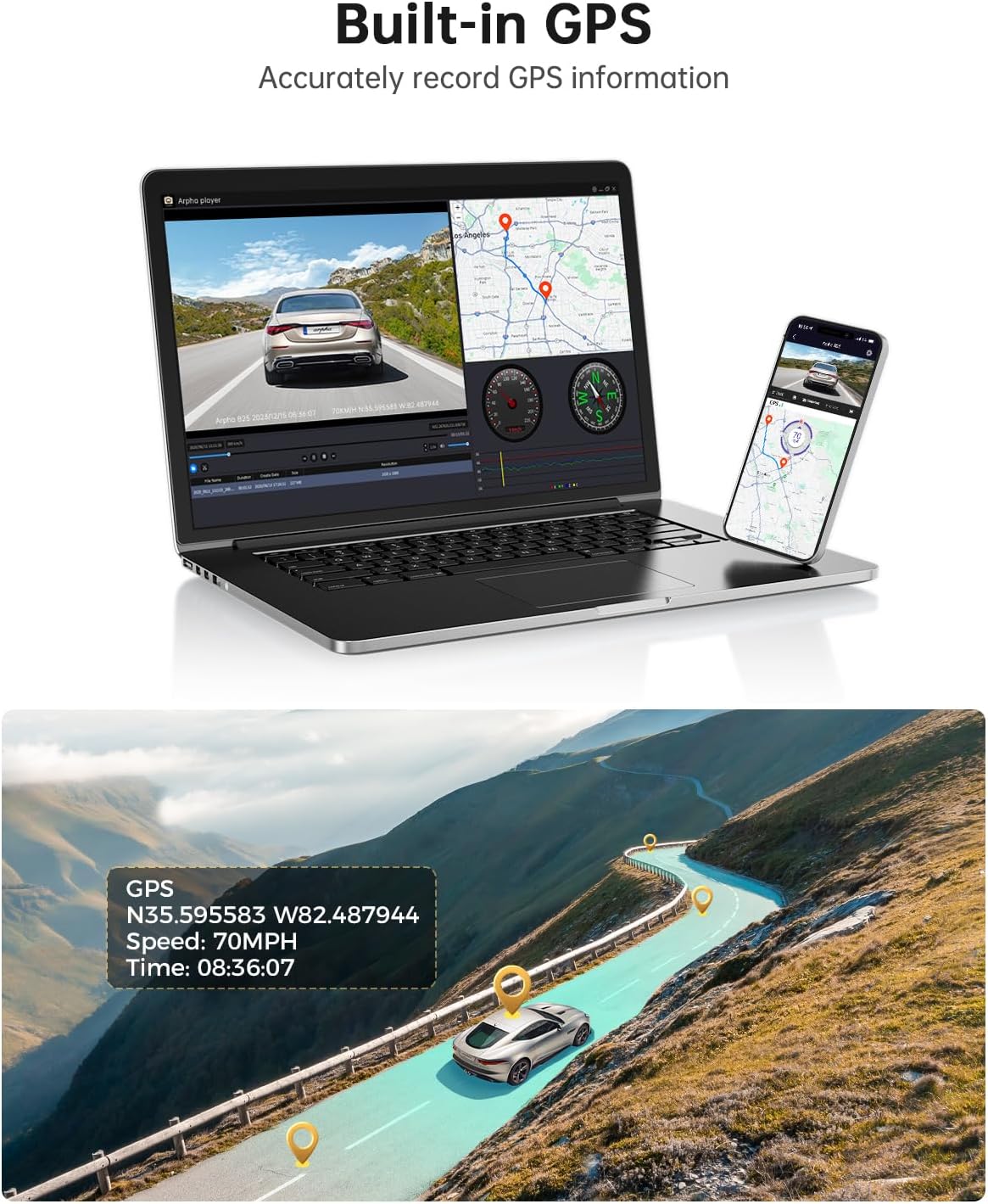
Figure 5: Connect to the ARPHA Vision app via 5G WiFi for seamless control and file kierownictwo.
4.4 Wbudowany GPS
The integrated GPS module accurately records your vehicle's driving route, speed, and coordinates. This data can be viewobok twojego filmu footage using the ARPHA GPS Player software on a computer or within the mobile app.

Figure 6: GPS data provides detailed route and speed information.
4.5 Sterowanie głosowe
Obsługuj kluczowe funkcje bez użycia rąk za pomocą komend głosowych. Obsługiwane polecenia obejmują:
- „Zablokuj wideo”
- „Zrób zdjęcie”
- „Otwórz nagranie”
- „Wyłącz nagrywanie”
Figure 7: Hands-free operation with voice control for safety and convenience.
4.6 WDR Ultrawyraźna wizja nocna
The Wide Dynamic Range (WDR) technology enhances video clarity in low-light conditions, ensuring that details are visible even at night or in tunnels.

Figure 8: WDR technology provides clear video recording in challenging lighting conditions.
4.7 Advanced Driving Assistant System (ADAS)
The ADAS feature provides real-time alerts to enhance driving safety:
- Lane Departure Reminder: Ostrzega Cię, gdy Twój pojazd zjeżdża z pasa ruchu.
- Vehicle Approaching Warning: Notifies you of vehicles approaching too closely.
- Ostrzeżenie o kolizji z pieszymi: Provides alerts for potential pedestrian collisions.
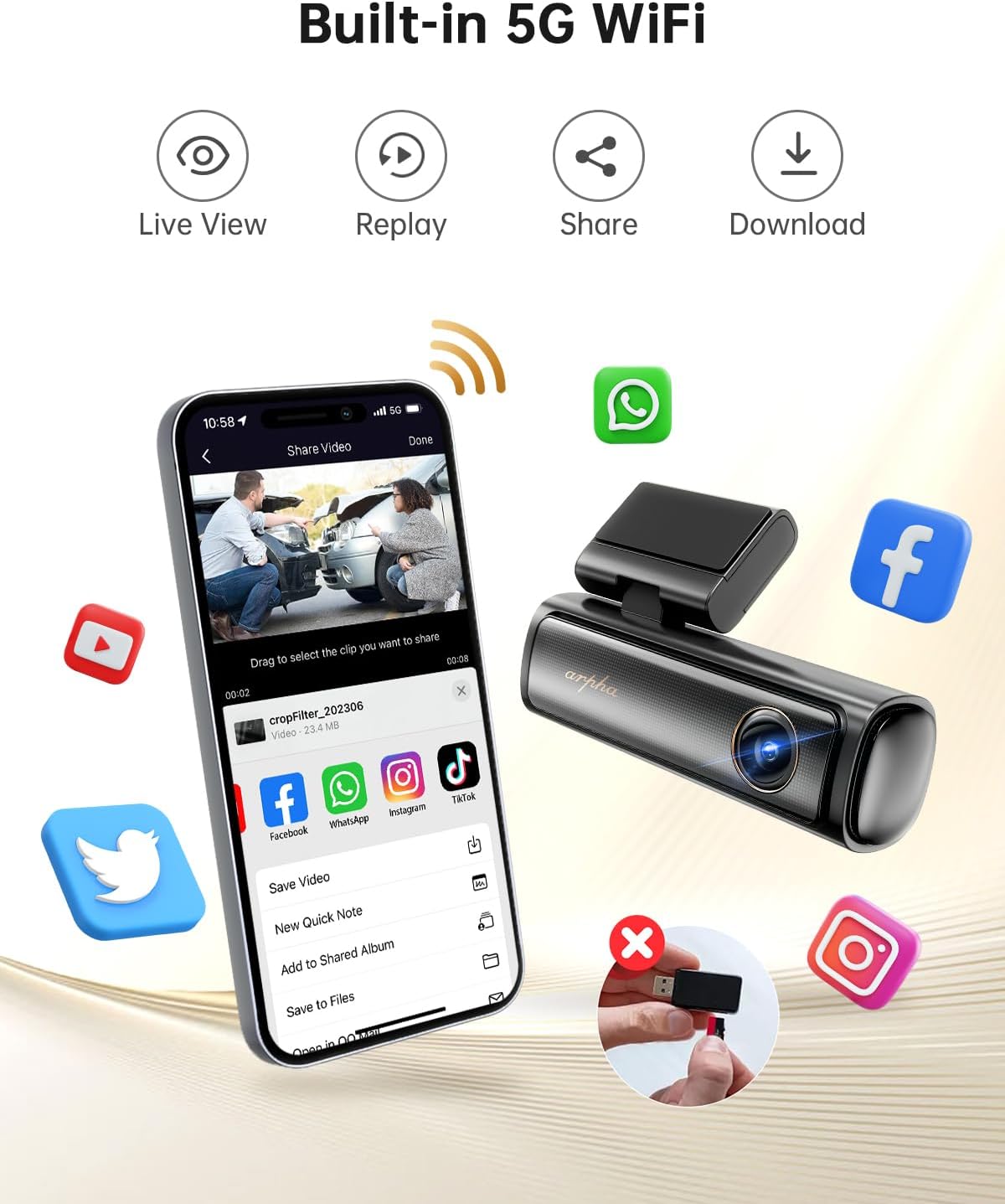
Figure 9: ADAS features assist in safer driving by providing timely warnings.
4.8 Monitor parkingowy 24-godzinny
To enable 24-hour parking monitoring, a 3-lead hardwire kit with an output current of 2.5A is required (search ASIN: BOBML1DK8W). This feature offers two modes:
- Tryb parkowania z wykrywaniem kolizji: The dash cam will automatically record if an impact is detected while parked.
- Tryb parkowania poklatkowego: Records continuously at 1 frame per second, compressing 24 hours of footagw krótkim filmie.

Figure 10: 24-Hour Parking Monitor provides continuous surveillance when the vehicle is off.
5. Konserwacja
- Zarządzanie kartami SD: Regularly format the SD card (at least once a month) to ensure optimal performance and prevent data corruption. Replace the SD card if it shows signs of wear or frequent errors.
- Czyszczenie soczewek: Keep the front and rear camera lenses clean using a soft, lint-free cloth to ensure clear video quality. Avoid abrasive materials that could scratch the lens.
- Połączenia kablowe: Periodically check all cable connections to ensure they are secure and free from damage. Loose connections can lead to intermittent power or recording issues.
- Zagadnienia dotyczące temperatury: The dash cam is designed to operate in temperatures from 4°F to 158°F (-20°C to 70°C) thanks to its supercapacitor. Avoid exposing the device to extreme temperatures outside this range for prolonged periods.
6. Rozwiązywanie Problemów
- Recording Stops Intermittently:
- Ensure your SD card is a Class 10 U3 speed or above. Lower speed cards may not keep up with the data rate.
- Format the SD card regularly within the dash cam's settings or via the app.
- The SD card may be faulty; try replacing it with a new, high-quality card.
- Problemy z połączeniem Wi-Fi:
- Confirm you have downloaded the correct app: ARPHA Vision.
- Ensure Bluetooth is enabled on your phone for initial pairing.
- Restart both the dash cam and your smartphone, then attempt to reconnect.
- Kamera nie włącza się:
- Check if the car charger is properly inserted into the 12V outlet and receiving power.
- Verify that the Type-C USB Power Cable is securely connected to both the dash cam and the car charger.
- Test the car charger with another device to ensure it is functional.
- Słaba jakość widzenia nocnego:
- Clean the camera lenses thoroughly.
- Ensure no obstructions (e.g., stickers, dirt) are blocking the lens.
- ADAS Features Not Functioning Correctly:
- Verify the front camera is mounted centrally and the lens is clean.
- Ensure the windshield area in front of the camera is clear of any obstructions or glare.
7. Specyfikacje
| Wymiary produktu | 6.3 x 5.51 x 2.36 cala |
| Waga przedmiotu | 1.6 funta |
| Numer modelu przedmiotu | B25 |
| Technologia łączności | Wi-Fi (5 G) |
| Cechy specjalne | App Control, Built-In GPS, Built-In Microphone, Built-In WiFi, Loop Recording, Parking Monitor, Voice Control |
| Rozmiar ekranu | 3 cali |
| Technologia czujnika optycznego | CMOS |
| Automatyczne położenie części | Przód |
| Typ wyświetlacza | LCD |
| Szybkość klatek | 30 klatek na sekundę |
8. Gwarancja i wsparcie
For warranty information, technical support, or any inquiries regarding your ARPHA B25 Dash Cam, please refer to the contact details provided in the original product packaging or visit the official ARPHA webZachowaj paragon jako dowód zakupu na wypadek reklamacji.