
PROSCAN PDVD7751
Instrukcja obsługi przenośnego odtwarzacza DVD Proscan PDVD7751 z dwoma ekranami i 7-calowym ekranem
Model: PDVD7751
Wstęp
This manual provides essential information for the safe and efficient operation of your Proscan PDVD7751 7" Dual Screen Portable DVD Player. Please read this manual thoroughly before using the device and retain it for future reference.
The Proscan PDVD7751 is designed to provide portable entertainment with its dual 7-inch widescreen color LCD displays. It is suitable for various environments, including family road trips and general on-the-go use. The player supports multiple media formats and offers flexible power options for convenience.
Zawartość opakowania
Sprawdź, czy w przesyłce znajdują się wszystkie elementy wymienione poniżej:
- Main Unit Proscan 7" Dual Screen Portable DVD Player
- Second Display Screen Unit
- Zasilacz sieciowy AC
- Zasilacz samochodowy prądu stałego
- 2x Headrest Mounting Straps
- 1x Video Connection Cable (for connecting both displays)
- Podręcznik użytkownika (ten dokument)

Image: All components included in the Proscan PDVD7751 package, laid out on a surface.
Organizować coś
1. Włączanie urządzenia
The unit can be powered using either the included AC wall adapter for home use or the DC car adapter for in-vehicle use.
- Zasilanie prądem zmiennym: Connect the AC wall adapter to the DC IN port on the main unit and plug it into a standard wall outlet.
- Moc samochodu: Connect the DC car adapter to the DC IN port on the main unit and plug it into your vehicle's cigarette lighter socket.
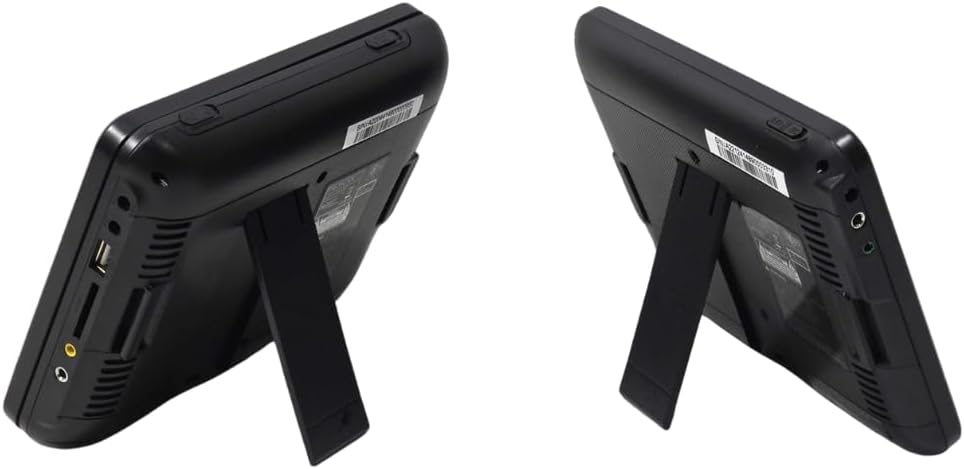
Image: Close-up of the side panel of the main DVD player unit, highlighting the power input and other ports.
2. Connecting the Dual Screens
To utilize both screens, connect the video connection cable from the main unit to the second display screen unit.
- Locate the AV OUT port on the main DVD player unit.
- Connect one end of the video connection cable to the AV OUT port.
- Locate the AV IN port on the second display screen unit.
- Connect the other end of the video connection cable to the AV IN port on the second display.
3. Headrest Installation (Optional)
The included headrest mounting straps allow for easy installation in a vehicle.
- Securely attach one mounting strap to the back of each screen unit.
- Wrap the straps around the vehicle's headrests and fasten them to hold the screens in place.
- Adjust the straps to ensure the screens are stable and at an optimal viewkąt.

Image: Two Proscan screens securely attached to the back of car headrests using the provided straps.
Instrukcja obsługi
1. Wkładanie płyty
- Open the disc cover on the main DVD player unit.
- Ostrożnie umieść płytę DVD lub CD na wrzecionie etykietą do góry.
- Zamknij pokrywę płyty, aż zatrzaśnie się na swoim miejscu.
2. Odtwarzanie multimediów
- Turn on the main unit using the power switch. The screen will display the Proscan logo.
- The player will automatically detect the disc and begin playback.
- Use the control buttons on the unit or the remote control to manage playback (Play/Pause, Stop, Skip, Volume).

Image: The main DVD player unit with a movie playing on its 7-inch screen.
3. Using USB and SD Card
The player supports media playback from USB drives and SD cards.
- Insert a USB drive into the USB port or an SD card into the SD card slot on the side of the main unit.
- Use the 'Mode' button on the unit or remote to select the appropriate input source (USB or SD).
- Poruszaj się po swoich mediach files using the control buttons and select the desired file do odtwarzania.

Image: Close-up of the side panel of the main DVD player unit, showing the USB port and SD card slot.
4. Zgodność z mediami
The Proscan PDVD7751 supports a wide range of media formats:
- Formaty DVD: DVD, DVD±R/RW, VCD
- CD Formats: CD, CD-R/RW
- Formaty audio: MP3
Konserwacja
- Czyszczenie: Use a soft, dry cloth to clean the screen and exterior of the unit. Do not use liquid cleaners or abrasive materials.
- Pielęgnacja dysków: Trzymaj płyty za krawędzie, aby uniknąć odcisków palców i zarysowań. Przechowuj płyty w pudełkach, gdy ich nie używasz.
- Składowanie: Jeśli odtwarzacz nie będzie używany przez dłuższy czas, należy przechowywać go w chłodnym, suchym miejscu, z dala od bezpośredniego światła słonecznego i ekstremalnych temperatur.
Rozwiązywanie problemów
| Problem | Możliwa przyczyna | Rozwiązanie |
|---|---|---|
| Brak zasilania | Zasilacz nie jest podłączony lub jest uszkodzony. | Ensure the AC/DC adapter is securely connected to the unit and a working power source. Check the power outlet. |
| Płyta nie jest odtwarzana / błąd „Brak płyty” | Disc is dirty, scratched, or inserted incorrectly. Protective tag nie usunięto. | Clean the disc with a soft cloth. Reinsert the disc with the label side up. Ensure the yellow protective tag from the disc tray is removed before first use. |
| No picture on second screen | Video connection cable is loose or faulty. | Check that the video connection cable is securely plugged into both the main unit's AV OUT and the second screen's AV IN ports. |
| Brak dźwięku | Głośność jest zbyt niska lub wyciszona. | Increase the volume using the VOL+ button or check if the unit is muted. |
Specyfikacje
- Marka: PROSKAN
- Numer modelu: PDVD7751
- Rozmiar ekranu: Podwójny 7 cala
- Typ wyświetlacza: LCD
- Kolor: Czarny
- Waga przedmiotu: Około 2 funtów
- Media Type Support: SD Card, USB, DVD, DVD±R/RW, CD, CD-R/RW, VCD, MP3
Gwarancja i wsparcie
For warranty information or technical support, please refer to the contact details provided with your purchase documentation or visit the official Proscan webstrona.
Filmy o produktach
FANGOR Car DVD Player - Make Kids Love Road Trips
Video: An official seller video demonstrating the FANGOR car DVD player, highlighting its use for entertaining children during road trips. This video showcases the dual screen setup and ease of use in a vehicle environment.
OTIC 10.1" Dual Screen DVD Player
Wideo: Oficjalny film sprzedawcyasing the OTIC 10.1" Dual Screen DVD Player. This short video demonstrates the product's features and how it can be used to provide entertainment on the go.
Ask a question about this manual
Ask about setup, troubleshooting, compatibility, parts, safety, or missing instructions. Manuals+ will review the question and use this page’s manual context to help answer it.