
MOUNT PRO B0CHF3PC58
MOUNT PRO Triple Monitor Mount User Manual
Model: B0CHF3PC58
1. Wprowadzenie
This manual provides detailed instructions for the installation, operation, and maintenance of your MOUNT PRO Triple Monitor Mount. Please read this manual thoroughly before installation to ensure correct setup and safe usage. Keep this manual for future reference.
2. Informacje dotyczące bezpieczeństwa
Ważne instrukcje bezpieczeństwa:
- Ensure your desk surface is stable and capable of supporting the combined weight of the mount and all monitors.
- Nie należy przekraczać maksymalnego udźwigu 17.6 funtów (8 kg) na ramię.
- Use only the provided hardware. If any parts are missing or damaged, contact MOUNT PRO customer service.
- Nieprawidłowa instalacja może spowodować uszkodzenie mienia lub obrażenia ciała.
- Adjust gas spring tension carefully. Refer to the adjustment section for proper procedure.
3. Zawartość opakowania
Verify that all components are present before beginning installation. While a complete list is not provided, typical components include:
- Main Pole and Base (C-Clamp and Grommet options)
- Monitor Arms (Gas Spring Arms)
- Płyty VESA
- Klipsy do zarządzania kablami
- Zestaw narzędzi (śruby, podkładki, klucze imbusowe)

Image: Typical package contents for the MOUNT PRO Triple Monitor Mount.
4. Konfiguracja i instalacja
The MOUNT PRO Triple Monitor Mount offers two installation methods: C-Clamp and Grommet mounting. Choose the method suitable for your desk.
4.1. Choose Mounting Method

Image: Illustration of C-Clamp i opcje montażu przelotek.
- C-Clamp Montowanie: Fits desks with a thickness of 0.39" - 3.15" (10mm - 80mm).
- Montaż przelotki: Fits desks with a thickness of 0.39" - 1.97" (10mm - 50mm) and requires an existing hole in the desk.
4.2. Base Assembly (C-Clamp)
- Attach the L-plate to the bottom of the pole base using the provided screws.
- Zabezpiecz C-clamp to the L-plate.
- Place the assembled base onto your desk and tighten the C-clamp aby zabezpieczyć go solidnie.
Video: Step-by-step guide on how to install the MOUNT PRO Triple Monitor Mount, including base assembly.
4.3. Base Assembly (Grommet)
- If using grommet mounting, detach the bolt from the C-clamp montaż.
- Insert the grommet bolt through the desk hole and secure it from underneath with the washer and nut.
- Attach the pole base to the grommet bolt.
4.4. Montaż na słupie
- Connect the upper and lower sections of the pole and secure them with the provided screw.
- Slide the pole onto the mounted base and tighten the securing screw.
4.5. Arm and VESA Plate Installation
- Slide the cable clips and fixators onto the pole at desired heights.
- Attach the monitor arms to the pole, securing them with the fixators.
- Attach the VESA plates to the back of your monitors using the appropriate screws. Ensure the screws are tightened securely.
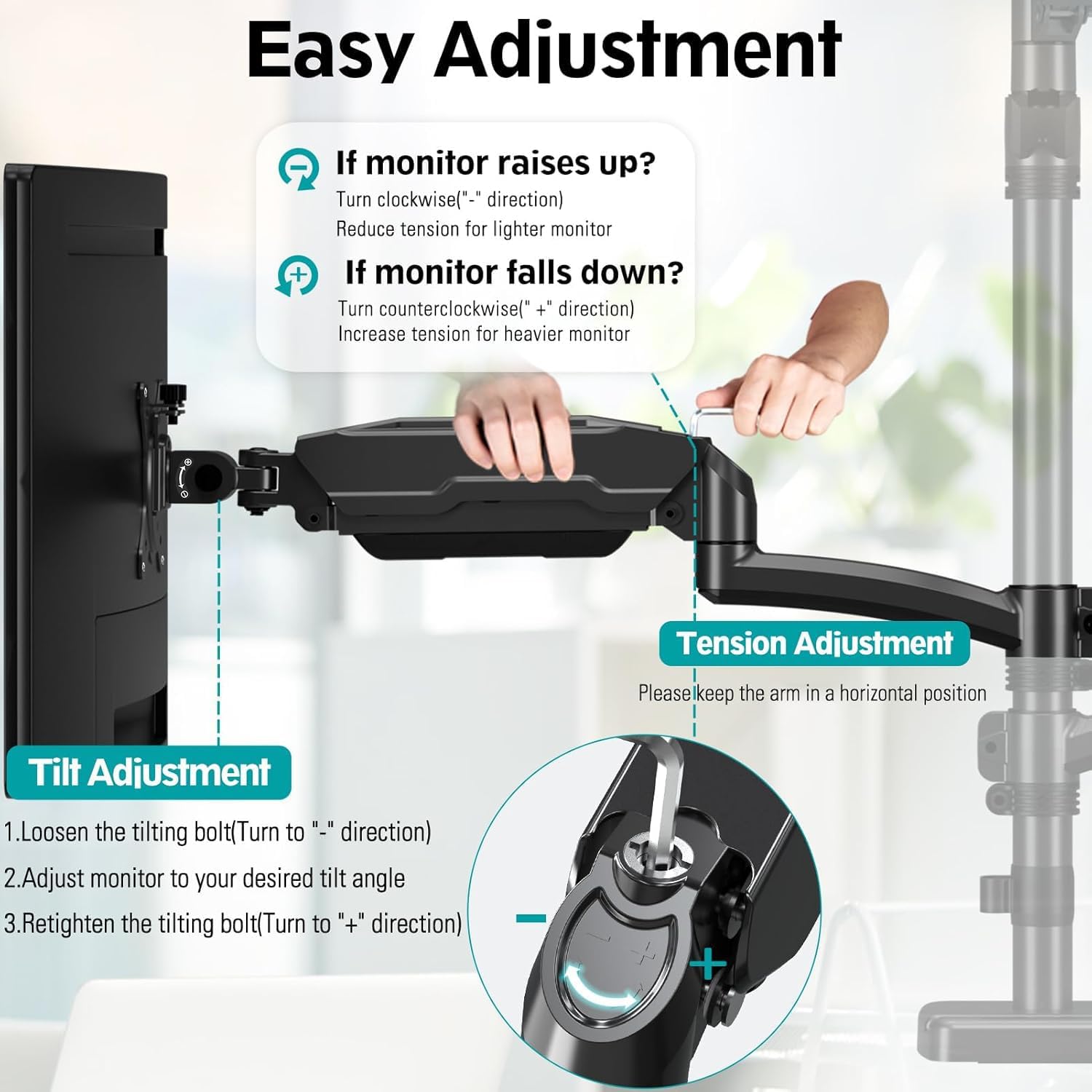
Image: Attaching the VESA plate to the back of a monitor.
4.6. Attaching Monitors
- Carefully slide each monitor (with VESA plate attached) onto the head of its respective arm.
- Zabezpiecz monitor na ramieniu, dokręcając śrubę blokującą na głowicy VESA.
5. Obsługa i regulacje
The MOUNT PRO Triple Monitor Mount offers extensive adjustability for optimal viewkomfort.
5.1. Regulacja napięcia sprężyny gazowej
The gas spring arms allow for smooth height adjustments. Adjust the tension based on your monitor's weight.
- Jeśli monitor raises up, turn the tension screw counter-clockwise ("-" direction) to reduce tension for a lighter monitor.
- Jeśli monitor falls down, turn the tension screw clockwise ("+" direction) to increase tension for a heavier monitor.
- Keep the arm in a horizontal position during adjustment.

Image: Instructions for adjusting gas spring tension.
5.2. Tilt, Swivel, and Rotation
- Przechylenie: Adjust your screen from +90° to -90° for vertical angle. Loosen the tilting bolt, adjust, then retighten.
- Obracać: Swivel the monitor 180° for horizontal angle adjustment.
- Obrót: Obróć monitor o 360°, aby przełączać się między orientacją poziomą i pionową.

Image: Visual representation of tilt, swivel, and rotation adjustments.
Video: Demonstration of the MOUNT PRO Triple Monitor Mount's full motion capabilities.
5.3. Zarządzanie kablami
Wykorzystaj zintegrowany system zarządzania kablami, aby utrzymać porządek w miejscu pracy.
- Route monitor cables through the cable clips on the arms and along the main pole.
- Secure the cable covers on the arms to conceal the cables.
6. Konserwacja
Regularna konserwacja zapewnia długowieczność i bezpieczne działanie uchwytu monitora.
- Czyszczenie: Przetrzyj uchwyt miękką ściereczką.amp płótno. Unikaj ściernych środków czyszczących.
- Kontrole okresowe: Okresowo sprawdzaj wszystkie śruby i połączenia, aby upewnić się, że są dobrze dokręcone i zabezpieczone. W razie potrzeby dokręć je ponownie.
- Sprężyna gazowa: If monitors feel loose or too stiff, re-adjust the gas spring tension as described in Section 5.1.
7. Rozwiązywanie Problemów
Jeśli napotkasz problemy, zapoznaj się z poniższymi typowymi problemami i rozwiązaniami:
- Monitor sags or does not hold position:
- The gas spring tension may be too low for the monitor's weight. Increase tension by turning the screw clockwise ("+" direction).
- Ensure all VESA plate screws and arm connections are securely tightened.
- Monitor is too stiff to move:
- The gas spring tension may be too high. Decrease tension by turning the screw counter-clockwise ("-" direction).
- Góra wydaje się niestabilna:
- Upewnij się, że C-clamp or grommet base is securely fastened to the desk.
- Verify that the main pole is firmly attached to the base.
- Check that the combined weight of your monitors does not exceed the mount's capacity.
8. Specyfikacje
| Funkcja | Specyfikacja |
|---|---|
| Marka | MONTAŻ PRO |
| Model | B0CHF3PC58 |
| Kompatybilność z rozmiarem ekranu | Max 32" (not compatible with 1000R curved screens) |
| Nośność na ramię | Do 17.6 funtów (8 kg) |
| Zgodność ze standardem VESA | 75x75mm, 100x100mm |
| Typ montażu | C-Clamp (0.39"-3.15" desk thickness), Grommet (0.39"-1.97" desk thickness) |
| Typ ruchu | Obrót, przechylanie, przechylanie, przegubowe |
| Maximum Arm Height | 36.3 inches (from desk surface) |
| Przedłużenie ramienia | Do 18.1 cali |
| Tworzywo | Aluminium |
| Kolor | Czarny |
9. Gwarancja i wsparcie
For warranty information or technical support, please refer to the MOUNT PRO official webOdwiedź stronę internetową lub skontaktuj się bezpośrednio z działem obsługi klienta. Zachowaj paragon zakupu na wypadek reklamacji.
Ask a question about this manual
Ask about setup, troubleshooting, compatibility, parts, safety, or missing instructions. Manuals+ will review the question and use this page’s manual context to help answer it.