
1. Koniec produktuview
The Espelho Automatic Cat Feeder is a smart pet feeding solution designed to provide timely and portion-controlled meals for your cat or small to medium-sized dog. Featuring WiFi connectivity and app control, it ensures your pet is fed consistently, even when you are away. Its innovative design includes an anti-clogging system and dual power supply for reliable operation.

Image 1.1: Espelho Automatic Cat Feeder and its accompanying mobile application interface.
Główne cechy
- WIFI Smart Control Feeding: Set feeding times and portions via a dedicated smartphone app, allowing real-time monitoring and adjustment of your pet's diet.
- Anti-Clogging Convenience: Features an innovative anti-clogging system with a 45-degree exit angle to ensure smooth kibble flow and prevent blockages. The secure top cover maintains food freshness and prevents pet access.
- Removable for Cleaning: Designed for easy disassembly, allowing for thorough cleaning and maintenance of a hygienic feeding environment.
- Spersonalizowane zaproszenie na posiłek: Includes a 10-second voice recording function to call your pet for meals with a familiar sound.
- Podwójna moc: Operates via AC power or 3 x D batteries (not included) as a backup, ensuring uninterrupted feeding during power outagt.j.
- Durable Nylon Cord: The power cord is built to resist biting or chewing, enhancing product longevity and safety.
2. Przewodnik konfiguracji
2.1 Podłączenie zasilania
The feeder supports dual power options: AC adapter or D-cell batteries. For continuous operation, it is recommended to use the AC adapter and install batteries as a backup.

Image 2.1: Dual power supply options for the feeder, showing AC adapter and battery compartment.
To install batteries, open the battery compartment at the bottom of the feeder and insert three D-cell batteries, ensuring correct polarity. Close the compartment securely.
2.2 App Installation and Device Connection
To utilize the smart features of your Espelho feeder, download and connect the device to the 'Smart Life' application.
- Download 'Smart Life' App: Zeskanuj poniższy kod QR lub odwiedź smartapp.tuya.com/smartlife to download the app. Register and log in.
- Configure the Device: Connect the feeder to a power source. Wait for the third LED indicator to be in fast flashing mode, indicating WiFi Pairing Mode.
- Włącz Bluetooth i Wi-Fi: Turn on your phone's Bluetooth and WiFi. Ensure you are connected to a 2.4GHz WiFi network.
- Add the Device in App: Open the 'Smart Life' app, click the '+' icon on the top right corner to add a new device. Select 'DU4LB-WS-01 WiFi Feeder' or similar.
- Połącz się z siecią: Enter your 2.4GHz WiFi password and proceed with the connection.
- Wait for Successful Addition: The app will confirm once the device is successfully added. You can then set up your feeding plan.


3. Instrukcja obsługi
3.1 Setting Up Feeding Schedules
The app allows for precise control over your pet's feeding schedule, including meal times and portion sizes.

Within the app, navigate to the 'Meal Plan' section. You can set up to 10 meals per day, with 1 to 20 portions per meal (approximately 8g per portion). Adjust the time and number of portions for each scheduled feeding.
3.2 Karmienie ręczne
To dispense food immediately, use the 'Feed Now' option in the app. You can select the number of portions to dispense instantly.
3.3 Spersonalizowane nagrywanie głosu
Record a 10-second voice message that will play at each scheduled feeding time to call your pet.

Image 3.1: The feeder's voice recording feature in use.
4. Konserwacja i czyszczenie
4.1 Demontaż w celu czyszczenia
Regular cleaning is essential for your pet's health and the feeder's longevity. The food tank and bowl are detachable for easy cleaning.

Image 4.1: Detachable components of the feeder for cleaning. Note: Do not wash the base unit.
Hand wash the food tank and stainless steel bowl with mild soap and water. Ensure all parts are completely dry before reassembling.
4.2 Recommended Kibble Size and Types
For optimal performance and to prevent clogging, use kibble within the recommended size range.


Image 4.2: Recommended kibble sizes (2-12mm) and suitable food types.
Przypomnienie: Do not use any kibble over 12mm, as it may get stuck inside the feeder and fail to feed your pet.
4.3 Wymiana worka pochłaniającego wilgoć
The feeder includes a desiccant bag to keep pet food dry and fresh, and to prevent moisture buildup. Replace the desiccant bag periodically to maintain effectiveness.

Image 4.3: Location of the pet food desiccant bag in the feeder lid.
5. Rozwiązywanie Problemów
Aby zapoznać się z najczęstszymi problemami i ich rozwiązaniami, zapoznaj się z poniższą tabelą.
| Wydanie | Możliwa przyczyna | Rozwiązanie |
|---|---|---|
| Food Clogging / Not Dispensing | Kibble size too large; moisture in food; feeder mechanism obstruction. | Ensure kibble is 2-12mm. Check and clean the dispensing mechanism. Replace desiccant bag. |
| Problemy z łącznością aplikacji | Incorrect WiFi password; not connected to 2.4GHz WiFi; feeder not in pairing mode. | Verify WiFi password. Connect phone to 2.4GHz network. Reset feeder to pairing mode (fast flashing LED). |
| Feeder Not Dispensing (Scheduled) | Power interruption; low battery; incorrect schedule settings in app. | Check AC power connection. Replace D-cell batteries. Verify meal plan and portion settings in the app. |
| Pet Accessing Food Manually | Feeder unstable; lid not securely closed. | Ensure feeder is placed on a stable, flat surface. Securely close the top lid to prevent pet access. |
| Voice Recording Not Playing | Recording error; volume too low. | Re-record the voice message in the app. Check app settings for volume control. |
6. Specyfikacje
Detailed technical specifications for the Espelho Automatic Cat Feeder.
| Specyfikacja | Wartość |
|---|---|
| Nazwa modelu | Automatic pet feeder for cats and dogs |
| Numer modelu przedmiotu | karmnik dla zwierząt |
| Nazwa marki | Szlachetny |
| Pojemność | 3 litrów |
| Tworzywo | Akrylonitryl Butadienowo-styrenowy |
| Kolor | Czarny |
| Wymiary produktu (DxSxW) | 7.5 x 5.5 x 5.5 cala |
| Waga przedmiotu | 3.67 funta |
| Zasilacz | AC Adapter, 3 x D Batteries (not included) |
| Gatunki docelowe | Cat, Dog, Small Animals |
| Zalecana wielkość krokietów | 2-12 mm |
| Instrukcje pielęgnacji | Tylko pranie ręczne (części zdejmowane) |
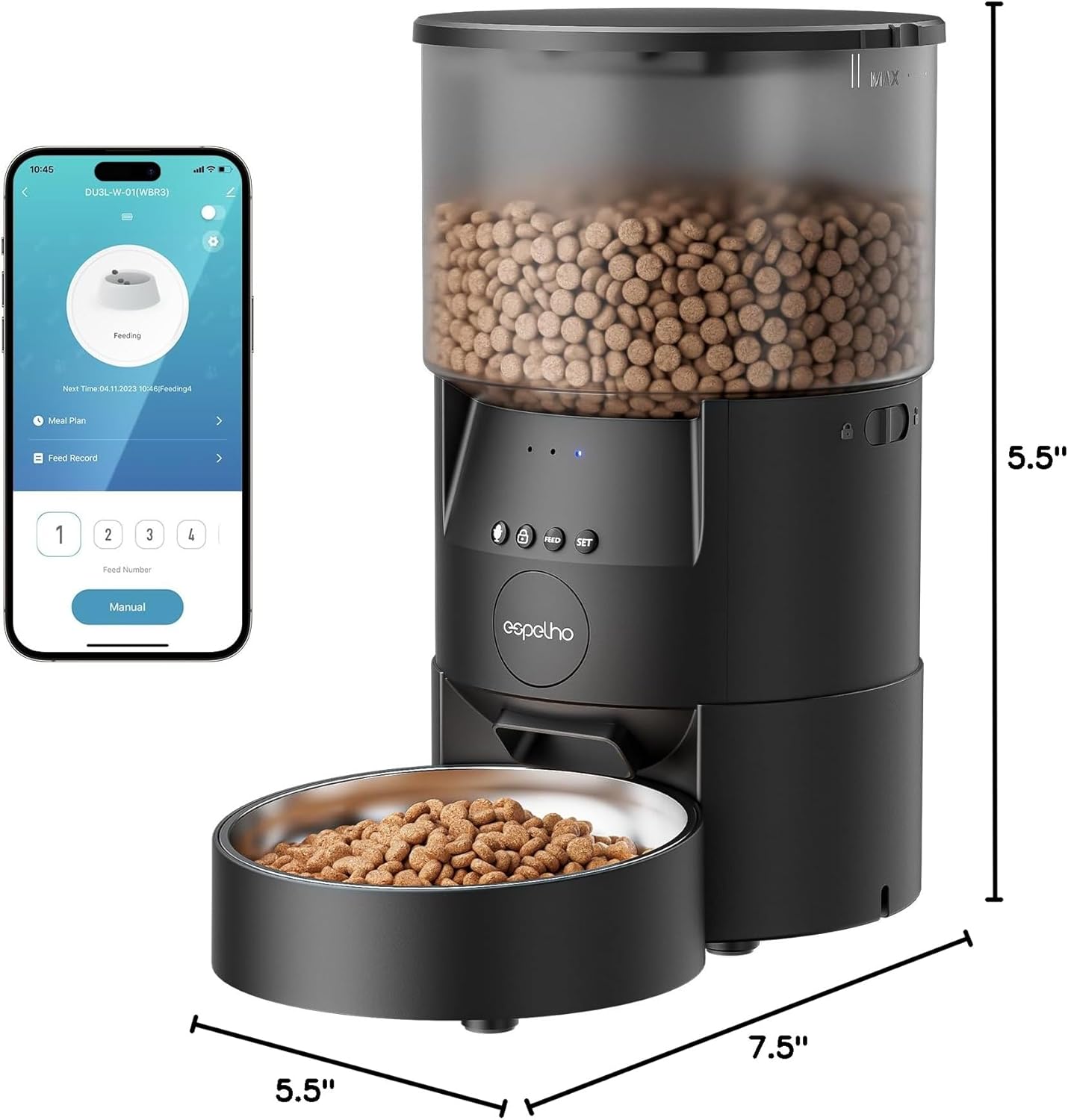
Image 6.1: Product dimensions of the Espelho Automatic Cat Feeder.
7. Gwarancja i wsparcie
7.1 Informacje o gwarancji
The Espelho Automatic Cat Feeder comes with a 1-year warranty from the date of purchase. This warranty covers manufacturing defects and malfunctions under normal use conditions.

Image 7.1: Warranty and customer service details.
7.2 Obsługa klienta
For any questions, technical assistance, or warranty claims, please contact Espelho customer service. We offer 24-hour customer service to assist you.
Visit the official Espelho Store for more information and support: Espelho Store on Amazon.