
PONNOR AL929
PONNOR AL929 Money Counter Machine User Manual
Model: AL929
1. Wprowadzenie
This manual provides detailed instructions for the safe and efficient operation of your PONNOR AL929 Money Counter Machine. The AL929 is designed for mixed denomination counting, serial number reading, and multi-currency counterfeit detection, suitable for various business environments.
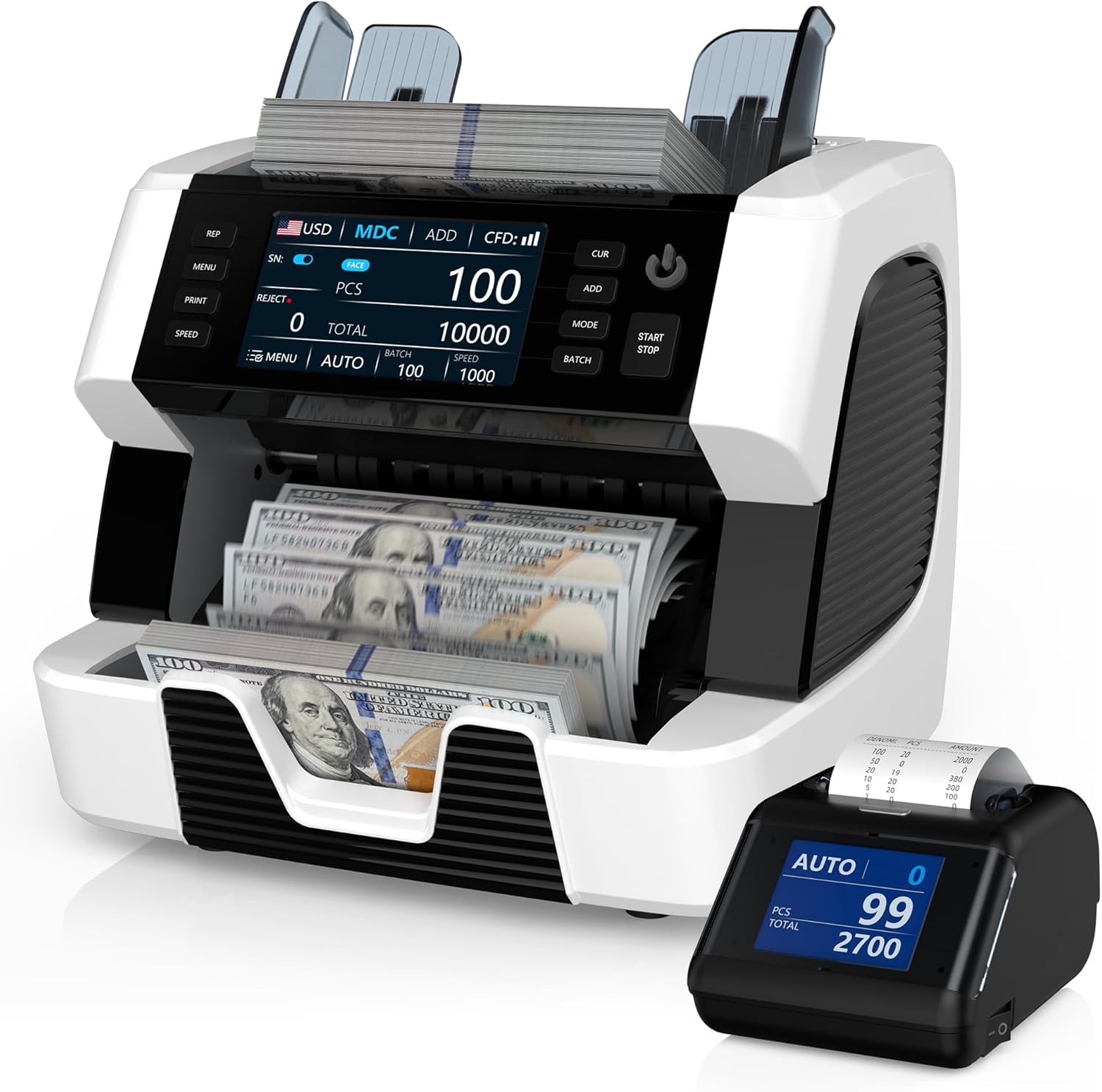
Figure 1: PONNOR AL929 Money Counter Machine with external display and counted bills.
2. Zawartość opakowania
Sprawdź, czy w opakowaniu znajdują się wszystkie elementy:
- PONNOR AL929 Banknote Counter
- Wyświetlacz zewnętrzny
- Kabel zasilający
- External Monitor Data Cable
- Instrukcja obsługi
- Nylonowa szczotka do czyszczenia
- Papier kalibracyjny CIS
- Bezpiecznik
- Miękka ściereczka do czyszczenia

Figure 2: Package contents of the PONNOR AL929 Money Counter Machine.
3. Konfiguracja
3.1 Początkowe rozmieszczenie i podłączenie zasilania
- Umieść maszynę na stabilnej, płaskiej powierzchni.
- Connect the power cable to the machine's power socket and then to a suitable power outlet.
- Turn on the machine using the power switch located on the rear panel.
3.2 Connecting the External Display and Printer
- Wyświetlacz zewnętrzny: Connect the external monitor data cable from the machine's "External Display Port" to the external display unit.
- Drukarka: Connect the data cable from the machine's "RS232 Printer Port" to the external thermal printer. Ensure the printer has a paper roll installed.

Figure 3: Rear panel connections for power, external display, and printer.
4. Działanie
The AL929 features a 4.5-inch touch screen and button keypad for intuitive control.

Rysunek 4: Panel sterowaniaview with key functions labeled.
4.1 Basic Counting Modes
- AUTO/MANUAL Counting: Select the desired mode on the control panel. In AUTO mode, counting begins automatically when bills are placed in the hopper.
- Mixed Denomination Counting (MDC): This mode counts mixed bills and provides a total value, quantity, and value breakdown by denomination.
- Funkcja DODAJ: Accumulates the count of multiple batches.
- BATCH Function: Counts bills into preset batches (e.g., 100 bills).
- Regulacja prędkości: Adjust the counting speed (e.g., 800-1200 pieces/min) as needed.
4.2 Multi-Currency Support
The AL929 supports over 120 currencies. The default recognizable currencies include USD, EUR, GBP, CAD, and MXN. For other currencies, contact support to obtain the necessary update files.

Figure 5: Multi-currency and mixed denomination counting display.
4.3 Serial Number Reading
The machine can read and record serial numbers of counted bills. This feature is accessible via the control panel.
4.4 Wykrywanie podróbek
The AL929 is equipped with multiple detection methods for bank-level anti-counterfeiting:
- UV (Ultraviolet Detection): Wykrywa oznaki UV na banknotach.
- MG (Magnetic Ink Detection): Checks for magnetic ink patterns.
- IR (Infrared Sensor): Verifies infrared security features.
- 2CIS (Contact Image Sensor): Provides image recognition for detailed analysis.
- NT (Note Thickness) & SN (Serial Number) Recognition: Additional security checks.
If a counterfeit note is detected, the machine will issue a red warning and an audible alert.

Figure 6: Bank-grade counterfeit detection features.
4.5 Printing Results
After connecting the external printer, press the 'PRINT' button on the machine to generate a detailed report. The report includes currency type, total amount, serial numbers, and the number of notes counted.

Figure 7: External thermal printer in operation, showing a sampwydruk pliku.
5. Konserwacja
5.1 Czyszczenie maszyny
Regular cleaning ensures optimal performance and longevity.
- CIS Sensors: Open the back cover and use the provided nylon brush or soft cleaning cloth to gently clean the CIS sensors.
- General Dust: Use the nylon brush or soft cleaning cloth to remove dust from the hopper, stacker, and other accessible areas.
5.2 Adjusting Feeding Gap
If bills are jamming frequently or feeding improperly, the feeding gap may need adjustment. Locate the adjustable screw and turn it slightly to optimize the gap. Refer to the manual for precise adjustment instructions.

Rysunek 8: Wewnętrzne view highlighting the banknote processing wheel and adjustable screw.
6. Rozwiązywanie Problemów
| Problem | Możliwa przyczyna | Rozwiązanie |
|---|---|---|
| Red warning/Audible alert | Counterfeit, half bills, or very worn bills detected. Incorrect function setting (e.g., FACE/ORI, ADD, BATCH, SN). Counting mode error (MDC mode only effective for multi-currency). | Remove the suspect note from the stacker. Check and adjust function settings. Refer to the manual for specific mode requirements. Press RESTART to continue. |
| Billa Jamminga | Bills are wrinkled or damaged. Feeding gap is too tight or too loose. CIS sensors are dirty. | Remove the jammed bill. Adjust the feeding gap using the adjustable screw. Clean the CIS sensors as described in the Maintenance section. |
| Cannot count specific currency | Currency not pre-installed or firmware is outdated. | Contact PONNOR support to obtain the necessary currency installation packages and update the machine via the USB port. |
7. Specyfikacje
- Model: AL929
- Wymiary: 7.1 x 13.1 x 11.4 cala
- Waga przedmiotu: 19.05 funta
- Prędkość liczenia: 800-1200 pieces/min
- Metody wykrywania: 2CIS, UV, MG, IR, NT, SN
- Wsparcie walutowe: 120+ currencies (default: USD, EUR, GBP, CAD, MXN)
- Wyświetlacz: 4.5-calowy ekran dotykowy
- Łączność: USB for updates, RS232 for printer, External Display Port
8. Gwarancja i wsparcie
PONNOR is committed to providing high-quality products and customer satisfaction. For warranty information, technical support, or currency updates, please contact PONNOR customer service. We provide more than 120 currencies for you to update; you can contact us to get the file.
Informacje kontaktowe: Refer to the contact details provided on the official PONNOR webwitryny lub dokumentacji zakupu.
Powiązane dokumenty - AL929
 |
Instrukcja obsługi licznika banknotów MUNBYN IMC01 Instrukcja obsługi liczarki banknotów MUNBYN IMC01, szczegółowo opisująca jej funkcje, obsługę, instalację, konserwację i specyfikację techniczną. Dowiedz się, jak skutecznie liczyć i zarządzać banknotami za pomocą tego zaawansowanego urządzenia. |
 |
Instrukcja obsługi licznika banknotów MUNBYN IMC01 Instrukcja obsługi liczarki banknotów MUNBYN IMC01, szczegółowo opisująca jej funkcje, obsługę, instalację, konserwację i dane techniczne. Dowiedz się, jak liczyć banknoty, korzystać z różnych trybów i rozwiązywać typowe problemy. |
 |
Instrukcja obsługi liczarki pieniędzy DETECK DT600C: obsługa, funkcje i rozwiązywanie problemów Kompleksowa instrukcja obsługi liczarki pieniędzy DETECK DT600C. Dowiedz się więcej o jej funkcjach, trybach pracy, wykrywaniu falsyfikatów, danych technicznych, konserwacji, rozwiązywaniu problemów i gwarancji. |
 |
Kolibri KBR-1500 One-Pocket Mixed Denomination Money Counter User Manual User manual for the Kolibri KBR-1500, a one-pocket mixed denomination money counter. Provides detailed instructions on operation, safety, maintenance, troubleshooting, and warranty information. |
 |
Instrukcja obsługi liczarki pieniędzy wielowalutowych DETECK DT500 Mix Denomination Instrukcja obsługi liczarki wielowalutowej DETECK DT500. Zawiera szczegółowe informacje na temat funkcji, specyfikacji, obsługi, kalibracji, konserwacji i bezpieczeństwa. |
 |
Liczarka banknotów MUNBYN IMC01: Często zadawane pytania i przewodnik rozwiązywania problemów Kompleksowy przewodnik z odpowiedziami na często zadawane pytania i rozwiązywaniem problemów dotyczących liczarki banknotów MUNBYN IMC01, obejmujący informacje na temat możliwości, kodów błędów, czyszczenia, kalibracji i ustawień. |
Ask a question about this manual
Ask about setup, troubleshooting, compatibility, parts, safety, or missing instructions. Manuals+ will review the question and use this page’s manual context to help answer it.