1. Wprowadzenie
This manual provides detailed instructions for the installation, operation, and maintenance of your GAMDIAS GD-CHIONE M4-240 CPU Liquid Cooler. Please read this manual thoroughly before installation to ensure proper setup and optimal performance. This All-In-One (AIO) liquid cooler is designed to provide efficient thermal management for your CPU, featuring an integrated display and customizable software.

Image: The GAMDIAS GD-CHIONE M4-240 CPU Liquid Cooler, showcasing its dual ARGB fans, radiator, and the 2.1-inch IPS LCD display on the pump head.
2. Funkcje produktu
- Rotating Personalized IPS LCD Screen: Features a 2.1-inch LCD screen with an embedded ARGB fan and pump, providing cooling and display capabilities. Compatible with ASUS, MSI, GIGABYTE, and ASRock motherboards via GAMDIAS CHIONE CAST software.
- Możliwość dostosowania wyświetlacza: The water cooling display allows personalization with images or animated GIFs as background for system statistics.
- Monitorowanie na żywo: Provides real-time monitoring of CPU, GPU, and other component statistics. The pump head includes an ARGB lighting ring with pre-installed lighting modes.
- Next Generation ARGB AIO Pump: Incorporates an innovative 3-phase drive motor water pump (up to 2800RPM), a micro-embedded fan for enhanced heat dissipation around CPU VRM, and a high-density copper base plate for optimal CPU contact.
- Superior Radiator: Equipped with a premium-class copper radiator, featuring a 25% increase in thickness and density in the inner fins area for reliable cooling performance (TDP: 270W ±10%).
- Uniwersalna kompatybilność: Compatible with Intel LGA2066 / 2011-v3 / 2011 / 1700 / 1200 / 1151 / 1150 / 1155 / 1156 / 1366 and AMD Ryzen AM5 / AM4 / AM3+ / AM3 / AM2+ / AM2 / FM2+ / FM2 / FM1 / TR4 sockets.
3. Zawartość opakowania
Please verify that all components are present and in good condition before proceeding with installation. If any items are missing or damaged, please contact GAMDIAS customer support.
- GD-CHIONE M4-240 Radiator with Integrated Pump and 2.1" IPS LCD Display
- 2 x 120mm ARGB PWM Fans
- Intel Mounting Bracket Kit (LGA 1700/1200/115X/20XX)
- AMD Mounting Bracket Kit (AM5/AM4/TR4)
- Śruby montażowe i osprzęt
- Pasta termoprzewodząca (gotowa do użycia lub w tubce)
- USB Cable for Display and Software Control
- Fan Y-Cable (if applicable)
- Kabel synchronizacyjny ARGB
- Instrukcja obsługi (ten dokument)
4. Konfiguracja i instalacja
Before beginning installation, ensure your system is powered off and unplugged from the wall outlet. Refer to your motherboard and PC case manuals for specific instructions regarding component installation.
4.1. Przygotowanie
- Rozpakuj wszystkie komponenty i sprawdź je na liście zawartości opakowania.
- Ensure your CPU socket type is supported (Intel LGA 1700/1200/115X/20XX or AMD AM5/AM4/TR4).
- Clean the CPU surface thoroughly if replacing an existing cooler.
4.2. Mounting the CPU Waterblock
Select the appropriate mounting bracket for your CPU socket (Intel or AMD) and attach it to the pump unit according to the included quick installation guide diagrams.
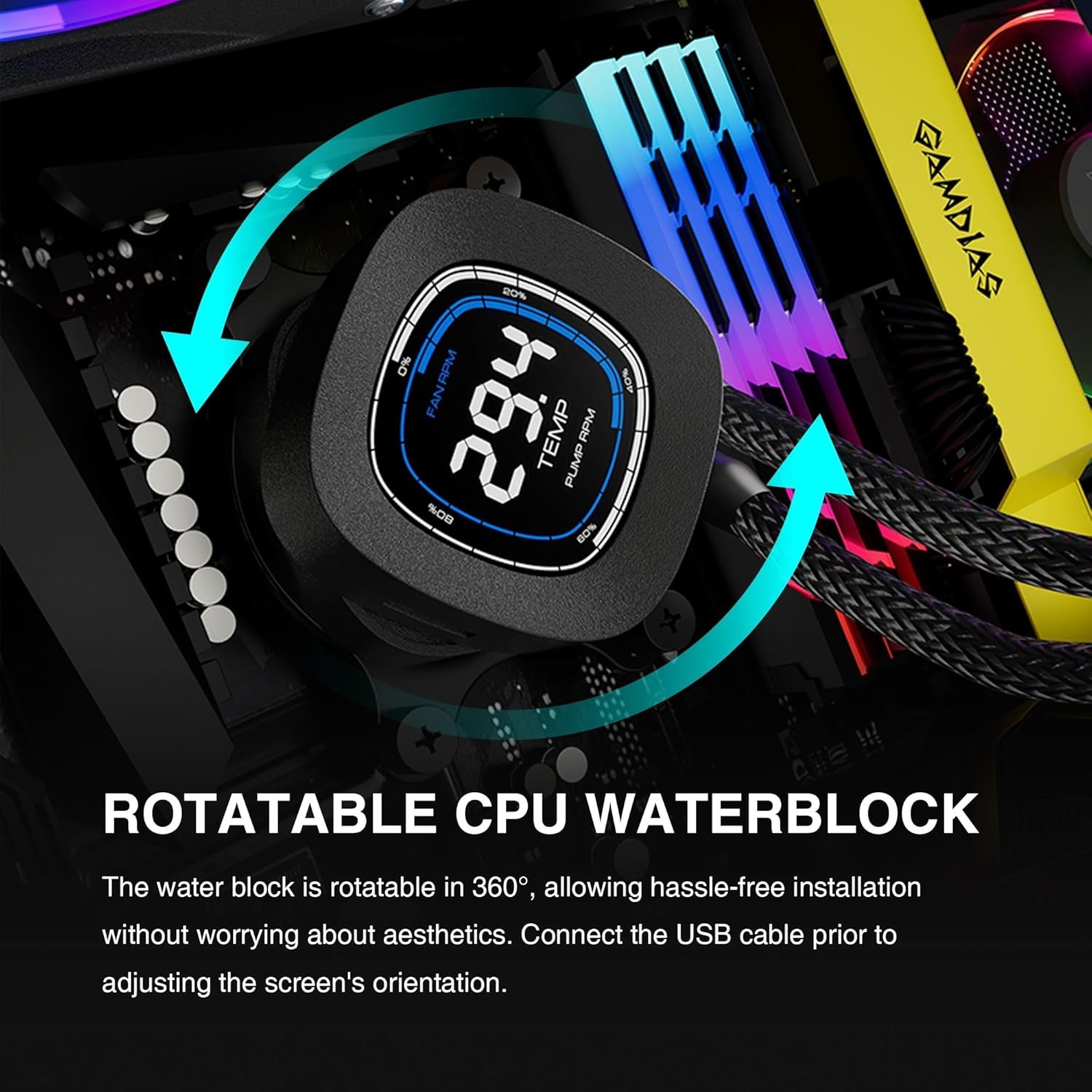
Image: The rotatable CPU waterblock, highlighting its 360-degree rotation capability for flexible installation and aesthetic alignment. Connect the USB cable before adjusting the screen's orientation.
Carefully place the waterblock onto the CPU, aligning the mounting holes with the backplate/standoffs. Secure it with the provided thumb screws, tightening them in a diagonal pattern until snug.

Image: Diagram illustrating the universal compatibility of the CHIONE M4 AIO cooler with both Intel (LGA 1700 ready) and AMD (AM5 ready) platforms, showing the upgraded mounting kits.
4.3. Installing the Radiator and Fans
Attach the two 120mm ARGB PWM fans to the radiator using the long screws provided. Ensure the fan airflow direction is appropriate for your case's cooling strategy (intake or exhaust).

Image: Close-up of the radiator fins, indicating an industry-leading 32mm thickness and 26mm fin height, designed for improved heat dissipation.
Mount the radiator assembly to an available fan mount location in your PC case (e.g., front, top, or rear). Use the shorter screws to secure the radiator to the case.
4.4. Podłączanie kabli
- Podłącz 3- lub 4-pinowy kabel zasilający pompę do złącza CPU_FAN lub AIO_PUMP na płycie głównej.
- Connect the fan power cables to available fan headers on your motherboard or a fan controller. Use the Y-cable if necessary.
- Connect the ARGB cable from the pump and fans to a 3-pin 5V ARGB header on your motherboard. Ensure it is a 5V header, not a 12V RGB header, to prevent damage.
- Connect the USB cable from the pump to an available internal USB 2.0 header on your motherboard. This is essential for the display functionality and software control.

Obraz: Wnętrze view of a PC build demonstrating ARGB lighting synchronization. The CHIONE M4 series requires connection to a 3-pin 5V ARGB header for customizable lighting effects and is compatible with GAMDIAS AEOLUS BOX and mainstream RGB software.
4.5. Instalacja oprogramowania
Download the GAMDIAS CHIONE CAST LITE software from the official GAMDIAS website. Install the software to enable customization of the LCD display, monitor system statistics, and control fan/pump speeds.
5. Instrukcja obsługi
5.1. Using CHIONE CAST LITE Software
Once installed, launch the CHIONE CAST LITE software. This application provides an interface to manage your cooler's display and performance settings.

Image: Screenshot of the CHIONE CAST LITE software interface, demonstrating options for customizing display mode, temperature units, and setting fan and pump speeds. It also shows firmware and software version information.
5.2. Display Modes and Monitoring
The 2.1-inch LCD screen on the water block can display various system statistics in real-time. The CHIONE CAST LITE software allows you to switch between different display modes, such as 'Stack Mode' and 'Clock Mode', and customize the information shown.

Image: Visual representation of the two main display modes: 'Stack Mode' and 'Clock Mode'. These modes show CPU temperature, fan speed, and pump speed, with customizable temperature units (°C/°F) via CHIONE CAST LITE software.
You can monitor CPU temperature, fan RPM, and pump RPM directly on the display. The software also allows for full customization of charts and temperature unit displays.
5.3. Adjusting Fan and Pump Speeds
Within the CHIONE CAST LITE software, you can adjust the fan and pump speeds. This allows you to balance cooling performance and noise levels according to your preferences. Ensure that fan and pump speeds are set to maintain optimal CPU temperatures, especially under load.

Image: The exclusive in-line PWM pump, illustrating its design for stable and powerful liquid circulation, minimizing vibrations for quiet operation.
6. Konserwacja
Regularna konserwacja pomaga zapewnić długowieczność i optymalną wydajność chłodnicy cieczy.
- Czyszczenie kurzu: Okresowo czyść żeberka chłodnicy i łopatki wentylatora, aby zapobiec gromadzeniu się kurzu, który może utrudniać przepływ powietrza i wydajność chłodzenia. Używaj sprężonego powietrza lub miękkiej szczotki.
- Zarządzanie kablami: Ensure all cables are securely connected and not obstructing airflow within the PC case.
- Kontrola wizualna: Occasionally inspect the tubing and connections for any signs of leaks or damage. While rare, addressing issues early can prevent further problems.
- Aktualizacje oprogramowania: Sprawdź GAMDIAS website periodically for updated versions of the CHIONE CAST LITE software or firmware for your cooler.
7. Rozwiązywanie Problemów
If you encounter issues with your GAMDIAS GD-CHIONE M4-240, refer to the following common problems and solutions:
| Problem | Możliwa przyczyna | Rozwiązanie |
|---|---|---|
| No display on pump head | USB cable not connected or loose; Software not running; Power issue. | Ensure USB cable is securely connected to motherboard header. Verify CHIONE CAST LITE software is installed and running. Check pump power connection. |
| Wysokie temperatury procesora | Poor thermal paste application; Waterblock not seated properly; Fans not spinning; Pump not functioning; Radiator clogged with dust. | Re-apply thermal paste and re-seat waterblock. Check fan and pump connections. Clean radiator fins. Ensure fan/pump speeds are adequate in software. |
| Fans not spinning or ARGB not working | Incorrect fan/ARGB header connection; Software/driver issue. | Verify fan power cables are connected to motherboard fan headers. Ensure ARGB cable is connected to a 5V ARGB header. Check motherboard BIOS/UEFI settings for fan control. Reinstall CHIONE CAST LITE software. |
| Nietypowy hałas z pompy | Air bubbles in the loop; Pump malfunction. | Orient the radiator higher than the pump to allow air bubbles to collect in the radiator. Gently tilt the PC case to help move air bubbles. If noise persists, contact support. |
8. Specyfikacje
| Funkcja | Specyfikacja |
|---|---|
| Numer modelu | GD-CHIONE M4-240 |
| Wymiary produktu | 10.91" dł. x 4.69" szer. x 1.26" wys. (27.71 x 11.91 x 3.2 cm) |
| Waga | 4.14 funtów (1.88 kg) |
| Metoda chłodzenia | Woda |
| TDP Support | 270W ±10% |
| Rozmiar wentylatora | 120mm |
| Maksymalna prędkość obrotowa (wentylatory) | 2000 obr./min. |
| Przepływ powietrza | Do 69.01 CFM |
| Poziom hałasu | 29dB (maks.) |
| Prędkość pompy | Do 2800 obr./min. |
| Typ złącza zasilania | 4-Pin (PWM) |
| Tomtage | 12 wolty |
| Cotage | 3 watów |
| Kompatybilne gniazda | Intel: LGA2066 / 2011-v3 / 2011 / 1700 / 1200 / 1151 / 1150 / 1155 / 1156 / 1366 AMD: AM5 / AM4 / AM3+ / AM3 / AM2+ / AM2 / FM2+ / FM2 / FM1 / TR4 |
9. Gwarancja i wsparcie
GAMDIAS products are manufactured to the highest quality standards. For information regarding warranty coverage, terms, and conditions, please refer to the warranty card included with your product or visit the official GAMDIAS website. If you require technical assistance or have questions not covered in this manual, please contact GAMDIAS customer support through their official channels.
Oficjalny GAMDIAS Webstrona: www.gamdias.com