
Wstęp
Thank you for choosing the Vivitar Singimals Kids Karaoke Speaker. This manual provides essential information for the safe and effective use of your new karaoke speaker. Please read it thoroughly before operation and retain it for future reference.
Zawartość pudełka:
- Singimals Kids Karaoke Speaker (Asher The Fox)
- Mikrofon przewodowy
- Kabel ładujący
- Instrukcja obsługi
Produkt ponadview
The Vivitar Singimals Kids Karaoke Speaker is designed for interactive fun, featuring a 5W speaker, Bluetooth v5.1 connectivity, and multicolor LED lighting. It offers up to 12 hours of playtime on a single charge.
Główne cechy:
- Głośnik 5W: Delivers clear and crisp audio for an engaging karaoke experience.
- Bluetooth v5.1: Ensures stable and efficient wireless connection to compatible devices.
- 12-godzinny czas odtwarzania: Enjoy extended entertainment with the built-in rechargeable battery.
- Wielokolorowe oświetlenie LED: Dynamic lights that pulse and dance to the music, enhancing the performance atmosphere.
- Przenośna konstrukcja: Compact and lightweight for easy transport and use anywhere.
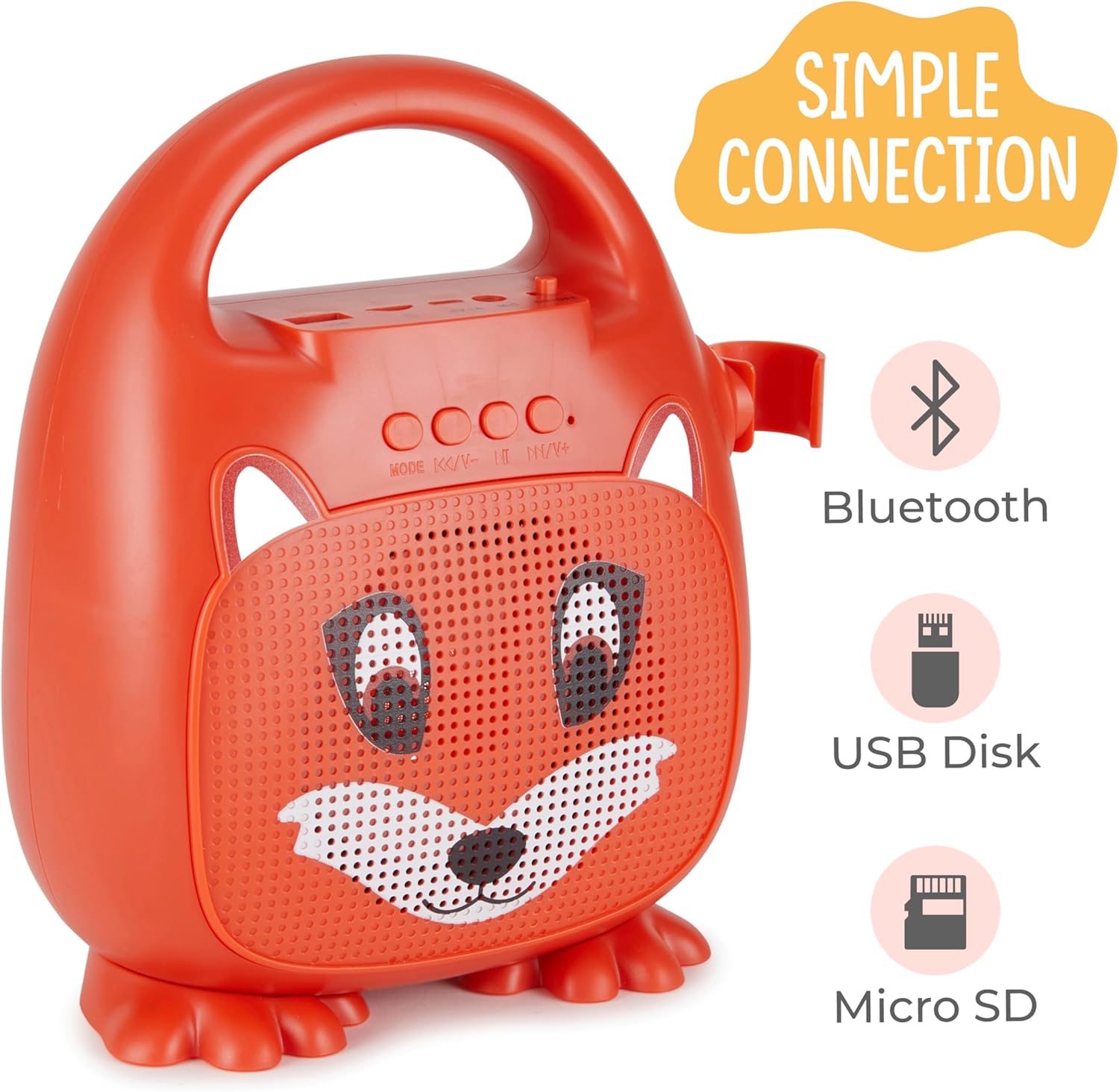
Rycina 1: Przód view of the Singimals Kids Karaoke Speaker (Asher The Fox).
Organizować coś
1. Ładowanie głośnika:
Before first use, fully charge the speaker. Connect the provided charging cable to the speaker's charging port (usually labeled "5V 1A" or similar) and the other end to a USB power adapter (not included) or a computer's USB port. The charging indicator light will show the charging status.
2. Podłączanie mikrofonu:
Insert the microphone's plug into the MIC input port on the speaker. Ensure the microphone's ON/OFF switch is in the 'ON' position when in use.

Figure 2: Wired Microphone with ON/OFF switch.
3. Włączanie/wyłączanie:
Locate the ON/OFF switch on the speaker. Slide it to the 'ON' position to power on the device. Slide it to 'OFF' to power down.
4. Parowanie Bluetooth:
- Power on the karaoke speaker. It will automatically enter Bluetooth pairing mode, indicated by a flashing LED light.
- Na smartfonie lub innym urządzeniu z włączoną funkcją Bluetooth przejdź do ustawień Bluetooth.
- Szukaj available devices and select "Singimals" (or similar name) from the list.
- Once connected, the LED indicator on the speaker will stop flashing and remain solid, and you may hear an audible confirmation.
5. USB Disk and Micro SD Card Playback:
Insert a USB flash drive or a Micro SD card (with pre-loaded audio files) into the respective ports on the speaker. The speaker will automatically detect the media and begin playback. Use the 'MODE' button to switch between input sources (Bluetooth, USB, Micro SD).

Figure 3: Control panel and input ports.
Instrukcja obsługi
Przyciski sterujące:
| Przycisk | Funkcjonować |
|---|---|
| TRYB | Switches between input modes (Bluetooth, USB, Micro SD). |
| Poprzedni utwór / Zmniejszenie głośności | Naciśnij krótko, aby przejść do poprzedniego utworu. Naciśnij długo, aby zmniejszyć głośność. |
| Odtwórz / Pauza | Plays or pauses the current audio track. |
| Następny utwór/zwiększanie głośności | Naciśnij krótko, aby przejść do następnego utworu. Naciśnij długo, aby zwiększyć głośność. |
Oświetlenie LED:
The speaker features multicolor LED lights that illuminate the speaker grille. These lights automatically pulse and change colors with the music. There is no separate control for the LED lighting; it operates automatically when the speaker is on.
Konserwacja
- Czyszczenie: Wipe the speaker and microphone with a soft, dry cloth. Do not use abrasive cleaners or solvents.
- Składowanie: Przechowywać urządzenie w chłodnym i suchym miejscu, z dala od bezpośredniego światła słonecznego i ekstremalnych temperatur.
- Pielęgnacja baterii: Aby przedłużyć żywotność baterii, ładuj głośnik regularnie, nawet jeśli nie jest często używany. Unikaj całkowitego rozładowywania baterii przez dłuższy czas.
- Narażenie na działanie wody: To urządzenie nie jest wodoodporne. Trzymaj je z dala od wody i wilgoci.
Rozwiązywanie problemów
| Problem | Rozwiązanie |
|---|---|
| Głośnik nie włącza się. | Ensure the ON/OFF switch is in the 'ON' position. Charge the speaker if the battery is depleted. |
| Brak dźwięku z mikrofonu. | Check if the microphone is securely plugged into the MIC port. Ensure the microphone's ON/OFF switch is in the 'ON' position. |
| Nie można sparować przez Bluetooth. | Ensure the speaker is in Bluetooth mode (flashing LED). Turn off and on Bluetooth on your device. Move your device closer to the speaker. |
| Niska jakość dźwięku. | Ensure the audio source is of good quality. Adjust the volume on both the speaker and the connected device. Check for obstructions around the speaker grille. |
Specyfikacje
| Funkcja | Szczegół |
|---|---|
| Marka | Vivitar |
| Numer modelu | SNG200-FOX |
| Technologia łączności | Bluetooth |
| Wersja Bluetooth | wersja 5.1 |
| Moc wyjściowatage | 5 watów |
| Źródło zasilania | Zasilany bateryjnie |
| Pozycja Wymiary (dł. x szer. x wys.) | 4.72 x 8.7 x 9.25 cala |
| Waga przedmiotu | 0.94 kilograma |
| Tworzywo | Plastikowy |
| Wejście audio | Microphone, USB, Micro SD |
Informacje dotyczące bezpieczeństwa
- Nie wystawiaj urządzenia na działanie ekstremalnych temperatur, bezpośredniego światła słonecznego i wysokiej wilgotności.
- Trzymaj urządzenie z dala od wody i innych płynów.
- Nie należy podejmować prób demontażu ani modyfikacji urządzenia. Spowoduje to unieważnienie gwarancji i może spowodować uszkodzenia.
- Używaj wyłącznie dostarczonego kabla ładującego.
- Supervise young children during use to ensure safe operation.
- Aby zapobiec uszkodzeniu słuchu, należy unikać długotrwałego słuchania muzyki przy dużej głośności.
Gwarancja i wsparcie
For warranty information and customer support, please refer to the warranty card included with your product or visit the official Vivitar webZachowaj paragon jako dowód zakupu.
Producent: Sakar International, Inc.