Wstęp
This manual provides essential information for the proper use and maintenance of your RF Remote Control for Arris IPTV/OTT Set-Top TV Boxes. Please read this manual thoroughly before operating the device to ensure optimal performance and longevity.
Informacje dotyczące bezpieczeństwa
Aby zapobiec uszkodzeniom lub obrażeniom, należy przestrzegać następujących środków ostrożności:
- Nie wystawiaj pilota na bezpośrednie działanie promieni słonecznych, wysokich temperatur i wilgoci.
- Unikaj upuszczania pilota i narażania go na silne uderzenia.
- Nie próbuj demontować ani modyfikować pilota. Spowoduje to unieważnienie gwarancji.
- Baterie należy przechowywać poza zasięgiem dzieci. W przypadku połknięcia natychmiast zasięgnij porady lekarza.
- Zużyte baterie należy utylizować zgodnie z lokalnymi przepisami.
Zawartość opakowania
Sprawdź, czy w opakowaniu znajdują się wszystkie elementy:
- 1 x RF Remote Control (for Arris VIP4205, VIP5305BT, VIP5305W)
- (Baterie nie są dołączone do zestawu i należy je zakupić osobno)
Organizować coś
1. Instalacja baterii
Pilot wymaga dwóch baterii AAA (brak w zestawie).
- Znajdź komorę baterii z tyłu pilota.
- Press down on the tab and slide the battery cover off.
- Włóż dwie baterie AAA, upewniając się, że bieguny dodatni (+) i ujemny (-) są prawidłowo ustawione względem oznaczeń wewnątrz komory.
- Wsuń pokrywę baterii z powrotem na miejsce, aż zaskoczy.

Na tym zdjęciu widać tył view of the remote control, highlighting the battery compartment cover. The cover is a solid piece, indicating where it needs to be removed to access the battery slots.
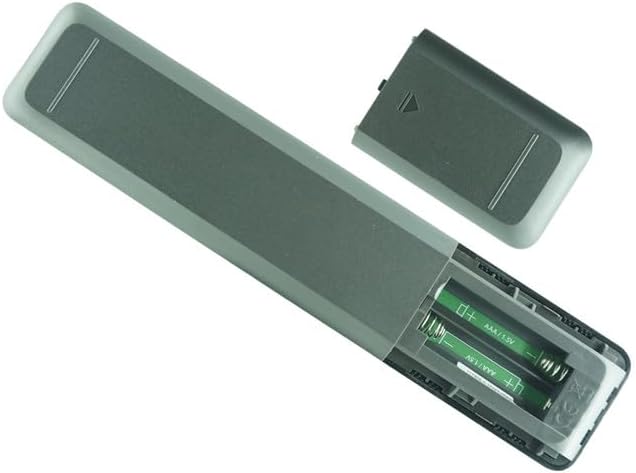
This image shows the remote control with its battery cover detached, exposing the two empty AAA battery slots. The internal markings for positive and negative terminals are visible, guiding correct battery insertion.

This image illustrates the remote control with two AAA batteries already inserted into their respective compartments. The batteries are oriented correctly according to the polarity markings.
2. Pairing with Arris Set-Top Box (RF Pairing)
This remote control uses Radio Frequency (RF) technology and typically requires pairing with your Arris VIP4205, VIP5305BT, or VIP5305W set-top box. The exact pairing procedure may vary slightly depending on your specific set-top box model and firmware version. Refer to your Arris set-top box's original user manual for detailed pairing instructions.
General Pairing Steps (Consult your set-top box manual for specifics):
- Ensure your Arris set-top box is powered on.
- On your Arris set-top box, navigate to the Ustawienia menu.
- Look for options such as Zdalne sterowanie, Łączenie w pary, Lub Urządzenia Bluetooth (even though this is RF, some menus might group it here).
- Follow the on-screen prompts to initiate the pairing process. This often involves pressing and holding specific buttons on the new remote control (e.g., a dedicated pairing button, or a combination like "OK" and "Menu") until an indicator light on the remote or set-top box flashes.
- Once paired, the remote control should be fully functional.
Notatka: This remote is designed as a replacement. If your original remote was an IR (Infrared) remote, this RF remote may not be a direct plug-and-play replacement without specific set-top box configuration or if your set-top box does not support RF remotes. Verify compatibility with your Arris set-top box model before use.
Obsługa pilota zdalnego sterowania
This section outlines the general functions of the buttons on your RF remote control. Button layouts may vary slightly, but core functionalities remain consistent.
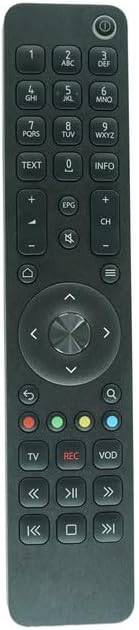
Na tym zdjęciu widać wyraźnie i prosto view of the front face of the RF remote control, showcasing all its buttons and their labels. This is the primary visual reference for button identification.

This image shows the RF remote control from an angled perspective, providing a sense of its three-dimensional design and button layout from a different viewpunkt.
Funkcje przycisków:
| Przycisk | Funkcjonować |
|---|---|
| Moc (⏻) | Turns the set-top box on or off. |
| Klawiatura numeryczna (0-9) | Direct channel entry, text input. |
| TEKST | Accesses text-based services or teletext. |
| INFORMACJE | Wyświetla informacje o programie. |
| Zwiększanie/zmniejszanie głośności (+/-) | Dostosowuje poziom głośności. |
| Niemy (🔇) | Wycisza lub wyłącza wyciszenie dźwięku. |
| Zmiana kanału w górę/w dół (CH +/-) | Zmienia kanał. |
| Dom (🏠) | Powrót do menu głównego lub ekranu głównego. |
| Z powrotem (↩) | Wraca do poprzedniego ekranu lub menu. |
| Menu (☰) | Otwiera menu główne. |
| Panel nawigacyjny (góra, dół, lewo, prawo, OK) | Umożliwia poruszanie się po menu i wybieranie opcji. |
| Search (🔍) | Inicjuje funkcję wyszukiwania. |
| Kolorowe przyciski (czerwony, zielony, żółty, niebieski) | Context-sensitive functions, often indicated on-screen. |
| TV | Switches input to TV or returns to live TV. |
| REK | Starts recording current program (if PVR/DVR functionality is available). |
| Wideo na żądanie | Accesses Video On Demand services. |
| Playback Controls (Rewind, Play/Pause, Fast Forward, Skip Back, Stop, Skip Forward) | Controls media playback (e.g., recorded content, VOD). |
Note: Some functions may require specific features or subscriptions from your service provider.
Konserwacja
Czyszczenie
Do czyszczenia pilota należy używać miękkiej, suchej ściereczki. W przypadku uporczywych zabrudzeń należy delikatnie przetrzećampen the cloth with water or a mild, non-abrasive cleaner. Do not use harsh chemicals or abrasive materials, as they may damage the surface.
Wymiana baterii
Replace batteries when the remote control's responsiveness decreases or if the indicator light (if present) signals low battery. Always replace both batteries at the same time with new AAA batteries. Do not mix old and new batteries, or different types of batteries.
Rozwiązywanie problemów
| Problem | Możliwa przyczyna | Rozwiązanie |
|---|---|---|
| Pilot nie odpowiada. | Baterie rozładowane lub nieprawidłowo włożone. | Wymień baterie, zwracając uwagę na prawidłową biegunowość. |
| Pilot nie odpowiada. | Remote not paired with set-top box. | Refer to the "Pairing with Arris Set-Top Box" section and your set-top box manual for pairing instructions. |
| Limited functionality or some buttons not working. | Compatibility issues or specific functions not supported by your set-top box. | Ensure your Arris set-top box model (VIP4205, VIP5305BT, VIP5305W) is compatible with this RF remote. Some advanced functions may require specific firmware or service provider features. |
| Remote control works intermittently. | Niski poziom naładowania baterii. | Wymień baterie. |
| Remote control works intermittently. | Zakłócenia ze strony innych urządzeń RF. | Ensure there are no strong RF interference sources nearby. Try moving the set-top box or remote slightly. |
If the problem persists after trying these solutions, contact your service provider or the remote control vendor for further assistance.
Specyfikacje
- Model: RF Remote Control for Arris VIP4205, VIP5305BT, VIP5305W
- Łączność: Częstotliwość radiowa (RF)
- Zgodne urządzenia: Arris VIP4205, VIP5305BT, VIP5305W IPTV/OTT HD Set-Top TV Boxes
- Źródło zasilania: Baterie 2 x AAA (brak w zestawie)
- Cechy szczególne: Replacement remote, Ergonomic design
- Producent: Easytry
- Kraj pochodzenia: Chiny
Gwarancja i wsparcie
Informacje o gwarancji
This product is sold as a replacement remote control. Specific warranty terms, if any, are typically provided by the seller at the time of purchase. Please refer to your purchase documentation or contact the seller directly for warranty details.
Obsługa klienta
For any questions, issues, or further assistance regarding this remote control, please contact the seller or manufacturer through the platform where you purchased the product. Provide your order number and a detailed description of the issue for prompt support.
Note: As this is a replacement remote, comprehensive technical support for specific set-top box functionalities should primarily be directed to your Arris service provider.


