
1. Wprowadzenie
Thank you for choosing the FLEXISPOT L-Shaped Electric Standing Desk. This manual provides essential information for the safe assembly, operation, and maintenance of your new desk. Please read these instructions carefully before use and retain them for future reference. This desk is designed to provide a versatile and ergonomic workspace, allowing seamless transitions between sitting and standing positions.
2. Instrukcje bezpieczeństwa
Aby zapewnić bezpieczną obsługę i zapobiec obrażeniom lub uszkodzeniom, należy przestrzegać następujących wskazówek bezpieczeństwa:
- Przed użyciem upewnij się, że wszystkie elementy są bezpiecznie zamocowane.
- Podczas pracy urządzenia należy trzymać dzieci i zwierzęta z dala od biurka.
- Do not place hands or other body parts near moving parts of the desk frame.
- Avoid overloading the desk. The maximum load capacity is 80 kg.
- Nie siadaj i nie stawaj na biurku.
- Only use the desk indoors in a dry environment.
- Odłącz zasilanie przed czyszczeniem lub konserwacją.
- If any parts are damaged or missing, contact customer support immediately. Do not attempt to repair the desk yourself.
3. Zawartość opakowania
Please verify that all parts are present and undamaged before beginning assembly. Refer to the assembly diagram for a complete list of components.
- L-Shaped Desktop (2 parts)
- 4-Leg Frame (Dual Motor Mechanism)
- Inteligentny Panel Sterowania
- Zasilacz i kable
- Sprzęt montażowy (śruby, narzędzia itp.)
- Instrukcja obsługi
4. Instalacja i montaż
Montaż zazwyczaj wymaga dwóch osób. Postępuj ostrożnie, wykonując poniższe kroki:
- Rozpakuj komponenty: Ostrożnie wyjmij wszystkie części z opakowania i połóż je na miękkiej, czystej powierzchni, aby zapobiec zarysowaniom.
- Assemble the 4-Leg Frame: Connect the frame components according to the included diagram. Ensure all bolts are tightened securely. The 4-leg design provides enhanced stability.
- Install Dual Motor Mechanism: The dual motor system is integrated into the frame. Ensure all motor connections are secure. This mechanism allows for smooth and precise height adjustments.
- Zamontuj panele biurkowe: Carefully place the two desktop panels onto the assembled frame. Align the pre-drilled holes and secure the desktop to the frame using the provided screws. The L-shaped design offers ampprzestrzeń robocza.
- Montaż panelu sterowania: Attach the intelligent control panel to the underside of the desktop in an easily accessible location. Connect the control panel cable to the main control box.
- Podłącz zasilanie: Plug the power adapter into the control box, then plug the power cord into a standard electrical outlet.
- Initial Reset: After connecting power, perform an initial reset. Press and hold the 'Reset' button (usually marked with a circular arrow) until the desk reaches its lowest position and then slightly rises. This calibrates the desk.
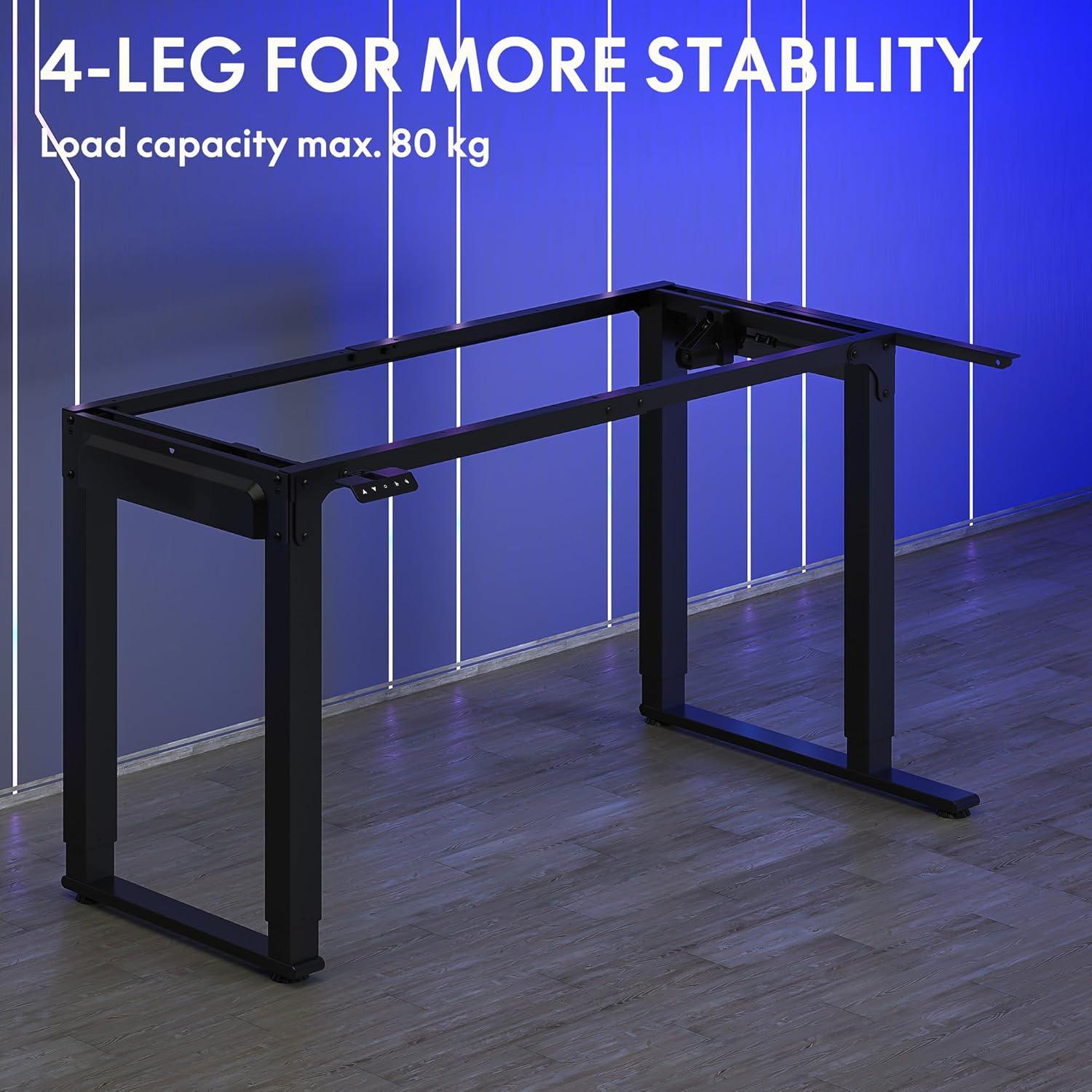
Image: The robust 4-leg frame provides superior stability for the L-shaped standing desk.

Image: Detail of the dual-motor mechanism, ensuring accurate and smooth height positioning.
5. Instrukcja obsługi
Your FLEXISPOT L-Shaped Electric Standing Desk features an intelligent control panel for easy height adjustment and memory presets.
5.1 Funkcje panelu sterowania

Image: The intelligent control panel with clearly labeled buttons for desk operation.
- Przyciski góra/dół (▲ / ▼): Press and hold to continuously adjust the desk height up or down. Release to stop at the desired height.
- Reset Button (↺): Used for initial calibration or to reset the desk if an error occurs. Press and hold until the desk moves to its lowest point and slightly rises.
- Sitting Preset Button (👭): Press to automatically move the desk to your programmed sitting height.
- Standing Preset Button (👭 with upward arrow): Press to automatically move the desk to your programmed standing height.
5.2 Ustawianie ustawień pamięci
To save your preferred sitting or standing height:
- Dostosuj wysokość biurka do swoich potrzeb za pomocą przycisków Góra/Dół.
- Press and hold the desired preset button (Sitting or Standing) for approximately 3-5 seconds until you hear a beep or see the display flash. This indicates the height has been saved.

Image: The desk can be adjusted from a minimum height of 72cm to a maximum of 117cm.

Image: The spacious L-shaped desktop (180cm x 110cm) provides ample room for multiple computers and accessories.
6. Konserwacja
Regularna konserwacja gwarantuje długowieczność i optymalną wydajność Twojego biurka.
- Czyszczenie: Przetrzyj blat i ramę miękką szmatką.amp szmatką. Unikaj silnych środków chemicznych i ściernych środków czyszczących.
- Kontrola: Okresowo sprawdzaj wszystkie śruby i połączenia, aby upewnić się, że są dobrze dokręcone. W razie potrzeby dokręć.
- Zarządzanie kablami: Ensure power cables and other device cables are properly managed to prevent entanglement or damage during height adjustments.
- Pielęgnacja silnika: The dual motors are designed for durability. Avoid obstructing the desk's movement or exceeding the weight limit to prevent strain on the motors.

Image: The desk features safe and stylish rounded corners.
7. Rozwiązywanie Problemów
Jeśli masz problemy z biurkiem, zapoznaj się z poniższymi typowymi problemami i ich rozwiązaniami:
| Problem | Możliwa przyczyna | Rozwiązanie |
|---|---|---|
| Biurko się nie porusza. | Odłączony przewód zasilający; Luźny przewód panelu sterowania; Zadziałało zabezpieczenie przeciążeniowe. | Check power connections; Ensure control panel cable is secure; Reduce weight on desk and perform a reset. |
| Biurko porusza się nierównomiernie lub wydaje nietypowe dźwięki. | Unbalanced load; Loose connections; Obstruction. | Distribute weight evenly; Check and tighten all frame connections; Remove any obstructions. Perform a reset. |
| Height presets are not working. | Ustawienia predefiniowane nie zostały zapisane prawidłowo. | Re-save the desired height by holding the preset button until confirmation. |
| Biurko zatrzymuje się w połowie ruchu. | Overload protection; Overheating protection. | Reduce weight on the desk. Allow the desk to cool down for 20-30 minutes if it has been used continuously. |
If the problem persists after attempting these solutions, please contact FLEXISPOT customer support.
8. Specyfikacje
| Funkcja | Szczegół |
|---|---|
| Numer modelu | QS2LB-1811 |
| Marka | ELASTYCZNI |
| Rodzaj biurka | Elektryczne biurko stojące w kształcie litery L |
| Typ silnika | Podwójny silnik |
| Typ ramki | 4-Leg Frame |
| Zakres regulacji wysokości | od 72 cm do 117 cm |
| Wymiary biurka (dł. x szer.) | Wymiary: 180cm x 110cm |
| Maksymalna ładowność | 80 kilogramów |
| Poziom hałasu | < 50 dB |
| Tworzywo | Stal stopowa (rama) |
| Kolor | Czarny |
| Waga przedmiotu | 30 kilograma |
9. Gwarancja i wsparcie
FLEXISPOT products are designed for quality and durability. For specific warranty information, please refer to the warranty card included with your purchase or visit the official FLEXISPOT website. If you require technical assistance, have questions about assembly, or need to report a missing/damaged part, please contact FLEXISPOT customer support directly. Ensure you have your model number (QS2LB-1811) and purchase details available when contacting support.
Informacje kontaktowe: Please refer to the contact details provided on the FLEXISPOT official webAby uzyskać dostęp do najbardziej aktualnych kanałów pomocy, odwiedź witrynę lub dokumentację zakupu.