
1. Rozpoczęcie pracy
1.1 Zawartość opakowania
Zanim zaczniesz, upewnij się, że w przesyłce znajdują się wszystkie elementy:
- 2 x QCY T13X Earbuds
- 1 x etui ładujące
- 3 x Pairs of Eartips (Small, Medium - pre-installed, Large)
- Kabel ładujący 1 x USB-C
- 1 x Instrukcja obsługi
1.2 Pierwsze ładowanie
The earbuds must be fully charged before first use. Place both earbuds into the charging case. Connect the USB-C cable to the charging case and a power source. A full charge takes approximately 120 minutes. If the earbuds are not used for more than two weeks, charge them regularly to maintain battery health.
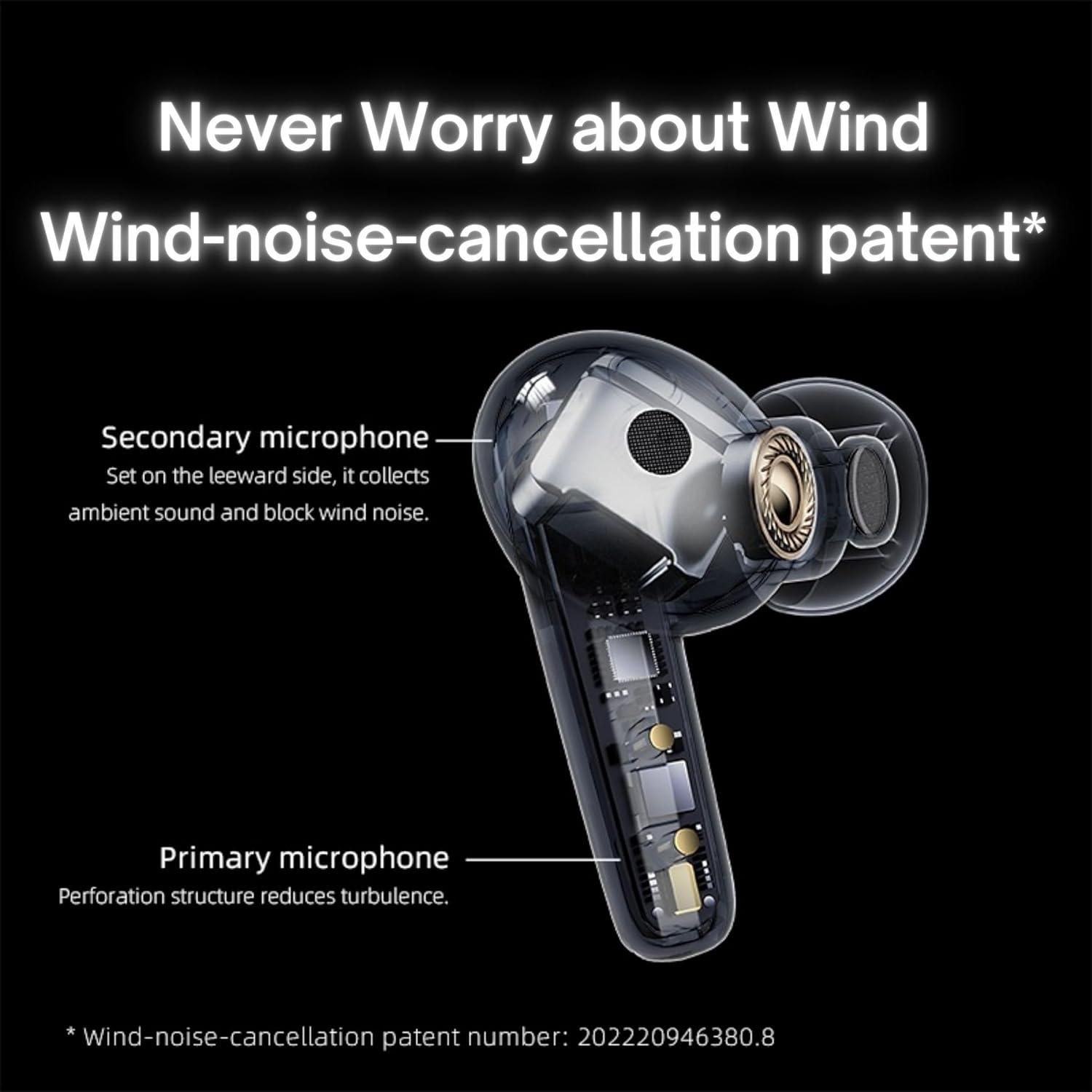
Image: QCY T13X Earbuds in their charging case, connected with a USB-C cable for charging. The image illustrates the charging process and the compact design of the case and earbuds.
1.3 Eartip Selection
For optimal sound quality and comfort, choose the eartips that best fit your ears. The package includes small, medium, and large sizes. The medium size is pre-installed. A proper seal is crucial for bass response and noise isolation.
1.4 Parowanie z urządzeniem
- Sprawdź, czy słuchawki są naładowane i umieszczone w etui ładującym.
- Otwórz pokrywę etui ładującego. Słuchawki automatycznie przejdą w tryb parowania.
- Na swoim smartfonie lub urządzeniu z włączoną funkcją Bluetooth przejdź do ustawień Bluetooth.
- Szukaj available devices and select "QCY T13X" from the list.
- Po nawiązaniu połączenia usłyszysz dźwięk potwierdzenia.

Image: QCY T13X Earbuds and their charging case, highlighting the Bluetooth 5.3 connectivity. This image demonstrates the wireless technology used for pairing.
2. Korzystanie ze słuchawek dousznych
2.1 Włączanie/wyłączanie zasilania
- Włączanie: Open the charging case, and the earbuds will automatically power on. Alternatively, press and hold the touch panel on both earbuds for 1-2 seconds.
- Wyłączone: Place the earbuds back into the charging case and close the lid. They will automatically power off and begin charging. Alternatively, disconnect them from your device, and they will power off after a few minutes of inactivity.
2.2 Sterowanie odtwarzaniem muzyki
The QCY T13X earbuds feature touch controls for easy management of your audio:
- Odtwórz/Pauza: Double-tap the touch panel on either earbud.
- Następny utwór: Kliknij trzykrotnie prawą słuchawkę douszną.
- Poprzedni utwór: Kliknij trzykrotnie lewą słuchawkę.

Image: A person wearing a QCY T13X earbud, demonstrating the discreet design and the area for touch controls. This image helps visualize how the earbuds are worn and interacted with.
2.3 Zarządzanie połączeniami
- Odbieranie/kończenie połączeń: Double-tap the touch panel on either earbud.
- Odrzuć połączenie: Press and hold the touch panel on either earbud for 1.5 seconds.
2.4 Regulacja głośności
Volume control is managed through the QCY application on your smartphone. Download the QCY app to customize settings and adjust volume levels directly.
2.5 QCY Application
For enhanced features and customization, download the official QCY app from your device's app store. The app allows you to:
- Dostosuj głośność.
- Dostosuj sterowanie dotykowe.
- Select from various EQ presets (e.g., Pure Vocals, Boosted Original, Soft and Immersive).
- Aktualizacja oprogramowania.

Image: QCY T13X Earbuds with a graphic indicating three default EQ settings: Pure Vocals, Boosted Original, and Soft and Immersive. This highlights the sound customization options available through the app.
2.6 Łączność wielourządzeniowa
The QCY T13X supports seamless switching between multiple paired devices. Once paired with several devices, the earbuds can intelligently connect to the active audio source.

Image: QCY T13X Earbuds shown connected to both a smartphone and a tablet, illustrating the multi-device connectivity feature. This image demonstrates the flexibility of using the earbuds with different devices.
3. Konserwacja i pielęgnacja
3.1 Ładowanie słuchawek dousznych i etui
The charging case has a capacity of 350 mAh, with each earbud having a 45 mAh battery. A single charge provides up to 8 hours of playback, and the charging case extends total playback time to up to 30 hours. The earbuds support fast charging. Ensure regular charging if not used for extended periods.
3.2 Czyszczenie
Regularly clean your earbuds and charging case to ensure optimal performance and hygiene. Use a soft, dry, lint-free cloth. For eartips, remove them and gently wipe with a damp szmatką, a następnie dokładnie wysuszyć przed ponownym przymocowaniem.
3.3 Przechowywanie
Store your QCY T13X earbuds in their charging case when not in use. Avoid exposing them to extreme temperatures, such as below 10 degrees Celsius (50°F) or above 60 degrees Celsius (140°F), to prevent battery damage and ensure longevity.
4. Rozwiązywanie Problemów
4.1 Przywracanie ustawień fabrycznych
If you experience persistent connection or functionality issues, a factory reset may resolve them:
- Delete the previous connection record for "QCY T13X" from your phone's Bluetooth settings.
- Umieść obie słuchawki w etui ładującym i upewnij się, że się ładują.
- Naciśnij i przytrzymaj przycisk na etui ładującym przez 10 sekundy.
- The red and blue LED indicators will flash alternately 3 times, indicating a successful reset.
4.2 Problemy z połączeniem
- Sprawdź, czy Bluetooth jest włączony w Twoim urządzeniu.
- Make sure the earbuds are charged and within the 10-meter Bluetooth range.
- Try restarting your device and the earbuds.
- Wykonaj przywracanie ustawień fabrycznych, postępując zgodnie z powyższym opisem.
4.3 Problemy z dźwiękiem
- Check the volume levels on both your device and through the QCY app.
- Ensure the eartips provide a proper seal in your ear.
- Wyczyść głośniki słuchawek z wszelkich zanieczyszczeń.
- If only one earbud is working, try placing both back in the case, closing the lid, and then reopening to re-establish the connection between them.
5. Specyfikacje
| Funkcja | Specyfikacja |
|---|---|
| Nazwa modelu | T13X (BH23QT26A) |
| Rozmiar kierowcy | Przetwornik dynamiczny 7.2 mm |
| Mikrofony | 4 (ENC Noise Reduction, Mic Amplification, Echo Cancellation) |
| Wersja Bluetooth | 5.3 |
| Zasięg Bluetooth | Do 10 metrów |
| Obsługiwane protokoły | HFP / A2DP / AVRCP |
| Kodeki audio | AAC, SBC |
| Pojemność baterii słuchawek | 45 mAh (każdy) |
| Pojemność akumulatora etui ładującego | 350 mAh |
| Całkowity czas odtwarzania | Do 30 godzin (z etui ładującym) |
| Single Use Playback Time | Do 8 godzin |
| Czas ładowania (etui) | Około 120 minut |
| Odporność na wodę | IPX5 |
| Waga (słuchawka) | 6.34g |
| Waga całkowita (etui + słuchawki) | 48.15g |
| Metoda kontroli | Dotykać |
| Kontrola hałasu | Aktywne usuwanie hałasu (ANC) |
| Odpowiedź częstotliwościowa | 20000 kHz |
| Wrażliwość | 105dB |
| Impedancja | 100 omy |

Image: An exploded diagram of a QCY T13X earbud, illustrating the internal 7.2mm dynamic driver. This image provides insight into the audio technology within the earbud.

Image: A detailed diagram of a QCY T13X earbud, highlighting the placement of its multiple microphones for Environmental Noise Cancellation (ENC) and wind noise reduction. This image explains the technology behind clear calls.
6. Gwarancja i wsparcie
6.1 Gwarancja producenta
The QCY T13X Bluetooth Earbuds come with a 1-letnia gwarancja producentaProsimy zachować dowód zakupu na wypadek roszczeń gwarancyjnych. Gwarancja obejmuje wady materiałowe i wykonawcze powstałe w wyniku normalnego użytkowania.
6.2 Obsługa klienta
For further assistance, technical support, or warranty inquiries, please visit the official QCY website or contact their customer service. You can also refer to the QCY app for additional resources and FAQs.