
Wstęp
This manual provides comprehensive instructions for the setup, operation, maintenance, and troubleshooting of your VisionTechShop TVP-12B Price Computing Scale and LP-50 Thermal Label Printer. Please read this manual thoroughly before operating the device to ensure proper function and longevity.

Figure 1: VisionTechShop TVP-12B Price Computing Scale with LP-50 Thermal Label Printer and labels.
Organizować coś
1. Rozpakowywanie
Carefully unpack all components from the box. Ensure you have the TVP scale, DLP-50 printer, and the case of LST8060 labels (12 rolls).
Video 1: Unpacking the TVP Scale and DLP-50 Printer. This video demonstrates how to safely unpack your new scale and printer, identifying all included components.
2. Podłączenie zasilania
- Connect the 12V/500mA adapter to the TVP scale. The port is located on the underside of the scale.
- Connect the 12V/2.5A adapter to the DLP-50 printer.
- Plug both adapters into a suitable power outlet. A red light will illuminate on the front of the scale, indicating it is receiving power. A green light will appear on the printer.
3. Połączenie kabla interfejsu
Connect the interface cable between the DLP-50 printer and the TVP scale. The connection port for the printer is labeled 'LABEL PRINTER' and for the scale, it is on the underside.
4. Pierwsze włączenie zasilania
Turn on the scale using the switch located on the right front side of the bottom of the scale. The display will cycle through numbers and then settle at 0.00.
Instrukcja obsługi
1. Changing Measurement Units (Lb/Oz/Kg)
To change the measurement unit, press the JEDNOSTKA key. The display will cycle through kilograms (kg), pounds (lb), and ounces (oz). Select your desired unit.
Video 2: How to Change Measurement Units and Use the Give Change Function. This video demonstrates how to switch between different weight units and utilize the change calculation feature.
2. Using the Accumulation Function
The accumulation function allows you to sum the total price of multiple items. Follow these steps:
- Power on the TVP scale while holding down the TARA key. Continue holding until 'Pn' appears on the screen.
- Wprowadź kod 0000 i naciśnij TARA wejść.
- Naciskać TARA Ponownie.
- Użyj M+ or PLU buttons to navigate until the weight display reads 'F11'.
- Naciskać TARA to enter the setting. The 'Unit Price' display should read 'nodE'.
- Naciskać PLU until the 'Unit Price' reads 'EP50'.
- Naciskać M+ to go back, then press TARA zapisać.
- Naciśnij ZERO key repeatedly to exit to the main menu.
- Place the first item on the scale and enter its unit price.
- Naciskać M+ to accumulate the price.
- Remove the first item, place the second item, enter its unit price, and press M+ again. Repeat for all items.
- Naciskać CH Do view the accumulated total price.
Video 3: How to Use the Accumulation Function. This video guides you through the steps to enable and use the accumulation feature for multiple item transactions.
3. Creating PLU Profiles
To save frequently used prices as PLU (Price Look-Up) profiles:
- Enter the desired unit price using the numeric keypad.
- Trzymaj PLU key for 3 seconds until 'SAVE PoS' appears on the screen.
- Enter a PLU number (0-9) where you want to save the price. For example, press '1' for PLU 1. The screen will show 'SAVEd'.
- To recall a saved PLU, place an item on the scale, press PLU, and then the corresponding PLU number.
- Naciskać M+ to print a label with the PLU information.
Video 4: Creating PLU Profiles. This video demonstrates how to save and recall Price Look-Up profiles for quick access to common item prices.
4. Turning On the Backlight
Aby włączyć podświetlenie wyświetlacza:
- Power on the TVP scale.
- Przytrzymaj '.' (decimal) key until the backlight setting opens. The display will show '6LSEE' and 'OFF' or 'ON' or 'AUTO'.
- Użyj M+ or PLU button to cycle through 'OFF', 'ON', or 'AUTO'. 'AUTO' mode saves power by turning on the backlight only when the scale is in use.
- Naciskać TARA aby zapisać swój wybór.
Video 5: How to Turn On the Backlight. This video shows how to adjust the backlight settings for optimal visibility.
5. Using the Give Change Function
To calculate change for a customer:
- Place the item on the scale and enter its unit price.
- Naciskać M+ to add the item to the total.
- Naciskać CH Do view the total price.
- Enter the amount the customer paid using the numeric keypad. The 'Total Price' display will show the change due.
- Naciskać TARA to clear the transaction and exit.
6. Drukowanie etykiet
After weighing an item and entering its unit price, press the M+ key to print a label. The printer will generate a label with sales information including weight, unit price, and total price. Note: The printer does not print barcodes. It prints text such as "THANK YOU", "Total Weight", "Price per lb and Total Price". If the total price is 0.00, no label will be printed. The total price must be greater than 0.00 to print a label.
Konserwacja
Czyszczenie
The TVP-12B scale features a stainless steel removable platter for easy cleaning. Regularly clean the platter and the scale body with a damp cloth. Avoid using abrasive cleaners or submerging the unit in water.

Figure 2: TVP-12B Scale with its protective dust cover.
Ochrona
A dust cover is included to protect the scale from dust and spills when not in use. Always use the dust cover to prolong the life of your scale.
Rozwiązywanie problemów
Printer Not Printing Labels
- Ensure the total price displayed on the scale is greater than 0.00. The printer will not issue a label if the total price is zero.
- Check if the printer is properly connected to the scale via the interface cable and that its power adapter is securely plugged in and the printer is turned on (green light).
- Verify that the label roll is correctly installed and not jammed.
Specyfikacje
| Funkcja | Szczegół |
|---|---|
| Marka | VisionTechSklep |
| Model | TVP-12B |
| Pojemność | 12lb x 0.002lb, 160oz x 0.05oz, 6kg x 0.001kg |
| Dokładność odczytu | NTEP Required Accuracy |
| Jednostki miary | Lb/Oz/Kg switchable |
| Certyfikaty | NTEP Approved Legal for Trade (Coc #19-038), NSF Certified |
| model drukarki | LP-50 Thermal Label Printer |
| Dołączone etykiety | 1 Case of 12 Rolls of LST8060 Labels (55 x 25mm, 550 Per Roll) |
| Typ wyświetlacza | LCD z podświetleniem |
| PLU Memory | 10 Indirect PLU for selection |
| Źródło zasilania | Adapter, Battery Operated |
| Materiał talerza | Stal nierdzewna |
| Rozmiar talerza | 10.5 x 8 inch (W x D) |
| Wymiary w skali | 11 x 12 x 4 inch / 288 x 313 x 108.8mm (W x D x H) |
| Masa netto | 9 funta / 4.1 kg |
| Współczynnik kształtu | Typ ławki |
| Zalecane zastosowania | Food, Fish |

Figure 3: Dimensions of the TVP-12B Price Computing Scale.
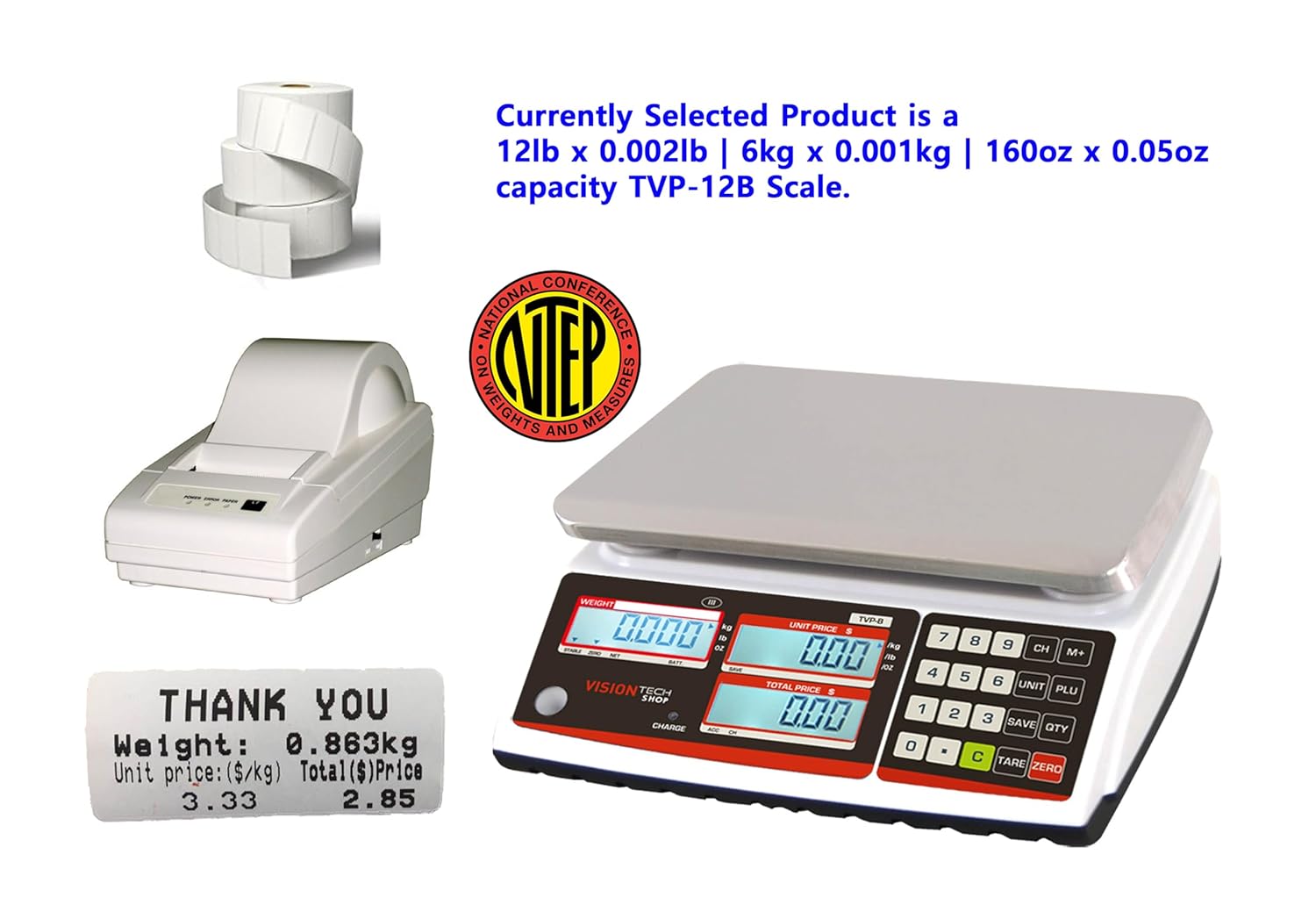
Figure 4: NTEP Certificate of Conformance for TVP Series scales.
Wsparcie
For technical support or any inquiries regarding your VisionTechShop product, please contact us:
- Telefon: +1.201.970.8897
- E-mail: GoUSApos@Gmail.com
- Webstrona: www.VisionTechShop.com
- Adres: 100 Temple Ave. Hackensack, NJ 07601