
1. Wprowadzenie
Dziękujemy za zakupasing the BLOW 4625FHD DVB-T2 H.265 Digital Terrestrial TV Tuner. This device allows you to receive digital terrestrial television broadcasts (DVB-T2) with H.265 (HEVC) compression, offering high-definition video quality. This manual provides essential information for the safe and efficient setup, operation, and maintenance of your new tuner. Please read it thoroughly before use and retain it for future reference.
2. Informacje dotyczące bezpieczeństwa
- Bezpieczeństwo elektryczne: Aby zapobiec porażeniu prądem elektrycznym, nie otwieraj obudowy.asing. Wszelkie prace serwisowe powierzaj wykwalifikowanemu personelowi.
- Źródło zasilania: Używaj wyłącznie określonego zasilacza. Upewnij się, że napięcietage odpowiada wymaganiom urządzenia.
- Wentylacja: Nie zasłaniaj otworów wentylacyjnych. Zapewnij odpowiedni przepływ powietrza wokół urządzenia, aby zapobiec przegrzaniu.
- Wilgoć: Keep the device away from water, rain, and excessive humidity.
- Czyszczenie: Przed czyszczeniem odłącz zasilanie. Użyj miękkiej, suchej ściereczki. Nie używaj płynów ani aerozoli do czyszczenia.
- Umieszczenie: Place the device on a stable, flat surface. Avoid placing it near heat sources or in direct sunlight.
3. Zawartość opakowania
Po otwarciu opakowania należy sprawdzić, czy wszystkie elementy są obecne i w dobrym stanie:
- BLOW 4625FHD DVB-T2 Tuner Unit
- Zdalne sterowanie
- Power Adapter (integrated cable)
- Instrukcja obsługi (ten dokument)

Image 3.1: Retail packaging of the BLOW 4625FHD DVB-T2 Tuner, showing the tuner unit and remote control.
4. Koniec produktuview
4.1. Panel przedni
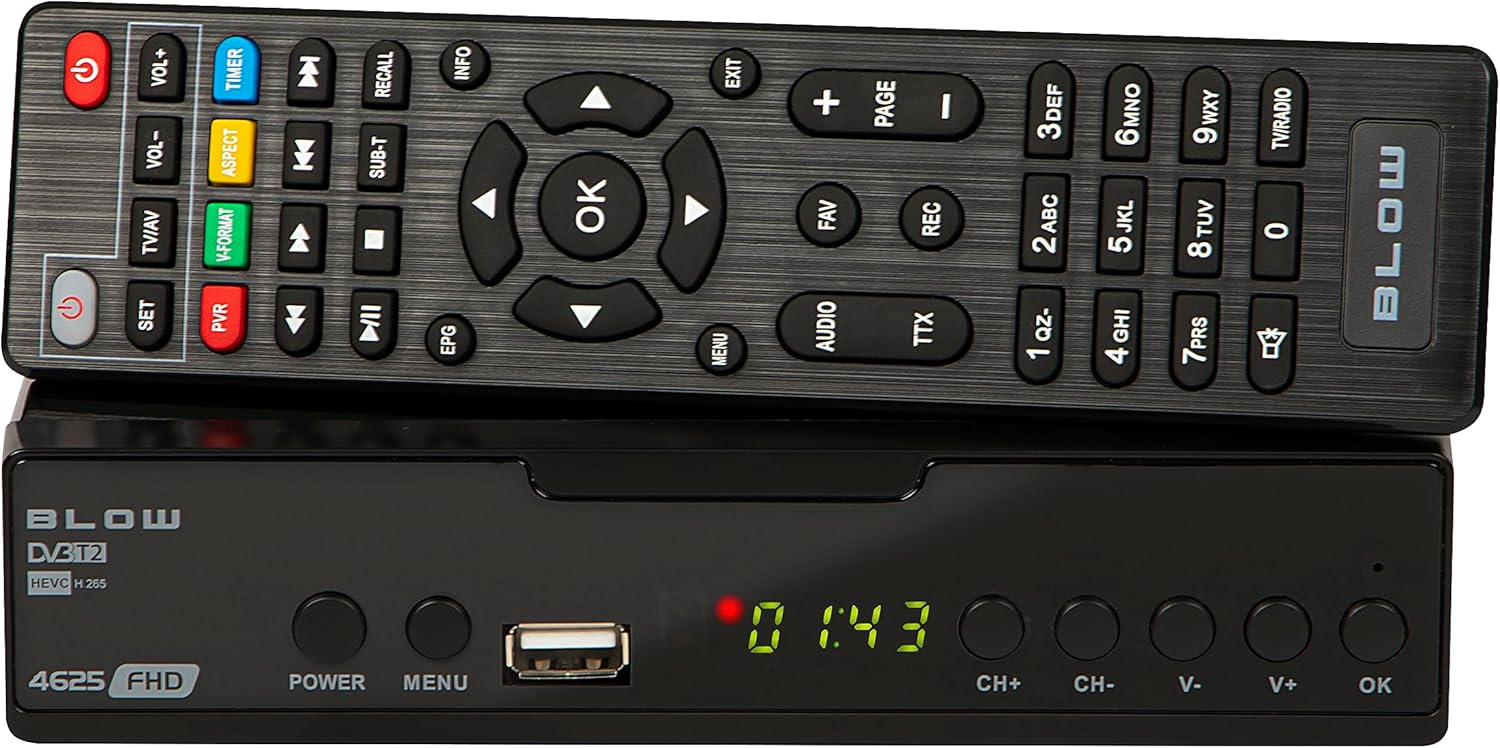
Obraz 4.1: Przód view of the BLOW 4625FHD DVB-T2 Tuner with its remote control.
The front panel features a digital display, a USB port for media playback and PVR functions, and essential control buttons:
- Wyświetlacz: Shows channel number, time, or menu information.
- MOC: Włącza lub wyłącza urządzenie (tryb czuwania).
- MENU: Dostęp do menu głównego.
- Port USB: Do podłączania urządzeń pamięci masowej USB.
- CH+/CH-: Zmienia kanały w górę lub w dół.
- V+/V-: Reguluje głośność w górę lub w dół.
- OK: Potwierdza wybór w menu.
4.2. Panel tylny

Image 4.2: Rear panel of the BLOW 4625FHD DVB-T2 Tuner, showing various input and output ports.
Na tylnym panelu znajdują się wszystkie niezbędne porty połączeniowe:
- Wejście RF: Łączy się z anteną naziemną.
- WYJŚCIE RF: For looping the antenna signal to another device (e.g., another TV or tuner).
- WSPÓŁOSIOWY: Cyfrowe wyjście audio.
- HDMI: High-Definition Multimedia Interface output for connecting to modern TVs.
- SCART: Analog video and audio output for connecting to older TVs.
- WEJŚCIE AC: Wejście zasilania urządzenia.
4.3. Pilot zdalnego sterowania
The remote control provides full functionality for operating the tuner. Familiarize yourself with its buttons for easy navigation and control.
- MOC: Włącza/wyłącza tuner.
- GŁOŚNOŚĆ+/GŁOŚNOŚĆ-: Reguluje głośność.
- CH+/CH-: Zmienia kanały.
- OK: Potwierdza wybór.
- Przyciski nawigacyjne (góra/dół/lewo/prawo): Umożliwia nawigację po menu.
- MENU: Otwiera menu główne.
- WYJŚCIE: Wychodzi z bieżącego menu lub ekranu.
- EPG: Wyświetla elektroniczny przewodnik po programach.
- PVR: Umożliwia dostęp do funkcji Osobistego Rejestratora Wideo.
- REK: Starts recording the current program.
- ULUBIONE: Dostęp do listy ulubionych kanałów.
- Telewizja/AV: Switches between TV and AV input modes on the tuner.
- FORMAT V: Changes video output format.
- AUDIO: Selects audio track (if available).
- TTX: Funkcja telegazety.
- Przyciski numeryczne (0-9): Bezpośredni wybór kanału.
5. Konfiguracja
5.1. Connecting the Tuner
- Połączenie antenowe: Podłącz kabel anteny naziemnej do WEJŚCIE RF port on the rear panel of the tuner.
- Połączenie telewizyjne (HDMI): For best picture quality, connect an HDMI cable from the HDMI port on the tuner to an available HDMI input on your television.
- Połączenie telewizyjne (SCART): If your TV does not have an HDMI input, connect a SCART cable from the SCART port on the tuner to the SCART input on your television.
- Podłączenie zasilania: Podłącz zasilacz do WEJ.AC port on the tuner, then plug the adapter into a wall outlet.
5.2. First Time Installation and Channel Scan
- Turn on your television and select the correct input source (HDMI or SCART) corresponding to where you connected the tuner.
- Naciśnij MOC button on the tuner or remote control to turn on the device.
- The first time you power on the tuner, a "First Time Installation" wizard will appear. Follow the on-screen prompts.
- Select your preferred language, country, and other initial settings.
- Initiate the "Auto Scan" or "Channel Search" function. The tuner will automatically search for available DVB-T2 channels in your area. This process may take several minutes.
- Once the scan is complete, the tuner will save the channels and display the first available channel.
6. Obsługa
6.1. Podstawowa telewizja Viewwchodzenie
- Zmiana kanałów: Użyj CH+/CH- buttons on the remote or front panel, or enter the channel number directly using the number buttons.
- Regulacja głośności: Użyj GŁOŚNOŚĆ+/GŁOŚNOŚĆ- przyciski na pilocie.
- Niemy: Naciśnij Niemy button on the remote to mute/unmute audio.
- Pasek informacyjny: Naciśnij INFORMACJE button on the remote to display current program information.
6.2. Elektroniczny przewodnik po programach (EPG)
Naciśnij EPG button on the remote control to access the Electronic Program Guide. This displays program schedules for all available channels. Use the navigation buttons to browse through channels and programs. Press OK Do view details or set a reminder/recording.
6.3. Odtwarzanie multimediów (USB)
The BLOW 4625FHD supports media playback from a USB storage device. Insert a USB drive into the front USB port. Navigate to the "Multimedia" or "USB" section in the main menu to browse and play supported audio (MP3, WMA) and video files.
6.4. Personal Video Recorder (PVR)
To use the PVR function, connect a USB storage device (e.g., USB flash drive or external hard drive) to the USB port. The device must be formatted correctly (usually FAT32 or NTFS). You can record live TV programs by pressing the REK button on the remote. Scheduled recordings can be set via the EPG or the PVR menu.
- Nagrywanie natychmiastowe: While watching a program, press REK aby rozpocząć nagrywanie. Naciśnij ZATRZYMYWAĆ SIĘ zakończyć.
- Zaplanowane nagrywanie: In the EPG, select a program and press OK, then choose the option to schedule a recording.
- Odtwarzanie nagrań: Access recorded content through the PVR or Multimedia menu.
7. Konserwacja
- Czyszczenie: Ensure the device is unplugged before cleaning. Use a soft, dry, lint-free cloth to wipe the exterior. Do not use abrasive cleaners, waxes, or solvents.
- Wentylacja: Regularly check that the ventilation slots are not obstructed by dust or debris.
- Aktualizacje oprogramowania: Okresowo sprawdzaj producenta website for any available software updates. Follow the instructions provided with the update carefully.
8. Rozwiązywanie Problemów
| Problem | Możliwa przyczyna / rozwiązanie |
|---|---|
| Brak obrazu i dźwięku |
|
| Komunikat „Brak sygnału” |
|
| Pilot nie działa |
|
| Picture freezes or pixelates |
|
9. Specyfikacje
| Model | BLOW 4625FHD (77-048) |
| Wymiary (dł. x szer. x wys.) | 9D x 9B x 2.5H cm |
| Waga | 428 gram |
| Łączność | HDMI, USB, SCART, Coaxial, RF IN/OUT |
| Rozdzielczość wyjściowa wideo | 1080p |
| Obsługiwane standardy | DVB-T2, H.265 (HEVC), H.264 |
| Zakres częstotliwości | VHF: 170-230 MHz, UHF: 470-860 MHz |
| Formaty audio | MP3, WMA |
| Tryb wyjścia audio | Stereo, dźwięk przestrzenny |
| Zasilacz | 12 Volt, 43 Milliampere (Operating) |
| Pobór mocy w trybie czuwania | <0.5 W |
| Zalecane zastosowanie | Digital terrestrial TV viewi nagrywać |
| Producent | Cios |
10. Gwarancja
The BLOW 4625FHD DVB-T2 H.265 Digital Terrestrial TV Tuner comes with a 2-letnia gwarancja producenta from the date of purchase. This warranty covers defects in materials and workmanship under normal use. It does not cover damage caused by misuse, accident, unauthorized modification, or external causes. Please retain your proof of purchase for warranty claims.
11. Wsparcie
If you encounter any issues that cannot be resolved using the troubleshooting guide, or if you require further assistance, please contact your retailer or the manufacturer's customer support. Refer to the product packaging or the manufacturer's official webstrona dla danych kontaktowych.