
1. Wprowadzenie i koniecview
Thank you for choosing the FENGE Dual Monitor Stand with Drawers. This manual provides essential information for the safe and effective assembly, operation, and maintenance of your new monitor stand. Designed to elevate your monitors to an ergonomic viewing height, this stand also offers integrated storage solutions to help organize your workspace.
The FENGE Dual Monitor Stand is a versatile accessory suitable for various setups, including dual monitor configurations, single large monitors, laptops, printers, and even as a TV stand. Its robust construction and adjustable features are designed to enhance your comfort and productivity.
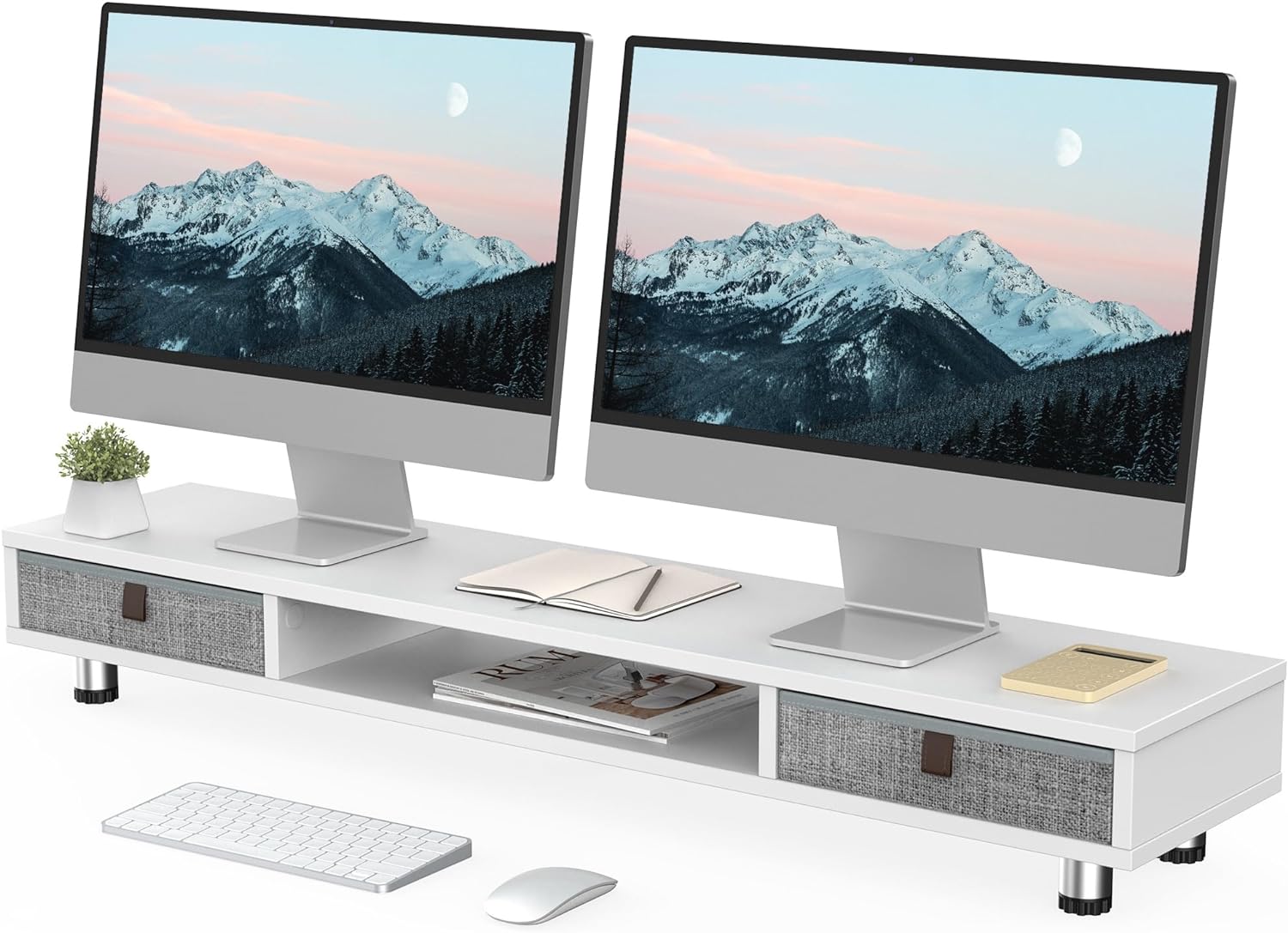
Image 1.1: FENGE Dual Monitor Stand in a typical dual monitor setup, showcasing jego designu i funkcjonalności.

Image 1.2: Visual representation of the stand's benefits: improved desktop organization, ergonomic monitor elevation, and support for cervical spine health.
2. Instalacja i montaż
The FENGE Dual Monitor Stand requires minimal assembly. Please follow these steps carefully to ensure proper setup.
- Rozpakuj komponenty: Ostrożnie wyjmij wszystkie części z opakowania. Sprawdź, czy wszystkie elementy są obecne zgodnie z dołączoną listą części (niezawartą w niniejszej instrukcji).
- Zamontuj nogi: Position the main board on a soft, clean surface to prevent scratches. Attach the adjustable legs to the designated points on the underside of the board using the provided screws. Ensure they are securely fastened.
- Włóż szuflady: Slide the fabric drawers into their respective compartments on the stand.
- Dostosuj wysokość: Once assembled, place the stand on your desk. Adjust the height of the stand by rotating the anti-slip foot mats on the bottom of each leg. Turn clockwise to raise and counter-clockwise to lower. Ensure all legs are adjusted to an even height for stability.

Image 2.1: Detail of the stand's construction, highlighting the sturdy board, solid legs, and adjustable feet for height customization.

Image 2.2: The adjustable foot mechanism allows for precise height tuning.
3. Instrukcja obsługi
Using your FENGE Dual Monitor Stand is straightforward. Follow these guidelines for optimal use.
- Placement of Monitors/Devices: Carefully place your monitors, laptop, printer, or TV on the top surface of the stand. Ensure the weight is evenly distributed and does not exceed the maximum load capacity of 99 lbs (45 kg).
- Wykorzystanie szuflad do przechowywania: The two slide-out fabric drawers are designed for storing small office supplies such as pens, sticky notes, mobile devices, and cables. Gently pull the leather handle to open and push to close.
- Central Compartment: The open central compartment provides additional space for items like notebooks, tablets, or a keyboard when not in use, helping to keep your desk tidy.
- Ergonomiczne pozycjonowanie: Adjust the stand's height using the adjustable feet to achieve a comfortable eye level for your monitors. This helps reduce neck and eye strain during prolonged use.

Image 3.1: The practical slide-out drawers offer convenient storage for small items, keeping your workspace clutter-free.

Image 3.2: The stand's versatility allows it to function as a printer station, dual monitor riser, or TV stand.
4. Konserwacja
Proper care will ensure the longevity and appearance of your FENGE Dual Monitor Stand.
- Czyszczenie: Wipe the surface of the stand with a soft, damp szmatką. W przypadku uporczywych plam można użyć łagodnego roztworu mydła, a następnie przetrzeć czystą, suchą szmatką.
- Unikaj silnych środków chemicznych: Do not use abrasive cleaners, solvents, or harsh chemicals, as these can damage the finish of the engineered wood.
- Pielęgnacja szuflady: Szuflady z tkaniny można czyścić punktowo za pomocąamp cloth and mild detergent if necessary. Allow them to air dry completely before reinserting.
- Regularne kontrole: Periodically check that all leg connections are secure to maintain stability.
5. Rozwiązywanie Problemów
If you encounter any issues with your monitor stand, refer to the following common solutions.
- Stojak jest niestabilny/chwiejny:
- Ensure all legs are securely tightened to the main board.
- Verify that the adjustable feet are evenly extended and making full contact with the desk surface. Adjust as needed.
- Check that the desk surface itself is level.
- Drawers are Sticking/Difficult to Open:
- Remove the drawer and check for any obstructions inside the compartment or along the drawer's edges.
- Ensure the drawer is inserted correctly and aligned within its slot.
- Confirm that the drawer is not overloaded, which could cause it to bind.
- Scratches on Desk Surface:
- The adjustable feet are equipped with anti-slip mats to prevent scratches. Ensure these mats are intact and clean.
- Avoid dragging the stand across the desk; lift it when repositioning.
6. Specyfikacje
Detailed specifications for the FENGE Dual Monitor Stand (Model G04D2101A-C).
| Funkcja | Szczegół |
|---|---|
| Numer modelu | G04D2101A-C |
| Tworzywo | Engineered Wood (MDF Board, 15mm thick) |
| Kolor | Biały |
| Długość całkowita | 42.5 cala (1080 mm) |
| Całkowita głębokość | 9.3 cala (235 mm) |
| Zakres regulacji wysokości | 6.0 cala (152 mm) do 6.6 cala (167 mm) |
| Wymiary szuflady (wewnętrzne) | Approximately 10.9 inches (277mm) wide |
| Central Compartment Length | Około 18.3 cala (464 mm) |
| Maksymalna ładowność | 99 funta (45 kg) |
| Waga przedmiotu | 8.3 kilograma |
| Wymagany montaż | Tak |

Image 6.1: Detailed dimensions and weight capacity of the monitor stand.
7. Gwarancja i wsparcie
Information regarding product warranty and customer support was not available in the provided product data. For specific warranty details or to contact customer support, please refer to the product packaging, the manufacturer's official website, or your point of purchase.
Manufacturer: FENGE
Place of Business: No.918 Cidong Avenue Cidong Industrial Zone ningbo