
DEPSTECH NTC55-US
Instrukcja obsługi kamery endoskopowej DEPSTECH
Model: NTC55-US
1. Wprowadzenie
This user manual provides comprehensive instructions for the safe and effective operation of your DEPSTECH Endoscope Camera. Designed for detailed visual inspection in hard-to-reach areas, this device offers high-definition imaging and robust connectivity for various applications, including automotive, plumbing, and home inspections.

Figure 1.1: DEPSTECH Endoscope Camera Overview
This image displays the DEPSTECH Endoscope Camera, featuring its flexible cable, the camera probe with LED lights, and the control unit connected to an iPhone. The iPhone screen shows an inspection view, highlighting the product's primary function.
2. Informacje dotyczące bezpieczeństwa
- Nie należy używać endoskopu w środowiskach, w których występują gazy łatwopalne lub wybuchowe.
- Ensure the device is disconnected from your phone before cleaning.
- The camera probe is IP67 waterproof, but the main control unit and USB connector are not. Avoid submerging these parts in liquid.
- Przechowywać w miejscu niedostępnym dla dzieci.
- Nie należy podejmować prób demontażu ani modyfikacji urządzenia. Spowoduje to unieważnienie gwarancji.
- Use only with compatible iOS devices (iOS 12.0+).
3. Zawartość opakowania
Sprawdź, czy w przesyłce znajdują się wszystkie elementy:
- DEPSTECH Endoscope Camera (Model NTC55-US)
- Instrukcja obsługi
- Mocowanie haka
- Mocowanie magnetyczne

Figure 3.1: Included Accessories and Packaging
This image shows the DEPSTECH Endoscope Camera, its packaging box, the user manual, and the included hook and magnet accessories, laid out on a dark surface.
4. Koniec produktuview
Familiarize yourself with the components of your endoscope camera:
- Port Lightning: Connects to your iOS device.
- Soft Cable: The initial flexible section of the cable.
- Regulacja jasności: Control unit with LED+ and LED- buttons to adjust camera light intensity.
- Kabel półsztywny: The main 16.4ft (5m) cable that retains its shape for easier navigation.
- Dia 7mm Probe: The camera head with integrated LED lights.

Figure 4.1: Endoscope Component Diagram
This diagram illustrates the various parts of the DEPSTECH endoscope, including the Lightning connector, soft cable, brightness adjustment unit, semi-rigid cable, and the 7mm diameter camera probe, each clearly numbered for identification.
5. Konfiguracja
5.1. Zgodność
This endoscope camera is designed exclusively for iOS devices running iOS 12.0 or higher, including iPhones and iPads. It is not compatible with Android phones, even with adapters, and specifically not compatible with the iPhone 15 series.

Figure 5.1: iOS Device Compatibility
This image visually confirms the endoscope's compatibility with iPhone and iPad devices running iOS 12.0 or later, explicitly stating its incompatibility with Android phones and the iPhone 15 series.
5.2. Instalacja aplikacji
To use the endoscope, you must download and install the "DEPSTECHCAM" application from the Apple App Store.
- Step 1: Download "DEPSTECHCAM" APP. Scan the QR code provided in the product packaging or search for "DEPSTECHCAM" directly in the Apple App Store.
- Step 2: Connect to your iOS 12.0+ iPhone/iPad. Plug the endoscope's Lightning connector into your device.
- Step 3: Allow access to all photos, get started. Grant the app necessary permissions when prompted to enable full functionality.

Rysunek 5.2: Przewodnik szybkiej konfiguracji
This image illustrates the three essential steps for setting up the endoscope: downloading the "DEPSTECHCAM" app from the App Store (with a QR code), connecting the endoscope to an iOS device, and granting the app access to photos for operation.
Aby pobrać aplikację bezpośrednio, odwiedź stronę: DEPSTECHCAM App Download
6. Instrukcja obsługi
6.1. App User Interface
The DEPSTECHCAM app features a clear and intuitive interface for easy operation:
- Status połączenia: Indicates if the endoscope is properly connected.
- Allow access to all photos: Prompt for necessary permissions.
- View zdjęcia/filmy: Access your captured media.
- Noir/Color: Toggle between black & white and color modes.
- Ustawienie: Access app settings.
- Screen rotation 90°: Rotate the live view.
- File: Zarządzać files.
- Zoom 1X / 1.5X / 2X: Adjust digital zoom.
- Take photos/record videos: Capture images or start/stop video recording.
- Wybierać: Wybierz wiele files.
- Zdjęcia / filmy files: Browse captured media.
- Files information: View details about selected files.
- Udział files: Share captured media.
- Usuwać files: Remove unwanted media.

Figure 6.1: DEPSTECHCAM App Interface
This image displays three screenshots of the DEPSTECHCAM application, highlighting key features such as connection status, photo/video viewing, na żywo view controls (zoom, photo/video capture, color mode, screen rotation), and file opcje zarządzania.
6.2. Adjusting Illumination (Bluart 3.0 Tech)
The endoscope features six adjustable LED lights with Bluart 3.0 technology for optimal visibility. Use the "LED+" and "LED-" buttons on the control unit to increase or decrease brightness. The optimal focus range is 0.79-3.93 inches (2-10cm).
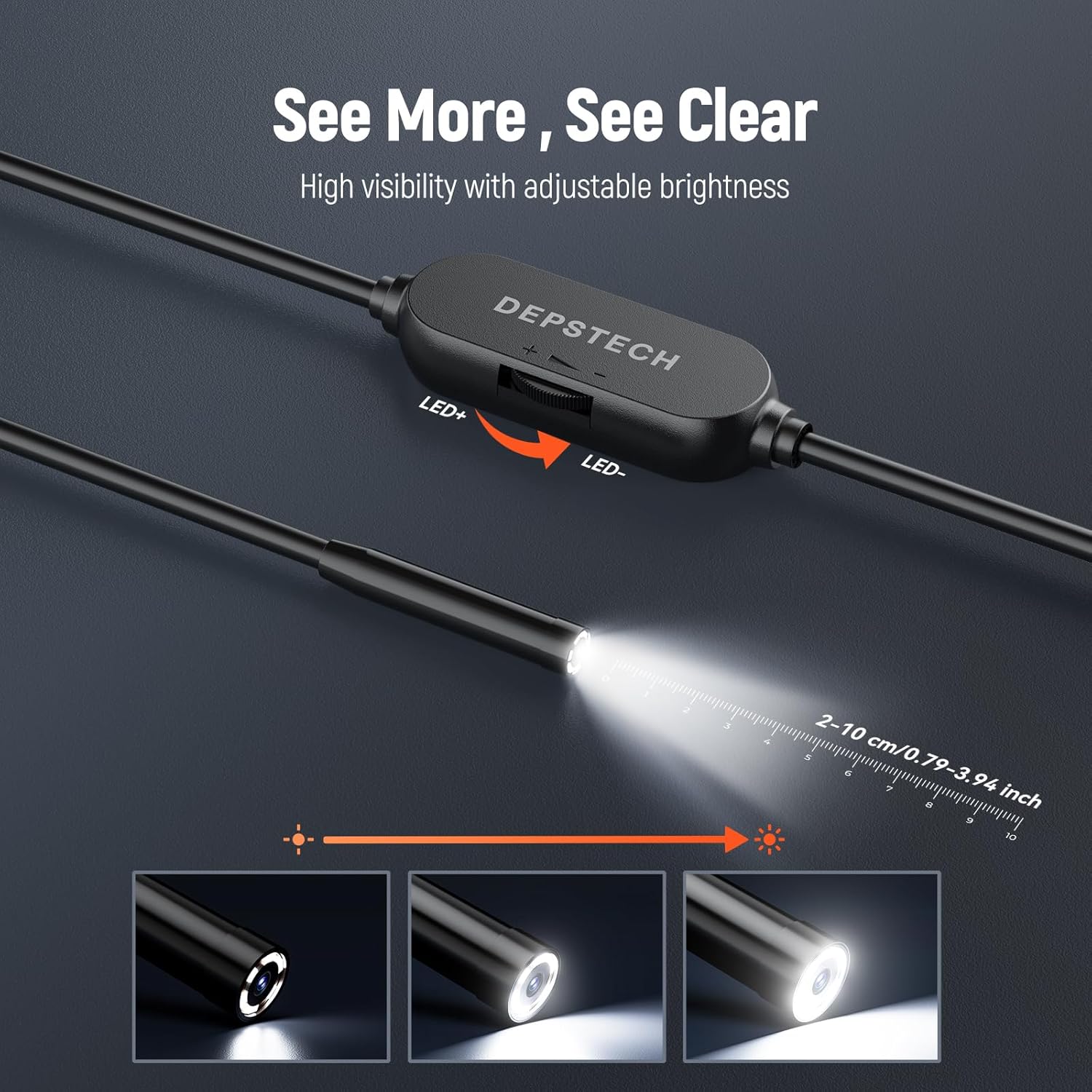
Figure 6.2: Adjustable LED Brightness
This image shows the control unit of the DEPSTECH endoscope with "LED+" and "LED-" buttons, illustrating how to adjust the brightness of the camera's integrated LED lights for improved visibility during inspections.

Figure 6.3: Bluart 3.0 Technology
This diagram highlights DEPSTECH's Bluart 3.0 technology, which enhances image clarity and true-to-reality video quality through the camera's blue LED system, showing different illumination patterns.
6.3. Zastosowania praktyczne
The DEPSTECH Endoscope Camera is versatile for various inspection needs:
- Automotive Inspection: Examine engine components, spark plug holes, or other confined spaces in vehicles.
- Inspekcja hydrauliki: Inspect pipes, drains, and sewer lines for clogs, leaks, or damage.
- Inspekcja domu: Look inside walls, behind appliances, or in ventilation systems to identify issues.
- Zastosowanie przemysłowe: Ideal for machinery inspection, HVAC systems, and construction.

Figure 6.4: Engine Inspection
This image shows a user holding the DEPSTECH endoscope cable while viewing the live feed on an iPhone, inspecting the internal components of a car engine.

Figure 6.5: Wall Cavity Inspection
A user is shown inserting the endoscope camera into an opening in a wall, with the iPhone displaying the live view of electrical wiring and internal structures.

Figure 6.6: Sink Drain Inspection
This image depicts the endoscope probe being inserted into a kitchen sink drain, with the user observing the internal view on a connected iPhone, demonstrating its use for plumbing inspections.

Figure 6.7: Appliance Inspection
A user is shown inspecting the interior of an appliance, possibly a washing machine or dryer, by inserting the endoscope and viewing the live feed on their iPhone.

Figure 6.8: Floor Drain Inspection
This image shows the endoscope being used to inspect a floor drain, with the camera's view displayed on the connected iPhone, demonstrating its utility for examining plumbing systems.
7. Konserwacja
- Czyszczenie obiektywu: Gently wipe the camera lens with a soft, dry cloth. For stubborn dirt, use a lens cleaning solution on the cloth, not directly on the lens.
- Pielęgnacja kabli: Avoid sharp bends or kinks in the cable to prevent internal damage. Coil the cable loosely for storage.
- Składowanie: Przechowuj endoskop w chłodnym i suchym miejscu, z dala od bezpośredniego światła słonecznego i ekstremalnych temperatur.
- Narażenie na działanie wody: While the probe is waterproof (IP67), ensure the USB connector and control unit remain dry. If they get wet, dry them thoroughly before use.
8. Rozwiązywanie Problemów
| Problem | Możliwa przyczyna | Rozwiązanie |
|---|---|---|
| No image on screen / "Not Connected" error |
|
|
| Słaba jakość obrazu / Rozmazany obraz |
|
|
| Aplikacja ulega awarii lub zawiesza się |
|
|
9. Specyfikacje
| Funkcja | Szczegół |
|---|---|
| Nazwa modelu | Depstech Caméra endoscopique HD (NTC55-US) |
| Średnica kamery | 7mm (0.28in) |
| Długość kabla | 16.4 stóp (5 m) |
| Odporność na wodę | IP67 (Camera Probe Only) |
| Łączność | Lightning (for iOS devices) |
| Pole View (pole widzenia) | 80° |
| Typ fokusu | Ręczne ustawianie ostrości |
| Optimal Focus Distance | 0.79-3.93 cale (2-10 cm) |
| Oświetlenie | 6 Adjustable LED Lights (Bluart 3.0 Tech) |
| Wymiary produktu | 1.72 x 1.49 x 0.38 cm (Control Unit); 231 g (Total Weight) |
| Producent | DEPSTECH |
10. Gwarancja i wsparcie
DEPSTECH products are designed for durability and performance. For warranty information, technical support, or customer service inquiries, please refer to the contact details provided on the official DEPSTECH website or your purchase documentation. Our support team is available to assist with any questions or issues you may encounter.
Visit the official DEPSTECH Store: DEPSTECH Store on Amazon.ca