
DOOGEE V30
Instrukcja obsługi wytrzymałego smartfona DOOGEE V30
Your comprehensive guide to setting up, operating, and maintaining your DOOGEE V30.
1. Koniec produktuview
The DOOGEE V30 is a rugged smartphone designed for durability and high performance, featuring advanced connectivity, a powerful camera system, and a long-lasting battery.
Główne cechy
- Built-in eSIM Global Network: Seamless global connectivity with support for multiple phone numbers and data plans.
- 6.6" FHD+ 120Hz Display: Immersive visual experience with a high refresh rate and vibrant colors.
- Potrójny aparat AI 108 MP: High-resolution main camera, 32MP front camera, 20MP night vision, and 8MP wide-angle/macro lens for versatile photography.
- 10800mAh Battery & 66W Fast Charging: Extended usage time with rapid charging capabilities.
- Pełna ochrona 360°: IP68/IP69K and MIL-STD-810H certified for water, dust, and drop resistance.
- Procesor MediaTek Dimensity 900: Efficient performance for demanding applications and multitasking.

Obraz: przód i tył view of the DOOGEE V30 Rugged Smartphone, highlighting its robust design and camera module.
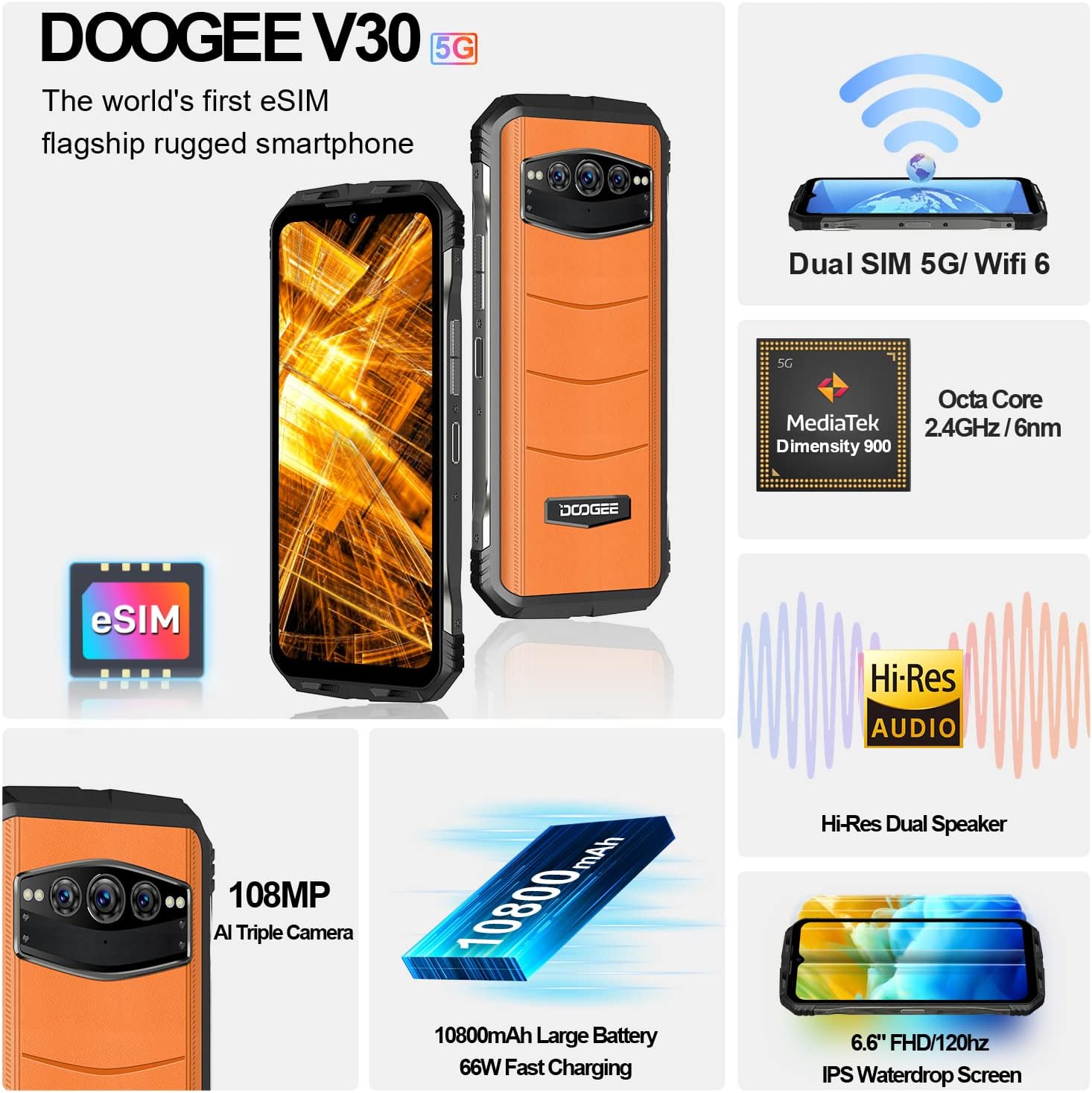
Obraz: Ponadview of the DOOGEE V30's key features including eSIM, Dual SIM, MediaTek Dimensity 900, Hi-Res Audio, 108MP camera, 10800mAh battery, and 6.6" FHD+ display.
2. Przewodnik konfiguracji
2.1 Zawartość pudełka
Przed rozpoczęciem upewnij się, że wszystkie komponenty są obecne:
- DOOGEE V30 Unlocked Rugged Smartphone X1
- Kabel typu C x1
- 66W Fast Charger x1
- Anti-explosion film (pre-applied) x1
- Anti-explosion film x1 (spare)
2.2 SIM Card and eSIM Setup
The DOOGEE V30 supports both physical SIM cards and eSIM technology.
- Physical SIM Card Installation: Locate the SIM card tray on the side of the device. Use the provided SIM ejector tool to open the tray. Insert your Nano-SIM card(s) into the designated slots, ensuring the gold contacts face downwards. Close the tray securely.
- Aktywacja eSIM: The DOOGEE V30 features built-in eSIM functionality. To activate an eSIM profile, navigate to Settings > Network & internet > SIMs. You can typically scan a QR code provided by your carrier or manually enter activation details. This allows for multiple phone numbers and data plans without physical SIM cards.

Image: Illustration of the DOOGEE V30's eSIM toolkit interface, showing options to scan, choose from album, or input download for eSIM activation.
2.3 Pierwsze ładowanie
Before first use, it is recommended to fully charge your DOOGEE V30. Use the provided 66W Fast Charger and Type C cable for optimal charging speed.
- Connect the Type C cable to the charging port at the bottom of the phone.
- Connect the other end of the cable to the 66W Fast Charger.
- Podłącz ładowarkę do gniazdka elektrycznego.
- The phone will indicate charging status on the screen. A full charge typically takes approximately 2 hours.

Image: Visual representation of the DOOGEE V30's 10800mAh battery capacity and 66W super fast charging, showing 50% charge in 30 minutes.
3. Operating Your DOOGEE V30
3.1 Podstawowa nawigacja
- Przycisk zasilania: Located on the side, press and hold to power on/off or restart. A short press will lock/unlock the screen.
- Przyciski głośności: Dostosuj głośność multimediów, połączeń i dzwonków.
- Gesty na ekranie dotykowym: Przesuwaj, dotykaj i szczypaj, aby powiększać i pomniejszać, aby poruszać się po aplikacjach i korzystać z nich w interakcjach.
3.2 Korzystanie z kamery
The DOOGEE V30 features a versatile camera system:
- Główny aparat AI 108 MP: For high-resolution photos with enhanced detail.
- 32MP Front-facing Camera: Do wyraźnych selfie i rozmów wideo.
- Kamera noktowizyjna 20 MP: Utilizes infrared sensors to capture images in low-light or complete darkness.
- Aparat szerokokątny i makro 8 MP: For expansive landscape shots or detailed close-ups.
To access the camera, tap the Camera icon on your home screen or app drawer. Select different modes (Photo, Video, Night Vision, Portrait, Pro, etc.) from the interface.

Image: Comparison of 48MP and 108MP image quality, demonstrating the enhanced detail of the DOOGEE V30's 108MP AI main camera.
3.3 Wyświetlacz i dźwięk
Experience superior visuals and sound with your DOOGEE V30:
- 6.6" FHD+ Display: Enjoy crisp, clear visuals with 2408*1080 resolution and 401 PPI.
- Częstotliwość odświeżania 120 Hz: Provides smoother scrolling and more fluid animations, especially noticeable in gaming and video playback.
- Dual Hi-Res Speakers: Delivers rich, immersive audio for music, videos, and calls.

Image: Visual comparison of 90Hz and 120Hz refresh rates on the DOOGEE V30's 6.6" FHD+ display, highlighting the smoother experience of 120Hz, alongside the Hi-Res Audio logo.
3.4 Wydajność
The DOOGEE V30 is powered by the MediaTek Dimensity 900 processor, ensuring efficient and responsive performance. It comes with 8GB of RAM, expandable virtually by an additional 7GB, and 256GB of internal storage, expandable up to 2TB via TF card.
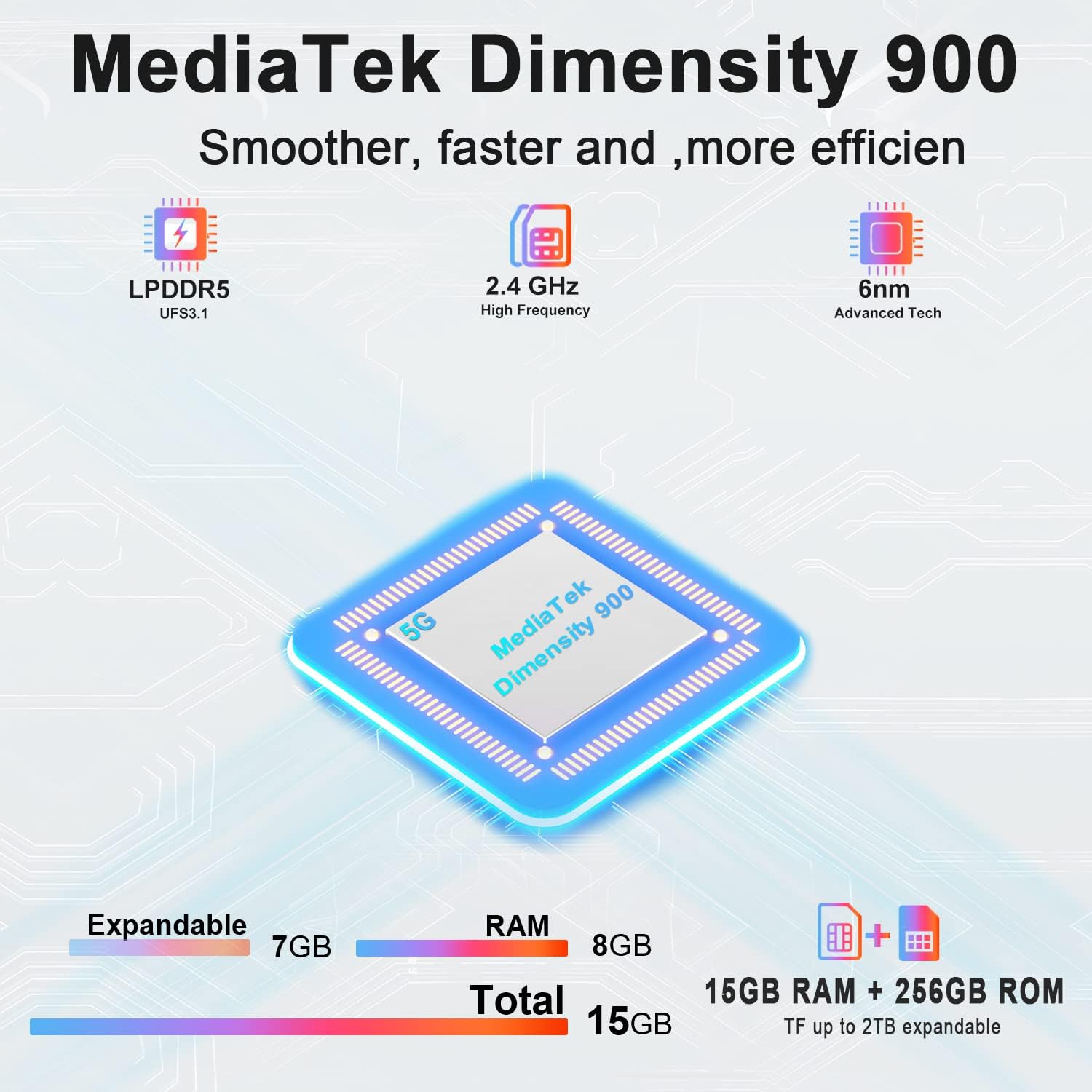
Image: Diagram illustrating the MediaTek Dimensity 900 processor's features, including LPDDR5, UFS3.1, 2.4 GHz high frequency, and 6nm advanced tech, along with the 15GB (8GB+7GB expandable) RAM and 256GB ROM.
4. Pielęgnacja i konserwacja
4.1 Cechy trwałości
The DOOGEE V30 is built to withstand harsh environments, certified with:
- IP68: Wodoodporność do głębokości 1.5 metra przez 30 minut.
- IP69K: Odporne na strumienie wody pod wysokim ciśnieniem i wysoką temperaturą.
- MIL-STD-810H: Military-grade standard for resistance against drops, shocks, and extreme temperatures.
While rugged, avoid intentional abuse or exposing the device to conditions beyond its specified limits.

Image: Demonstrations of the DOOGEE V30's ruggedness, including its MIL-STD-810H compliance, IP68 waterproof rating (30 minutes, 1.5m deep), and IP69K dustproof rating (360°).
4.2 Instrukcje dotyczące czyszczenia
- Do przecierania ekranu i obudowy należy używać miękkiej, niepozostawiającej włókien ściereczki.
- W przypadku uporczywych plam delikatnieampWyczyść szmatkę wodą lub płynem do czyszczenia ekranów.
- Unikaj stosowania silnych środków chemicznych, materiałów ściernych i sprężonego powietrza.
- Przed ładowaniem lub podłączaniem akcesoriów upewnij się, że wszystkie porty są suche.
4.3 Pielęgnacja baterii
- Unikaj ekstremalnych temperatur (wysokich i niskich), ponieważ mogą one skrócić żywotność baterii.
- Nie należy regularnie rozładowywać akumulatora do końca; staraj się utrzymywać jego poziom naładowania powyżej 20%.
- Use only the original or certified chargers and cables.
5. Rozwiązywanie typowych problemów
| Problem | Możliwa przyczyna | Rozwiązanie |
|---|---|---|
| Telefon się nie włącza | Niski poziom baterii; Awaria systemu | Ładuj telefon przez co najmniej 10 minut. Naciśnij i przytrzymaj przycisk zasilania przez 10–15 sekund, aby wymusić ponowne uruchomienie. |
| Nie można połączyć się z siecią | SIM card issue; Network settings; Out of coverage | Ensure SIM card is correctly inserted. Check network settings (APN). Try restarting the phone. Contact your carrier. |
| Ekran nie reaguje | Software glitch; App conflict | Force restart the phone. If issue persists, try factory reset (backup data first). |
| Bateria szybko się rozładowuje | Background apps; High screen brightness; Poor signal | Close unused apps. Reduce screen brightness. Disable unnecessary features (GPS, Wi-Fi, Bluetooth). Check for app updates. |
| Camera issues (e.g., yellow filter) | Software bug; Specific camera mode | Clear camera app cache/data (Settings > Apps > Camera). Check for system updates. If a specific filter is applied, try changing camera modes or resetting camera settings. |
6. Specyfikacje techniczne
| Funkcja | Specyfikacja |
|---|---|
| Nazwa modelu | V30 |
| System operacyjny | Android 12.0 |
| Edytor | MediaTek Dimensity 900 (2.4 GHz CPU Speed) |
| BARAN | 8 GB (expandable with 7GB virtual RAM) |
| Pojemność pamięci masowej | 256 GB (możliwość rozszerzenia do 2 TB za pomocą karty TF) |
| Rozmiar ekranu | 6.58 cala FHD+ (rozdzielczość 2408 x 1080) |
| Częstotliwość odświeżania | 120 Hz |
| Główna kamera | 108MP AI Triple Camera (includes 20MP Night Vision, 8MP Wide Angle & Macro) |
| Przednia kamera | 32MP |
| Moc znamionowa akumulatora | 10800 mAh |
| Czas ładowania | Approx. 2 Hours (with 66W Fast Charger) |
| Technologie łączności | 5G Cellular, NFC, GPS, eSIM/Dual SIM |
| Operator sieci bezprzewodowej | Odblokowany dla wszystkich przewoźników |
| Wymiary produktu | 6.67 x 3.2 x 0.63 cala |
| Waga przedmiotu | 9.5 uncji (270 grama) |
| Cechy specjalne | eSIM/Dual SIM 5G, 108MP AI Triple Camera, 8GB+7GB Virtual Expandable RAM, Dual Band Navigation(L1+L5), 120Hz Refresh Rate |
| Normy trwałości | IP68/IP69K, MIL-STD-810H |
7. Gwarancja i wsparcie
DOOGEE is committed to providing excellent customer service for your V30 Rugged Smartphone.
- Gwarancja: Your DOOGEE V30 comes with a 2-year free warranty from the date of purchase. This warranty covers manufacturing defects and malfunctions under normal use.
- Gwarancja zwrotu pieniędzy: Enjoy a 30-day money-back guarantee without reason, along with free returns.
- Obsługa klienta: For any issues or inquiries, a professional support team is available 24/7 to assist you. Please refer to the contact information provided with your purchase or visit the official DOOGEE webstrona z opcjami pomocy.
For more information and to explore other DOOGEE products, visit the Sklep DOOGEE na Amazon.
Ask a question about this manual
Ask about setup, troubleshooting, compatibility, parts, safety, or missing instructions. Manuals+ will review the question and use this page’s manual context to help answer it.