
1. Wprowadzenie
The IHSENO Mini WiFi Smart Switch Relay is a compact and intelligent device designed to integrate your traditional lighting and appliances into a smart home system. It operates on 2.4GHz WiFi and is compatible with the Tuya Smart Life App, allowing for remote control, voice commands via Alexa and Google Home, and intelligent scheduling.

Obraz 1.1: Koniecview of the IHSENO Mini WiFi Smart Switch Relay and its packaging.
Główne cechy:
- Mini WiFi Smart Switch: Designed for 2.4GHz WiFi, enabling whole-house intelligence through the Tuya APP.
- Tuya Smart Life App Control: Connects with other smart devices for intelligent scene linkage.
- Customize Different Scene Modes: Allows setting scenes like 'Reading' or 'Movie' and controlling various smart devices.
- Alexa & Google Home Enabled: Supports voice control for hands-free operation.
- Kompaktowa konstrukcja: Fits into most standard electrical boxes, even with existing wiring.
2. Informacje dotyczące bezpieczeństwa
Przed instalacją i uruchomieniem należy uważnie przeczytać wszystkie instrukcje bezpieczeństwa. Nieprzestrzeganie tych instrukcji może spowodować porażenie prądem, pożar lub inne zagrożenia.
- Zalecana profesjonalna instalacja: Prace elektryczne powinien wykonywać wykwalifikowany elektryk.
- Wyłącz zasilanie przed instalacją: Przed instalacją lub serwisowaniem urządzenia należy zawsze odłączyć zasilanie za pomocą wyłącznika automatycznego.
- Tylko do użytku wewnątrz pomieszczeń: Urządzenie przeznaczone jest do użytku wewnątrz pomieszczeń, w suchych miejscach.
- Tomtage i aktualne oceny: Nie przekraczaj określonej objętościtage (AC 100-240V) and current (3 Amps) ratings.
- Okablowanie: Ensure all wiring connections are secure and comply with local electrical codes. Input and output connections cannot be reversed.

Image 2.1: Safety and Certification details for the Mini Smart Switch.
3. Konfiguracja i instalacja
The IHSENO Mini WiFi Smart Switch Relay is designed for easy integration into your existing electrical system. It supports both 1-way and 2-way control setups.
Schematy okablowania:
Ważny: Always ensure the power is OFF at the circuit breaker before performing any wiring. Input and output connections cannot be reversed.

Image 3.1: Wiring Method 1 - Direct connection to a lamp and mains power.

Image 3.2: Wiring Method 2 - Connection with a 1-way wall switch.

Image 3.3: Wiring Method 3 - Connection with a 2-way wall switch.
Parowanie aplikacji:
- Pobierz Tuya Smart or Inteligentne życie aplikację ze sklepu z aplikacjami na Twoim smartfonie.
- Zarejestruj się lub zaloguj na swoje konto.
- Upewnij się, że smartfon jest podłączony do sieci Wi-Fi 2.4 GHz.
- Power on the smart switch. The indicator light should blink rapidly, indicating it's in pairing mode. If not, refer to the troubleshooting section for resetting the device.
- In the app, tap '+' to add a device. Select 'Electrical' > 'Switch (Wi-Fi)' or allow the app to auto-discover the device.
- Aby dokończyć proces parowania, postępuj zgodnie z instrukcjami wyświetlanymi na ekranie.
4. Instrukcja obsługi
Once installed and paired, you can control your IHSENO Mini WiFi Smart Switch Relay through various methods.
4.1. Zdalne sterowanie aplikacją
Control your connected devices from anywhere using the Tuya Smart Life App, as long as your smartphone and the switch are connected to the internet.

Image 4.1: WiFi Remote Control functionality.

Image 4.2: App Remote Control in action, showing control of a lamp.
4.2. Sterowanie głosowe
Integrate your smart switch with Amazon Alexa or Google Assistant for convenient voice commands.
- Otwórz aplikację Alexa lub Google Home.
- Link your Tuya Smart Life account to the voice assistant.
- Odkryj urządzenia.
- Użyj poleceń takich jak „Alexa, włącz l”amp" or "Hey Google, turn off the kitchen light."
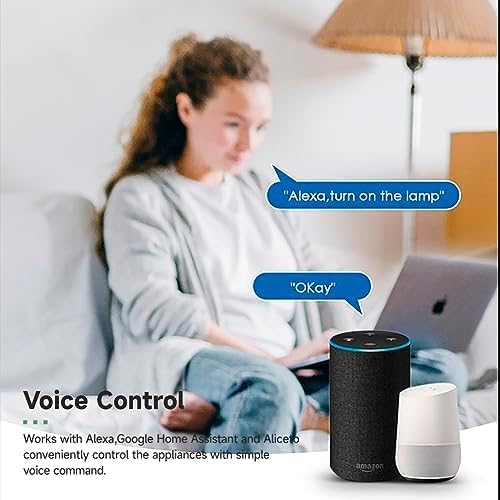
Image 4.3: Voice control with Alexa and Google Home.
4.3. Intelligent Timing and Scene Modes
Set schedules, countdowns, and create custom scene modes within the Tuya Smart Life App.
- Chronometraż: Schedule devices to turn on/off at specific times (e.g., 23:30 Off).
- Kolarstwo: Set recurring schedules (e.g., 08:00 ON Everyday).
- Odliczanie: Ustaw timer, po którym urządzenie wyłączy się po upływie określonego czasu.
- Tryby scen: Combine multiple smart devices to activate with a single command or schedule (e.g., 'Movie Night' scene dims lights and turns on entertainment).
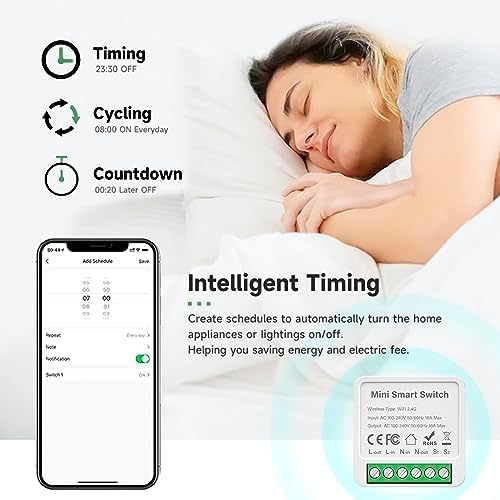
Image 4.4: Intelligent Timing features in the app.
4.4. Funkcja udostępniania
Share control of your smart devices with family members through the Tuya Smart Life App.

Image 4.5: Sharing function for family members.
5. Konserwacja
To ensure the longevity and optimal performance of your IHSENO Mini WiFi Smart Switch Relay, follow these simple maintenance guidelines:
- Czyszczenie: Do czyszczenia urządzenia należy używać miękkiej, suchej ściereczki. Nie należy używać płynów czyszczących ani aerozoli.
- Środowisko: Unikaj wystawiania urządzenia na działanie nadmiernej wilgoci, ekstremalnych temperatur lub bezpośredniego światła słonecznego.
- Kontrola: Okresowo sprawdzaj połączenia przewodów, zwracając uwagę na oznaki zużycia lub luzów.
6. Rozwiązywanie Problemów
If you encounter issues with your IHSENO Mini WiFi Smart Switch Relay, refer to the following common problems and solutions:
- Urządzenie nie łączy się:
- Upewnij się, że Twoja sieć Wi-Fi obsługuje częstotliwość 2.4 GHz. Urządzenie nie obsługuje Wi-Fi 5 GHz.
- Check that the device is powered on and the indicator light is blinking rapidly. If not, power cycle the device or perform a factory reset (refer to app instructions for reset procedure).
- Move the device closer to your WiFi router during pairing.
- Urządzenie jest offline w aplikacji:
- Verify your home WiFi network is active and has internet access.
- Check the power supply to the smart switch.
- Uruchom ponownie router WiFi.
- Sterowanie głosowe nie działa:
- Ensure your Tuya Smart Life account is correctly linked to Alexa or Google Home.
- Check the device name in the voice assistant app; ensure it's easy to pronounce and recognize.
- Verify your voice assistant device is connected to the internet.
- Physical switch not responding:
- Ensure all wiring connections are secure and correct according to the diagrams.
- Check if the physical switch itself is functional.
7. Specyfikacje
Technical specifications for the IHSENO Mini WiFi Smart Switch Relay:

Rysunek 7.1: Szczegółowe specyfikacje produktu.
| Specyfikacja | Szczegół |
|---|---|
| Marka | IHSENO |
| Model | B0CF1FYYBN |
| Typ bezprzewodowy | WiFi 2.4G |
| Wejście Voltage | Prąd zmienny 100-240 V 50/60 Hz |
| Objętość wyjściatage | Prąd zmienny 100-240 V 50/60 Hz |
| Maksymalny prąd znamionowy | 3 Amps (Note: Product image shows 16A Max, but product specifications list 3 Amps. Please verify with product packaging.) |
| Typ montażu | Montaż powierzchniowy |
| Materiał kontaktowy | Miedź |
| Tworzywo | PC V0 (Fireproof) |
| Rozmiar | 41x20x41mm (approx. 1.6*0.8*1.6 inches) |
| Tryb działania | (ON)-ON-OFF |
| Typ przełącznika | 1-drożny |
| Styl przełączania | Naciśnij przycisk |
| Zgodność aplikacji | Smart Life (Support iOS & Android) |
8. Gwarancja i wsparcie
IHSENO is committed to providing high-quality products and customer satisfaction.
If you have any questions about this product, please feel free to contact our customer service team. We aim to reply within 24 hours to assist you with any inquiries or issues.
Szczegółowe warunki gwarancji można znaleźć w dokumentacji zakupu.