
Wstęp
This manual provides detailed instructions for the safe and efficient use of your Blow Portable Bluetooth Speaker, Model 30-391. Please read this manual thoroughly before operating the device and retain it for future reference.
The Blow 30-391 is a versatile portable Bluetooth speaker designed for universal use with smartphones, tablets, computers, and other audio devices. It features Bluetooth 5.0 connectivity, AUX input, Micro USB port, and an integrated microphone for various audio applications.
Zawartość opakowania
Sprawdź, czy w przesyłce znajdują się wszystkie wymienione poniżej elementy:
- Blow Portable Bluetooth Speaker (Model 30-391)
- Kabel ładujący USB
- Kabel mikrofonowy
- Instrukcja obsługi (ten dokument)
- Zdalne sterowanie

Obraz: Przód view of the Blow Portable Bluetooth Speaker 30-391, showcasing its RGB lighting, included remote control, and wired microphone.

Image: The USB charging cable and the microphone cable that come with the speaker.
Cechy produktu
- Łączność: Bluetooth 5.0, AUX-in (3.5mm), Micro USB, USB port, MicroSD card slot.
- Wyjście audio: 10 Watts maximum speaker output.
- Bateria: Integrated 4500 mAh rechargeable battery.
- Cechy szczególne: Integrated microphone, RGB lighting effects, voice control capability.
- Ruchliwość: Compact design with a handle for easy transport.
- Zgodność: Universal compatibility with desktop computers, laptops, smartphones, and tablets.
Organizować coś
1. Ładowanie głośnika
Before first use, fully charge the speaker. Connect the supplied USB charging cable to the Micro USB port on the speaker and the other end to a standard USB power adapter (not included) or a computer's USB port. The charging indicator light will illuminate during charging and turn off when fully charged.
2. Włączanie/wyłączanie zasilania
Locate the power switch on the top panel of the speaker. Slide the switch to the "ON" position to power on the speaker. Slide it to the "OFF" position to power off the speaker.

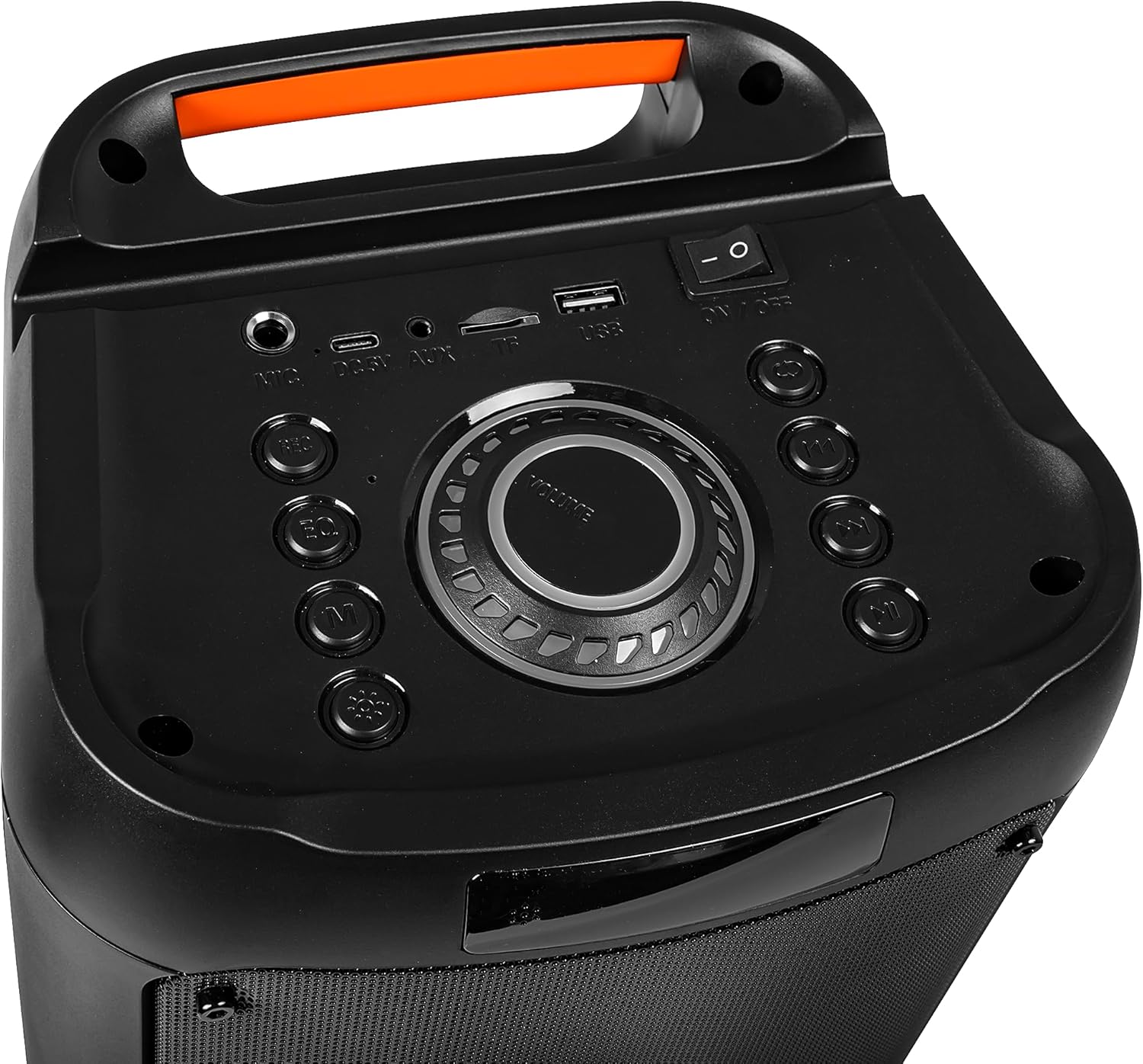
Image: Close-up of the speaker's top control panel, showing the power switch, volume knob, and various input ports.
3. Parowanie Bluetooth
- Włącz głośnik. Automatycznie przejdzie on w tryb parowania Bluetooth, co będzie sygnalizowane migającą diodą LED.
- Na swoim urządzeniu mobilnym (smartfonie, tablecie itp.) włącz Bluetooth i wyszukaj dostępne urządzenia.
- Select "Blow 30-391" from the list of devices.
- Po sparowaniu głośnik wyemituje sygnał dźwiękowy potwierdzający, a dioda LED przestanie migać.
- Głośnik automatycznie połączy się ponownie z ostatnio sparowanym urządzeniem po włączeniu, jeżeli urządzenie znajduje się w zasięgu, a Bluetooth jest włączony.
4. Połączenie AUX
To connect an external audio device via AUX, use a 3.5mm audio cable (not included). Plug one end into the AUX-in port on the speaker and the other end into the headphone jack or audio output of your device. The speaker will automatically switch to AUX mode.
5. Odtwarzanie z USB/MicroSD
Insert a USB flash drive or a MicroSD card (up to 32GB) containing MP3 audio files into the respective port on the speaker. The speaker will automatically detect the storage device and begin playing music. Use the control buttons to navigate tracks.
Instrukcja obsługi
1. Koniec kontroliview
The speaker features a control panel on the top for easy operation. Refer to the image in the "Setup" section for button layout.
- Przycisk zasilania: WŁ./WYŁ.
- Pokrętło głośności: Rotate to adjust master volume.
- Przycisk trybu: Naciśnij, aby przełączać się między trybami Bluetooth, AUX, USB i MicroSD.
- Przycisk Odtwórz/Pauza: Naciśnij, aby odtworzyć lub wstrzymać dźwięk.
- Przyciski poprzedniego/następnego utworu: Naciśnij, aby przejść do poprzedniego lub następnego utworu.
- Przycisk korektora: Press to cycle through equalizer presets.
- Przycisk trybu światła: Naciśnij, aby zmienić efekty oświetlenia RGB.
- Wejście mikrofonowe: Connect the wired microphone here.
2. Korzystanie z mikrofonu
Connect the supplied wired microphone to the microphone input port on the speaker. Adjust the microphone volume using the dedicated control (if available) or the main volume knob. The integrated microphone allows for voice control and hands-free calling when connected via Bluetooth.
3. Efekty świetlne RGB
The speaker features dynamic RGB lighting. Press the "Light Mode" button on the control panel or remote control to cycle through different lighting patterns or to turn the lights off.
Konserwacja
- Czyszczenie: Do czyszczenia obudowy głośnika należy używać miękkiej, suchej ściereczki. Nie należy używać środków czyszczących o właściwościach ściernych ani rozpuszczalników.
- Pielęgnacja baterii: Aby przedłużyć żywotność baterii, unikaj częstego całkowitego rozładowywania. Ładuj głośnik regularnie, nawet jeśli nie jest używany przez dłuższy czas.
- Składowanie: Przechowuj głośnik w chłodnym, suchym miejscu, z dala od bezpośredniego światła słonecznego i ekstremalnych temperatur.
- Wodoodporność: Ten głośnik NIE jest wodoodporny. Unikaj narażenia na działanie wody i nadmiernej wilgoci.
Rozwiązywanie problemów
| Problem | Możliwe rozwiązanie |
|---|---|
| Głośnik nie włącza się. | Ensure the battery is charged. Connect the speaker to a power source using the USB cable. Check the power switch position. |
| Nie można sparować przez Bluetooth. | Ensure the speaker is in pairing mode (flashing LED). Make sure your device's Bluetooth is enabled and within range (up to 10 meters). Forget previous pairings on your device and try again. |
| Brak dźwięku. | Check the volume level on both the speaker and your connected device. Ensure the correct input mode (Bluetooth, AUX, USB, MicroSD) is selected. Check cable connections for AUX mode. |
| Niska jakość dźwięku. | Ensure the speaker is not too far from the Bluetooth device. Avoid obstacles between the speaker and the device. Try a different audio source or file. |
| Mikrofon nie działa. | Ensure the microphone is securely connected to the input port. Check microphone volume settings. |
Specyfikacje
| Numer modelu | 30-391 |
| Marka | Cios |
| Technologia łączności | Bluetooth 5.0, Auxiliary (3.5mm), Micro USB, USB |
| Tryb wyjścia audio | AUX, Bluetooth |
| Maksymalna moc wyjściowa głośnika | 10 watów |
| Pojemność baterii | 4500 mAh |
| Max Memory Card Size | 32 GB (MicroSD) |
| Cechy specjalne | Integrated Microphone, RGB Lighting, Voice Control |
| Źródło zasilania | Zasilany bateryjnie |
| Wymiary produktu (dł. x szer. x wys.) | 26 x 46 x 24 cm (w przybliżeniu) |
| Waga produktu | 3.67 kg (w przybliżeniu) |
| Kolor | Black (with multicolor RGB lighting) |

Obraz: Bok view of the Blow Portable Bluetooth Speaker 30-391, showing its vertical orientation.
Obraz: Tył view of the Blow Portable Bluetooth Speaker 30-391, highlighting the integrated carrying handle.
Obraz: Szczegółowy view of the top control panel, including the power switch, volume knob, and various input ports.

Image: The retail packaging for the Blow Portable Bluetooth Speaker 30-391, showing product features and accessories.
Gwarancja i wsparcie
The Blow Portable Bluetooth Speaker 30-391 comes with a limited warranty. Please refer to the warranty card included in your package for specific terms and conditions. For technical support, troubleshooting assistance, or warranty claims, please contact your retailer or the manufacturer directly. Contact information can typically be found on the product packaging or the manufacturer's official webstrona.
Producent: Cios
ASIN: B0CDXQRT9Q