
1. Wprowadzenie
The CALEX Smart Home Indoor Ambiance Aroma Diffuser 590100500 is designed to enhance your indoor environment by improving air quality, diffusing pleasant aromas, and providing ambient lighting. This smart device integrates seamlessly into your smart home ecosystem, offering control through the Calex app, voice commands, and programmable features.
Główne cechy obejmują:
- Aroma diffusion with essential oils.
- Realistic flame effect for ambiance.
- Adjustable ambient lighting with 16 million color options.
- Smart control via Calex app (timers, programmable scenarios).
- Voice control compatibility with Google Assistant, Siri, and Amazon Alexa.
- 300ml water tank capacity with automatic shut-off.
2. Informacje dotyczące bezpieczeństwa
Please read all safety instructions before using the device to prevent injury or damage.
- Always place the diffuser on a stable, flat surface away from direct sunlight, heat sources, and electronic devices.
- Do not exceed the maximum water fill line (300ml) to prevent overflow.
- Używaj wyłącznie czystej wody z kranu lub wody destylowanej. Nie używaj gorącej wody.
- Only use 100% pure, water-soluble essential oils. Other oils or corrosive liquids may damage the device.
- Przechowywać urządzenie w miejscu niedostępnym dla dzieci i zwierząt domowych.
- Do not cover the mist outlet during operation.
- Unplug the device from the power outlet before cleaning or refilling.
- The device features an automatic shut-off function when the water tank is empty, and sends a notification to your phone.
- A built-in safety configuration will cause the diffuser to flash if the remaining water in the tank needs to cool down after a maximum of 72 hours of continuous operation.
- Nie próbuj samodzielnie naprawiać ani modyfikować urządzenia. Skontaktuj się z obsługą klienta, aby uzyskać pomoc.
3. Zawartość opakowania
Sprawdź, czy w opakowaniu znajdują się wszystkie elementy:
- CALEX Smart Home Indoor Ambiance Aroma Diffuser (Model 5901000500)
- Zasilacz
- Instrukcja obsługi
4. Koniec produktuview
Familiarize yourself with the components of your aroma diffuser.
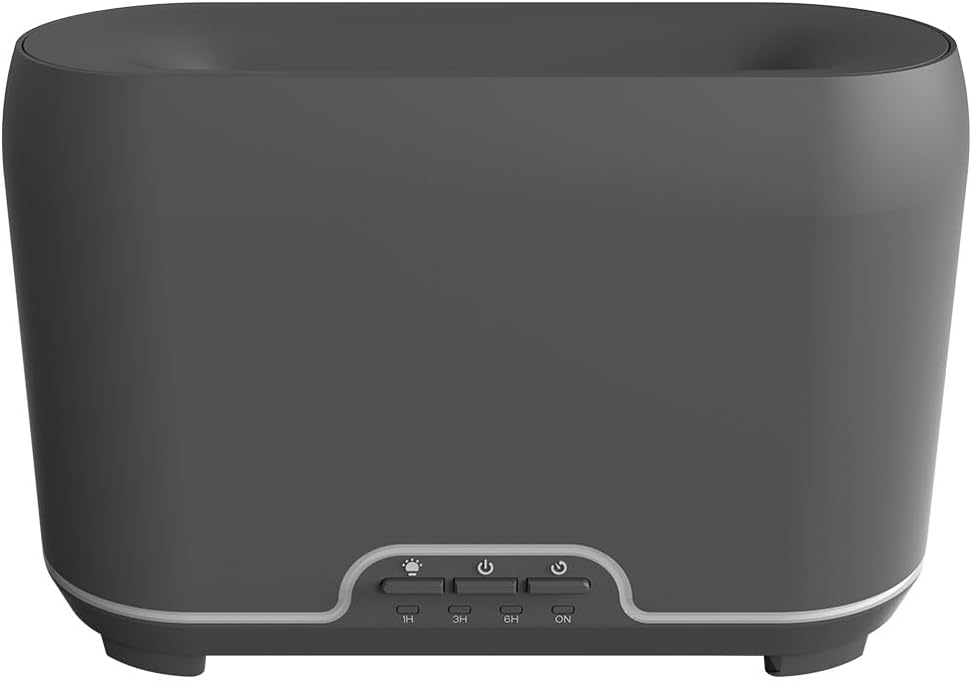
Obraz: Przód view of the CALEX Smart Home Aroma Diffuser, showing the control panel with buttons for light, power, and timer settings (1H, 3H, 6H, ON).

Image: The CALEX Smart Home Aroma Diffuser operating on a wooden table, displaying its ambient flame effect and mist output.
The diffuser typically consists of a water tank, an ultrasonic plate, a mist outlet, and a control panel with buttons for power, light, and timer functions. The power input port is usually located at the back or bottom of the device.
5. Konfiguracja
Wykonaj poniższe kroki w celu wstępnej konfiguracji:
- Umieszczenie: Umieść dyfuzor na płaskiej, stabilnej powierzchni.
- Otwórz pokrywę: Delikatnie zdejmij górną pokrywę dyfuzora.
- Napełnij zbiornik na wodę: Fill the water tank with clean water up to the 300ml maximum fill line. Do not overfill.
- Dodaj olejek eteryczny: Dodaj kilka kropli ulubionego olejku eterycznego bezpośrednio do zbiornika na wodę.
- Zamknij pokrywę: Załóż dokładnie górną pokrywę.
- Podłącz zasilanie: Plug the power adapter into the diffuser's power input port, then plug the adapter into a wall outlet.
- Pobierz aplikację Calex: Download the free Calex Smart app from your smartphone's app store (available for iOS and Android).
- Połącz się z Wi-Fi: Follow the in-app instructions to connect your diffuser to your home WiFi network. Ensure your WiFi is 2.4GHz.
6. Instrukcja obsługi
The CALEX Smart Home Aroma Diffuser can be operated via the Calex app or its integrated control buttons.
6.1 Using the Calex Smart App
The Calex app provides full control over your diffuser's functions:
- Włączanie/wyłączanie: Turn the diffuser on or off remotely.
- Kontrola mgły: Adjust the mist output level.
- Sterowanie oświetleniem: Change the ambient light color from over 16 million options, adjust brightness, and select lighting modes.
- Efekt płomienia: Activate or deactivate the flame effect.
- Timery: Set schedules for the diffuser to turn on or off automatically.
- Programmable Scenarios: Create custom scenarios based on time, weather, or other smart home triggers.
- Powiadomienia: Receive alerts when the water tank is empty.
6.2 Sterowanie głosowe
Integrate your diffuser with voice assistants for hands-free control:
- Asystent Google: Link your Calex account in the Google Home app. Use commands like "Hey Google, turn on the diffuser."
- Siri: Create custom shortcuts in the Apple Home app or through the Calex app for Siri commands.
- Amazon Alexa: Enable the Calex skill in the Alexa app. Use commands like "Alexa, set diffuser light to blue."
6.3 Przyciski sterowania ręcznego
The control panel on the diffuser allows for basic operation:
- Przycisk zasilania: Press once to turn on/off the mist and flame effect.
- Przycisk światła: Press to cycle through light colors or turn the light on/off.
- Timer Buttons (1H, 3H, 6H, ON): Select a desired operating duration. The diffuser will automatically shut off after the selected time. 'ON' typically means continuous operation until water runs out or manually turned off.
7. Konserwacja
Regularne czyszczenie zapewnia optymalną wydajność i wydłuża żywotność dyfuzora.
- Codzienne sprzątanie: Po każdym użyciu opróżnij zbiornik z resztek wody. Wytrzyj wnętrze zbiornika czystą, miękką ściereczką.
- Cotygodniowe sprzątanie: For a more thorough clean, unplug the device. Add a small amount of white vinegar (about 10ml) to the water tank and let it sit for 10-15 minutes to dissolve mineral buildup. Gently wipe the ultrasonic plate with a cotton swab or soft brush. Rinse the tank thoroughly with clean water, avoiding the air outlet.
- Czyszczenie zewnętrzne: Przetrzyj zewnętrzną część dyfuzora miękką szmatką.amp ściereczka. Nie należy używać środków czyszczących o właściwościach ściernych ani rozpuszczalników.
- Ensure the device is completely dry before refilling or storing.
8. Rozwiązywanie Problemów
Jeśli napotkasz problemy, zapoznaj się z poniższymi typowymi problemami i rozwiązaniami:
| Problem | Możliwa przyczyna | Rozwiązanie |
|---|---|---|
| Brak mgły lub słaba mgła | Niski poziom wody Zabrudzona płyta ultradźwiękowa Zablokowany wylot mgły | Uzupełnij wodę do odpowiedniego poziomu. Wyczyść płytę ultradźwiękową zgodnie z instrukcją konserwacji. Ensure the mist outlet is clear. |
| Urządzenie się nie włącza | Brak zasilania Zbiornik na wodę jest pusty Awaria urządzenia | Sprawdź podłączenie zasilania i gniazdko ścienne. Napełnij zbiornik na wodę. Skontaktuj się z obsługą klienta, jeśli problem będzie się powtarzał. |
| Problemy z połączeniem aplikacji | Nieprawidłowe hasło WiFi Router too far 2.4GHz vs 5GHz WiFi | Zweryfikuj hasło WiFi. Move diffuser closer to the router. Ensure your router is broadcasting a 2.4GHz network and connect to it. |
| Efekt płomienia nie działa | Feature deactivated in app Awaria urządzenia | Check app settings to ensure flame effect is enabled. Skontaktuj się z obsługą klienta. |
9. Specyfikacje
| Funkcja | Specyfikacja |
|---|---|
| Numer modelu | 5901000500 |
| Marka | CALEKS |
| Pojemność | 300 mililitrów |
| Tworzywo | Plastikowy |
| Automatyczne wyłączanie | Tak |
| Łączność | Wi-Fi (2.4 GHz) |
| Metody kontroli | Calex Smart App, Voice Control (Google Assistant, Siri, Amazon Alexa), Manual Buttons |
| Opcje światła | 16 milionów kolorów |
| Zalecany obszar użytkowania | Medium space |
| Międzynarodowy kod artykułu (EAN/UPC) | 08712879157090 |
10. Gwarancja i wsparcie
Aby uzyskać informacje o gwarancji lub pomocy technicznej, zapoznaj się z dokumentacją dołączoną do produktu lub skontaktuj się bezpośrednio ze sprzedawcą/producentem. Zachowaj dowód zakupu na wypadek roszczeń gwarancyjnych.