
Wstęp
Thank you for choosing the ASHATA 6-Channel USB 3.7V Lithium Battery Charger Board. This device is designed to efficiently charge up to six 3.7V LiPo 1S or LiHv batteries simultaneously and independently. Its compact design and versatile power input make it an ideal solution for hobbyists and professionals requiring reliable battery charging.
Zawartość opakowania
- 1 x ASHATA 6-Channel USB Lithium Battery Charger Board
Informacje dotyczące bezpieczeństwa
Przed użyciem produktu należy przeczytać i zrozumieć wszystkie instrukcje bezpieczeństwa. Nieprzestrzeganie tych instrukcji może spowodować porażenie prądem, pożar lub poważne obrażenia.
- Use only with compatible 3.7V LiPo 1S or LiHv batteries. Do not attempt to charge other battery types.
- Ensure the charger is connected to a stable 5V USB power source (e.g., computer USB port, power bank, phone charger).
- Nie pozostawiaj ładujących się akumulatorów bez nadzoru.
- Trzymaj ładowarkę z dala od wody, wilgoci i wysokich temperatur.
- Do not short-circuit the charging ports.
- Jeśli ładowarka lub akumulator wykazują oznaki uszkodzenia, należy natychmiast zaprzestać ich używania.
- Przechowywać w miejscu niedostępnym dla dzieci.
Produkt ponadview
The ASHATA 6-Channel USB Lithium Battery Charger Board features a compact design with multiple independent charging channels and user-friendly indicators.
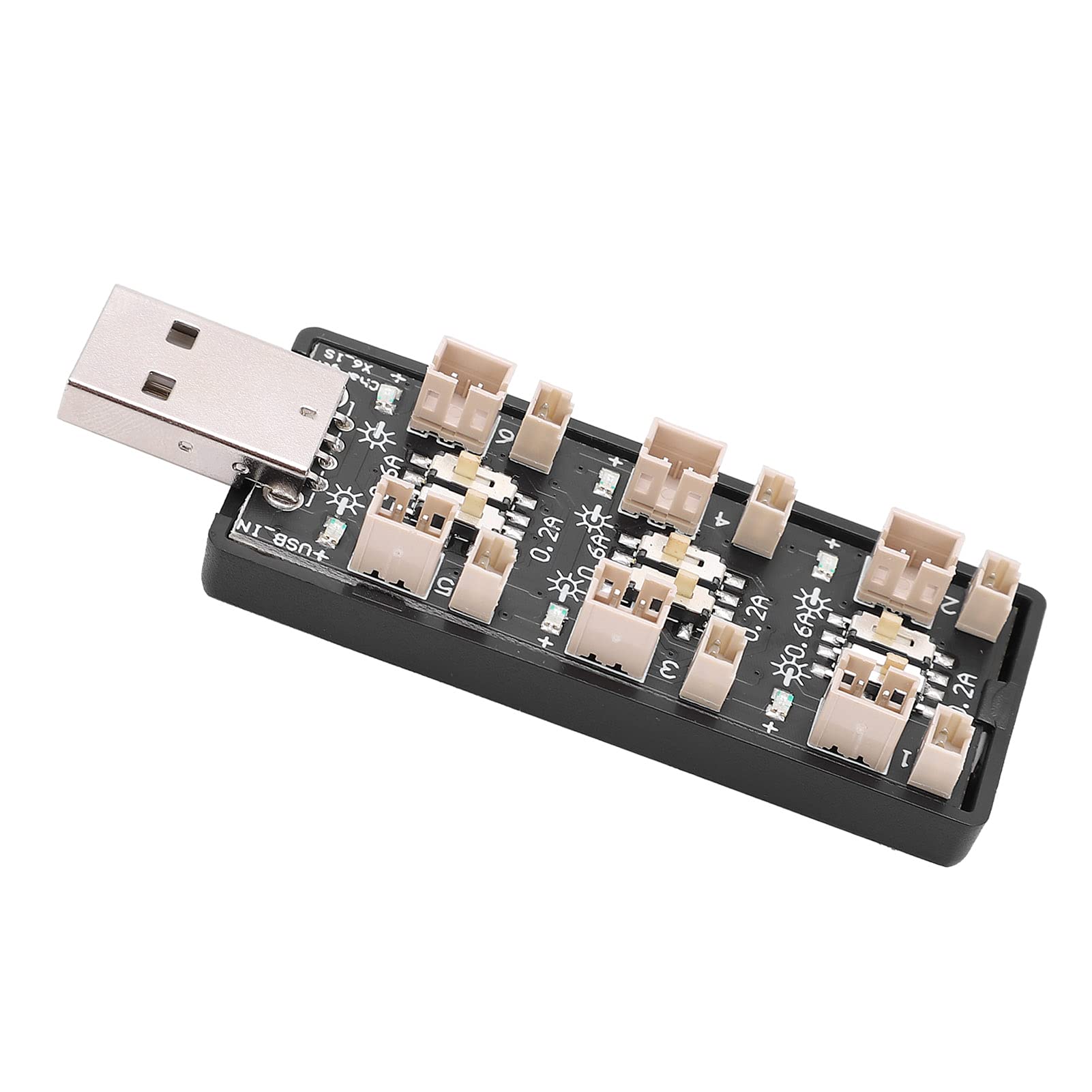
Rysunek 1: Ogólnie view of the ASHATA 6-Channel USB Lithium Battery Charger Board, showing the integrated USB plug for power input and the six charging ports.
Kluczowe komponenty:
- Wtyczka wejściowa USB: Standard USB-A connector for power input.
- Charging Ports (x6): Independent ports for connecting 3.7V LiPo 1S or LiHv batteries.
- Current Selection Switches (x6): Individual toggle switches for each channel to select charging current (0.2A or 0.6A).
- LED Indicators (x6): Each channel has an LED to indicate charging status.

Rysunek 2: Zbliżenie view highlighting the individual charging ports and their corresponding current selection toggle switches (0.2A and 0.6A settings) and LED indicators.
Organizować coś
- Podłącz źródło zasilania: Insert the integrated USB plug of the charger board into a compatible 5V USB power source. This can be a computer USB port, a power bank, or a standard USB wall adapter (e.g., phone charger).
- Przygotuj baterie: Ensure your 3.7V LiPo 1S or LiHv batteries are in good condition and compatible with the charger's ports.

Rysunek 3: Z góry na dół view of the charger board, illustrating the layout of the six independent charging channels and the USB input.
Instrukcja obsługi
- Wybierz prąd ładowania: For each battery you intend to charge, adjust the corresponding toggle switch to either 0.2A or 0.6A.
- 0.2A: Suitable for smaller capacity batteries or for a slower, more gentle charge.
- 0.6A: Suitable for larger capacity batteries or when a faster charge is desired. Ensure your battery can handle this current.
- Podłącz baterie: Carefully plug your 3.7V LiPo 1S or LiHv batteries into the charging ports. Ensure correct polarity.
- Monitoruj stan ładowania: The LED indicator for each channel will behave as follows:
- Migająca dioda LED: Oznacza, że bateria jest aktualnie ładowana.
- Stała dioda LED: Indicates that the battery is fully charged and the charging process has automatically stopped.
- Odłącz akumulatory: Once the LED turns solid, the battery is fully charged. Disconnect the battery from the charging port.
- Odłącz zasilanie: When all charging is complete, disconnect the USB charger board from its power source.

Rysunek 4: Góra i dół views of the charger board, showing the compact form factor and the USB input.
Konserwacja
- Czyszczenie: Use a dry, soft cloth to clean the charger board. Do not use liquid cleaners or solvents.
- Składowanie: Przechowuj ładowarkę w chłodnym, suchym miejscu, z dala od bezpośredniego światła słonecznego i ekstremalnych temperatur, gdy nie używasz ładowarki.
- Kontrola: Periodically inspect the charger for any signs of damage to the casing, ports, or USB plug.
Rozwiązywanie problemów
| Problem | Możliwa przyczyna | Rozwiązanie |
|---|---|---|
| LED does not light up when battery is connected. |
|
|
| Battery charges slowly. |
|
|
| Charger or battery gets excessively hot. |
|
|
Specyfikacje
| Numer modelu | Rich0CsIrfVFiU |
| Wejście Voltage Zakres | USB 5V ± 5% (0.5A ~ 2A) |
| Objętość wyjściatage Zakres | 2.5V ~ 4.20V |
| Zakres prądu wyjściowego | 600mA x 6CH (0.6A) / 200mA x 6CH (0.2A) |
| Liczba kanałów | Niezależne kanały 6 |
| Odpowiedni typ baterii | LiPo 1S; LiHv high voltage lithium battery (3.7V nominal) |
| Wymiary (dł. x szer. x wys.) | Wymiary 8 x 3 x 2 cm |
| Producent | ASZATA |
| Kraj pochodzenia | Chiny |
Gwarancja i wsparcie
For warranty information or technical support, please refer to the retailer's policy or contact ASHATA customer service through their official channels. Please have your model number (Rich0CsIrfVFiU) and purchase details ready when contacting support.