
Wstęp
Thank you for choosing the CCN R10 4K 48MP Digital Camera. This compact and versatile camera is designed to capture high-quality photos and videos with ease. Featuring 4K video recording, 48MP still images, a 3.0-inch 180° flip screen, 16X digital zoom, and WiFi connectivity, it is suitable for both beginners and enthusiasts. This manual provides detailed instructions for setting up, operating, maintaining, and troubleshooting your camera to ensure optimal performance.
Zawartość opakowania
Sprawdź zawartość paczki, aby upewnić się, że znajdują się w niej wszystkie elementy:
- CCN R10 4K Digital Camera
- Kabel USB
- Obiektyw szerokokątny
- Obiektyw makro
- Karta Micro SD 64 GB
- Akumulator do ponownego ładowania
- Instrukcja obsługi

This image displays the CCN R10 4K digital camera along with its accessories: a lens hood, USB cable, 32GB memory card, and a carrying case. The camera itself is black with a structured body and a blue-illuminated flash.
Koniec kameryview
The CCN R10 camera is designed for intuitive use, featuring a compact body and essential controls. Key components include the lens, flash, 3.0-inch flip screen, power button, shutter button, mode dial, and various ports.

A black CCN R10 4K 48MP digital camera is shown with its 3.0-inch flip screen extended and an interchangeable lens attached. The camera features a compact design suitable for portability.
Organizować coś
1. Instalacja baterii
- Otwórz pokrywę komory baterii znajdującą się na spodzie aparatu.
- Insert the rechargeable lithium-ion battery, ensuring the correct orientation according to the polarity indicators.
- Dokładnie zamknij pokrywę komory baterii.
2. Instalacja karty pamięci
- Znajdź gniazdo karty Micro SD, zazwyczaj w pobliżu komory baterii.
- Insert the provided 64GB Micro SD card into the slot until it clicks into place. Ensure the card is inserted in the correct direction.
- Aby wyjąć kartę, delikatnie naciśnij ją, aż wyskoczy.
3. Lens Attachment (Wide-Angle/Macro)
- Align the threads of the wide-angle or macro lens with the camera's main lens.
- Gently screw the accessory lens onto the camera's lens until it is securely attached. Do not overtighten.
- To remove, unscrew the lens counter-clockwise.
4. Ładowanie akumulatora
- Podłącz kamerę do źródła zasilania za pomocą dołączonego kabla USB.
- Zaświeci się kontrolka ładowania. Po zakończeniu ładowania zgaśnie lub zmieni kolor.
- Pełne naładowanie trwa zazwyczaj około 2–3 godzin.
Podstawowa obsługa
1. Włączanie/wyłączanie zasilania
- Aby włączyć urządzenie, naciśnij i przytrzymaj przycisk zasilania, aż ekran się podświetli.
- Aby wyłączyć urządzenie, naciśnij i przytrzymaj przycisk zasilania, aż ekran się wyłączy.
2. Wybór trybu
Use the Mode button (usually located on the top of the camera) to switch between different shooting modes:
- Tryb zdjęć: Do robienia zdjęć.
- Tryb wideo: Do nagrywania wideo footage.
- Tryb poklatkowy: For capturing a sequence of images over time to create a time-lapse video.
3. Using the 3.0-inch Flip Screen
The camera features a 3.0-inch screen that can be flipped 180°. This is particularly useful for:
- Selfiki: Flip the screen forward to easily compose self-portraits.
- Vlogowanie: Monitor your recording while filming yourself.
- Low/High Angle Shots: Adjust the screen for comfortable viewing when shooting from difficult angles.
4. Funkcja powiększania
The camera supports 16X digital zoom. Use the zoom rocker or dedicated buttons (if available) to zoom in or out. Note that digital zoom may reduce image quality compared to optical zoom.
5. Autofokus
The camera features single autofocus (SAF) with 9 autofocus points. To focus:
- Half-press the shutter button. The camera will automatically focus on the subject.
- The focus frame on the screen will change from red to green when focus is achieved.
- Fully press the shutter button to capture the photo or start recording.
Zaawansowane funkcje
1. Łączność Wi-Fi
The CCN R10 camera can connect to your smartphone via WiFi for remote control and file przenosić.
- Download the dedicated application (refer to the camera's on-screen instructions or manual for app name) on your smartphone.
- Enable WiFi on the camera through the settings menu.
- Połącz swój smartfon z siecią WiFi aparatu.
- Open the application to control the camera remotely, view live feed, or download photos and videos directly to your phone.
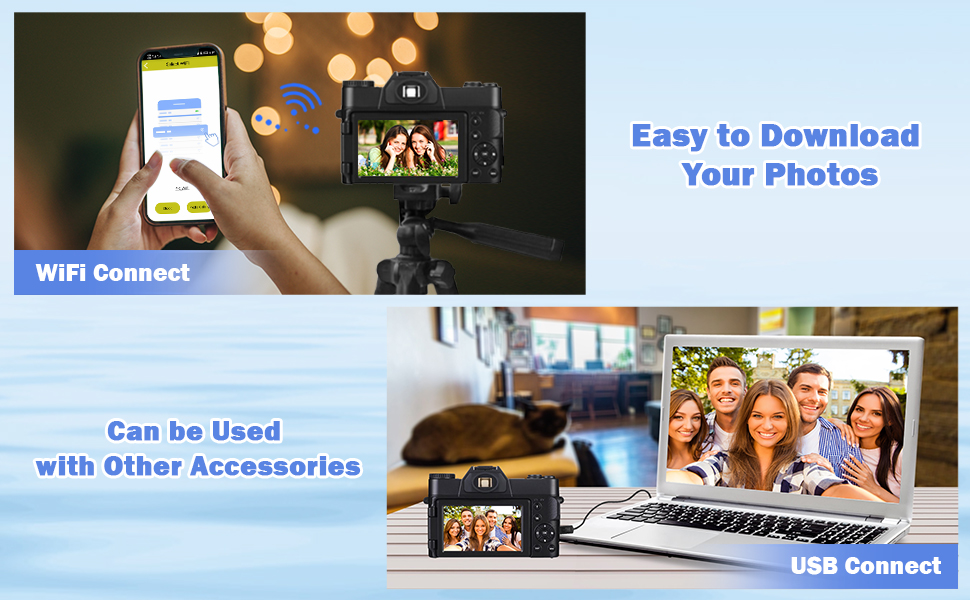
The image shows the CCN R10 digital camera wirelessly connected to a smartphone. The smartphone screen displays a connection interface, indicating the camera's WiFi functionality for remote control or file przenosić.
2. Using Wide-Angle and Macro Lenses
The included 52mm wide-angle and macro lenses expand the camera's photographic capabilities:
- Obiektyw szerokokątny: Ideal for capturing expansive landscapes, group photos, or architectural shots where you need a broader field of view.
- Obiektyw makro: Perfect for close-up photography, allowing you to capture intricate details of small subjects like insects, flowers, or textures.
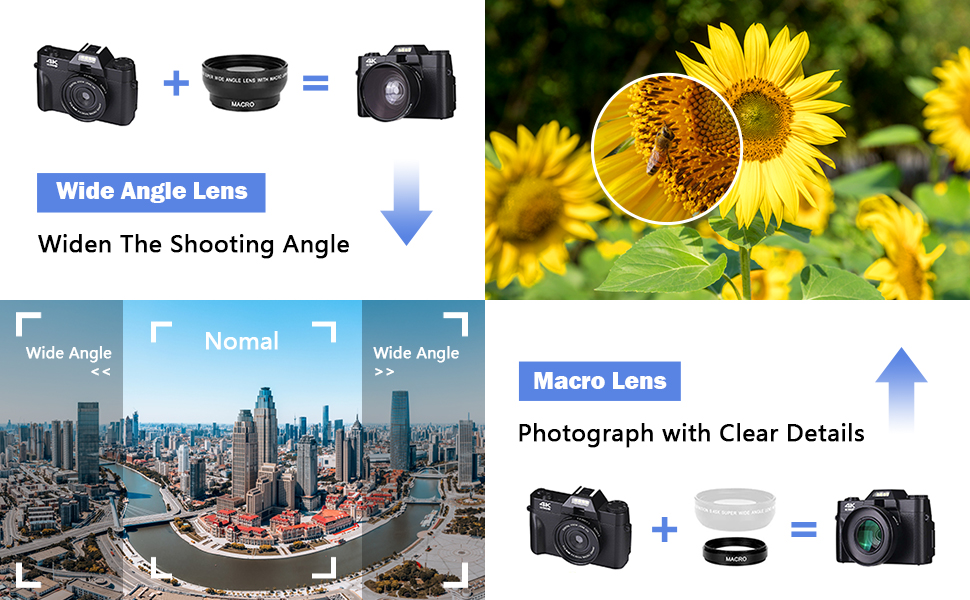
A visual comparison demonstrating the effects of wide-angle and macro lenses. The wide-angle view shows an expansive cityscape, while the macro view highlights the intricate details of a sunflower with a bee, illustrating the camera's versatility for different photographic needs.
3. Funkcja Flash
The camera features an automatic flash function to provide additional illumination in low-light conditions. The flash will activate automatically when needed, or it can be manually controlled through the camera's settings.
Konserwacja
1. Czyszczenie aparatu i obiektywów
- Use a soft, lint-free cloth to clean the camera body. Do not use harsh chemicals or solvents.
- For lenses, use a specialized lens cleaning solution and a microfiber cloth. Gently wipe in a circular motion from the center outwards. Avoid touching the lens surface with your fingers.
- Use a blower brush to remove dust from the lens and sensor (if accessible).
2. Pielęgnacja baterii
- Całkowicie naładuj baterię przed pierwszym użyciem.
- Unikaj wystawiania baterii na działanie ekstremalnych temperatur.
- If the camera will not be used for an extended period, remove the battery and store it in a cool, dry place.
3. Przechowywanie
- Store the camera in a dry, dust-free environment, preferably in a camera bag or case.
- Unikaj bezpośredniego światła słonecznego i wysokiej wilgotności.
Rozwiązywanie problemów
| Problem | Możliwa przyczyna | Rozwiązanie |
|---|---|---|
| Kamera się nie włącza. | Bateria jest rozładowana lub nieprawidłowo włożona. | Naładuj akumulator do pełna. Upewnij się, że akumulator jest włożony z zachowaniem prawidłowej polaryzacji. |
| Nie można robić zdjęć/kręcić filmów. | Karta pamięci jest pełna, zablokowana lub nie została włożona. | Sprawdź stan karty pamięci. Usuń niepotrzebne. files. Unlock the card if it's locked. Reinsert the card correctly. |
| Niska jakość obrazu. | Lens is dirty, lighting is poor, or digital zoom is too high. | Clean the lens. Ensure adequate lighting. Avoid excessive digital zoom. |
| Problemy z połączeniem WiFi. | Incorrect app, camera WiFi off, or incorrect password. | Ensure the correct app is installed. Turn on camera WiFi. Verify WiFi password. |
Jeśli napotkasz problemy, które nie zostały tutaj wymienione lub potrzebujesz dalszej pomocy, skontaktuj się z obsługą klienta.
Specyfikacje
| Funkcja | Specyfikacja |
|---|---|
| Marka | CCN |
| Nazwa modelu | R10 |
| Effective Still Image Resolution | 48 MP |
| Rozdzielczość przechwytywania wideo | 4K (4320p) at 60 FPS |
| Rozmiar czujnika optycznego | 1/3.2" |
| Technologia czujnika fotograficznego | BSI CMOS |
| Zoom cyfrowy | 16x |
| Rozmiar ekranu | 3.0 cali |
| Typ ekranu | AMOLED, Color, 180° Flip |
| Typ soczewki | Wide-Angle (52mm), Macro (52mm) |
| Maksymalna apertura | 1.8 milimetrów |
| Stabilizacja obrazu | Cyfrowy |
| Autofokus | Single Autofocus (SAF) with 9 points |
| Technologia łączności | USB, Wi-Fi |
| Wyjście wideo | HDMI |
| Utrzymany File Formaty | MP4, JPEG |
| Typ karty pamięci | Micro SD (64GB included, max 64GB supported) |
| Typ baterii | Polimer litowy |
| Współczynnik kształtu | Kompaktowy |
| Poziom wodoodporności | Nie jest wodoodporny |
| Poziom umiejętności | Początkujący |
Gwarancja i wsparcie
The CCN R10 Digital Camera comes with a premium warranty. For specific details regarding the warranty period and coverage, please refer to the warranty card included in your package or contact CCN customer service.
Should you have any questions about the product, require technical assistance, or need to report an issue, please do not hesitate to contact our customer service team. Contact information can typically be found on the manufacturer's webmiejscu lub na opakowaniu produktu.