
sunvito X6
sunvito Bone Conduction Headphones User Manual
Model: X6 | Brand: sunvito
1. Wprowadzenie
Thank you for choosing sunvito Bone Conduction Headphones. These innovative headphones transmit sound through your cheekbones, allowing you to enjoy audio while remaining aware of your surroundings. Designed for versatility, they are ideal for various activities including swimming, running, cycling, and daily use.
This manual provides detailed instructions on how to set up, operate, and maintain your headphones to ensure optimal performance and longevity.

Image: sunvito Bone Conduction Headphones, showcasing ich wodoodporna konstrukcja.
2. Główne cechy
- Technologia przewodnictwa kostnego: Delivers sound through vibrations, keeping your ears open to ambient sounds for enhanced safety.
- Stopień wodoodporności IP68: Fully submersible, suitable for swimming up to 2 meters deep for 4 hours.
- Built-in 32GB Memory: Store thousands of songs for MP3 playback, essential for underwater use where Bluetooth signals cannot transmit.
- Łączność Bluetooth 5.3: Provides stable and efficient wireless connection for everyday use.
- Długa żywotność baterii: Up to 8 hours of music playback on a single 2-hour charge.
- Lekkie i wygodne: Weighing only 28 grams (1 ounce), designed for extended wear without discomfort.
- Ładowanie magnetyczne: Secure and convenient charging interface.

Image: Open-ear design allows awareness of surroundings, enhancing safety during outdoor activities.

Image: IP68 waterproof rating ensures reliable performance even during swimming.
3. Zawartość opakowania
Proszę zaznaczyć pole dotyczące następujących elementów:
- sunvito Bone Conduction Headphones (Model X6)
- Magnetyczny kabel ładujący
- Instrukcja obsługi (ten dokument)
4. Koniec produktuview
Familiarize yourself with the main components and controls of your sunvito headphones:
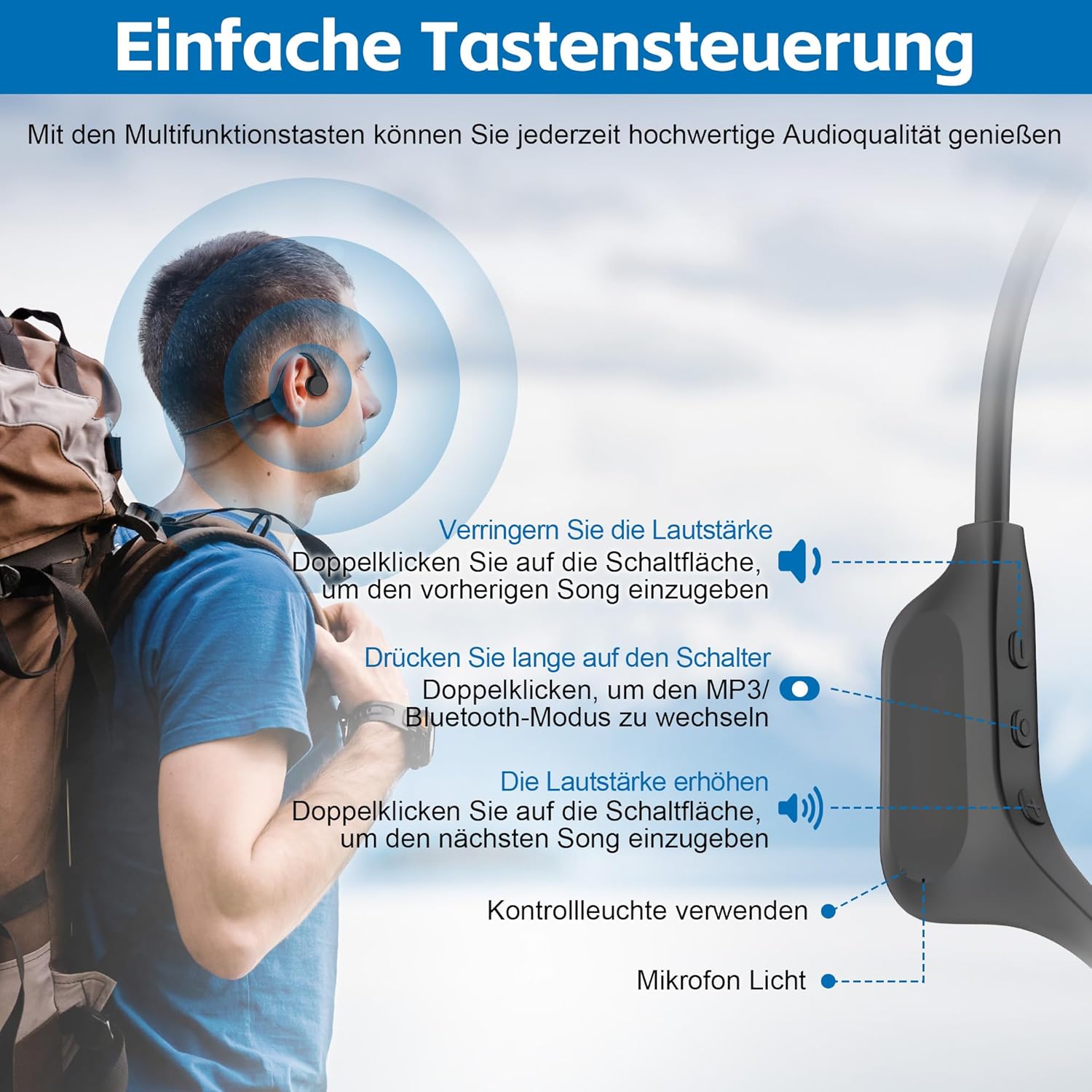
Obraz: Szczegółowy view of the headphone controls and components.
- Lewy przycisk: Volume Down / Previous Song (double-click)
- Środkowy przycisk: Power On/Off (long press) / Play/Pause (tap) / Switch Mode (double-click)
- Prawy przycisk: Volume Up / Next Song (double-click)
- Kontrolka: Shows status (power, pairing, charging)
- Mikrofon: For calls
- Magnetyczny port ładowania: Do ładowania i przesyłania danych
5. Konfiguracja
5.1 Ładowanie słuchawek
Before first use, fully charge your headphones. Connect the magnetic charging cable to the charging port on the headphones and plug the USB end into a power source (e.g., computer USB port, wall adapter).
- Czas ładowania: Pełne naładowanie zajmuje około 2 godzin.
- Czas pracy baterii: do 8 godzin ciągłego odtwarzania.

Image: Magnetic charging port.

Image: Charging and battery life indication.
5.2 parowanie Bluetooth
Aby podłączyć słuchawki do urządzenia obsługującego technologię Bluetooth:
- Sprawdź, czy słuchawki są naładowane i wyłączone.
- Naciśnij i przytrzymaj Środkowy przycisk for approximately 3-5 seconds until the indicator light flashes blue and red, indicating pairing mode.
- Na swoim urządzeniu (smartfonie, tablecie, komputerze) włącz Bluetooth i wyszukaj nowe urządzenia.
- Select "sunvito X6" from the list of available devices.
- Po nawiązaniu połączenia kontrolka zaświeci się ciągłym niebieskim światłem.

Image: The headphones feature an upgraded Bluetooth 5.3 chip for stable connectivity.
6. Instrukcja obsługi
6.1 Podstawowe sterowanie
| Funkcjonować | Działanie przycisku |
|---|---|
| Włączanie/wyłączanie zasilania | Długie naciśnięcie Środkowy przycisk |
| Odtwórz/Pauza | Uzyskiwać Środkowy przycisk |
| Zwiększ głośność | Uzyskiwać Prawy przycisk |
| Zmniejsz głośność | Uzyskiwać Lewy przycisk |
| Następna piosenka | Kliknij dwukrotnie Prawy przycisk |
| Poprzednia piosenka | Kliknij dwukrotnie Lewy przycisk |
| Odbierz/Zakończ połączenie | Uzyskiwać Środkowy przycisk |
| Odrzuć połączenie | Długie naciśnięcie Środkowy przycisk |
| Przełącz tryb Bluetooth/MP3 | Kliknij dwukrotnie Środkowy przycisk |
7. MP3 Mode for Swimming
When using the headphones for swimming or other underwater activities, Bluetooth connectivity is not reliable due to water interference. For these scenarios, utilize the built-in 32GB MP3 player.
7.1 Ładowanie muzyki
- Podłącz słuchawki do komputera za pomocą magnetycznego kabla ładującego.
- The headphones will be recognized as a removable disk (USB drive).
- Przeciągnij i upuść wybrany plik audio MP3 files directly into the headphone's storage.
- Przed odłączeniem bezpiecznie odłącz urządzenie od komputera.
7.2 Using MP3 Mode
- Kliknij dwukrotnie Środkowy przycisk to switch to MP3 mode. The indicator light will change to confirm the mode.
- Ensure a swimming cap is worn to help secure the headphones during vigorous activity.
- Note: Volume control in MP3 mode might differ or be fixed depending on the firmware version.

Image: The headphones are designed to withstand water immersion, perfect for aquatic sports.
8. Konserwacja
- Czyszczenie: After each use, especially after swimming, wipe the headphones clean with a soft, dry cloth. Pay particular attention to the magnetic charging contacts to prevent corrosion.
- Wysuszenie: Ensure the headphones are completely dry before charging to prevent damage to the charging port.
- Składowanie: Przechowuj słuchawki w chłodnym, suchym miejscu, z dala od bezpośredniego światła słonecznego i ekstremalnych temperatur.
- Unikaj uderzenia: Nie upuszczaj słuchawek ani nie narażaj ich na silne uderzenia, ponieważ może to spowodować uszkodzenie ich wewnętrznych podzespołów.

Image: The headphones are suitable for a wide range of activities, from mountaineering to daily work.
9. Rozwiązywanie Problemów
Jeśli masz problemy ze słuchawkami, zapoznaj się z poniższymi typowymi problemami i ich rozwiązaniami:
| Problem | Możliwa przyczyna | Rozwiązanie |
|---|---|---|
| Słuchawki nie włączają się | Niski poziom naładowania baterii; przycisk zasilania nie był naciskany wystarczająco długo | Charge the headphones fully; Press and hold the Middle Button for 3-5 seconds |
| Nie można sparować przez Bluetooth | Headphones not in pairing mode; Device Bluetooth off; Too far from device | Ensure headphones are flashing blue/red; Turn on device Bluetooth; Move closer to device (within 10 meters) |
| No sound in MP3 mode underwater | Not in MP3 mode; No music loaded; Volume too low | Double-click Middle Button to switch to MP3 mode; Connect to PC and load MP3 files; Adjust volume if possible |
| Headphones not recognized by computer | Loose connection; Driver issue; Water on charging contacts | Ensure cable is securely connected; Try a different USB port/computer; Clean and dry charging contacts thoroughly |
| Jakość dźwięku jest słaba | Improper fit; Volume too high/low; Source audio quality | Adjust placement on cheekbones; Optimize volume; Use high-quality audio files |
10. Specyfikacje
| Funkcja | Szczegół |
|---|---|
| Nazwa modelu | X6 |
| Marka | sunvito |
| Technologia łączności | Bezprzewodowy (Bluetooth) |
| Technologia komunikacji bezprzewodowej | Bluetooth 5.3 |
| Typ sterownika audio | Sterownik przewodnictwa kostnego |
| Wbudowana pamięć | 32 GB |
| Poziom wodoodporności | Wodoodporność IP68 |
| Żywotność baterii | 8 godzin |
| Czas ładowania | 2 godzin |
| Waga przedmiotu | 28 gramów (0.988 uncji) |
| Tworzywo | Akrylonitryl-butadien-styren (ABS), silikon, elastomer termoplastyczny (TPE) |
| Umieszczenie ucha | Otwarte ucho |
| Typ sterowania | Media Control (Buttons) |
| Zalecane zastosowania | Calling, Cycling, Running, Skateboarding, Snowboarding, Music, Sport, Travel |
11. Gwarancja i wsparcie
sunvito products are manufactured to the highest quality standards. For warranty information, technical support, or customer service inquiries, please refer to the contact details provided on the product packaging or visit the official sunvito webStrona. Zachowaj dowód zakupu na wypadek roszczeń gwarancyjnych.
Ask a question about this manual
Ask about setup, troubleshooting, compatibility, parts, safety, or missing instructions. Manuals+ will review the question and use this page’s manual context to help answer it.