
1. Koniec produktuview
The DBPOWER DJS90 Portable Car Jump Starter is a versatile device designed to provide emergency jump-starting for vehicles, act as a portable power bank, and offer essential lighting functions. It features a high peak current of 1600A and an 18000mAh battery capacity, capable of starting various 12V vehicles.

Figure 1: DBPOWER DJS90 Portable Car Jump Starter and included accessories.
Główne cechy:
- Vehicle Jump Starting: 1600A peak current for 12V vehicles (up to 7.5L gas / 5.5L diesel engines).
- Przenośny bank mocy: 18000mAh capacity with 2 USB outputs for charging smartphones, tablets, and other devices.
- Światło awaryjne LED: Features stable, strobe, and SOS signal modes.
- Zabezpieczenia: Heavy-duty smart clamps with low/high voltage, over-temperature, short-circuit, reverse polarity, and jump starter time-out protection.
- Trwałość: Operates in temperatures from -4°F to 140°F.
2. Zawartość opakowania
Sprawdź, czy w przesyłce znajdują się wszystkie elementy:

Figure 2: What's in the Box - DBPOWER DJS90 Jump Starter and accessories.
- 1x DBPOWER DJS90 Jump Starter Unit
- 1x Intelligent Jumper Clamps
- 1x USB Line (Charging Cable)
- 1x Instrukcja obsługi
- 1x Hard Shell Storage Case
3. Konfiguracja i ładowanie
Before initial use, fully charge the jump starter. It is recommended to recharge the device after each use to maintain optimal battery life.
Ładowanie urządzenia do awaryjnego uruchamiania:
- Locate the USB input port on the jump starter.
- Connect the provided USB charging cable to the input port.
- Plug the other end of the USB cable into a suitable USB power adapter (not included) or a car's USB port.
- The LED display will indicate the charging progress. Ensure the device is fully charged before storing or using for jump-starting.
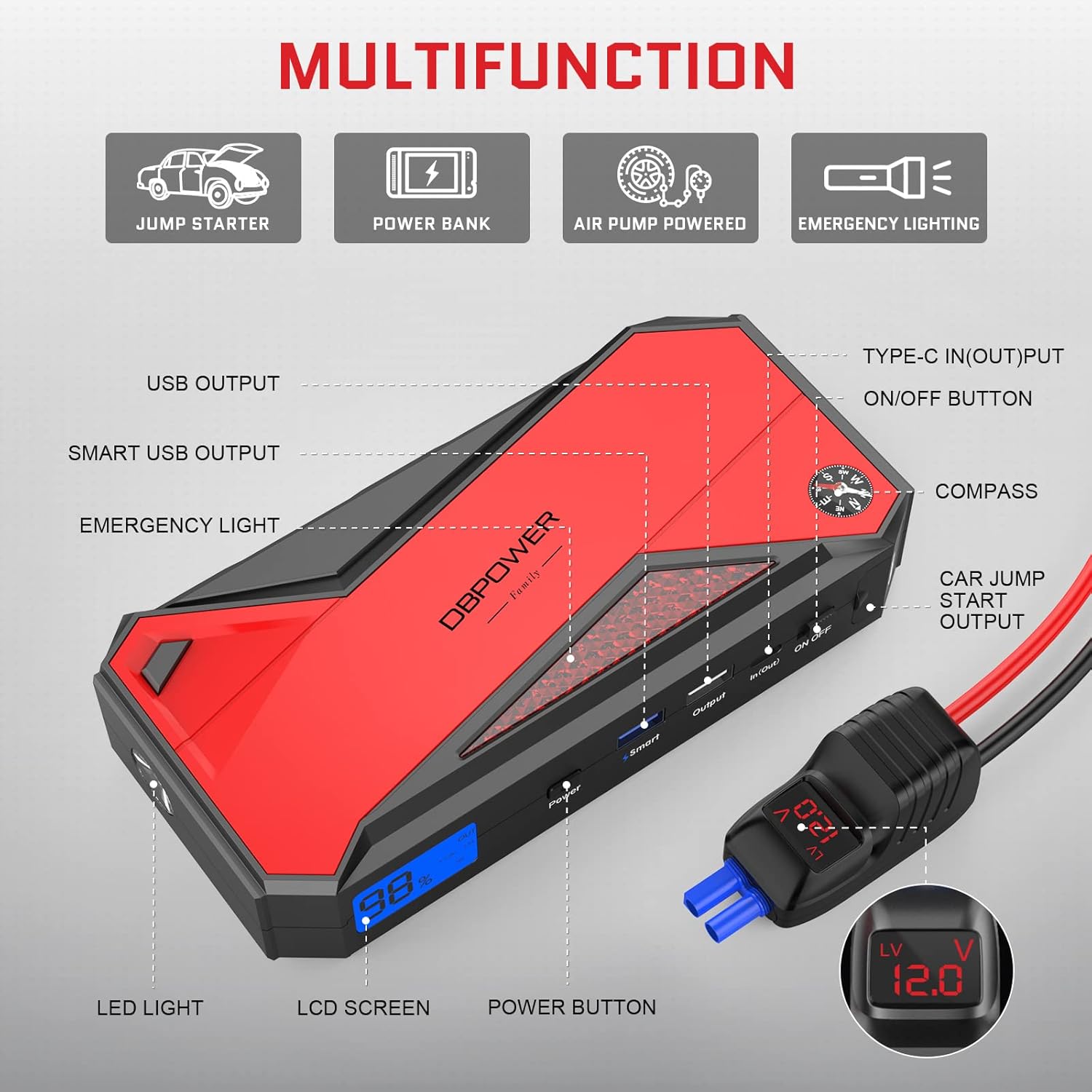
Figure 3: Multifunction ports on the DBPOWER DJS90.
4. Instrukcja obsługi: Uruchamianie pojazdu za pomocą kabli rozruchowych
Always ensure the jump starter is at least 50% charged before attempting to jump-start a vehicle.
Przewodnik krok po kroku:
- Przygotuj pojazd: Wyłącz zapłon pojazdu i wszystkie akcesoria. Zaciągnij hamulec postojowy.
- Podłączanie przewodów rozruchowych do rozrusznika: Open the protective flap on the jump starter and firmly insert the blue end of the intelligent jumper clamps into the car jump start output port.
- Połącz Clamps do baterii: Podłącz czerwony (dodatni, +) przewódamp to the positive terminal of the vehicle's battery. Attach the black (negative, -) clamp do ujemnego bieguna akumulatora pojazdu. Upewnij się, że połączenie jest bezpieczne.
- Sprawdź lampkę kontrolną: The indicator light on the intelligent jumper clamps should turn solid green, indicating a safe and ready connection. If it flashes or shows a different color, refer to the troubleshooting section.
- Pojazd startowy: Enter your vehicle and start the engine. If the vehicle does not start immediately, wait 30 seconds before trying again. Do not attempt more than 3 consecutive starts.
- Usuń Clamps: Once the vehicle starts, immediately remove the black (negative) clamp z akumulatora pojazdu, a następnie czerwony (dodatni) klaksonamp. Then, disconnect the jumper clamps od rozrusznika.

Figure 4: Instructions to Start Your Vehicle.
Video 1: Demonstration of using a portable jump starter to start a vehicle. This video illustrates the process of connecting the jump starter to a car battery and successfully starting the engine, highlighting the ease of use and independence from roadside assistance.
5. Operating Instructions: Power Bank & LED Light
Używanie jako banku mocy:
The DJS90 can charge various electronic devices via its USB output ports.
- Podłącz kabel ładujący USB swojego urządzenia do jednego z portów wyjściowych USB rozrusznika.
- Rozrusznik automatycznie rozpocznie ładowanie Twojego urządzenia.
- The 18000mAh capacity can provide multiple charges for smartphones, tablets, and other small electronics.

Figure 5: Power Bank Capabilities.
Korzystanie ze światła LED:
Wbudowane światło LED oferuje wiele trybów pracy dostosowanych do różnych sytuacji.
- Locate the power button for the LED light (often integrated with the main power button or a dedicated light button).
- Press and hold the button to turn on the stable light mode.
- Press the button again to cycle through strobe mode, SOS signal mode, and then off.

Figure 6: Four Lighting Modes.
6. Funkcje bezpieczeństwa
The DBPOWER DJS90 is equipped with intelligent jumper clamps that provide multiple safety protections:
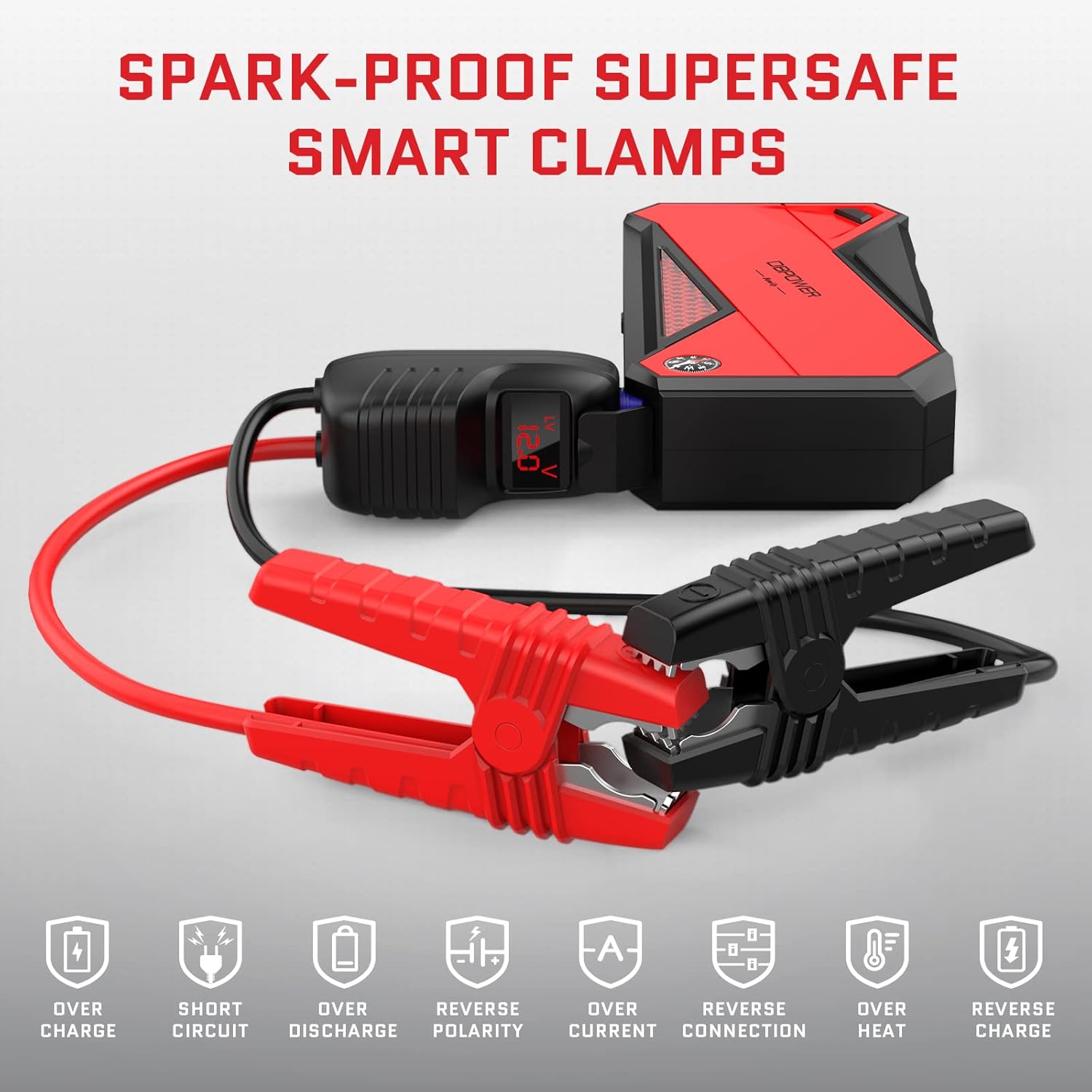
Rysunek 7: Inteligentny Clamps Safety Protections.
- Niska/wysoka objętośćtage Ochrona: Prevents damage from incorrect voltagpoziomy.
- Zabezpieczenie przed przegrzaniem: Shuts down if the device gets too hot.
- Zabezpieczenie przed zwarciem: Zapobiega uszkodzeniom spowodowanym przypadkowymi zwarciami.
- Ochrona przed odwrotną polaryzacją: Alarmuje i zapobiega działaniu, jeśliampsą podłączone nieprawidłowo.
- Jump Starter Time-Out Protection: Automatically shuts off after a period of inactivity to conserve power.
7. Konserwacja
- Regularnie ładuj: For optimal performance and longevity, fully recharge the jump starter after each use and at least every three months if stored.
- Składowanie: Store the device in its hard shell case in a cool, dry place, away from direct sunlight and extreme temperatures.
- Czyszczenie: Wipe the unit and clamps with a dry, soft cloth. Do not use harsh chemicals or abrasive materials.
8. Rozwiązywanie Problemów
- Pojazd nie uruchamia się: Zapewnij clamps are securely connected to the correct battery terminals. Check the jump starter's battery level. If the intelligent clamps' indicator light is not solid green, refer to the manual for specific error codes or try reconnecting.
- Rozrusznik nie ładuje: Verify the charging cable and adapter are working correctly. Ensure the charging port on the jump starter is clean and free of debris.
- Światło LED nie działa: Check if the jump starter is powered on. Press and hold the light button to activate.
9. Specyfikacje
| Funkcja | Specyfikacja |
|---|---|
| Numer modelu | DJS90 |
| Szczytowy prąd wyjściowy | 1600 Amps |
| Pojemność baterii | 18000mAh |
| Kompatybilność silnika | Up to 7.5L Gas / 5.5L Diesel (12V) |
| Temperatura pracy | -4°F do 140°F (-20°C do 60°C) |
| Wyjście USB | 2 USB outputs (details may vary, refer to unit) |
| Waga przedmiotu | 2.83 funta |
| Wymiary opakowania | 9.84 x 5.24 x 4.49 cala |
10. Gwarancja i wsparcie
DBPOWER is committed to ensuring customer satisfaction. If you have any questions or require assistance with your product, please do not hesitate to contact our customer support team. We aim to respond to all inquiries within 24 hours.
For support, please visit the official DBPOWER webodwiedź witrynę lub zapoznaj się z informacjami kontaktowymi znajdującymi się na opakowaniu produktu.