
1. Wprowadzenie
This manual provides detailed instructions for the installation, operation, and maintenance of your SECULINK C17-4MP Dual-Band WiFi Dome Security Camera. This camera is designed for outdoor surveillance, featuring 4MP resolution, pan/tilt/zoom capabilities, automatic tracking, human detection, and color night vision. Please read this manual thoroughly before use to ensure proper functionality and safety.
2. Zawartość opakowania
Sprawdź, czy w przesyłce znajdują się wszystkie elementy:
- SECULINK C17-4MP Dome Security Camera
- Zasilacz (ładowarka)
- Śruby montażowe i kołki ścienne
- Zestaw wodoodporny do kabla sieciowego (jeśli dotyczy)
- Szybki przewodnik
3. Koniec produktuview
The SECULINK C17-4MP camera features a robust dome design suitable for outdoor environments. Key components include:
- Obiektyw aparatu: Przechwytuje wideo footage.
- Diody podczerwieni: Zapewnia oświetlenie umożliwiające widzenie w nocy.
- White Light LEDs (Floodlight): Poprawia widzenie kolorów w nocy i działa odstraszająco.
- Mikrofon: Do wprowadzania danych audio i komunikacji dwukierunkowej.
- Głośnik: Do wyjścia audio i komunikacji dwukierunkowej.
- Anteny: For dual-band 2.4GHz/5GHz Wi-Fi connectivity.
- Gniazdo kart Micro SD: Obsługuje pamięć lokalną do 256 GB.
- Przycisk resetowania: W celu przywrócenia ustawień fabrycznych.
- Port zasilania: Wejście zasilania DC 12V.

Obraz 3.1: Koniecview of the SECULINK C17-4MP camera and its mobile application interface.
4. Konfiguracja
4.1 Pobieranie aplikacji i rejestracja konta
- Pobierz SECUEYE mobile application from the App Store (iOS) or Google Play Store (Android).
- Otwórz aplikację i postępuj zgodnie z instrukcjami wyświetlanymi na ekranie, aby zarejestrować nowe konto lub zalogować się, jeśli już je posiadasz.
4.2 Włączanie kamery
Connect the provided power adapter to the camera's power port and plug it into an electrical outlet. The camera will initiate its self-test sequence, indicated by a rotating motion and status light changes.
4.3 Łączenie z Wi-Fi
The SECULINK C17-4MP supports dual-band Wi-Fi (2.4GHz and 5GHz) for flexible network connectivity.
- Ensure your mobile device is connected to the same Wi-Fi network you intend to connect the camera to.
- In the SECUEYE app, tap the "Add Device" or "+" icon.
- Wybierz model aparatu lub zeskanuj kod QR na aparacie (jeśli jest dostępny).
- Follow the app's instructions to enter your Wi-Fi network name (SSID) and password.
- The app will guide you through the pairing process, which may involve scanning a QR code displayed on your phone with the camera lens or listening for an audio prompt.
- Once connected, the camera's status light will indicate a successful connection (refer to the app or quick start guide for specific light indicators).
4.4 Montaż kamery
The camera is designed for wall mounting and is IP65/IP66 weatherproof, making it suitable for outdoor installation.
- Choose a suitable mounting location that provides the desired viewkąt widzenia i znajduje się w zasięgu Wi-Fi.
- Za pomocą szablonu montażowego (jeśli jest dołączony) lub podstawy kamery zaznacz miejsca wywiercenia otworów na ścianie.
- Wywierć otwory i włóż kołki rozporowe.
- Przymocuj podstawę kamery do ściany za pomocą dołączonych śrub.
- Attach the camera body to the base.
- Ensure all cable connections are secure and protected from weather using the waterproof kit if necessary.
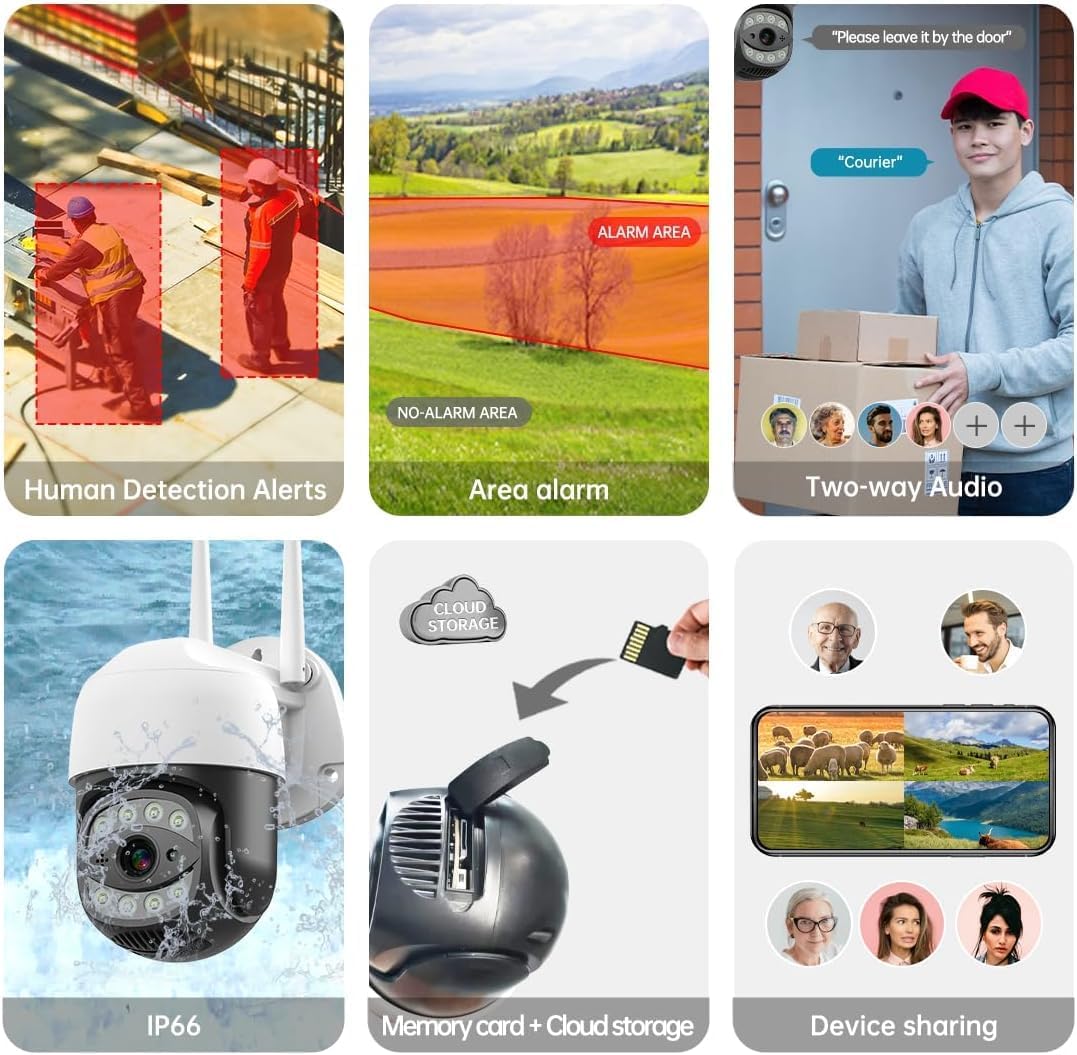
Image 4.1: The SECULINK C17-4MP camera is rated IP66 for dust and water resistance, suitable for various weather conditions.
5. Instrukcja obsługi
5.1 Na żywo View i odtwarzanie
Uzyskaj dostęp do transmisji wideo na żywo iview nagrano footage through the SECUEYE app. The camera provides 4MP (2560x1440p) resolution for clear images.

Image 5.1: Visual comparison demonstrating the enhanced clarity of 5MP resolution over lower resolutions.
5.2 Pan, Tilt i Zoom Cyfrowy (PTZ)
Kontroluj kamerę viewing angle remotely using the SECUEYE app. The camera offers:
- Obrót poziomy: 335 stopnia
- Pochylenie pionowe: 90 stopnia
- Zoom cyfrowy: Powiększenie 10x
Use pinch-to-zoom gestures on your mobile device to digitally zoom in on specific areas of interest.

Image 5.2: Demonstrates controlling the camera's pan and tilt functions via the mobile app.

Image 5.3: Illustration of the 10x digital zoom feature, allowing closer inspection of details.
5.3 Automatic Tracking and Human Motion Detection
The camera features intelligent detection capabilities to enhance security monitoring.
- Automatyczne śledzenie: When enabled, the camera will automatically detect and follow moving human figures within its field of view, recording their path.
- Wykrywanie ruchu człowieka: Advanced algorithms distinguish human activity from other movements (e.g., pets, swaying branches), reducing false alarms.
- Alerty: Upon detection, the camera can send real-time alerts to your mobile phone.
- Floodlight and Sound Alarm: Built-in spotlights activate upon motion detection at night, and a security siren can be triggered as an additional deterrent.

Image 5.4: The camera's AI Humanoid Detection identifies human presence and sends alerts.

Image 5.5: The camera's automatic tracking capability follows detected human movement.

Image 5.6: Illustrates the camera's ability to differentiate human activity from other movements, reducing false alarms.
5.4 Tryby widzenia nocnego
The camera offers multiple night vision options for clear surveillance in low-light conditions:
- Widzenie nocne w podczerwieni (IR): Uses IR LEDs to provide black and white video in complete darkness, with a range of up to 100ft (30m).
- Kolorowe widzenie nocne: Utilizes white light LEDs (floodlight) to capture full-color video at night when motion is detected or manually activated.
- Czujnik światła gwiazd: Enhances low-light performance to produce clearer images even without additional illumination.

Image 5.7: Demonstrates the different night vision modes: infrared (black and white), white light (color), and full-color night vision.

Image 5.8: The camera's infrared night vision provides visibility up to 20 meters in darkness.
5.5 Dźwięk dwukierunkowy
The built-in microphone and speaker allow for real-time two-way communication through the SECUEYE app. You can listen to audio from the camera's location and speak through the camera's speaker.
5.6 Opcje przechowywania
The camera supports two primary storage methods for recorded footage:
- Karta micro sd: Insert a Micro SD card (up to 256GB, sold separately) into the designated slot for local storage. The camera can record 24/7 or motion-triggered videos.
- Przechowywanie w chmurze: Optional cloud storage services are available through the SECUEYE app for secure, remote backup of your recordings.
5.7 Udostępnianie urządzenia
You can share access to your camera's live feed and recordings with family members or trusted individuals through the SECUEYE app, allowing multiple users to monitor the property simultaneously.
6. Konserwacja
To ensure optimal performance and longevity of your SECULINK C17-4MP camera, consider the following maintenance tips:
- Wyczyść obiektyw: Periodically wipe the camera lens with a soft, clean, lint-free cloth to remove dust, dirt, or water spots that may affect image clarity. Avoid abrasive cleaners.
- Sprawdź połączenie zasilania: Ensure the power adapter and cable remain securely connected and free from damage, especially in outdoor environments.
- Aktualizacje oprogramowania układowego: Regularly check the SECUEYE app for available firmware updates. Updates often include performance improvements, new features, and security enhancements.
- Sprawdź montaż: Periodically check the camera's mounting for stability, especially after severe weather conditions.
7. Rozwiązywanie Problemów
If you encounter issues with your SECULINK C17-4MP camera, refer to the following common troubleshooting steps:
7.1 Kamera nie łączy się z siecią Wi-Fi
- Sprawdź sygnał Wi-Fi: Ensure the camera is within range of your Wi-Fi router. Weak signals can cause connection issues.
- Verify Network Credentials: Double-check that the Wi-Fi network name (SSID) and password entered in the app are correct.
- Zgodność routera: Confirm your router supports 2.4GHz or 5GHz bands, and that the camera is attempting to connect to a compatible band.
- Uruchom ponownie urządzenia: Power cycle both your Wi-Fi router and the camera.
- Zresetuj kamerę: If issues persist, perform a factory reset on the camera (refer to the quick start guide for reset button location and procedure) and attempt the setup process again.
7.2 Słaba jakość obrazu
- Wyczyść obiektyw: Sprawdź, czy obiektyw aparatu jest czysty i nie ma na nim smug ani brudu.
- Szerokość pasma sieciowego: A slow internet connection can affect live stream quality. Check your network speed.
- Warunki oświetleniowe: Ensure adequate lighting for optimal image quality, especially for color night vision.
7.3 Detekcja ruchu nie działa lub jest zbyt czuła
- Dostosuj czułość: In the SECUEYE app settings, adjust the motion detection sensitivity level.
- Strefy wykrywania: Configure specific detection zones to monitor only relevant areas and exclude areas with frequent irrelevant motion (e.g., public roads, swaying trees).
- Sprawdź harmonogram: Ensure motion detection is enabled for the desired time periods in the app.
7.4 No Recording to SD Card
- Insert SD Card Correctly: Ensure the Micro SD card is inserted properly into the slot.
- Sformatuj kartę SD: Format the SD card through the camera settings in the SECUEYE app.
- Card Capacity/Health: Ensure the SD card is not full or corrupted. Try a different, known-good SD card if necessary.
- Ustawienia nagrywania: Verify that continuous recording or motion-triggered recording is enabled in the app settings.
8. Specyfikacje
| Funkcja | Specyfikacja |
|---|---|
| Model | C17-4MP |
| Rezolucja | 4MP (2560x1440p Max) |
| Czujnik obrazu | CMOS |
| Długość ogniskowej | 3.6mm |
| Kąt obrotu panoramy | 335° w poziomie |
| Kąt obrotu pochylenia | 90° w pionie |
| Zoom cyfrowy | 10x |
| Wizja nocna | IR-Cut, Starlight, LED (Color Night Vision) |
| Odległość w podczerwieni | Do 100 stóp (30 metrów) |
| Audio | Wbudowany mikrofon i głośnik (dźwięk dwukierunkowy) |
| Odporność na wodę | IP65, IP66 (Waterproof) |
| Łączność | Dual-Band Wi-Fi (2.4GHz/5GHz), Wired Ethernet |
| Składowanie | Karta Micro SD (do 256 GB), przechowywanie w chmurze |
| Moc | DC 12V, 9 Watts |
| Temperatura pracy | -10°C do +50°C (14°F do 122°F) |
| Zgodność aplikacji | SECUEYE (iOS, Android) |
| Wymiary | 7 x 7 x 5 cala (opakowanie) |
| Waga przedmiotu | 1.2 funta |
9. Gwarancja i wsparcie
For warranty information and technical support, please refer to the official SECULINK webOdwiedź stronę internetową lub skontaktuj się bezpośrednio z działem obsługi klienta. Zachowaj paragon jako dowód zakupu na wypadek reklamacji.
Producent: SECULINK