
1. Wprowadzenie
Thank you for choosing the Deko TV PRO2 DVB-T2 HEVC Digital Terrestrial Receiver. This device allows you to receive digital terrestrial television broadcasts (DVB-T2) with HEVC (H.265) encoding, providing high-quality video and audio. This manual will guide you through the setup, operation, and maintenance of your new receiver to ensure optimal performance and enjoyment.
2. Zawartość pudełka
Proszę dokładnie sprawdzić zawartość opakowania. Jeśli brakuje któregokolwiek z elementów lub jest on uszkodzony, prosimy o kontakt ze sprzedawcą.
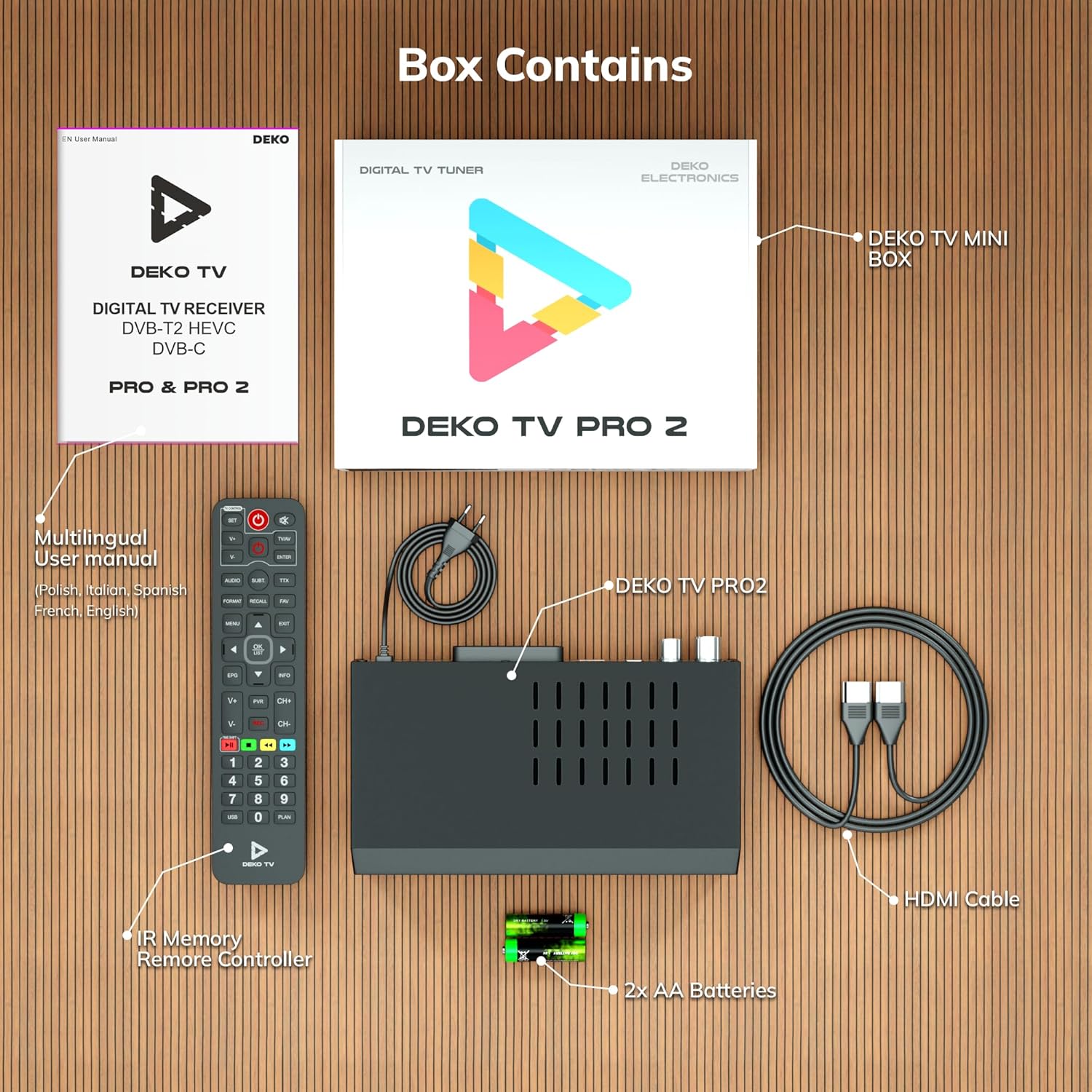
Rysunek 2.1: Deko TV PRO2 Box Contents. The image displays the Deko TV PRO2 receiver, a multilingual user manual, an IR remote control, two AA batteries, a power cable, and an HDMI cable.
- Deko TV PRO2 Digital Terrestrial Receiver
- Pilot na podczerwień
- 2 baterie AAA
- Kabel zasilający
- Kabel HDMI
- Wielojęzyczna instrukcja obsługi
3. Funkcje produktu
The Deko TV PRO2 offers a range of features designed to enhance your viewdoświadczenie:

Rysunek 3.1: Deko TV PRO2 Key Features. This image illustrates the main functionalities including DVB-T2 Terrestrial reception, Timeshift, HEVC H.265 Codec support, Personal Video Recorder (PVR), universal compatibility, and Crystal Clear Full HD output.
- DVB-T2 Terrestrial: Supports the latest digital terrestrial broadcasting standard.
- HEVC H.265 Codec: Ensures efficient video compression for high-quality picture.
- Uniwersalna kompatybilność: Works with both modern and older television models.
- Przesunięcie w czasie: Wstrzymaj transmisję na żywo i kontynuuj oglądanie później.
- Osobisty rejestrator wideo (PVR): Record your favorite programs to a connected USB storage device.
- Crystal Clear Full HD: Delivers high-definition video output.
- Podwójne porty USB: For media playback and PVR functionality.
4. Przewodnik konfiguracji
4.1. Połączenia fizyczne
Before powering on the device, ensure all necessary connections are made.

Rysunek 4.1: Rear Panel Connections. This image details the rear panel of the Deko TV PRO2, indicating the RF IN, RF LOOP THROUGH, two USB ports, HDMI output, and SCART connector.
- Połączenie antenowe: Podłącz kabel anteny naziemnej do WEJŚCIE RF port on the back of the receiver. If you have another device (e.g., a TV with an integrated tuner) that also needs an antenna signal, you can connect it to the RF LOOP THROUGH port.
- Połączenie telewizyjne (HDMI): For high-definition video and audio, connect an HDMI cable from the HDMI port on the receiver to an HDMI input on your television.
- Połączenie telewizyjne (SCART): For older televisions, connect a SCART cable from the SCART port w odbiorniku do wejścia SCART w telewizorze. (Note: Do not use both HDMI and SCART simultaneously for video output.)
- Urządzenia USB: Insert USB storage devices (for PVR or media playback) into the USB ports. The device has two USB ports.
- Podłączenie zasilania: Connect the power cable to the receiver and then plug it into a wall outlet.
4.2. Instalacja baterii w pilocie zdalnego sterowania
Open the battery compartment on the back of the remote control and insert two AAA batteries, ensuring correct polarity (+/-). Close the compartment.
4.3. Pierwsze włączenie i skanowanie kanałów
- Sprawdź, czy wszystkie połączenia są bezpieczne.
- Turn on your television and select the correct HDMI or SCART input source corresponding to where the Deko TV PRO2 is connected.
- Power on the Deko TV PRO2 using the power button on the front panel or the remote control.
- The first time you power on the receiver, an initial setup wizard will appear. Follow the on-screen instructions to select your language, country, and initiate an automatic channel scan. This process will find and store all available digital terrestrial channels.
- Po zakończeniu skanowania powinieneś móc view kanały.
5. Instrukcja obsługi
5.1. Podstawowe funkcje telewizora
- Wybór kanału: Użyj CH+/CH- buttons or the numeric keypad on the remote control to change channels.
- Regulacja głośności: Użyj GŁOŚNOŚĆ+/GŁOŚNOŚĆ- przyciski na pilocie.
- Dostęp do menu: Naciśnij MENU przycisk umożliwiający dostęp do menu głównego w celu uzyskania dostępu do ustawień i funkcji.
- Elektroniczny przewodnik po programach (EPG): Naciśnij EPG przycisk do view program information and schedules.
- Wyświetlacz informacyjny: Naciśnij INFORMACJE button to display current channel and program details.
5.2. Odtwarzanie multimediów USB
The Deko TV PRO2 supports media playback from USB storage devices.
- Podłącz dysk flash USB lub zewnętrzny dysk twardy do jednego z portów USB.
- Navigate to the "Media" or "USB" section in the main menu.
- Select the type of media you wish to play (e.g., Video, Music, Photo).
- Przeglądaj swoje files and select the desired content to play.
5.3. PVR (Personal Video Recorder) and Timeshift
To use PVR and Timeshift functions, a USB storage device must be connected and formatted by the receiver.
- Nagranie: Podczas oglądania programu naciśnij przycisk REK button on the remote control to start recording. Press ZATRZYMYWAĆ SIĘ to end the recording. Recorded programs can be accessed via the "PVR" or "Recordings" menu.
- Przesunięcie w czasie: Naciśnij PAUZA button during live TV to activate Timeshift. The program will pause, and recording will begin in the background. You can then use GRAĆ, SZYBKO PRZEWIJAJ, I PRZEWIJAĆ buttons to control playback. Press ZATRZYMYWAĆ SIĘ to exit Timeshift and return to live TV.
5.4. Internet and Multimedia Features (Optional Wi-Fi Adapter)
The Deko TV PRO2 supports internet connectivity via a compatible USB Wi-Fi adapter (sold separately). Once connected, you can access certain online multimedia features.

Rysunek 5.1: Internet Connectivity. This image shows the Deko TV PRO2 with an optional USB Wi-Fi adapter, indicating support for Wi-Fi, YouTube, and IPTV functionalities.
- Insert a compatible USB Wi-Fi adapter into one of the USB ports.
- Go to the "Network Settings" in the main menu to configure your Wi-Fi connection.
- Once connected, you may find options for applications like YouTube or IPTV within the receiver's menu, depending on the firmware version.
6. Konserwacja
- Czyszczenie: Use a soft, dry cloth to clean the receiver. Do not use liquid or aerosol cleaners.
- Wentylacja: Ensure the receiver has adequate ventilation. Do not block the ventilation slots.
- Aktualizacje oprogramowania: Okresowo sprawdzaj producenta webOdwiedź witrynę, aby sprawdzić dostępne aktualizacje oprogramowania. Aktualizacje mogą poprawić wydajność i dodać nowe funkcje. Postępuj zgodnie z instrukcjami dołączonymi do aktualizacji.
7. Rozwiązywanie Problemów
| Problem | Możliwa przyczyna | Rozwiązanie |
|---|---|---|
| Brak obrazu i dźwięku | Incorrect TV input selected; loose cables; receiver not powered on. | Select the correct HDMI/SCART input on your TV. Check all cable connections. Ensure the receiver is powered on. |
| Komunikat „Brak sygnału” | Antenna not connected; poor antenna signal; no channels scanned. | Check antenna connection. Adjust antenna position. Perform a channel scan (refer to Section 4.3). |
| Pilot nie działa | Batteries are dead or incorrectly inserted; obstruction between remote and receiver. | Replace batteries with new AAA batteries, ensuring correct polarity. Remove any obstructions. Point the remote directly at the receiver. |
| Nie można nagrywać na USB | USB device not connected or formatted; insufficient storage space. | Ensure USB device is properly connected. Format the USB device via the receiver's menu (this will erase all data). Check available storage space. |
8. Specyfikacje
| Funkcja | Szczegół |
|---|---|
| Marka | Deko |
| Numer modelu | PRO2 |
| Technologia łączności | USB |
| Znajomości | USB, Wi-Fi (via adapter), HDMI, SCART, RF IN, RF LOOP THROUGH |
| Kompatybilne urządzenia | Telewizja |
| Cechy specjalne | Connected and multimedia functions, universal remote control |
| Łączna liczba portów USB | 2 |
| Wszystkie porty HDMI | 1 |
| Kodowanie dźwięku | DD |
| Tryb wyjścia audio | Stereo, dźwięk przestrzenny |
| Konfiguracja kanału dźwięku przestrzennego | 2.1 |
| Typ pilota zdalnego sterowania | Zdalne sterowanie |
| Wymagane baterie | 2 AAA batteries (Zinc-carbon) |
9. Gwarancja i wsparcie
The Deko TV PRO2 receiver comes with a standard manufacturer's warranty. Please refer to the warranty card included in your package or contact your retailer for specific warranty terms and conditions.
For technical support, troubleshooting assistance beyond this manual, or inquiries about spare parts and software updates, please visit the official Deko Electronics weblub skontaktuj się z działem obsługi klienta. Dane kontaktowe zazwyczaj znajdują się na opakowaniu produktu lub u producenta. webstrona.