
1. Wprowadzenie i koniecview
The Microseven M7B4K-PSAA is a professional 4K (8MP) IP Power over Ethernet (PoE) security camera designed for robust surveillance. This camera features a Sony CMOS Sensor, a 2.8mm lens providing a 150° wide-angle view, and digital zoom capabilities. It is equipped with 18 IR LEDs for up to 100ft clear night vision and an automatic IR filter for true day/night video. The camera boasts an IP66 weatherproof rating and a durable all-metal casing, suitable for outdoor use.
Key functionalities include two-way audio with an amplified microphone and high-power speaker, intelligent human/vehicle motion detection with real-time alerts, and flexible recording options to a microSD card (up to 256GB, not included), Microseven Cloud, Microseven NVR, or an FTP server. The M7B4K-PSAA is open-source compatible, supporting RTSP, RTMP, Blue Iris, and other third-party software, and integrates with Alexa for voice control.
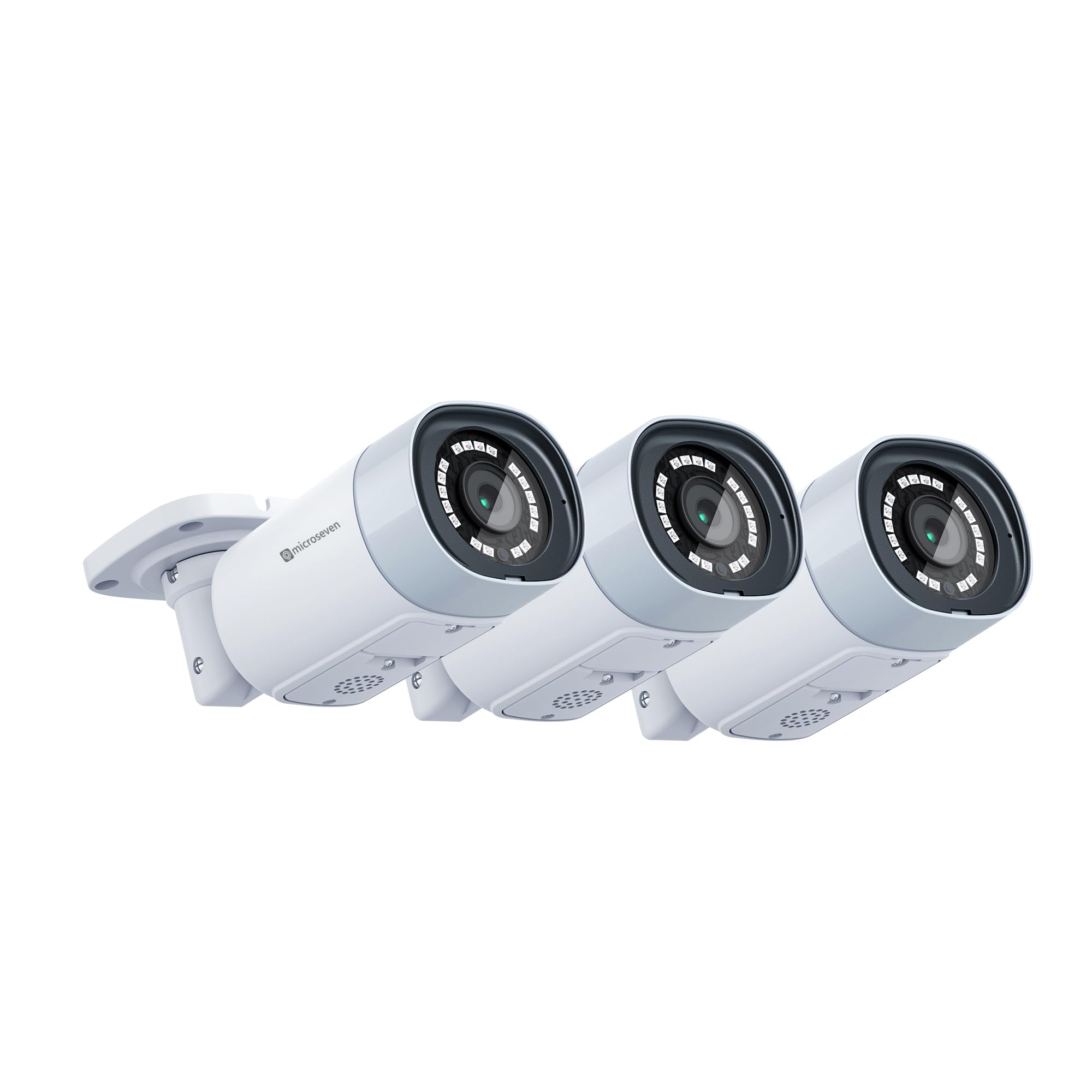
Image 1.1: Three Microseven M7B4K-PSAA 4K IP PoE security cameras. These cameras offer 8MP resolution and wide-angle viewing.

Image 1.2: Resolution comparison illustrating the superior detail of 8MP compared to 5MP and 2MP.
2. Konfiguracja
2.1 Rozpakowywanie i komponenty
Przed instalacją należy sprawdzić, czy wszystkie komponenty są obecne:
- Microseven M7B4K-PSAA Camera(s)
- Śruby montażowe i kotwy
- Wodoodporne złącze do kabla Ethernet
- Skrócona instrukcja obsługi (ta instrukcja)
2.2 Fizyczna instalacja
- Wybierz lokalizację: Wybierz odpowiednią lokalizację na zewnątrz, która zapewni pożądane viewing angle and is within range of your network infrastructure. Ensure the camera is mounted securely.
- Zamontuj kamerę: Use the provided mounting screws and anchors to securely attach the camera to a wall or ceiling. The universal ball mount allows for flexible positioning.
- Podłącz zasilanie i sieć:
- PoE (Recommended): Connect an Ethernet cable from a PoE switch or PoE injector to the camera's Ethernet port. This provides both power and data.
- Moc standardowa: If not using PoE, connect a 12V DC power adapter (not included) to the camera's power input and an Ethernet cable to your network router/switch.
- Wi-Fi: For wireless connectivity, ensure the camera is powered on and within range of your 2.4/5 GHz Wi-Fi network. Configuration will be done via the Microseven App or CMS.
- Bezpieczne połączenia: Use the waterproof connector for the Ethernet cable to protect against environmental elements.
2.3 Konfiguracja początkowa
After physical installation and power connection, configure the camera using the Microseven software:
- Oprogramowanie do pobrania: Download the Microseven CMS (Camera Management System) for Windows or macOS, or the Microseven App for iOS or Android from the official Microseven websklepy ze stronami internetowymi lub aplikacjami.
- Odkryj aparat: Launch the software/app. The application should automatically discover cameras on your local network. If not, use the 'Add Camera' function and manually enter the camera's IP address (if known) or scan the network.
- Ustaw hasło: For security, change the default password immediately upon first access.
- Network Settings (for Wi-Fi): If using Wi-Fi, navigate to the camera's network settings within the app/CMS and connect to your desired 2.4/5 GHz Wi-Fi network.

Image 2.1: Microseven Camera Management System (CMS) interface for managing multiple camera feeds.

Image 2.2: Software platform compatibility for Microseven cameras, including desktop and mobile applications.
3. Obsługa aparatu
3.1 Na żywo View i odtwarzanie
Uzyskaj dostęp do transmisji wideo na żywo i nagranego filmutage through the Microseven App or CMS software. You can view multiple cameras simultaneously and navigate through recorded events.
3.2 Opcje nagrywania
The M7B4K-PSAA offers flexible recording configurations:
- Ciągłe nagrywanie: Nagrywa 24/7.
- Zaplanowane nagrywanie: Records during specified time intervals.
- Nagrywanie aktywowane ruchem: Nagrywa tylko po wykryciu ruchu.
Recordings can be saved to a microSD card (up to 256GB, not included), Microseven Cloud, Microseven NVR, or an FTP server. Configure these options within the camera settings in the app or CMS.
3.3 Detekcja ruchu i alerty
The camera features intelligent human/vehicle motion detection to reduce false alarms. Configure detection zones and sensitivity:
- Typ wykrywania: Choose between human-only detection or regular motion detection.
- Alerty: Set up real-time alerts via email (with images), app push notifications (with video clips), or FTP uploads (video clips and images).
- Smart Alert Zone: Zdefiniuj określone obszary w obrębie kamery view for motion detection to minimize irrelevant alerts.

Image 3.1: Motion alert notifications with video clips displayed on a mobile device and desktop.

Image 3.2: Visual representation of human motion detection, highlighting a detected person.
3.4 Dźwięk dwukierunkowy
Skorzystaj z wbudowanego amplified microphone and high-power speaker for two-way communication. Access this feature through the Microseven App or CMS to listen and talk back.
3.5 Kontrola widzenia nocnego
The camera automatically switches to night vision in low-light conditions. You can manually enable or disable the IR LEDs and modify other camera properties remotely using the Microseven software.
3.6 Nagrywanie poklatkowe
Configure the camera to capture time-lapse videos, allowing you to condense long periods into short, viewable clips. This feature is accessible through the camera's settings in the Microseven software.
4. Konserwacja
Regular maintenance ensures optimal performance and longevity of your Microseven camera:
- Wyczyść obiektyw: Okresowo czyść obiektyw aparatu miękką,amp szmatką, aby usunąć kurz, brud lub plamy wodne, które mogą zasłaniać view. Unikaj środków czyszczących o działaniu ściernym.
- Sprawdź połączenia: Ensure all cable connections (Ethernet, power) are secure and free from damage. Verify the waterproof connector is properly sealed.
- Aktualizacje oprogramowania układowego: Check the Microseven website or app for available firmware updates. Keeping the firmware updated ensures access to the latest features and security enhancements.
- Zarządzanie kartami SD: If using a microSD card for storage, periodically check its status and ensure it has sufficient space. Format the card if necessary (this will erase all data).
- Aktualizacje oprogramowania: Keep the Microseven CMS and mobile apps updated to their latest versions for compatibility and performance improvements.
5. Rozwiązywanie Problemów
If you encounter issues with your Microseven M7B4K-PSAA camera, refer to the following common troubleshooting steps:
5.1 Brak zasilania/brak kontrolek
- Sprawdź źródło zasilania: Ensure the PoE switch/injector or power adapter is functioning correctly and providing power.
- Połączenie kablowe: Verify the Ethernet cable is securely connected to both the camera and the PoE source/router.
- Test with Different Port/Cable: If possible, try connecting to a different PoE port or using a different Ethernet cable.
5.2 Brak transmisji wideo
- Łączność sieciowa: Ensure the camera is properly connected to your network (wired or Wi-Fi). Check your router/switch status.
- Software/App Status: Verify that the Microseven App or CMS is running and the camera is added correctly. Try refreshing the device list.
- Konflikt adresów IP: Upewnij się, że kamera ma unikalny adres IP w Twojej sieci. Sprawdź listę klientów DHCP na routerze.
- Ustawienia zapory: If accessing remotely, ensure your network firewall is not blocking the camera's ports.
- Uruchom ponownie kamerę: Power cycle the camera by disconnecting and reconnecting its power source.
5.3 Fałszywe alarmy detekcji ruchu
- Dostosuj czułość: Lower the motion detection sensitivity in the camera settings.
- Konfiguruj strefy wykrywania: Exclude areas with frequent irrelevant motion (e.g., trees swaying, busy roads) using the smart alert zone feature.
- Human-Only Detection: Enable human-only detection if available in your firmware version to filter out non-human movements.
5.4 Problemy z dwukierunkową transmisją dźwięku
- Poziomy głośności: Check the volume settings on your viewing device and within the Microseven App/CMS.
- Zablokowanie mikrofonu/głośnika: Ensure the camera's microphone and speaker are not blocked.
- Szerokość pasma sieciowego: Poor network connection can affect audio quality. Ensure stable bandwidth.
For further assistance, refer to the Microseven support webodwiedź witrynę lub skontaktuj się z obsługą klienta.
6. Specyfikacje
| Funkcja | Specyfikacja |
|---|---|
| Marka | MIKROSIEDEM |
| Numer modelu | M7B4K-PSAA |
| Technologia łączności | Wired (PoE), Wireless (2.4/5 GHz Wi-Fi) |
| Rozdzielczość przechwytywania wideo | 3840x2160 (4K/8MP) |
| Funkcja specjalna | Two-Way Audio, Human/Vehicle Motion Detection |
| Pojemność pamięci masowej | Supports up to 256 GB Micro SD Card (not included) |
| Źródło zasilania | Corded Electric (PoE or 12V DC adapter) |
| Wymiary przedmiotu Dł. x Szer. x Wys. | 6 x 2.4 x 2.4 cala |
| Zgodność z systemem operacyjnym | Android, iOS, Windows, macOS |
| Zalecane zastosowania produktu | Monitoring zewnętrzny |
| Zakres noktowizora | 100 stóp |
| Typ soczewki | Wide Angle (2.8mm lens, 150° view) |
| Ocena odporności na warunki atmosferyczne | IP66 |
| UPC | 018406663859 |
7. Gwarancja i wsparcie
Microseven provides free software (CMS for Windows/macOS) and free mobile applications (iOS/Android) to manage and operate your camera. For detailed warranty information, technical support, and frequently asked questions, please visit the official Microseven webstrona. Zachowaj dowód zakupu na potrzeby roszczeń gwarancyjnych.
Microseven cameras are designed for broad compatibility, working with various third-party software and systems such as Blue Iris, Milestone, Synology, QNAP, and ONVIF-compliant devices.

Image 7.1: Compatibility with various NVRs, software, and smart home platforms.