
Wstęp
This manual provides detailed instructions for the setup, operation, and maintenance of your ADAM elements USB-C Hub Stand Pro. This device combines an ergonomic laptop stand with a 6-in-1 multiport USB-C hub, designed to enhance connectivity and comfort for M2/M1 Mac, iPad, and other USB-C compatible laptops.
Produkt ponadview
The ADAM elements USB-C Hub Stand Pro is a versatile accessory that integrates a laptop stand with a powerful USB-C hub. It features a detachable design, allowing the hub to be used independently. The stand offers adjustable height and a 360-degree rotatable base for optimal viewkąty.
Główne cechy:
- 6-w-1 koncentrator wieloportowy: Includes USB-C Host, 2x USB-A, USB-C PD, HDMI, and RJ45 Ethernet.
- Ergonomic Laptop Stand: Adjustable elevation up to 29 cm and 180-degree angle.
- Obrót o 360 stopni: Swivel base for flexible viewing.
- Wyjście HDMI 4K@60Hz: Supports high-resolution video with HDCP 2.2.
- Dostawa mocy 100 W: USB-C PD port for fast charging.
- Detachable Hub: Use the hub integrated with the stand or as a portable device.
- Durable All-Aluminum Design: Robust construction with anti-slip silicone pads.
- Right-Angle USB-C Cable: Reduces strain and ensures a secure connection.
Konfiguracja portu:
| Rodzaj portu | Ilość | Funkcjonalność |
|---|---|---|
| Host USB typu C | 1 | Connects to laptop/device (USB-C 3.1 Gen 2) |
| USB-A | 2 | Transfer danych do 5 Gb/s |
| USB-C PD | 1 | Power Delivery Pass-Through charging up to 100W |
| HDMI | 1 | Video output up to 4K@60Hz |
| RJ45 Ethernet | 1 | Network connection (1000 Mbps Max) |

Image: The ADAM elements USB-C Hub Stand Pro, showcasing its ergonomic design and integrated hub.

Obraz: Szczegółowy view of the 6 multi-function ports for charging, video, and data transmission.
Instrukcje konfiguracji
- Rozpakuj urządzenie: Carefully remove the USB-C Hub Stand Pro from its packaging.
- Umiejscowienie stojaka: Umieść stojak na stabilnej, płaskiej powierzchni.
- Dostosuj stojak:
- Gently adjust the stand's arms to your desired height and angle. The stand supports an elevation angle of up to 180 degrees and a height of up to 29 cm.
- The base can be rotated 360 degrees horizontally for optimal viewing.
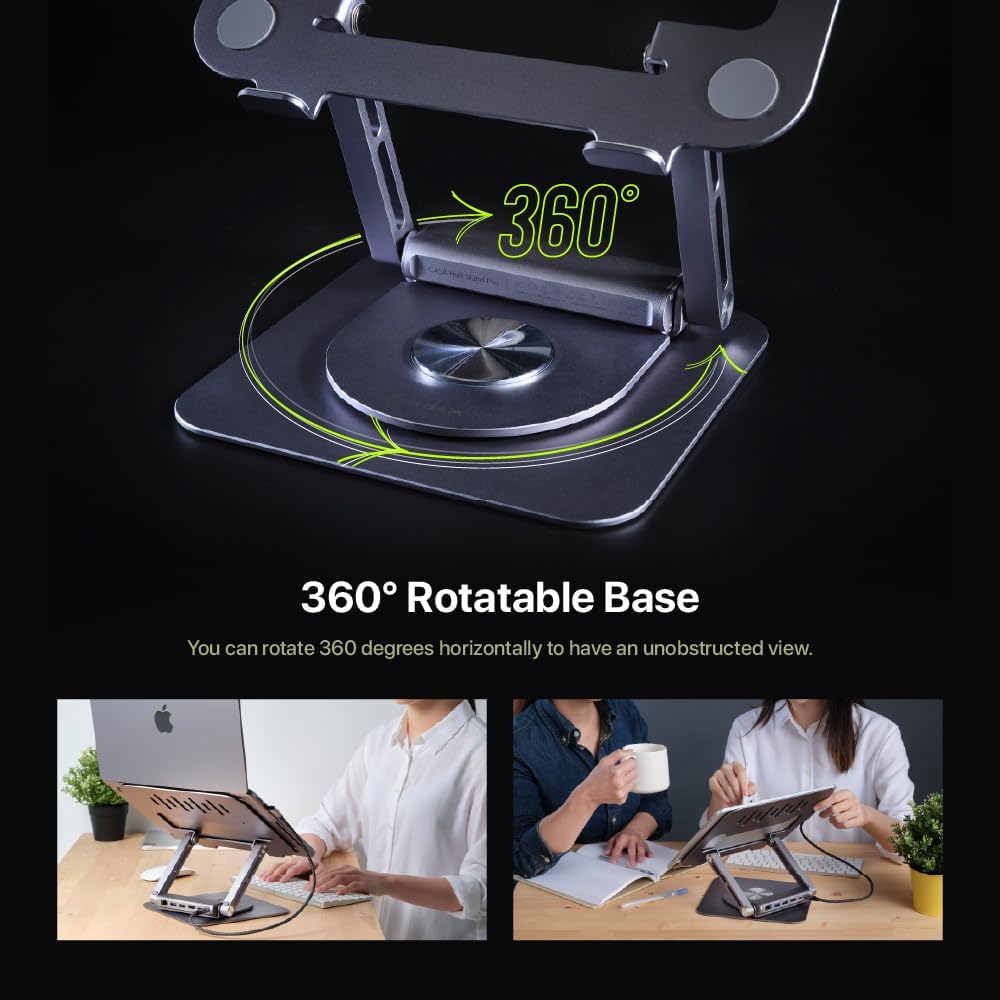
Image: Demonstrating the 360-degree rotatable base for flexible positioning.
- Attach/Detach the Hub:
- The hub is designed to be detachable. To attach, align the hub with the designated slot on the stand and slide it into place until it clicks securely.
- To detach, gently pull the hub away from the stand. This allows for independent use or portability.

Image: The detachable design of the hub, allowing it to be used separately.
- Połącz się ze swoim urządzeniem: Use the integrated right-angle USB-C cable to connect the hub to your laptop or iPad's USB-C port. Ensure the connection is firm.
- Podłącz urządzenia peryferyjne: Plug your desired peripherals (e.g., external monitor, USB drives, Ethernet cable, power adapter) into the corresponding ports on the hub.
Instrukcja obsługi
Korzystanie z koncentratora USB-C:
- Dostarczanie mocy (PD): Connect your laptop's USB-C power adapter to the USB-C PD port on the hub to charge your device while using the hub's other functions. The hub supports up to 100W pass-through charging.
- Porty USB-A: Use the two USB-A ports for connecting USB devices such as keyboards, mice, external hard drives, or flash drives. These ports support data transfer speeds up to 5Gbps.
- Wyjście HDMI: Connect an external monitor or projector to the HDMI port. The hub supports 4K resolution at 60Hz.
- To enjoy 4K@60Hz resolution, ensure your device supports DisplayPort (DP) 1.4 or higher.
- You can configure your display settings for Mirror Mode (duplicate your primary screen) or Extend Mode (expand your desktop across multiple screens) through your operating system's display settings.

Image: High-resolution 4K@60Hz video output capabilities.

Image: External display options: Mirror Mode and Extended Mode.
- Port Ethernet RJ45: Connect an Ethernet cable to this port for a stable wired network connection, supporting speeds up to 1000 Mbps.
Using the Laptop Stand:
- Ergonomiczna regulacja: Adjust the height and angle of the stand to achieve an ergonomic viewing position, reducing strain on your neck and back.
- Obrót o 360 stopni: Rotate the base of the stand to easily share your screen with others or change your viewing angle without moving the entire setup.
- Zgodność: The stand is designed to securely hold M2/M1 MacBook series, iPad, and other USB-C laptops. The anti-slip silicone pads ensure stability.

Image: The stand is suitable for MacBook and iPad series.
Konserwacja
- Czyszczenie: Use a soft, dry cloth to wipe down the stand and hub. Avoid abrasive cleaners or solvents that may damage the finish.
- Składowanie: When not in use, store the device in a cool, dry place. The detachable hub can be stored separately for travel.
- Pielęgnacja kabli: Ensure the right-angle USB-C cable is not excessively bent or strained to prevent damage.
- Unikaj przeciążania: Do not connect devices that exceed the hub's power capabilities.
Rozwiązywanie problemów
| Problem | Możliwa przyczyna | Rozwiązanie |
|---|---|---|
| Brak obrazu na monitorze zewnętrznym. | Incorrect cable connection, incompatible resolution, device not supporting DP 1.4. |
|
| Urządzenia USB nie zostały rozpoznane. | Loose connection, insufficient power, driver issues. |
|
| Laptop not charging via PD port. | Power adapter not connected, adapter not powerful enough, faulty cable. |
|
| Ethernet connection unstable or not working. | Loose cable, network issues, driver issues. |
|
Specyfikacje
| Funkcja | Szczegół |
|---|---|
| Numer modelu | AAPADHUBSTDPGY |
| Wymiary produktu | 1.8 x 10.2 x 8.8 cala (4.57 x 25.91 x 22.35 cm) |
| Waga przedmiotu | 2.3 funtów (1.04 kg) |
| Porty | 1x USB-C Host (USB-C 3.1 Gen 2), 2x USB-A (5Gbps), 1x USB-C PD (up to 100W), 1x HDMI (4K@60Hz), 1x RJ45 Ethernet (1000 Mbps) |
| Rozdzielczość HDMI | Up to 4K@60Hz, HDCP 2.2 compatible |
| Dostarczanie mocy | Up to 100W Pass-Through |
| Data Transfer Speed (USB-A) | Do 5 Gbps |
| Prędkość Ethernetu | 10/100/1000 Mb/s |
| Tworzywo | All-Aluminum |
| Kompatybilne urządzenia | M2/M1 MacBook Series, iPad, USB-C Laptops |
Gwarancja i wsparcie
ADAM ELEMENTS products are designed for reliability and performance. For warranty information and technical support, please refer to the official ADAM ELEMENTS webodwiedź witrynę lub skontaktuj się bezpośrednio z działem obsługi klienta.
For additional support or to inquire about replacement parts, please visit: www.adamelements.com