
1. Wprowadzenie
Thank you for choosing the ieGeek 5MP Solar WiFi Outdoor PTZ Security Camera. This manual provides essential information for the proper installation, operation, and maintenance of your device. Please read it thoroughly before use and retain it for future reference.
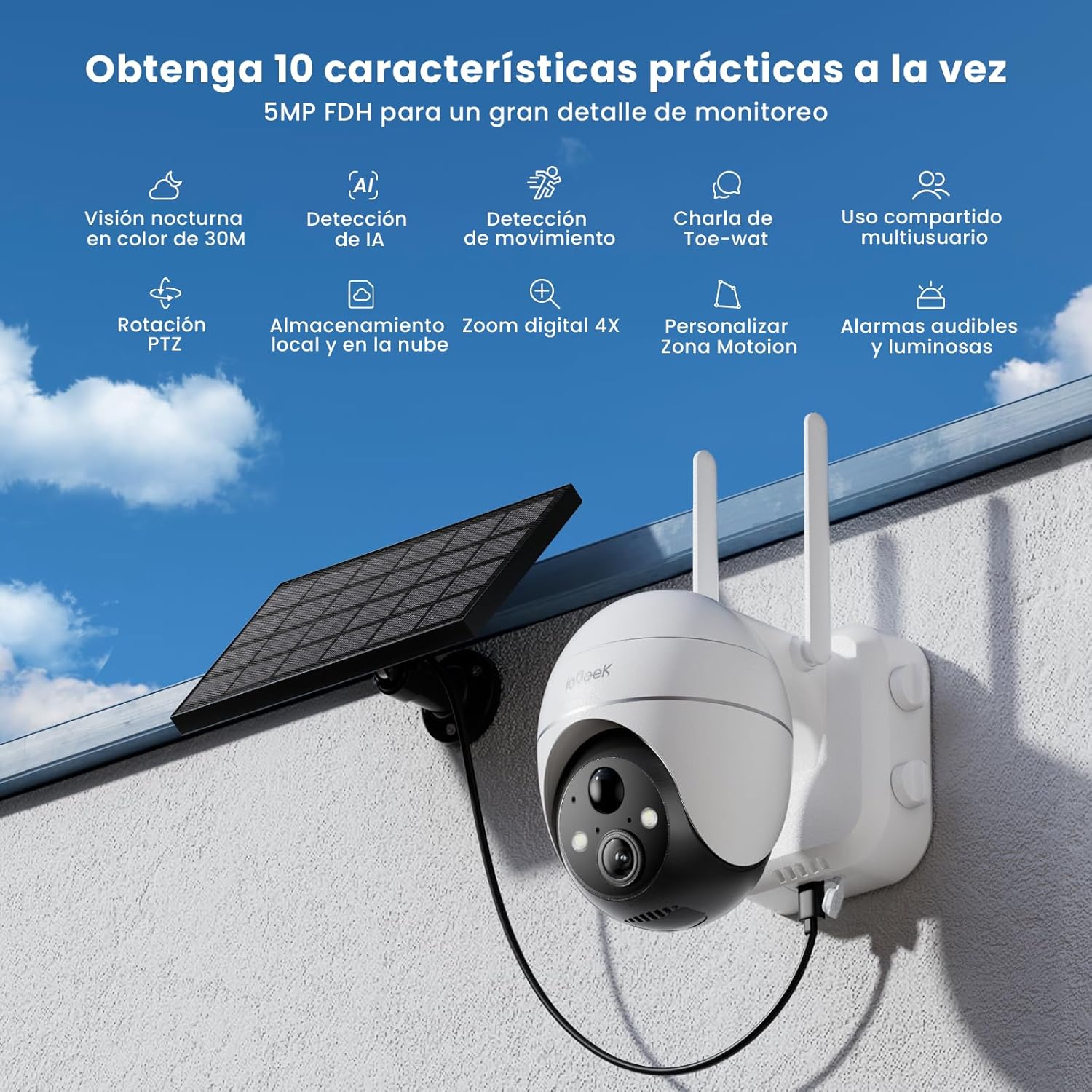
Figure 1: ieGeek 5MP Solar WiFi Outdoor PTZ Security Camera with solar panel, highlighting key features.
2. Koniec produktuview
2.1 Główne cechy
- 5MP Ultra-Clear Resolution: Provides superior visual images with 4x digital zoom for detailed viewing.
- Solar Power & Long-Lasting Battery: Operates using solar panels, eliminating power cables. The rechargeable battery lasts up to 60 days on a single charge.
- Obrót 355° i pochylenie 120°: Oferuje szeroki zakres view, ensuring comprehensive surveillance without blind spots.
- PIR Human Detection & Instant Alarms: Detects human shapes and sends alarm notifications within 2 seconds.
- Kolorowe widzenie nocne: Equipped with motion-activated spotlights for full-color details day and night.
- Dwukierunkowy dźwięk: Enables real-time listening and speaking through the camera via the app.
- Przechowywanie lokalne i w chmurze: Supports up to 128GB Micro SD card and offers 7 days of free cloud service.
- Alexa Smart Function: Control the camera and view footage using Alexa Smart Voice.
- Odporność na warunki atmosferyczne IP65: Designed for outdoor use, resistant to rain, snow, and varying temperatures (-20°C to 50°C).
2.2 Zawartość opakowania

Rysunek 2: Wymiary produktu i zawartość opakowania.
- ieGeek 5MP PTZ Security Camera x 1
- Solar Panel with Bracket x 1
- Instrukcja obsługi x 1
- Solar Panel User Manual x 1
- Mounting Screws and Expansion Screws x 7 sets
3. Przewodnik konfiguracji
3.1 Ładowanie akumulatora
Before initial use, fully charge the camera's internal battery using the provided USB cable. The solar panel will maintain the charge during outdoor operation.
3.2 Pobieranie aplikacji i tworzenie konta
Download the 'ieGeek Cam' app from the Google Play Store or Apple App Store. Follow the in-app instructions to create an account and log in.

Figure 3: Download the 'ieGeek Cam' app.
3.3 Parowanie kamery
- Włącz kamerę.
- Open the 'ieGeek Cam' app and tap 'Add Device'.
- Postępuj zgodnie z instrukcjami wyświetlanymi na ekranie, aby połączyć kamerę z siecią Wi-Fi 2.4 GHz.
- Zeskanuj kod QR wyświetlony na Twoim telefonie za pomocą obiektywu aparatu.
- Po nawiązaniu połączenia nadaj nazwę swojej kamerze i zakończ konfigurację.
3.4 Instalacja
Choose a location with good Wi-Fi signal and direct sunlight exposure for the solar panel. Use the provided screws and bracket to securely mount the camera and solar panel.

Figure 4: Flexible disassembly and easy installation.

Figure 5: Wireless setup with solar panel connection.
4. Instrukcja obsługi
4.1 Na żywo View i sterowanie PTZ
Access the live feed through the 'ieGeek Cam' app. Use the on-screen controls to pan 355° horizontally and tilt 120° vertically, adjusting the camera's view w razie potrzeby.

Figure 6: Remote PTZ control via smartphone app.
4.2 Detekcja ruchu i alerty
The camera features PIR human detection. When motion is detected, you will receive an instant alarm notification on your smartphone. Customize motion detection zones and sensitivity settings within the app to reduce false alerts.

Rysunek 7: Konfigurowalne strefy wykrywania ruchu.
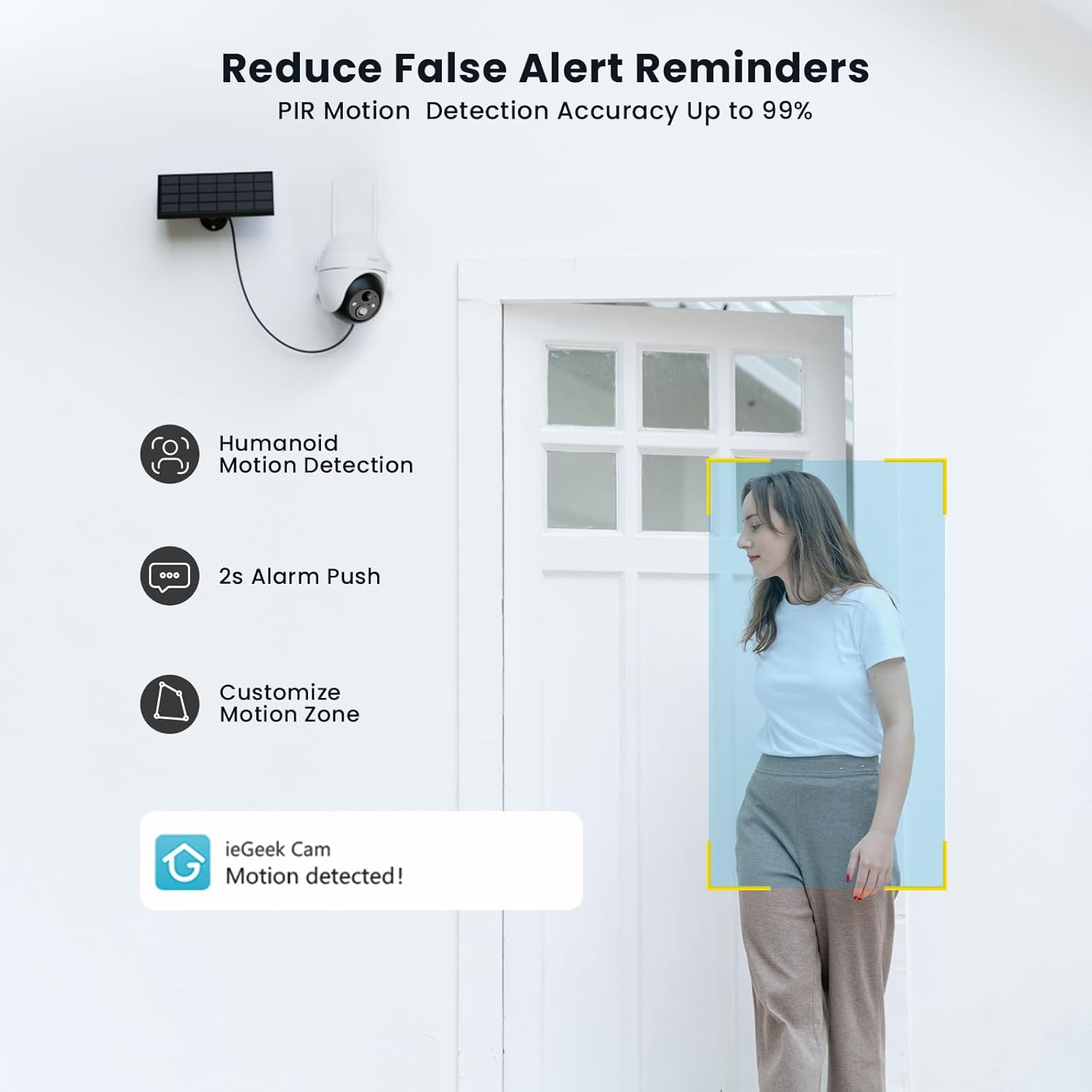
Figure 8: PIR Humanoid Motion Detection.
4.3 Dźwięk dwukierunkowy
Utilize the two-way audio feature to communicate with visitors or deter intruders. Tap the microphone icon in the app to speak, and listen through the camera's speaker.

Rysunek 9: Dwukierunkowa komunikacja audio.
4.4 Opcje przechowywania
The camera supports local storage via a Micro SD card (up to 128GB, purchased separately) and offers 7 days of free cloud storage. Recorded events can be accessed and reviewza pośrednictwem aplikacji.

Rysunek 10: Gniazdo karty Micro SD do przechowywania lokalnego.

Figure 11: Cloud storage options.
5. Konserwacja
- Wyczyść obiektyw: Aby zapewnić dobrą jakość obrazu, regularnie przecieraj obiektyw aparatu miękką, suchą ściereczką.
- Wyczyść panel słoneczny: Aby uzyskać maksymalną wydajność ładowania, utrzymuj panel słoneczny w czystości, wolny od kurzu, brudu i zanieczyszczeń.
- Sprawdź poziom naładowania baterii: Monitor the battery status via the app and ensure the solar panel receives adequate sunlight.
- Aktualizacje oprogramowania układowego: Keep the camera firmware updated through the app for optimal performance and security.
6. Rozwiązywanie Problemów
| Problem | Możliwa przyczyna | Rozwiązanie |
|---|---|---|
| Kamera nie łączy się z siecią Wi-Fi | Nieprawidłowe hasło Wi-Fi; Kamera znajduje się zbyt daleko od routera; Obsługuje tylko Wi-Fi 2.4 GHz. | Verify password; Move camera closer to router or use a Wi-Fi extender; Ensure your router is set to 2.4GHz. |
| Niska jakość obrazu | Brudny obiektyw; Słabe warunki oświetleniowe; Problemy z siecią. | Clean the lens; Ensure adequate lighting or rely on color night vision; Check Wi-Fi signal strength. |
| Bateria się nie ładuje | Solar panel obstructed or dirty; Insufficient sunlight; Faulty cable. | Clear obstructions and clean solar panel; Relocate panel to receive more direct sunlight; Check cable connections. |
| Brak alertów o wykryciu ruchu | Motion detection disabled; Incorrect sensitivity settings; App notifications blocked. | Enable motion detection in app; Adjust sensitivity; Check phone notification settings for the 'ieGeek Cam' app. |
7. Specyfikacje
| Funkcja | Szczegół |
|---|---|
| Nazwa modelu | ieGeek ZS-GX4S |
| Rezolucja | 5 MP |
| Łączność | Bezprzewodowa (Wi-Fi 2.4 GHz) |
| Źródło zasilania | Bateria, energia słoneczna |
| Pojemność baterii | 2000 mAh |
| Zakres obrotu/pochylenia | Obrót o 355°, pochylenie o 120° |
| Zoom cyfrowy | 4x |
| Wizja nocna | Kolorowa wizja nocna (podczerwień) |
| Wykrywanie ruchu | Detekcja człowieka PIR |
| Audio | Dwukierunkowy dźwięk |
| Składowanie | Micro SD (do 128 GB), przechowywanie w chmurze |
| Ocena odporności na warunki atmosferyczne | IP65 |
| Temperatura pracy | -20°C do 50°C |
| Wymiary | 18 x 17 x 12 centymetra |
| Tworzywo | Plastikowy |
| Kompatybilny z | Amazon Alexa |
8. Gwarancja i wsparcie
Firma ieGeek stawia sobie za cel dostarczanie niezawodnych produktów i zapewnianie doskonałej obsługi klienta.
- 2-letnia gwarancja: Your ieGeek camera is covered by a 2-year warranty from the date of purchase.
- 30-dniowa gwarancja zwrotu pieniędzy: Jeśli nie jesteś zadowolony z zakupu, możesz go zwrócić w ciągu 30 dni i otrzymać pełny zwrot pieniędzy.
- Dożywotnie wsparcie techniczne: ieGeek offers lifetime technical assistance for all its products.
For support, please contact us via email. Our customer service team is available 24/7 to assist you.

Figure 12: ieGeek Customer Support.