
Wstęp
The VIOFO A119 Mini 2 Dash Cam is a compact and powerful vehicle recording device designed to capture high-quality footage of your journeys. Featuring the latest STARVIS 2 IMX675 image sensor, it delivers stunning 2K 60fps video, enhanced night vision, and smart voice control for a safer and more convenient driving experience. This manual provides detailed instructions for setting up, operating, and maintaining your dash cam to ensure optimal performance and longevity.
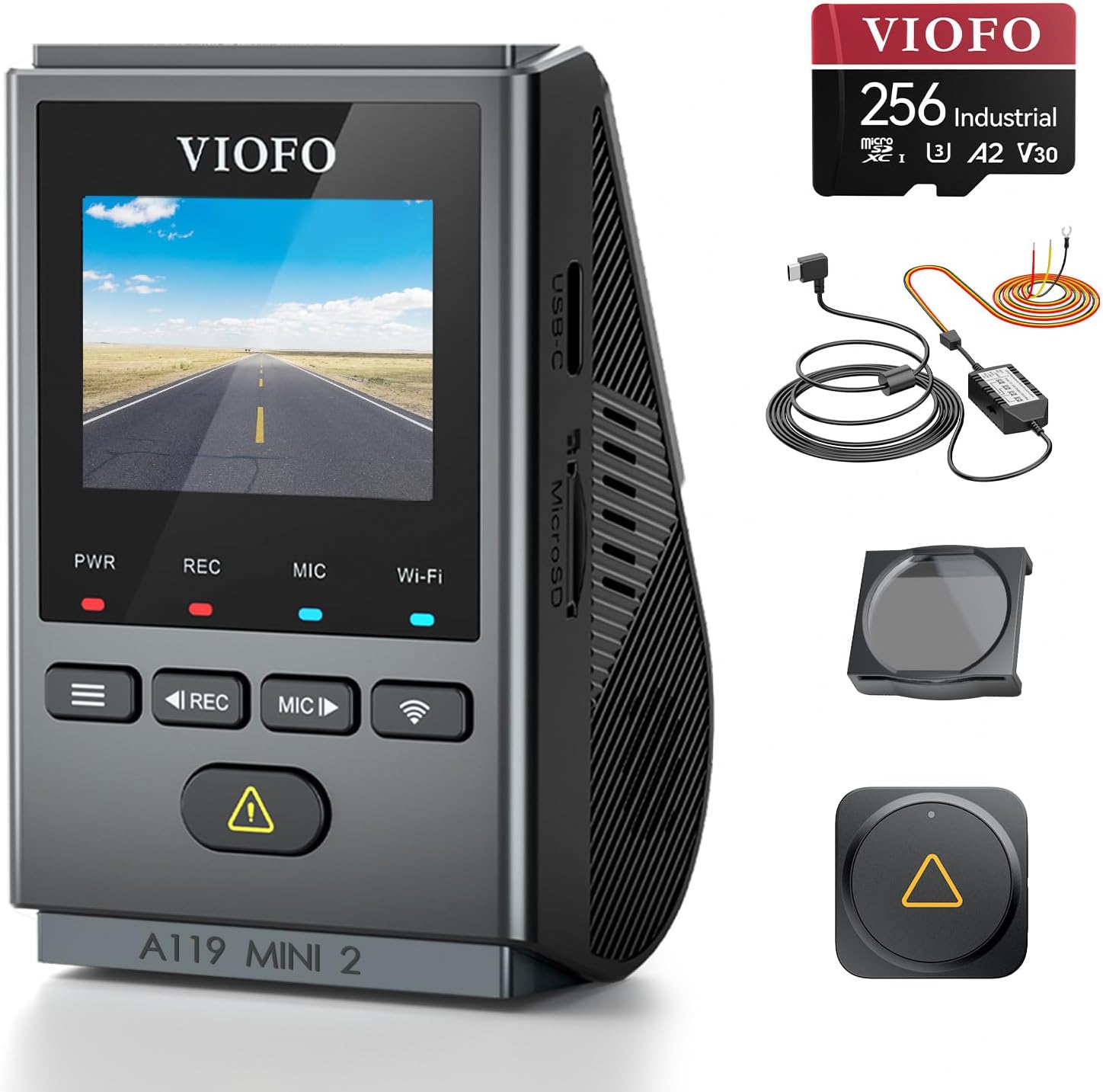
Figure 1: VIOFO A119 Mini 2 Dash Cam and included accessories.
Organizować coś
1. Co znajduje się w pudełku
Sprawdź, czy w opakowaniu znajdują się wszystkie komponenty:
- Kamera samochodowa VIOFO A119 Mini 2
- Ładowarka samochodowa
- 11.5-stopowy kabel ładujący
- 1.6 ft Data Cable
- Moduł GPS
- A119 Mini 2 Manual
- Narzędzie do usuwania przycięcia
- Spare Mount Sticker
- Naklejki statyczne na przednią szybę x2
- 256GB MicroSD Card (Industrial Grade)

Rysunek 2: Wizualna reprezentacja listy rzeczy do spakowania.
2. Instalacja karty MicroSD
The VIOFO A119 Mini 2 requires a high-endurance microSD card for reliable recording. Insert the included 256GB industrial-grade microSD card into the designated slot on the dash cam. Ensure it clicks into place. For optimal performance, it is recommended to format the card within the dash cam settings after insertion.


Figure 3: The included 256GB industrial microSD card and VIOFO's recommendation for high-endurance cards.
3. Instalacja kamery samochodowej
The compact design of the A119 Mini 2 allows for discreet installation behind your rearview mirror, minimizing obstruction to your view. Use the provided adhesive mount and follow these steps:
- Wyczyść obszar przedniej szyby, na którym zostanie zamontowana kamera samochodowa.
- Apply a windshield static sticker to the chosen area.
- Attach the adhesive mount to the static sticker, ensuring a firm press.
- Slide the dash cam onto the mounted bracket.
- Route the 11.5 ft charging cable from the dash cam to the car charger (cigarette lighter socket). Use the trim removal tool to neatly tuck the cable along the windshield and dashboard edges.
- Connect the car charger to your vehicle's power outlet.
Ważna uwaga:
- ● Always use the original car charger and cable provided. Do not use mobile phone chargers or data cables to power the dash cam, as this may cause damage or malfunction.


Figure 4: Dash cam dimensions and recommended installation method.
Instrukcja obsługi
1. Włączanie/wyłączanie i podstawowe nagrywanie
The dash cam will automatically power on and begin recording when connected to your vehicle's power supply and the engine is started. It will power off automatically when the engine is turned off.
The A119 Mini 2 records in stunning 2K (2560x1440P) at 60 frames per second (fps), or up to 2.7K (2592x1944P) at 30fps. This ensures clear capture of details like road signs and license plates.


Figure 5: High-resolution video capture capabilities, showing clear license plate details.
2. Night Vision 2.0 with DOL-HDR
Equipped with DOL-HDR technology and the STARVIS 2 IMX675 sensor, the A119 Mini 2 provides exceptional night vision. It balances extremely bright and dark areas to restore 2K details in low-light conditions, such as nighttime roads or tunnel entrances/exits.
Note: When HDR is enabled, the frame rate will be 30fps. 60fps and HDR functions cannot be used simultaneously.


Figure 6: Comparison of video quality with and without HDR in low-light conditions.
3. Inteligentne sterowanie głosowe
Control your dash cam hands-free using simple voice commands. This feature enhances driving safety by allowing you to keep your hands on the wheel and eyes on the road. The dash cam also provides voice notifications for setting changes or memory card errors.
Available voice commands include:
- „Zablokuj wideo”
- „Zrób zdjęcie”
- "Turn on WiFi" / "Turn off WiFi"
- „Włącz dźwięk” / „Wyłącz dźwięk”
- „Włącz ekran” / „Wyłącz ekran”
- "Video Start" / "Video Stop"
Video 1: Demonstration of the VIOFO A119 Mini 2's voice control feature, showing how to lock a video with a simple command.

Figure 7: Illustrates the convenience of voice control while driving.
4. 5GHz Wi-Fi Connectivity & VIOFO App
The A119 Mini 2 features upgraded 5GHz Wi-Fi for faster file transfers. Download the VIOFO app on your iOS or Android device to connect to the dash cam. Through the app, you can:
- Na żywo view kanał kamery.
- Odtwarzaj nagrane filmy.
- Download videos to your phone (up to 4 times faster than 2.4GHz Wi-Fi).
- Dostosuj ustawienia kamery samochodowej.
Możesz również przenieść files directly to your smartphone using the included USB 2.0 Type-C to Type-C cable, with download speeds up to 20MB/s on compatible devices like iPhone 15.


Figure 8: Dash cam connected to a smartphone via Wi-Fi and direct cable for file przenosić.
5. Built-in GPS Logger
The integrated GPS module automatically synchronizes satellite time and records crucial driving data, including route, speed, and time, directly into your video files. Dane te mogą być viewed during video playback using compatible software.

Figure 9: GPS data overlay on video playback, showing route and speed information.
6. Tryby parkowania
The A119 Mini 2 offers three advanced parking modes to protect your vehicle when parked. An optional HK4 hardwire kit (ASIN: B09MRVP2PX) is required to enable these features:
- Automatyczne wykrywanie zdarzeń (buforowane): Records 15 seconds before and 30 seconds after an event (e.g., impact detected by G-sensor).
- Nagrywanie poklatkowe: Records continuously at a low frame rate to save storage space while providing full coverage.
- Nagrywanie z niską przepływnością: Records continuously at a low bitrate, maintaining video quality while reducing file rozmiar.


Figure 10: The HK4 hardwire kit and a visual explanation of the three parking modes.
7. Nagrywanie w pętli i blokada awaryjna
The dash cam utilizes loop recording, automatically overwriting the oldest video files when the memory card is full. In the event of an accident or sudden impact detected by the G-sensor, the current video segment will be automatically locked to prevent it from being overwritten, ensuring critical evidence is preserved.

Figure 11: Visual representation of loop recording and emergency lock functionality.
8. Akcesoria opcjonalne
Enhance your A119 Mini 2 experience with these optional accessories:
- CPL Lens (ASIN: B01N0KVD4C): Redukuje odblaski i odbicia światła od przedniej szyby, poprawiając przejrzystość obrazu wideo.
- HK4 Hardwire Kit (ASIN: B09MRVP2PX): Enables advanced parking modes and provides continuous power.
- Bluetooth Remote (ASIN: B07GF9CF2X): Allows for quick and easy manual video locking or photo taking without touching the dash cam.


Figure 12: Various optional accessories available for the A119 Mini 2.
Konserwacja
1. Pielęgnacja karty MicroSD
Regular maintenance of your microSD card is crucial for reliable dash cam operation. Dash cams perform heavy writing cycles, which can degrade standard memory cards over time. Always use high-endurance cards like the one included with your A119 Mini 2.
- Formatowanie: Format the microSD card regularly (e.g., once a month) within the dash cam's settings to prevent data corruption and ensure optimal recording performance.
- Wymiana: If you experience frequent recording errors or corrupted files, consider replacing the microSD card with a new high-endurance card.
Figure 13: VIOFO's recommendation for high-endurance microSD cards for dash cams.
2. Czyszczenie obiektywu i ekranu
To ensure clear video quality, periodically clean the dash cam's lens and screen. Use a soft, lint-free cloth. For stubborn smudges on the lens, a small amount of lens cleaning solution designed for optics can be applied to the cloth (not directly to the lens).
Rozwiązywanie problemów
If you encounter issues with your VIOFO A119 Mini 2, refer to the following common problems and solutions:
- Kamera samochodowa nie włącza się:
- Sprawdź, czy ładowarka samochodowa jest prawidłowo podłączona do gniazda zasilania pojazdu i kamery samochodowej.
- Verify the vehicle's power outlet is functioning (e.g., by testing with another device).
- Sprawdź, czy używasz oryginalnej ładowarki samochodowej i kabla VIOFO.
- Wideotage jest niewyraźne lub niejasne:
- Oczyść obiektyw aparatu miękką szmatką.
- Check if the protective film has been removed from the lens.
- Upewnij się, że kamera samochodowa jest solidnie zamontowana i nie wibruje nadmiernie.
- Consider installing a CPL lens to reduce glare.
- Memory card error / Cannot record:
- Sformatuj kartę microSD w ustawieniach kamery samochodowej.
- Ensure you are using a high-endurance microSD card.
- Try a different compatible microSD card to rule out card malfunction.
- Problemy z połączeniem Wi-Fi:
- Ensure Wi-Fi is enabled on the dash cam (can be done via voice command or menu).
- Uruchom ponownie kamerę samochodową i smartfon.
- Make sure your phone is within close proximity to the dash cam.
- Update the VIOFO app to the latest version.
- Sterowanie głosowe nie reaguje:
- Mów wyraźnie i bezpośrednio do kamery samochodowej.
- Ensure the vehicle's interior is not excessively noisy.
- Sprawdź ustawienia kamery samochodowej i upewnij się, że sterowanie głosowe jest włączone.
For further assistance, please refer to the FAQ section on the official VIOFO webodwiedź witrynę lub skontaktuj się z działem obsługi klienta.

Figure 14: Important usage tips, including charging and microSD card requirements.
Specyfikacje
| Funkcja | Szczegół |
|---|---|
| Nazwa modelu | A119 Mini2 |
| Marka | VIOFO |
| Rozdzielczość przechwytywania wideo | 2K (2560x1440P@60fps), Max 2.7K (2592x1944P@30fps) |
| Czujnik obrazu | Sony STARVIS 2 IMX675 |
| Technologia łączności | Wi-Fi (5GHz), USB Type-C |
| Pole View | 140 stopni |
| Typ montażu | Uchwyt samoprzylepny |
| Kolor | Czarny |
| Wyświetlacz | 1.5" HD Screen |
| Źródło zasilania | Super kondensator |
| Cechy specjalne | Voice Control, GPS Logger, DOL-HDR Night Vision 2.0, Parking Modes |

Figure 15: Key hardware features: 1.5" HD screen and Super Capacitor.
Gwarancja i wsparcie
VIOFO is committed to providing reliable products and excellent customer service.
- Zasady zwrotu: The product is eligible for a 30-day return policy (refund/replacement).
- Gwarancja: Enjoy a 24-month free repair coverage for your dash cam.
- Obsługa klienta: Dedicated 24/7 customer support is available for any inquiries or assistance you may need.
For more information or to contact support, please visit the official VIOFO webstrona.

Rysunek 16: Koniecview of VIOFO's customer service and warranty offerings.