
Tecno LH8n (256+8)
Instrukcja obsługi TECNO Pova 5 Pro 5G
Model: LH8n (256+8)
Wstęp
This manual provides essential information for the safe and efficient operation of your TECNO Pova 5 Pro 5G smartphone. Please read it thoroughly before using your device to ensure optimal performance and longevity.

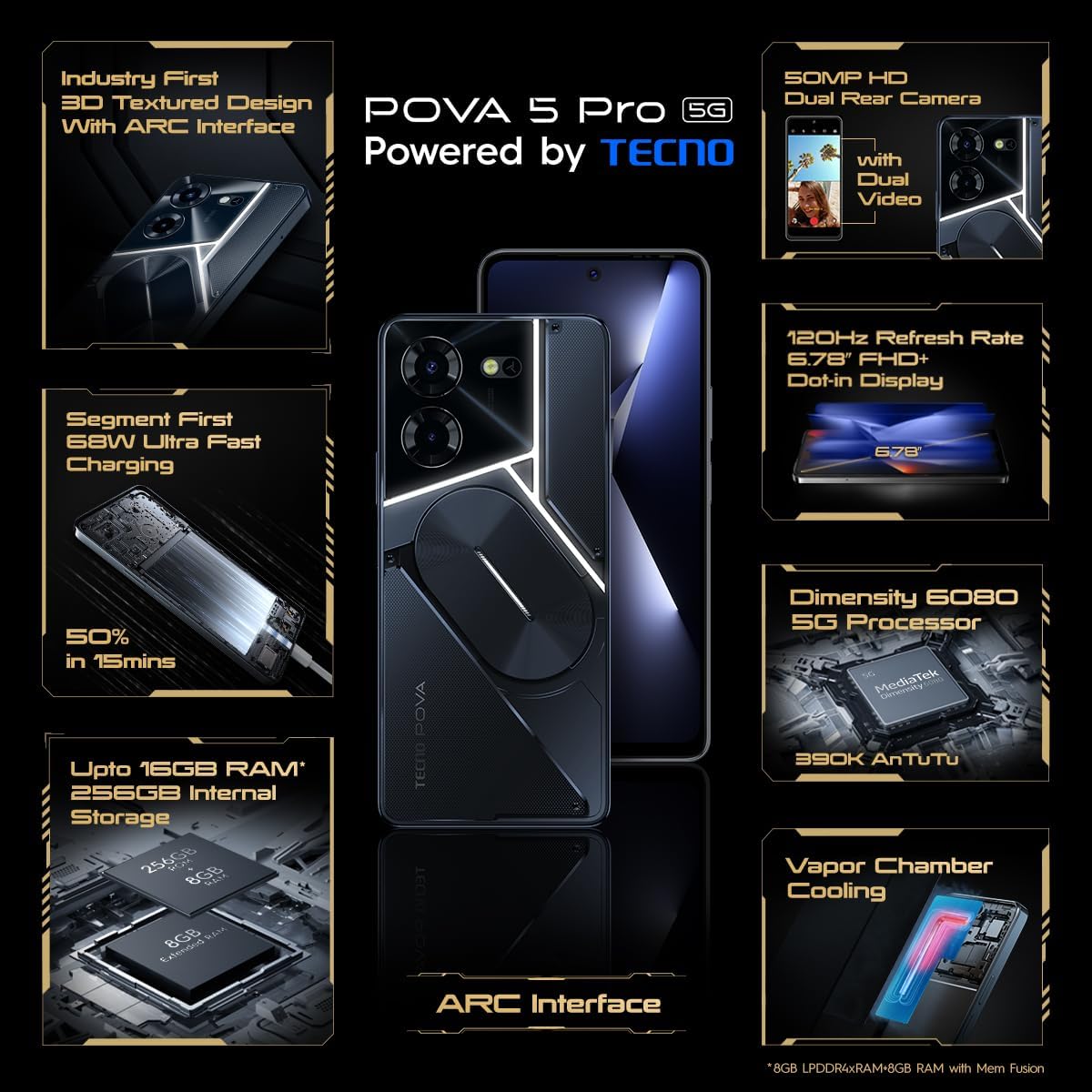
Image: The TECNO Pova 5 Pro 5G smartphone, showcasing its design and key feature of 68W Ultra Fast Charging.
Co jest w pudełku
Sprawdź, czy w opakowaniu znajdują się wszystkie elementy:
- Smartfon
- Zasilacz 68 W
- Kabel typu C
- Obudowa TPU
- Narzędzie do wyjmowania karty SIM

Image: A flat lay of the TECNO Pova 5 Pro 5G packaging contents, showing the smartphone, 68W power adapter, USB-C cable, TPU protective cover, and the SIM ejector tool.
Organizować coś
Konfiguracja początkowa
- Włóż kartę SIM/SD: Locate the SIM tray on the side of the device. Use the provided SIM ejector tool to open the tray. Insert your Nano-SIM card(s) and/or microSD card into the designated slots. Ensure the tray is fully reinserted.
- Włączanie: Press and hold the Power button (located on the right side) until the TECNO logo appears.
- Postępuj zgodnie z instrukcjami wyświetlanymi na ekranie: The device will guide you through initial setup, including language selection, Wi-Fi connection, Google account setup, and security settings.
Ładowanie urządzenia
The TECNO Pova 5 Pro 5G supports 68W Ultra Fast Charging.
- Podłącz kabel typu C do portu ładowania znajdującego się na dole telefonu.
- Podłącz drugi koniec kabla do zasilacza 68 W.
- Podłącz zasilacz do gniazdka ściennego.
- A full charge typically takes approximately 45 minutes, with 50% charge achievable in about 15 minutes.
Obraz: Czysty front view of the TECNO Pova 5 Pro 5G smartphone, highlighting its display and front camera.
Obsługa urządzenia
Podstawowa nawigacja
- Ekran dotykowy: Dotknij, aby wybrać, przesuń, aby przewijać, uszczypnij, aby powiększyć.
- Przycisk zasilania: Naciśnij, aby wybudzić/uśpić ekran. Naciśnij i przytrzymaj, aby wyłączyć lub ponownie uruchomić.
- Przyciski głośności: Dostosuj głośność multimediów, połączeń i dzwonków.
Korzystanie z aparatu
The device features a 50MP AI Dual Rear Camera and a 16MP Selfie Camera.
- Otwórz aplikację Aparat na ekranie głównym lub w szufladzie aplikacji.
- Wybierz żądany tryb (Zdjęcie, Wideo, Portret itp.).
- Naciśnij przycisk migawki, aby zrobić zdjęcie lub rozpocząć/zatrzymać nagrywanie wideo.
- Utilize AI enhancements for optimized scene recognition and image quality.
ARC Interface and Notifications
The TECNO Pova 5 Pro 5G features a unique multi-color ARC interface with backlighting.
- The ARC interface provides customizable light effects for notifications, incoming calls, gaming, and music playback.
- Access settings to personalize the light patterns and colors for different alerts.

Zdjęcie: Tył view of the TECNO Pova 5 Pro 5G, showcasing its distinctive 3D textured design and the illuminated ARC interface.

Obraz: szczegółowy view of the TECNO Pova 5 Pro 5G's ARC interface, illustrating the multi-color backlighting feature.
Konserwacja
- Pielęgnacja baterii: To prolong battery life, avoid exposing the device to extreme temperatures. Do not fully discharge the battery regularly.
- Czyszczenie: Do czyszczenia ekranu i obudowy używaj miękkiej, niepozostawiającej włókien ściereczki. Unikaj stosowania silnych środków chemicznych i materiałów ściernych.
- Aktualizacje oprogramowania: Regularnie sprawdzaj dostępność aktualizacji systemu i instaluj je, aby zapewnić optymalną wydajność, bezpieczeństwo i dostęp do nowych funkcji. Przejdź do Ustawienia > System > Aktualizacja systemu.
- Zarządzanie pamięcią masową: Okresowo usuwaj niepotrzebne filei aplikacje, aby zapewnić wystarczającą ilość miejsca na dane i szybkość urządzenia.
Rozwiązywanie problemów
- Urządzenie nie włącza się: Ensure the battery is charged. Connect the device to the charger for at least 15 minutes before attempting to power on again. If the issue persists, perform a forced restart by holding the Power button for 10-15 seconds.
- Problemy z ładowaniem: Verify that the charging cable and adapter are securely connected and undamaged. Try using a different outlet.
- Awaria/zawieszanie się aplikacji: Close the problematic app and reopen it. If the issue continues, clear the app's cache and data in Settings > Apps. As a last resort, uninstall and reinstall the app.
- Słaba łączność sieciowa: Check if Airplane Mode is off. Restart the device. If using mobile data, ensure your SIM card is properly inserted and your data plan is active.
- Przegrzanie: Avoid using the device in direct sunlight or during intensive tasks for extended periods. Close background applications.
Specyfikacje
| Funkcja | Specyfikacja |
|---|---|
| Nazwa modelu | Pova 5 Pro 5G |
| System operacyjny | Android 13.0 |
| Edytor | Dimensity 6080 (2.4 GHz Octa-Core) |
| BARAN | 8 GB (expandable up to 16 GB with Memory Fusion) |
| Pamięć wewnętrzna | 256 GB (UMCP) |
| Wyświetlacz | 6.78-inch FHD+ Dot-in Display |
| Częstotliwość odświeżania | 120 Hz |
| Kamera tylna | Podwójny aparat 50 MP AI |
| Przednia kamera | 16 MP Selfie Camera |
| Bateria | 5000 mAh litowo-polimerowy |
| Ładowanie | 68W Ultra Fast Charging |
| Wymiary | Wymiary 16.9 x 7.7 x 16.9 cm |
| Waga | 214 gramów |
| Łączność | 5G (10 bands supported), NFC, Bluetooth 5.1 |

Image: An internal diagram or view of the TECNO Pova 5 Pro 5G, illustrating its vapor chamber cooling system for efficient heat dissipation.
Gwarancja i wsparcie
Your TECNO Pova 5 Pro 5G comes with a manufacturer's warranty. Please refer to the warranty card included in your product packaging for specific terms and conditions.
For technical support, service, or warranty claims, please contact TECNO customer service. TECNO maintains a large service network with over 1200 service centers in India.
You can find more information and support resources by visiting the official Tecno store on Amazon: Sklep Techno
Ask a question about this manual
Ask about setup, troubleshooting, compatibility, parts, safety, or missing instructions. Manuals+ will review the question and use this page’s manual context to help answer it.